
Managing Amazon listings can be overwhelming, especially for sellers with large catalogs. Mistakes like suppressed listings, broken variations, or incorrect product data can cost you thousands of dollars in lost revenue. Automated tools like FlatFilePro help sellers quickly detect and fix these errors, saving time and protecting your sales.
FlatFilePro stands out with features like:
- Fast error detection: Identifies issues in 90 seconds using Amazon’s SP-API.
- Bulk editing: Simplifies updates for hundreds of listings with version control.
- Variation management: Drag-and-drop tools to manage parent-child relationships easily.
- International support: Manage listings across multiple marketplaces from one dashboard.
- Affordable pricing: Starts at $99/month with a 14-day free trial.
For sellers managing large inventories, automated solutions like FlatFilePro can prevent costly setbacks and streamline catalog management. If manual checks are draining your time, this tool might be worth exploring.
Ultimate Guide to Fixing Common Amazon FBA Listing Error Codes | Step-by-Step Solutions for Sellers

sbb-itb-ed4fa17
1. FlatFilePro

FlatFilePro is designed to catch listing errors before they start affecting your sales. Using its Reflection Engine, the software constantly monitors your catalog and flags issues almost instantly – taking just 90 seconds to identify broken listings [1][2]. This automated system eliminates the need for tedious manual checks.
Error Detection Speed
FlatFilePro connects directly through Amazon’s SP-API, ensuring fast and accurate data syncing without relying on web scraping [1][2]. The nightly checks are particularly effective at detecting catalog rot – a silent issue that impacts 93% of sellers – before it starts hurting your revenue [1]. The system uses a color-coded Reflecting Panel: red X marks highlight errors, while green checkmarks show healthy listings, giving you a quick overview of what needs attention [3].
Jack Haldrup, Founder of Dr. Squatch, shared: "This is the tool that powers our ops and analytics teams. Manual updating was cumbersome; now our listings update automatically!" [1]
In addition to spotting errors quickly, FlatFilePro makes bulk edits much simpler.
Bulk Editing Features
FlatFilePro claims to speed up Amazon listing edits by 17 times compared to traditional spreadsheet methods [2]. Its bulk editor allows you to update hundreds of listings at once, complete with version control for easy one-click reversion [1][2]. Before syncing changes to Amazon, the platform validates all data fields to prevent listing suppressions [4].
The Activity Log keeps track of every catalog change, recording who made edits and when [3]. For teams managing large inventories, administrators can limit employee access to specific areas – designers handle images, writers focus on text – avoiding costly mistakes [1][2].
Ian Sells, Founder of Million Dollar Sellers, remarked: "With FlatFilePro, I’ve been able to streamline my Amazon listing process significantly. What used to take hours now takes just minutes. It’s a game-changer for my business" [1].
Variation Management Efficiency
Managing parent-child relationships for product variations is simplified with a drag-and-drop interface, eliminating the errors common with spreadsheets [1]. FlatFilePro achieves a 95% success rate in handling variations, completing tasks in minutes that would typically take hours [3]. This efficiency helps reduce error codes like 8541, 8542, 8016, and 8560, which are critical for maintaining a smooth catalog [4].
The software also supports international selling, enabling you to manage listings across marketplaces in the US, Canada, and Europe from one screen [3]. Content locking by marketplace prevents black-hat attacks from altering your international listings [1].
Pricing and Value
FlatFilePro is priced at $99.00 per month, which includes two marketplace connectors [1][2][3]. Additional connectors cost $29.00 per month each [3]. A 14-day free trial is available with no credit card required, and the company offers a 100% refund guarantee if you see no value within six months [1][5]. For sellers managing over 300 listings, the ability to schedule 10-minute weekly catalog cleanups instead of hours of manual work can make this tool a worthwhile investment [1].
FlatFilePro’s features make it a powerful ally in protecting and managing your Amazon catalog efficiently.
2. Other Amazon Listing Software Solutions
Sellers have several options for maintaining catalog quality and spotting issues before they affect sales, including manual techniques and preventive strategies.
Manual Error Detection Methods
Regular manual audits are a time-tested way to catch listing errors. By systematically reviewing their catalogs, sellers can identify problems like broken variations, mismatched content, or incomplete product data. However, as catalogs grow, this process can become incredibly time-consuming, often requiring hours of spreadsheet analysis – something automated tools can handle in minutes.
For those managing product variations, manually checking parent-child relationships ensures consistency across titles, bullet points, and images. Common variation issues include:
- Error 8016: Insufficient variation data
- Error 8032: Incorrect parent-child linking
- Error 8804: Inconsistent attributes within a variation family
Spotting these errors manually involves meticulous cross-referencing of product details and adhering to Amazon’s specific category requirements.
Preventive Data Management Practices
Structured data entry processes can help prevent errors from occurring in the first place. By using standardized templates for product information, sellers ensure all required fields are completed and formatted correctly based on Amazon’s guidelines. This proactive approach reduces the risk of listing suppressions due to missing or improperly formatted data.
Scheduling regular catalog reviews – such as weekly or monthly health checks – can also help sellers catch issues early. Consistent reviews make it easier to spot recurring error patterns and address underlying problems in catalog management. However, for catalogs with more than 300 listings, maintaining this routine manually can demand a significant amount of time and effort.
The Value of Automation
While manual reviews and structured practices are helpful, they can’t compete with the speed and accuracy of automated systems. As catalogs expand and Amazon’s rules evolve, detecting errors quickly becomes essential. Automated tools provide continuous monitoring, eliminating the risk of human oversight and ensuring long-term catalog health.
For sellers with large or complex catalogs, combining preventive strategies with automated error detection offers the best way to maintain listing quality and protect revenue from issues like suppressed listings. This hybrid approach balances proactive management with the efficiency of technology.
Strengths and Weaknesses
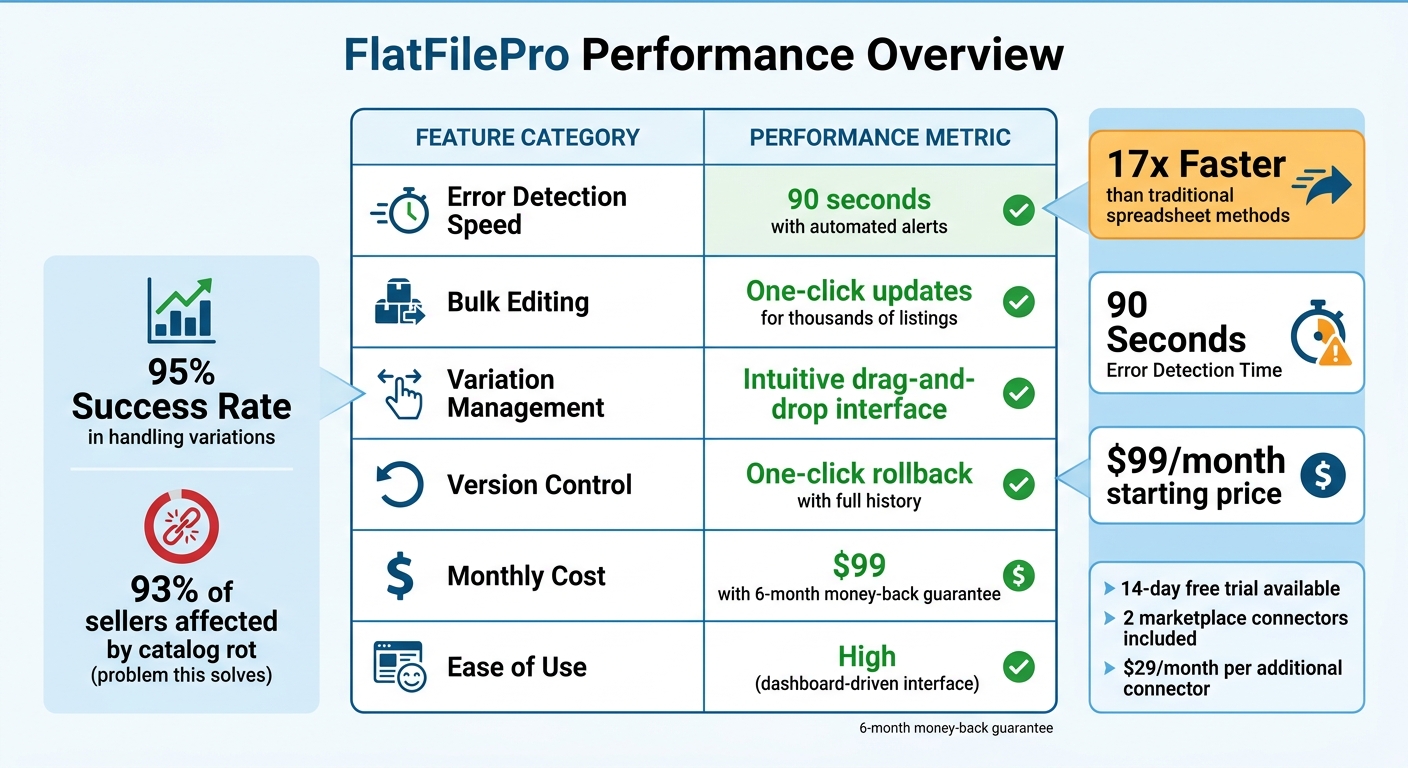
FlatFilePro Features and Performance Metrics for Amazon Sellers
FlatFilePro’s feature set shines in several areas, but let’s break down its strengths and explore where it could improve.
Strengths: FlatFilePro stands out in four main aspects: speed of error detection, bulk editing, variation management, and its pricing structure. The Reflection Engine, for instance, can detect silent listing failures in just 90 seconds, keeping sellers informed of catalog changes almost instantly [5]. Its API integration ensures data is delivered quickly and accurately, cutting out the risk of manual errors [5]. The drag-and-drop interface makes managing Amazon variation themes straightforward, and the one-click rollback feature offers full version control, complete with listing history [5]. At $99 per month, along with a 6-month money-back guarantee, the pricing is transparent and ideal for sellers handling extensive catalogs [5].
The software’s automation capabilities are particularly beneficial for growing catalogs. Instead of spending hours manually checking for issues or relying on technical expertise to build custom solutions, sellers can rely on FlatFilePro’s user-friendly dashboard to spot and fix problems efficiently.
Here’s a quick summary of how FlatFilePro performs across key areas:
| Feature | FlatFilePro Performance |
|---|---|
| Error Detection Speed | 90 seconds with automated alerts [5] |
| Bulk Editing | One-click updates for thousands of listings [5] |
| Variation Management | Intuitive drag-and-drop interface [5] |
| Version Control | One-click rollback with full history [5] |
| Monthly Cost | $99 with 6-month money-back guarantee [5] |
| Ease of Use | High (dashboard-driven interface) [5] |
These capabilities highlight FlatFilePro’s effectiveness as a tool for managing Amazon catalogs, offering sellers a streamlined way to handle their operations with less hassle and more precision.
Conclusion
Picking the right Amazon listing software comes down to your catalog size and how your team operates. If you’re managing hundreds – or even thousands – of SKUs with intricate parent-child variations, you’ll need a tool that can handle bulk operations without risking errors. The goal? A smooth and reliable catalog management experience.
FlatFilePro is a standout choice for sellers managing large catalogs, especially for 7- and 8-figure brands. Its automated Reflection Engine and easy-to-use variation manager make spotting errors and updating listings a breeze. With competitive pricing, it’s designed for sellers who want to spend just 10 minutes a week on catalog cleanup instead of dedicating hours – or an entire team – to it.
One of FlatFilePro’s biggest strengths is its ability to combat catalog rot. This affects 93% of sellers, causing silent issues like disappearing changes or broken variations that can go unnoticed [1][5]. With features like a global dashboard and role-based permissions, it simplifies teamwork while keeping your catalog in check. These tools make it a reliable choice for sellers adapting to ever-changing catalog needs.
For brands handling seasonal promotions, frequent updates, or constant competition, FlatFilePro’s bulk editing and version control features provide the speed and security required to stay ahead. Plus, the 2-week free trial (no credit card needed) gives you a chance to see how the Reflection Engine can uncover errors you might have missed.
FlatFilePro’s automation ensures your listings stay accurate, protecting your revenue from issues like suppressed listings or broken variations. For sellers looking to avoid costly mistakes, it’s an investment that quickly pays off.
As Jack Haldrup from Dr. Squatch puts it:
"We used to do everything manually, such a pain! Now we don’t have to think about anything and our listings update like magic!"
FAQs
What errors cause Amazon listings to get suppressed?
Amazon listings can get suppressed for several reasons, which often boil down to missing or incorrect details. For instance, required attributes like size, color, material, or even product descriptions might be absent. Image-related issues, such as using non-white backgrounds, including watermarks, or uploading low-resolution images, can also trigger suppression. Additionally, policy violations in titles or bullet points – like using restricted terms or adding too many symbols – can cause problems. Incorrect categorization or mismatched attributes can also lead to suppression, keeping your listing out of search results until these issues are fixed.
How can I prevent “catalog rot” from breaking my listings?
To keep your Amazon listings in top shape and avoid "catalog rot", it’s essential to stay proactive with regular monitoring and maintenance. Tools like FlatFilePro’s Reflection Engine can help you spot silent issues, like missing updates or broken variations, before they spiral out of control. Features such as bulk editing and drag-and-drop updates for managing parent-child relationships make it easier to maintain consistency. These steps ensure your listings remain accurate and error-free.
How do I fix broken variations without creating new errors?
To ensure broken variations in your catalog are fixed without causing new problems, consider using FlatFilePro. This tool’s Reflection Engine keeps an eye on your catalog in real-time, spotting variation issues as soon as they happen.
With its user-friendly drag-and-drop interface, you can quickly repair parent-child relationships, update several listings at once, and even roll back changes if necessary. This way, you maintain catalog accuracy while avoiding additional errors.