
Most Amazon listing tools promise to simplify catalog management but often create more problems than they solve. Sellers face issues like errors discovered only after uploads, lack of bulk editing capabilities, and tools that can’t keep up with Amazon’s frequent policy changes. These shortcomings waste time, hurt profitability, and make scaling harder.
Here’s what sellers need from listing software:
- Pre-Upload Error Detection: Spot and fix issues before uploading to avoid delays.
- Bulk Editing for Large Inventories: Efficiently update thousands of SKUs, including variations.
- Category-Specific Customization: Handle Amazon’s strict rules for different product types.
- Real-Time Integration: Sync updates instantly with Amazon’s API to reduce errors and downtime.
- AI-Powered Validation: Automatically detect and resolve compliance issues.
FlatFilePro addresses these challenges with tools like a Reflection Engine for monitoring, drag-and-drop variation management, and direct API integration, making catalog management faster and more reliable.
Common Problems with Amazon Listing Software

Most Amazon listing tools claim to simplify catalog management, but they often end up creating new headaches for sellers. Instead of streamlining workflows, these tools can lead to inefficiencies that waste time and hurt profitability. Let’s break down some of the most common issues.
Missing Advanced Bulk Editing Features
A major shortfall of many tools is their inability to address errors before uploading listings. This leads to repeated delays, especially for sellers managing hundreds or thousands of SKUs. The result? A listing process that feels more like a chore than a solution.
Many sellers still rely on Excel macros, but these can easily break when Amazon updates its templates. Even worse, Excel has a tendency to corrupt special characters without warning, which can result in suppressed listings[1].
Managing product variations is another sticking point. Basic tools often lack the functionality needed to create parent-child variation families, leaving sellers to manually piece everything together[1]. Additionally, Amazon’s standard inventory reports frequently omit key fields, like bullet points, making bulk updates far more difficult than they need to be[5]. These limitations force sellers to spend hours on tasks that should take minutes, slowing down operations and making scaling nearly impossible.
Poor Customization for Different Product Categories
Many tools try to cover multiple platforms, but this broad approach often means they fall short when it comes to Amazon’s specific needs. For example, Amazon enforces strict validation rules for different product categories. A title in some categories can’t exceed 125 characters – go over that limit, and your listing won’t publish[10].
Without pre-upload checks to flag these kinds of issues, sellers often discover problems only after their files are rejected. This leads to subpar listings and hours spent troubleshooting errors[1]. The lack of category-specific customization not only wastes time but also undermines the overall performance of listings, leaving sellers frustrated and unable to focus on growth.
Poor Integration with Amazon’s Changing Policies
Amazon frequently updates its Product Type schemas and validation rules, but many third-party tools struggle to keep up with these changes[7][1]. As Jamin Mahmood-Wiebe, Founder of Flat Magic, puts it:
"Amazon’s catalog requirements keep getting stricter. Templates change more often. Validation rules get tighter. Required fields keep growing"[1].
The lag between Amazon’s updates and third-party software adjustments often leads to errors such as "required attribute missing" or "invalid attribute." Common error codes like 90220, 4000001, and 90244 are frequent culprits when tools fail to adapt in time[7]. Ken Zhou, Chief Operating Officer at My Amazon Guy, highlights the risk:
"Regular updates from Amazon or third-party tools may cause compatibility issues or disrupt ongoing operations if not managed properly"[8].
When tools fall behind, listings can be suppressed, making products invisible in search results until compliance is restored. For sellers working with slim profit margins – typically around 21% – these disruptions can have a direct and damaging impact on daily operations and overall profitability[9][6].
sbb-itb-ed4fa17
How FlatFilePro Fixes These Problems

FlatFilePro, designed by experienced Amazon sellers, tackles key catalog management challenges with precision and efficiency.
Jack Haldrup, Founder of Dr. Squatch, shares his experience:
"This is the tool that powers our ops and analytics teams. We used to do everything manually, such a pain! Now we don’t have to think about anything and our listings update like magic!" [11]
By eliminating the need for manual workarounds, FlatFilePro leverages real-time monitoring and intelligent automation. It makes editing listings 17x faster than traditional spreadsheets and cuts down Amazon cases and error codes by 8x compared to manual Seller Central management [13].
Ian Sells, Founder of Million Dollar Sellers, echoes this sentiment:
"With FlatFilePro, I’ve been able to streamline my Amazon listing process significantly. What used to take hours now takes just minutes. It’s a game-changer for my business." [11]
Here’s how FlatFilePro addresses these challenges head-on:
Reflection Engine for Real-Time Listing Monitoring
The Reflection Engine performs nightly automated scans, comparing your listing data to what’s live on Amazon. A visual system – green checkmarks for matches and red X’s for errors – provides instant clarity. This makes it easy to catch and resolve listings not showing up, competitor hijacking, or unauthorized edits before they affect your rankings or brand reputation.
One-Click Bulk Editing for Unlimited SKUs
FlatFilePro’s bulk editing tool streamlines updates across your catalog, whether you’re managing 300 or 3,000 SKUs. You can edit titles, bullet points, descriptions, prices, and images in minutes. Features like version control allow you to roll back changes with a single click, while granular permissions ensure only authorized team members can make edits. Plus, you can sync content across multiple marketplaces from a single dashboard [13].
Drag-and-Drop Variations Manager
Managing parent-child relationships is simplified with a drag-and-drop interface. You can reassign child products between parent ASINs in just minutes. With a 95% success rate and updates completing in under five minutes, this tool helps resolve orphaned listings quickly and restores proper variation groupings [12].
AI-Powered Error Detection and Auto-Fix
FlatFilePro scans your listings proactively to identify issues before they lead to suppressions or impact search rankings. It flags missing fields, compliance problems, and content gaps by category – such as Product Identity, Details, Shipping, and Safety – so you can address them before uploading. This pre-upload validation reduces delays and rejections, keeping your listings running smoothly.
Direct API Integration for Faster Updates
Unlike tools dependent on flat file uploads with lengthy processing times, FlatFilePro uses direct API integration to sync changes in real time [14]. This means instant feedback on transaction-level errors, eliminating the need for manual exports or data transformations. Updates are not only immediate but also secure, thanks to AES 256-bit encryption, FIPS 140-2 validated modules, and 24/7 backups [13].
Comparison: Common Software Problems vs. FlatFilePro Solutions
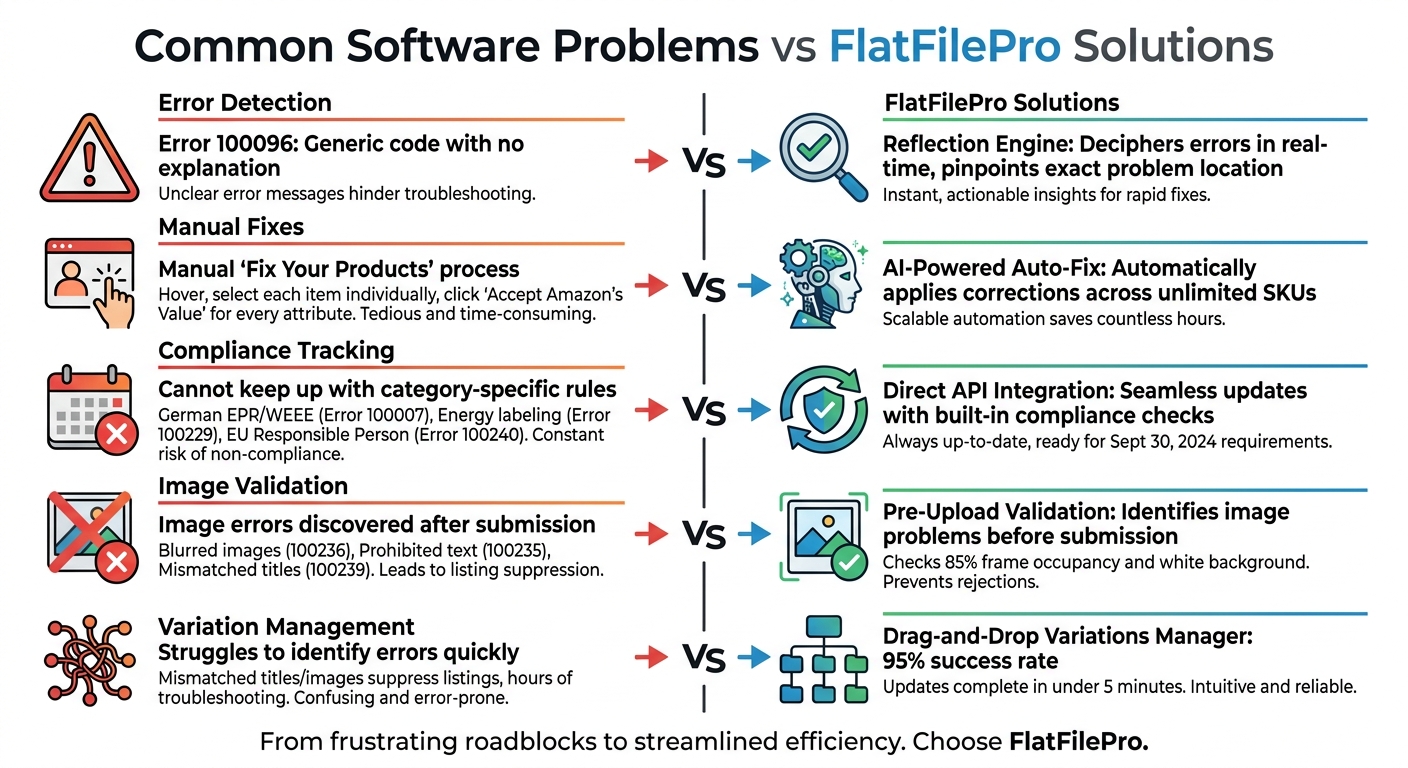
Common Amazon Listing Software Problems vs FlatFilePro Solutions Comparison
Many Amazon listing software tools rely heavily on manual processes, often making problems worse. Take Error 100096, for example – one of Amazon’s most frequent issues. All you get is a generic code with no real explanation [16]. FlatFilePro changes the game with its Reflection Engine, which deciphers these cryptic errors in real time, pinpointing the exact problem and its location. This automated approach tackles issues as they occur, saving you from guesswork.
Another pain point is the manual "Fix Your Products" process in Seller Central. To resolve suppressed listings, you have to hover over your inventory, select each affected item individually, and click "Accept Amazon’s Value" for every attribute conflict [15]. FlatFilePro’s AI-Powered Auto-Fix simplifies this by automatically applying corrections across unlimited SKUs, eliminating the need for tedious, item-by-item adjustments.
Compliance requirements bring their own set of challenges, especially as Amazon’s policies evolve. Traditional software often can’t keep up with category-specific rules like German EPR/WEEE registration (Error 100007), energy labeling (Error 100229), or EU Responsible Person mandates (Error 100240) [16]. Starting September 30, 2024, Amazon will even require compliance documents to be submitted and approved before listing new products [18]. FlatFilePro’s Direct API Integration handles these updates seamlessly, incorporating compliance checks to keep you ahead of the curve without manual tracking.
Image-related errors are another common hurdle. Issues like Error 100236 (blurred images), 100235 (prohibited text), and 100239 (mismatched titles) often lead to rejections, requiring images to meet strict standards like 85% frame occupancy and a pure white background [16]. FlatFilePro’s pre-upload validation identifies these problems before submission, preventing delays and ensuring smoother product launches.
When managing variations across large catalogs, the gap between traditional methods and FlatFilePro becomes even clearer. Standard processes often struggle to quickly identify errors [17], leading to issues like mismatched titles or images that suppress listings [16]. FlatFilePro’s Drag-and-Drop Variations Manager aligns parent–child relationships and assets with precision, achieving a 95% success rate for updates in under five minutes [12]. This efficiency is a stark contrast to the hours of troubleshooting often required with conventional tools. Together, these features highlight how FlatFilePro streamlines every aspect of Amazon product catalog management, addressing common frustrations with ease.
Best Practices for Amazon Catalog Management
Choose Tools with Real-Time Monitoring
Amazon frequently updates its approval requirements and product restrictions to ensure customer safety and maintain catalog integrity. As Manny from Amazon Staff puts it:
"As the Amazon catalog grows, we continuously make new determinations on which products should be restricted, which is based on a number of factors. Amazon does this to ensure authenticity and customer satisfaction" [2].
This means your listings could shift from active to inactive overnight, often without warning. This typically happens when new approvals are required or when product claims lack proper documentation.
Managing listings manually through flat files can lead to errors due to the complexity of the templates, resulting in hundreds of potential mistakes during uploads [19]. However, tools with real-time validation can catch these errors before they even reach Amazon. This not only helps prevent suppressed listings but also saves significant time. For example, tools that validate data cell by cell against Amazon’s guidelines can cut upload prep time from 3–5 days to just 10–20 minutes [19].
By reducing errors upfront with real-time monitoring, bulk editing becomes even more efficient for updating your catalog quickly and accurately.
Use Bulk Editing for Seasonal and Large-Scale Updates
When it comes to large-scale updates, such as modifying product claims across your catalog, bulk editing is a game-changer. Claims like "anti-bacterial", "organic", or "satisfaction guaranteed" often require proper documentation. Without it, Amazon may remove these listings [4].
For sellers just starting out, bulk editing is especially useful for working within Amazon’s weekly ASIN creation limits. Glenn from Amazon explains:
"To protect the onsite shopping experience for our customers, we limit the number of listings (new ASINs) that you can create in a given week until you establish a sales history with Amazon" [3].
Using bulk tools, you can focus on your most promising products, ensuring they get listed first. This approach not only maximizes your limited listing capacity but also helps you build the sales history needed to unlock more opportunities.
By simplifying updates and ensuring compliance, Amazon bulk upload tools are essential for keeping your catalog competitive and up-to-date.
Select Tools with Strong Compliance and Integration Features
Beyond error detection and bulk updates, tools that integrate directly with Amazon are vital for meeting compliance requirements. Amazon’s standards are tied to various regulatory frameworks, such as the FTC Green Guides for environmental claims and ANSI/WCMA safety standards for window coverings [4]. Each product category comes with its own set of rules, making adaptability a must.
Direct API integration offers a more efficient alternative to manual spreadsheet uploads. API-connected tools can push updates faster, provide real-time submission status, and adjust quickly to new category-specific requirements. This approach minimizes delays and reduces rejection rates, keeping your catalog compliant as Amazon’s policies evolve.
Conclusion
Managing an Amazon catalog can be overwhelming, especially when outdated reports leave out key details like bullet points and descriptions. On top of that, manual editing can accidentally erase backend data or disrupt active listings, leading to lost information and hours of frustrating troubleshooting. These challenges make it clear that sellers need a reliable, efficient way to handle their catalogs.
FlatFilePro was created by experienced Amazon sellers to tackle these exact issues. Its Reflection Engine keeps an eye on your listings every night, flagging any unauthorized changes before they can hurt your sales. With bulk listing tools with one-click editing, you can confidently update unlimited SKUs, and the drag-and-drop Variations Manager streamlines updates in under five minutes with a 95% success rate. Plus, its direct API integration ensures faster updates than traditional flat files, complete with real-time status updates. FlatFilePro takes the hassle out of catalog management, helping you protect your listings and keep your sales on track.
FAQs
How can I tell if my listings are at risk of suppression before I upload?
Before uploading your Amazon listings, it’s smart to double-check your data for any common issues that could lead to suppression. Look out for things like missing required fields, incorrect formatting, or anything that doesn’t align with Amazon’s guidelines. Using validation tools or detailed checklists can make this process easier. Pay close attention to product attributes, images, and categories – getting these right from the start can help you spot and fix problems early, saving you from headaches after the upload.
What’s the fastest way to bulk-edit thousands of SKUs without breaking variations?
The quickest way to update thousands of SKUs while keeping variations intact is by exporting your catalog using Amazon templates. Once exported, make precise edits in a spreadsheet program like Excel. Afterward, re-import the file using Amazon’s bulk listing tools. Be extra cautious with variation-specific fields to ensure they stay accurate. To minimize mistakes, test the process with a single item first, then gradually scale up to avoid breaking variation relationships.
How do I stay compliant when Amazon changes category rules and required fields?
Amazon’s category rules are always changing, so keeping up is crucial if you want your listings to stay compliant. Make it a habit to regularly check Seller Central, especially the "Category, product, and listing restrictions" section. This is where you’ll find the latest updates straight from Amazon.
Also, pay close attention to official communications like emails and account notifications. These often include important details about changes to product compliance documents or listing policies. To stay ahead, consider building compliance checks into your workflow. This way, you can quickly adjust to any new requirements and ensure your listings meet Amazon’s standards. Consistent tracking is key to avoiding disruptions.