
Mistakes in your Amazon product listings can cost you sales, harm your account health, and damage your reputation. Even small errors – like mismatched attributes or missing details – can lead to suppressed listings, reduced visibility, and policy violations. With Amazon enforcing stricter rules and competition growing, manual management isn’t enough. That’s where Amazon listing management software comes in.
Key benefits of using listing management tools:
- Detect errors automatically: Tools like FlatFilePro flag issues like missing attributes, incorrect pricing, or compliance problems in real time.
- Fix problems faster: Bulk editing features allow you to update hundreds of SKUs at once, saving time and reducing mistakes.
- Track changes: Version control ensures you can roll back to previous settings if needed.
- Protect your account health: Avoid penalties, listing suppression, and account suspension by staying compliant with Amazon’s rules.
- Simplify international selling: Manage and upload products on Amazon across multiple marketplaces from one dashboard.
Common Amazon Listing Errors and Their Effects

Types of Listing Errors
Amazon listing errors fall into specific categories, each linked to unique error codes.
Product matching errors happen when your offer doesn’t align with an existing product. These can include mismatches in GTIN/ASIN, conflicting attributes with Amazon’s catalog, or using a SKU that’s already assigned. Another frequent issue involves brand name errors. For instance, Error 5461 signals that you lack permission to create listings for a particular brand, while Error 5665 indicates a brand name hasn’t been approved by Amazon. To resolve this, you’ll need to complete a catalog authorization application. Meanwhile, Error 5664 arises when a generic product isn’t properly labeled as "generic."
Compliance issues also play a role. For example, shipping batteries, liquids, or hazardous materials without the required regulatory documentation can lead to shipment rejections.
How Listing Errors Hurt Your Business
The impact of these errors can be severe. One immediate consequence is listing suppression, which makes your product unbuyable. If shoppers can’t see or purchase your product, you lose potential sales.
Beyond that, errors negatively affect your Account Health Rating (AHR), which ranges from 0 to 1,000. Critical violations can drop your score to zero, triggering a three-day grace period before account deactivation. Repeat violations make matters worse, as penalties for the same infraction double with each occurrence [3]. If you hit five repeat violations within 180 days, your account faces critical risk [3].
Mistakes in titles, keywords, or categories also hurt search visibility, pushing listings down in results or showing them to irrelevant audiences. This gradual decline can be difficult to reverse [2].
Why Manual Listing Management Falls Short
Managing listings manually can’t keep up with these challenges. Spreadsheets and manual data entry are prone to errors. A simple typo in a GTIN, a mismatched image, or a missing attribute can result in listing suppression. As your SKU count grows, so does the likelihood of mistakes.
Manual processes also lack the speed and visibility needed to adapt to Amazon’s updates. If a listing is flagged, notifications often come too late. Without tools for automatic alerts or version tracking, resolving issues becomes time-consuming, especially for sellers managing hundreds or thousands of products. This highlights the importance of automated solutions to safeguard your listings and revenue.
sbb-itb-ed4fa17
Custom Amazon Listings & Analytics Platform | VASO Group x Deltologic
This collaboration highlights how a custom Amazon listing analysis tool can streamline data management and improve performance.
Key Features of Amazon Listing Management Software
Managing a large product catalog on Amazon requires more than just staying organized. The right software can help you avoid costly errors and keep your listings running smoothly.
Automated Error Detection and Alerts
One standout feature is the ability to monitor your catalog continuously. Automated error detection tools scan for issues like missing attributes, pricing inconsistencies, image compliance problems, and more – without requiring manual checks.
"Regular monitoring of your Amazon listings can help catch errors early before they impact your sales. Consider setting up automated alerts for critical listing changes." – Trutz Fries, Amalytix [4]
For instance, Amazon requires product images to fill at least 85% of the frame. Listings with non-white backgrounds or text overlays may be flagged automatically [6]. Tools like FlatFilePro’s Reflection Engine compare your stored data with live Amazon listings nightly, using color-coded indicators (green for correct data, red for errors) to help you prioritize fixes quickly.
By catching errors automatically, you can act fast and make bulk corrections efficiently.
Bulk Editing and Data Validation
Once errors are flagged, fixing them across a large catalog becomes the next challenge. For sellers managing hundreds or even thousands of SKUs, updating listings one by one is simply not feasible. Bulk editing tools solve this by allowing you to make changes to titles, bullet points, descriptions, and other attributes across your entire catalog in one go.
But speed alone isn’t enough – accuracy matters. These tools include data validation features that check your updates against Amazon’s Product Type Definitions. This ensures your edits meet Amazon’s requirements for character limits, acceptable values, and formatting, reducing the chances of submission rejections [5].
"Manual processes are more prone to human error, such as data entry mistakes, which can disrupt the entire supply chain." – Unicargo [1]
Data validation also helps avoid catalog conflicts by highlighting existing ASIN information, which minimizes the risk of duplicate SKUs or contradictory attributes [5]. And if bulk updates introduce new errors, version control systems offer a safety net.
Version Control and Error Recovery
Even with validation in place, mistakes can happen. That’s where version control comes in. Tools like FlatFilePro’s Activity Log keep a detailed record of every change made to your listings, including who made the change and when. If an error occurs, you can easily roll back to a previous version.
This feature is especially helpful for fixing accidental changes to un-editable attributes, which could otherwise cause submission failures [5]. By simplifying error recovery, version control reduces downtime and keeps your catalog running smoothly.
Tools That Target Specific Listing Errors
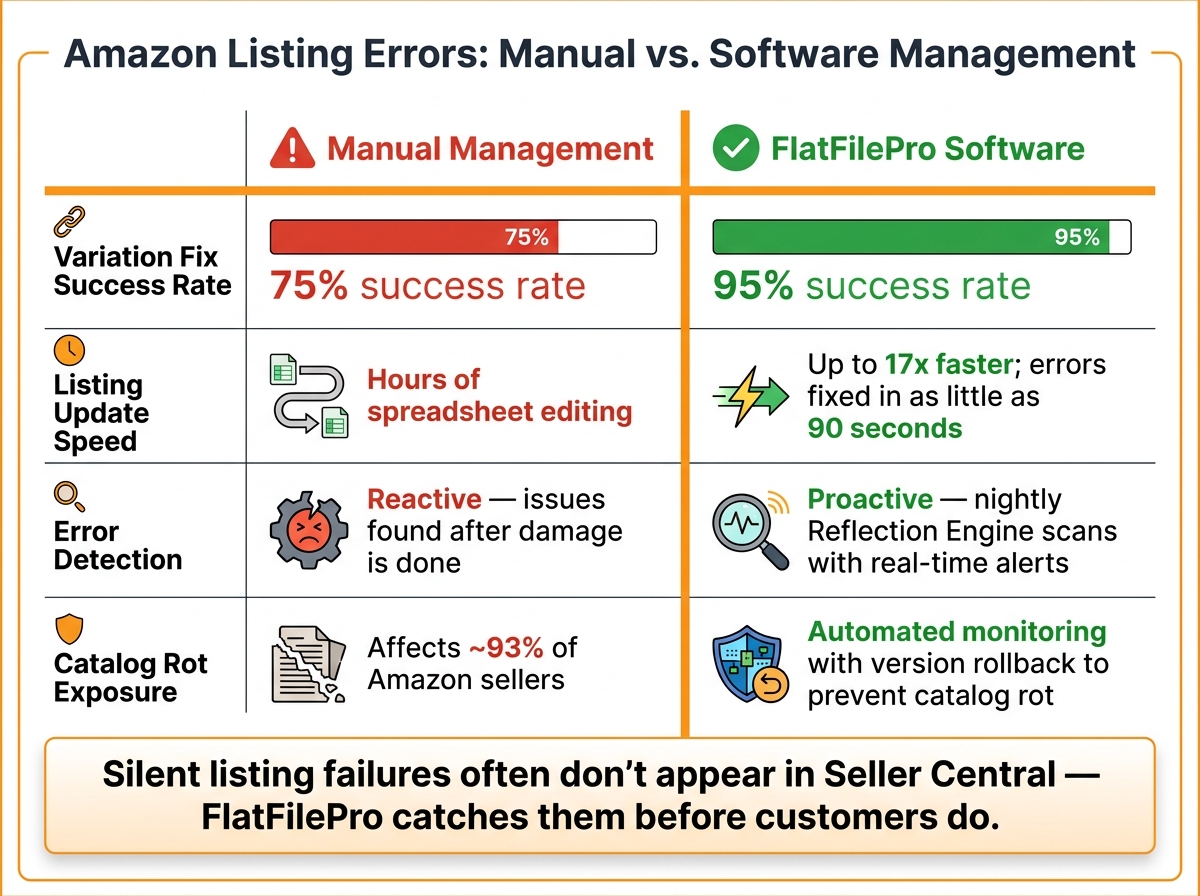
Amazon Listing Errors: Manual vs. Software Management
FlatFilePro goes beyond general error detection by offering tools that address specific, high-impact listing issues. Instead of merely identifying problems, this software hones in on the categories of errors that can cause the most disruption.
Managing Product Variations Without Errors
Variation errors are a major headache for Amazon sellers. When parent-child relationships break, child listings can get disconnected from their parent, leading to lost reviews and sales history. This issue is part of a broader phenomenon called "catalog rot", which affects about 93% of Amazon sellers [8].
FlatFilePro’s drag-and-drop Variations Manager simplifies fixing these errors. You can move child products between parent ASINs in under five minutes, achieving a 95% success rate – a big jump compared to the 75% success rate of manual methods [7]. Jack Haldrup, the Founder of Dr. Squatch, shared how this tool transformed their process:
"This is the tool that powers our ops and analytics teams. We used to do everything manually, such a pain! Now we don’t have to think about anything and our listings update like magic!" – Jack Haldrup, Founder, Dr. Squatch [8]
Next, we’ll look at how to stay ahead of unapproved listing changes.
Detecting Changes to Your Listings
Imagine logging into your Amazon account to find that your product titles, bullet points, or images have been altered – without your knowledge. These changes can happen due to system updates, competitor interference, or glitches, and Amazon doesn’t notify you when they occur.
"Amazon won’t send you a notification when one [a glitch] hits your account. You find out when the damage is already done." – Dillon Carter, Co-Founder and COO, Aura [9]
FlatFilePro’s Reflection Engine solves this by running nightly comparisons between your saved listing data and what’s live on Amazon. If something doesn’t match, it flags the discrepancy immediately, allowing you to act before the issue spirals. This is especially important because silent listing failures often don’t show up in your Seller Central dashboard. While everything might appear fine on your end, your customer-facing page could already be broken.
Now, let’s explore how to handle listings across multiple regions effectively.
Managing Listings Across Multiple Marketplaces
Selling on multiple Amazon marketplaces adds another layer of complexity. A common issue here is regional content gaps – when content slots are left blank in a marketplace like Amazon UK or Germany, it opens the door for unauthorized changes, sometimes referred to as "black-hat attacks" [8].
FlatFilePro addresses this with its international marketplace support. From a single dashboard, you can push content updates across regions like the US, UK, Canada, and Germany. Ian Sells, Founder of Million Dollar Sellers, highlighted the efficiency this provides:
"With FlatFilePro, I’ve been able to streamline my Amazon listing process significantly. What used to take hours now takes just minutes." – Ian Sells, Founder, Million Dollar Sellers [8]
Here’s a quick breakdown of the main error categories FlatFilePro targets and how it resolves them:
| Error Category | Common Cause | Software Solution |
|---|---|---|
| Broken Variations | Disconnected child listings, parent ASIN issues | Drag-and-drop variation builder; one-click fixes |
| Silent Listing Changes | Competitor edits, system glitches | Nightly Reflection Engine comparisons with alerts |
| Regional Content Gaps | Unused marketplace content slots | Cross-marketplace content sync; slot population |
| Catalog Rot | Untracked updates | Automated monitoring with version rollback |
How to Get the Most Out of Error-Prevention Software
Making the most of your listing management software goes beyond just activating it. The way you set it up and how your team interacts with it will determine whether it helps prevent errors or simply becomes another tool on your dashboard.
Cleaning Up Your Catalog Before You Start
Before linking FlatFilePro to your Seller Central account, take some time to audit your catalog. Amazon’s "Fix Your Products" tool can help you identify suppressed or inactive listings. Resolving these issues ahead of time ensures that only accurate, clean data is imported.
Double-check that every GTIN matches its barcode and that your brand name is consistently spelled and formatted. Mismatched product identifiers or inconsistent brand details can lead to permission errors during syncing. You might also want to remove low-margin or high-maintenance SKUs – streamlining your catalog makes it easier to manage and monitor in the long run. Once your catalog is in good shape, you’re ready to set up user roles for better control.
Setting Up Workflows and Team Permissions
After cleaning up your catalog, the next step is defining user roles in FlatFilePro. The tool’s advanced team access controls allow you to limit editing permissions by function. For instance, a graphic designer can update product images without accidentally altering pricing or keywords. This setup reduces the chance of mistakes and provides an audit trail if any issues arise.
Amazon Brand Registry complements this approach by letting you assign specific "selling roles", which control who can create or modify product detail pages. By combining these role assignments with FlatFilePro’s permissions, you add an extra layer of protection against unauthorized changes. To further minimize errors, consider integrating a pre-publish checklist into your workflow. This checklist could include verifying FNSKU labels, ensuring all required attributes are complete, and confirming that no mandatory fields are left blank before updates go live.
Keeping Your Catalog Accurate Over Time
Once your catalog is clean and workflows are in place, maintaining accuracy becomes an ongoing task. FlatFilePro’s Reflection Engine performs nightly comparisons between your saved data and what’s live on Amazon, flagging any discrepancies immediately. Setting up real-time alerts for listing suppressions or attribute conflicts allows your team to address problems before they grow into larger issues.
Make it a habit to review your catalog monthly. This helps you catch updates to Amazon’s complex listing requirements or packaging requirements, which can change without notice. Additionally, periodically auditing who has editing access – especially for generic or unbranded products – can prevent unauthorized changes that might lead to time-consuming fixes. Treat catalog management as a continuous process to ensure long-term accuracy and consistency in your listings.
Conclusion: Using FlatFilePro to Keep Amazon Listings Error-Free

Keeping your Amazon listings accurate and free of errors is critical to maintaining strong performance and protecting your revenue. Issues like mismatched GTINs, missing attributes, or unauthorized changes can quietly suppress your listings and hurt your bottom line. Instead of scrambling to fix problems after they arise, the right tools can help you stay ahead of them.
FlatFilePro takes the stress out of managing listing errors by turning a reactive process into a proactive one. With features like data validation, nightly discrepancy checks, and version control, it quickly identifies and resolves issues. Plus, granular user permissions help prevent accidental changes from disrupting your catalog.
FlatFilePro also saves time – allowing sellers to update listings up to 17x faster than manual spreadsheet edits. Thanks to its automated Sync/See/Save workflow, errors can be spotted and fixed in as little as 90 seconds [7]. For sellers managing large catalogs, those time savings add up fast.
"All changes pushed through the Amazon API ensuring the highest success rate." – FlatFilePro [7]
At just $99/month after a 7-day free trial, FlatFilePro not only keeps your catalog accurate but also protects your search rankings, buy box eligibility, and revenue. It’s a small investment with a big impact on your growth and peace of mind.
FAQs
What listing errors are most likely to suppress an Amazon listing?
Mistakes in your Amazon listing can cause serious problems, including suppression of the listing. Some of the most frequent issues include:
- Incomplete or Incorrect Product Details: Missing key information like product titles, descriptions, or images can trigger suppression. Incorrect details, such as wrong dimensions or misleading claims, can also cause trouble.
- Compliance Violations: Amazon has strict guidelines for listings. Violating these – whether through prohibited keywords, incorrect categorization, or failing to meet safety standards – can result in a suppressed listing.
- Issues During Listing Management: Errors can arise when updating listings, such as mismatched data or failure to adhere to Amazon’s formatting rules. These problems can lead to your listing being flagged.
If these errors are not addressed quickly, they can hurt your product’s visibility and sales. Keeping your listings accurate and compliant is key to avoiding suppression.
How can I stop unauthorized changes to my Amazon product pages?
To keep your Amazon product pages secure from unwanted changes, tools like FlatFilePro can be incredibly helpful. These tools provide features such as automated backups and error detection, allowing you to stay on top of your listings. By linking your Amazon Seller Central account, you can easily track and flag any alterations, ensuring your product information stays accurate. Plus, with regular backups and one-click editing, fixing or reversing unexpected changes becomes a breeze.
What should I clean up before syncing my catalog to FlatFilePro?
Before syncing your catalog to FlatFilePro, take some time to review your product listings for potential issues. Look out for things like mismatched product details, incorrect brand names, or generic errors. Double-check that all titles, descriptions, images, and specifications are accurate and consistent. Cleaning up incomplete or incorrect data beforehand can help prevent errors during bulk uploads and make the synchronization process much smoother.