
Managing an Amazon catalog manually can be overwhelming, especially with frequent updates to listing requirements and the challenges of handling hundreds or thousands of SKUs. The right Amazon listing software can help you:
- Automate tasks like bulk uploads, error detection, and pricing updates.
- Sync inventory in real-time across multiple marketplaces to avoid overselling.
- Monitor listings live to catch changes or errors quickly.
- Edit multiple listings at once to save time and ensure compliance.
For small sellers, tools costing $15–$49/month may suffice, while agencies or large-scale sellers might need advanced options starting at $200/month. Features like AI-powered error detection, multi-marketplace management, and version control can make a big difference in maintaining accurate, high-performing listings. FlatFilePro, for example, offers drag-and-drop variation tools and live monitoring to simplify catalog management.
Start by identifying your needs – whether it’s bulk editing, error detection, or managing listings across regions – and test software with a free trial before committing. The right tool can save time, reduce mistakes, and help you focus on growing your Amazon business.
What to Look for in Amazon Listing Software
The right listing software can address catalog challenges without introducing new complications.
Live Listing Monitoring
External parties or even Amazon itself can sometimes make unauthorized changes to your listings. Unlike older tools that might take 24–48 hours to flag these issues [8], machine learning–based monitoring detects problems almost instantly. This rapid response helps protect both your Buy Box and conversion rates by spotting subtle shifts in content or coordinated pricing attacks that basic rule-based systems might overlook [8].
"AI-powered anomaly detection identifies emerging issues, protecting your brand before competitors capitalize on vulnerabilities."
- Ari Levine, VP of Strategic Partnerships, i2o Retail [8]
Real-time alerts ensure your listings stay accurate without the need for constant manual oversight.
Bulk Editing for Multiple Products
Managing hundreds – or even thousands – of SKUs is no small task. Updating each listing individually just isn’t practical, especially when free Amazon product listing tools can streamline the process. Bulk editing tools allow you to make changes to titles, bullet points, descriptions, and backend keywords all at once, making it easier to adapt during shifts in pricing or category updates.
Some advanced platforms go a step further, using AI to generate SEO-optimized content for listings in just minutes [6]. Many also support bulk listing creation and offer tools for in-depth keyword research across multiple products. High-efficiency software can even publish these optimized listings directly to Amazon Seller Central, saving you from the tedious process of copying and pasting.
"One of my favorite features is the ability to publish listings directly to Amazon… This is a great quality-of-life feature compared to many tools, where you need to manually copy and paste each section."
- Levi Adler, Founder, Levi’s Toolbox [7]
Once updates are made, automated error detection ensures your listings meet Amazon’s standards before they go live.
Error Detection and Auto-Fix Tools
Fixing listing errors manually can eat up valuable time. AI-powered tools can identify common issues like missing attributes, mismatched data, or suppressed listings before they start affecting your search rankings or sales.
Many platforms include a "Focus on issues" filter, which flags required fields and suggests fixes before you publish. Some tools even audit CSV files to catch corrupted data values [9].
"AI suggestions appear highlighted in yellow. Never publish without reviewing first. You’re responsible for accuracy – AI can inadvertently include prohibited claims."
- Dougal_Amazon, Amazon Staff [9]
Built-in alerts for Amazon’s Terms of Service add another layer of protection, flagging restricted or monitored words. This is especially important since sellers accept AI-generated listing suggestions from Amazon about 90% of the time [6].
For those selling across multiple regions, maintaining quality and compliance across marketplaces is equally important.
Managing Multiple Amazon Marketplaces
If you’re selling in multiple regions, aligning your listings with local standards is critical. The best listing software synchronizes inventory, pricing, and content across various Amazon marketplaces while adapting to local language requirements, currency formats, and category rules. These capabilities ensure your listings remain consistent and compliant no matter where you’re selling.
Change History and Version Control
As your team grows or you work with more clients, keeping track of listing changes becomes essential. Features like change history and version control provide a detailed log of every edit made. This allows you to restore previous versions if necessary, protecting against accidental changes or unauthorized modifications. It also helps prevent gradual content drift over time, ensuring your listings stay aligned with your original goals.
sbb-itb-ed4fa17
Choosing Software Based on Your Business Size
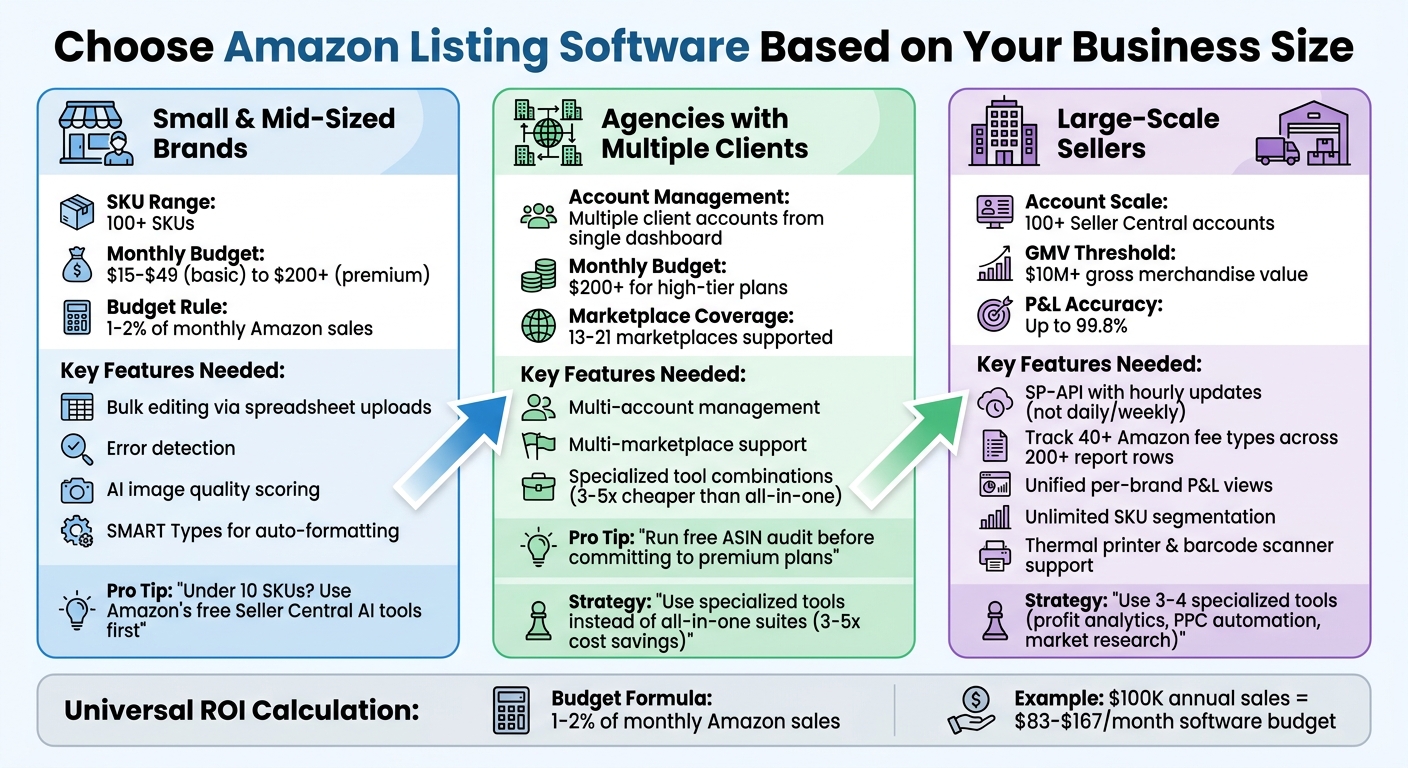
Amazon Listing Software Selection Guide by Business Size and Budget
Finding the right efficient Amazon listing software starts with understanding your business size and specific operational requirements. Each seller type faces unique challenges, which means the software should align with those needs.
For Small and Mid-Sized Brands
If your brand manages over 100 SKUs, you’ll need tools that simplify bulk editing and detect errors through spreadsheet uploads or templates. These features are essential for updating multiple listings at once, especially when Amazon updates its listing requirements overnight [2][5]. Some platforms include features like "SMART Types", which automatically reformat product data to meet Amazon’s latest standards [1]. Additionally, AI-powered tools can evaluate your listing images, scoring them on quality and compliance with gallery best practices [3].
Budget is a key factor. Software pricing for small and mid-sized businesses typically ranges from $15–$49 per month for basic plans to over $200 for premium options [10][11]. A good rule of thumb is to allocate 1–2% of your monthly Amazon sales to software expenses [6]. If you manage fewer than 10 SKUs, Amazon’s free Seller Central AI tools might cover your basic needs, allowing you to delay investing in paid software [6].
For agencies handling multiple client accounts, the requirements are entirely different.
For Agencies with Multiple Client Accounts
Agencies need software that can manage multiple accounts and marketplaces from a single dashboard [2]. Instead of relying on one all-in-one platform, many agencies opt for a combination of specialized tools. This approach often includes a broad enterprise platform for market research and PPC, paired with niche tools for advanced listing optimization [6]. While all-in-one suites might seem appealing, they can cost 3–5 times more than specialized tools and often include features you may never use [6].
For agencies working with global brands, it’s crucial to choose software that supports multiple international marketplaces. Some platforms cover up to 21 marketplaces, while others handle around 13 [6]. Before committing to a premium agency plan, consider running a free ASIN audit to identify gaps in your clients’ listings [6]. High-tier plans (priced at $200+ per month) are only worth it if your team frequently uses five or more of the core features [6].
The needs become even more complex for enterprise-level sellers.
For Large-Scale Sellers
Large-scale sellers often manage 100+ Seller Central accounts, requiring software that consolidates data into unified, per-brand profit and loss (P&L) views. Advanced analytics tools for this scale can track over 40 Amazon fee types across 200+ report rows [12].
At this level, speed is critical. Look for software that connects via SP-API, providing near real-time data with hourly updates rather than daily or weekly refreshes. Some top-tier platforms even offer up to 99.8% P&L accuracy, which is vital for enterprise valuations [12].
Instead of relying on a single suite, large sellers benefit from using 3–4 specialized tools. For example, one tool might focus on profit analytics, another on PPC automation, and a third on market research [12]. Enterprise-grade tools are designed for businesses managing $10 million or more in gross merchandise value [12].
Custom reporting dashboards and unlimited SKU segmentation – organized by brand, supplier, or lifecycle stage – offer flexibility that fixed reporting systems can’t provide. Additionally, for physical operations, the software should support tools like thermal printers and barcode scanners to streamline FBA labeling and box content management [13].
How to Evaluate Amazon Listing Software
Once you’ve determined your business needs and scale, the next step is figuring out if the software you’re considering actually works for you. This isn’t just about skimming through feature lists – it’s about testing how well the tool performs with your own catalog data.
Identify Your Catalog Problems
Before investing in any software, take a close look at your catalog and pinpoint its weaknesses. A free ASIN audit can help uncover issues like missing backend search terms, listing errors, or compliance problems [6]. Starting with free Amazon listing tools is a smart move to ensure your listings meet baseline compliance requirements.
If you’re selling internationally, confirm that the software supports your specific marketplaces – whether that’s Germany, the UK, Japan, or any of the 21 potential regions Amazon serves. Many platforms lean heavily toward US-centric data, so this is a critical step for global sellers [6].
Next, make sure the software integrates smoothly with Amazon’s systems.
Test API Integration and Sync Speed
Amazon offers Selling Partner API (SP-API) sandbox environments, which allow you to test how well the software connects to its systems without affecting live data [14]. Use these tools to verify the software’s API integration and connectivity before making a commitment [14][17].
For larger catalogs, bulk feed processing is non-negotiable. Confirm that the software supports JSON_LISTINGS_FEED for batch updates rather than relying on slow, one-by-one updates [16]. Additionally, check that it subscribes to LISTINGS_ITEM_STATUS_CHANGE notifications. These ensure real-time updates when Amazon modifies your listing’s searchability or buyability status [15].
Look out for common errors like 403 Unauthorized or 401 Token Expired, and ensure the software can manage Amazon’s rate limits efficiently [17]. These tests will give you confidence in the tool’s ability to handle real-time synchronization.
Check Scalability and Return on Investment
A good rule of thumb is to spend 1–2% of your monthly Amazon sales on software [6]. For example, if you’re generating $100,000 annually, plan to budget around $83–$167 per month for tools. This aligns with industry standards [6][4].
Evaluate whether the software can grow with your business. As your catalog expands, one-by-one updates won’t cut it. Look for batch scanning, bulk product research features, and tools that provide ROI projections and breakdowns of Amazon fees. This ensures your growth doesn’t eat into your margins [18]. According to Jungle Scout’s 2024 data, about 25% of Amazon sellers earn over $100,000 annually, but only 5–6% break the $1 million mark [4].
"The six-figure earners who stick around behave like operators, not lottery winners."
– Speed Commerce [4]
Use the Amazon Revenue Calculator to see how software costs will impact your margins before you commit [18]. If you’re considering premium options priced at $200 or more per month, make sure your team will use at least five core features regularly. Otherwise, specialized tools focused on listing optimization can often achieve similar results for up to 75% less [6].
Why FlatFilePro Works for Amazon Sellers

FlatFilePro was created by Amazon sellers who understand the frustrations of tedious spreadsheet work, broken variations, and unexpected listing changes. It’s built to tackle these issues head-on and deliver practical solutions.
FlatFilePro offers specialized tools designed to address the most common catalog challenges Amazon sellers face.
Reflection Engine for Live Monitoring
The Reflection Engine is a game-changer. It automatically compares your intended data with live Amazon listings every night. Instead of constantly refreshing Seller Central to check your updates, you get clear visual indicators – green checkmarks for healthy listings and red X’s for problem areas – organized by category. This system catches silent issues like missing bullet points or broken variations and even flags unauthorized changes. Plus, with the 1-click restore feature, you can instantly revert to a previous version, saving your content from unexpected errors [20].
"Our Reflection Engine monitors every heartbeat of your catalog, alerting you the moment rot spreads." – FlatFilePro [20]
This live monitoring feature works seamlessly with the error detection tools mentioned earlier.
Drag-and-Drop Variation Management
FlatFilePro’s drag-and-drop interface simplifies variation management, achieving a 95% success rate – far better than traditional flat file methods. Updates that used to take ages now finish in under five minutes [21]. The activity log provides real-time accountability, with instant rollback options that improve team efficiency.
Jack Haldrup, Founder of Dr. Squatch, shared his experience with the tool:
"This is the tool that powers our ops and analytics teams. We used to do everything manually, such a pain! Now we don’t have to think about anything and our listings update like magic!" [20]
Free Trial and Money-Back Guarantee
FlatFilePro also offers a risk-free way to try it out. With a 30-day free trial – no credit card required – you can test its features firsthand [19]. The subscription starts at $99 per month, which includes two marketplace connectors, with additional connectors available for $29 each [21]. If you’re not satisfied within the first six months, you’ll get a full refund [20]. This pricing is well-suited for Amazon sellers looking for scalable and efficient catalog management.
Ian Sells, Founder of Million Dollar Sellers, summed it up perfectly:
"With FlatFilePro, I’ve been able to streamline my Amazon listing automation process significantly. What used to take hours now takes just minutes." [20]
Conclusion
Navigating catalog challenges on Amazon requires picking listing software that directly tackles your operational headaches. Whether it’s fixing broken variations or managing multiple marketplaces, the right tool should address your specific needs.
Start by identifying your pain points. Are suppressed listings cutting into your sales? Are manual updates eating up hours of your time? Or maybe it’s tough to track changes across your team? Let these issues guide your choice. Once you’ve selected a tool, consider testing it with a month-to-month plan. During onboarding, review your catalog data weekly to ensure it aligns with Seller Central.
Scalability is another key factor. Some tools have limits on tracked keywords or ASINs, and exceeding these can lead to surprise price increases. Make sure the software allows bulk exports of historical data and listing history to avoid vendor lock-in later. This way, your investment can grow alongside your business.
FlatFilePro is designed with these challenges in mind. It offers live monitoring through its Reflection Engine, easy drag-and-drop variation management, and advanced error detection – all built by experienced Amazon sellers. Plus, they provide a free trial (typically 7 days, sometimes longer, with no credit card required) and a six-month money-back guarantee, making it risk-free to test if it suits your workflow.
The right listing software should save you time, reduce errors, and adapt as your business grows. By automating repetitive tasks and maintaining control over your data, you can focus on scaling your Amazon business effectively.
FAQs
What’s the minimum I should spend on listing software?
When it comes to listing software, there’s no set minimum spend – it all boils down to what your business needs and the features you’re after. Pricing usually kicks off at around $49/month for basic tools, but more advanced platforms can cost significantly more. If you’re on a tighter budget, there are options available for under $40/month, giving you plenty of flexibility to find a solution that aligns with your goals.
How can I tell if a tool’s SP-API sync is truly real-time?
To determine if a tool’s SP-API sync is genuinely operating in real time, look at how quickly it updates performance data like sales metrics. Ideally, these updates should happen with minimal delay. Keep in mind that Amazon’s SP-API can deliver near-real-time sales reports, but order data updates might lag by up to 30 minutes. Any tool promoting real-time sync should meet these standards for accuracy and quick responsiveness.
Which features matter most if I sell in multiple Amazon marketplaces?
When selling on multiple Amazon marketplaces, it’s crucial to focus on tools that allow smooth multi-marketplace synchronization and make bulk listing updates easier. Choose solutions that can manage regional differences, validate errors, and ensure compliance with specific marketplace rules. Features that handle currency conversions and localized details are essential for navigating the complexities of international sales. Additionally, an easy-to-use interface paired with automation tools can streamline SKU management and help maintain accurate listings across all regions.