
FlatFilePro‘s Free Amazon Image Link Generator simplifies the process of creating Amazon-compliant image URLs. If you’ve struggled with Amazon‘s bulk upload system rejecting links from services like Google Drive, this tool is a game-changer. Here’s what it does:
- Converts Local Files to Public URLs: Upload your product images, and the tool generates URLs that meet Amazon’s strict technical requirements.
- Supports Bulk Uploads: Handle hundreds of SKUs at once, saving time during seasonal campaigns or catalog updates.
- Ensures Compliance: URLs are formatted correctly to avoid errors, with images hosted on secure servers.
- Free to Use: No cost, no hosting setup – just quick and efficient URL generation.
This tool is ideal for sellers managing large inventories or global listings. It eliminates common image upload headaches, ensuring smoother workflows and better product presentation on Amazon.
Features and Benefits of the Image Link Generator
Automated Bulk URL Generation
FlatFilePro’s tool makes handling multiple product images a breeze by eliminating the need for manual uploads. You can upload hundreds of images in one go and instantly receive direct links formatted with proper extensions like .jpg or .png [4]. This feature is particularly useful for seasonal campaigns or when expanding your product catalog since the generated URLs are compatible with standard bulk upload file formats [2]. Additionally, managing SKUs becomes easier with a master file that links each image URL. These capabilities help you meet Amazon’s strict image standards with less hassle.
Meeting Amazon‘s Image Standards
This tool ensures your image URLs are fully compliant with Amazon’s technical requirements from the start. Proper URL encoding is crucial – spaces and special characters need to be replaced correctly, or Amazon might reject your files with "invalid or corrupted" errors [1].
"Amazon does not accept URLs from Google Photos or Google Drive. You’ll need to find somewhere else to host the images and then use that URL in your inventory file." – Seller_E54UocTxGrfq8, Amazon Seller Forum Contributor [1]
FlatFilePro’s system provides static URLs through a global CDN, guaranteeing constant availability. By automatically handling technical formatting issues, the tool prevents common bulk upload failures. This means your URLs will work correctly on the first try, saving you from the repetitive process of uploading, fixing errors, and re-uploading. These automated checks integrate smoothly into your workflow.
Better Listings and Faster Workflows
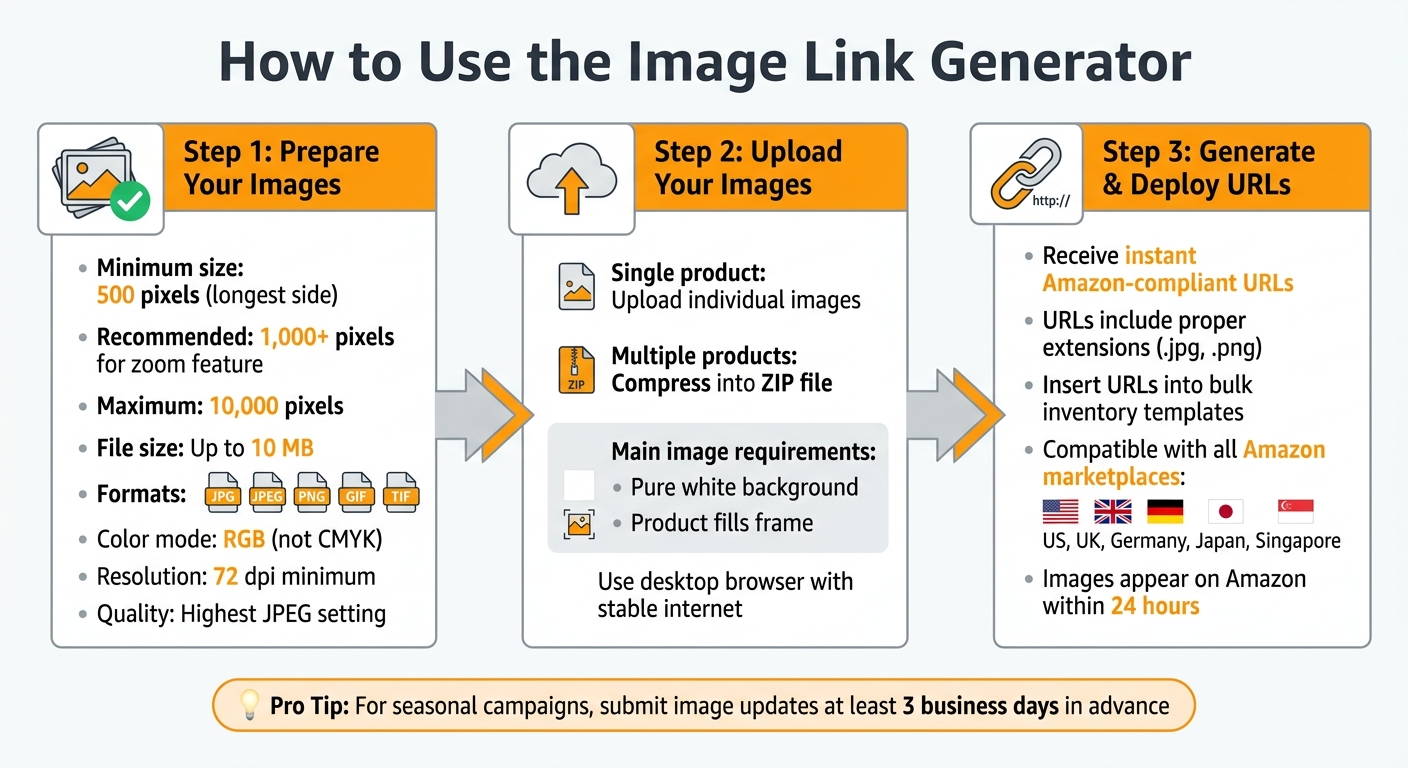
Beyond efficient URL generation and compliance, the tool significantly speeds up your listing process while enhancing quality by following Amazon listing best practices. For instance, images hosted through this system support Amazon’s zoom feature, which requires a minimum of 1,000 pixels on the longest side [2]. The tool accepts files up to 10 MB and supports all Amazon-approved formats, including JPG, JPEG, PNG, GIF, and TIF [2]. You get immediate access to functional URLs without the delays caused by manual troubleshooting [4].
The tool is also compatible with all major Amazon marketplaces, such as the US, UK, Germany, Japan, and Singapore [2][3]. This allows you to manage global listings from a single platform, eliminating the need for multiple hosting solutions or worrying about region-specific requirements.
sbb-itb-ed4fa17
HOW TO CREATE IMAGE URL FOR AMAZON FLAT FILES! QUICK AND EASY
How to Use the Image Link Generator
How to Generate Amazon-Compliant Image URLs in 3 Steps
Here’s a step-by-step guide to help you generate image URLs that meet Amazon’s requirements.
Getting Started with the Tool
Before diving in, make sure your images meet Amazon’s technical standards. The longest side should be at least 500 pixels (though 1,000 pixels is better for zoom functionality), with a maximum size of 10,000 pixels [6]. You can check these dimensions by viewing the file properties on your computer. For the best experience, use a reliable desktop browser and stable internet connection [5]. Once you’ve confirmed your images are ready, you can start generating URLs for your product listings.
Creating Image URLs for Single Products
To generate URLs for individual products, ensure your images align with the earlier specifications. Stick to JPEG format when possible, although PNG, TIFF, and non-animated GIF files are also acceptable. Avoid using proprietary formats like .ai or .psd files.
Double-check that your images are in RGB color mode – using CMYK can lead to color mismatches – and maintain a resolution of at least 72 dpi. For JPEG images, save them at the highest quality setting, but avoid re-saving them multiple times to prevent quality degradation. Also, resist the urge to upscale smaller images, as this can reduce clarity [7].
If you’re working with multiple products, refer to the bulk upload instructions below.
Generating URLs for Multiple Products at Once
When dealing with several products, compress your images into a ZIP file. This makes the bulk upload process smoother and helps avoid formatting errors, such as "error 15." Ensure the main image for each product complies with Amazon’s guidelines: a pure white background with the product clearly filling the frame.
Keep in mind that it can take up to 24 hours for updated images to appear on Amazon. Since Amazon’s algorithms determine which images to display, following the guidelines precisely is essential. To enhance customer engagement, try to include at least six images and one video per product detail page [8].
Practical Applications and Examples
Managing Seasonal Campaign Images
The Image Link Generator is a handy tool for keeping up with seasonal campaign demands. Amazon requires promotional images to be updated promptly and removed within 24 hours after the campaign ends [9]. This tight timeline calls for a quick and efficient way to update images across your catalog.
By generating URLs for seasonal assets and inserting them into bulk inventory templates, you can update hundreds of SKUs in just minutes. To ensure smooth processing, submit your seasonal image updates at least 3 business days in advance. While Amazon’s review process often takes 24 hours, it can sometimes extend up to 3 business days [9].
"Campaign dates for a specific holiday or seasonal event (for example, Halloween, Valentine’s Day and Christmas) must start within a reasonable time frame leading up to the event and must end within 24hrs after the event date." – Amazon Ads Support [9]
This approach allows seasonal updates to fit seamlessly into your broader catalog strategy, ensuring your campaigns stay relevant and timely.
Supporting Multi-Country Listings
Managing a global catalog is just as straightforward as handling seasonal campaigns with the Image Link Generator. Amazon operates in over 20 countries across regions like the Americas, Europe, the Middle East, Africa, and Asia-Pacific [11], with each marketplace often requiring unique image adjustments.
You can generate URLs for region-specific images and organize them by marketplace in your master SKU file. For instance, products sold in Germany may need images with CE certification marks, while the same items in Japan might require different safety labels. Amazon’s Image Manager makes it easy to manage country-specific images [10]. To avoid translation issues and improve readability across devices, minimize text on your images [10]. Once the URLs are ready, you can use bulk templates to quickly deploy these localized assets, simplifying international catalog management.
Conclusion
FlatFilePro’s Free Amazon Image Link Generator takes the hassle out of manual image verification by generating compliant URLs in bulk. In just minutes, you can update your entire catalog while avoiding common issues like watermarks, non-white backgrounds, or images that fail to meet Amazon’s size requirements for features like product zoom (over 1,000 pixels) [6]. This tool not only reduces upload errors but also speeds up your workflow, giving you more time to focus on growing your business.
Make Amazon image management easier – give FlatFilePro’s Free Amazon Image Link Generator a try and update your catalog effortlessly.
FAQs
How long do the generated image URLs stay active?
When you generate image URLs, their availability often depends on the hosting platform. On stable platforms, these URLs can stay active indefinitely. However, platforms like Amazon S3 may provide time-limited URLs, with their lifespan determined by the settings you choose during creation. Always check the policies of your hosting platform to ensure the URLs align with your requirements.
Can I map each image URL to the right SKU automatically?
Generating image URLs for Amazon listings can be done using a spreadsheet, where you manually or semi-automatically link the URLs to the corresponding SKUs. This process includes preparing the image URLs – such as those hosted on platforms like Google Drive – and assigning them to the correct SKU rows in your flat file. While you can generate URLs in bulk, automating the mapping process entirely may involve extra steps or tools that aren’t detailed here.
Will Amazon accept these URLs in all bulk upload templates?
Yes, Amazon allows you to include image URLs in bulk upload templates, provided they comply with Amazon’s image requirements. Tools like the Bulk Image Upload tool make this process easier by managing large volumes of images, processing valid ones, and generating error reports for any that don’t meet the standards.