
Need quick and easy ways to manage Amazon product images? A free Amazon image link generator lets you turn product photos into direct URLs, simplifying bulk uploads, sharing visuals, and maintaining consistency across platforms. These tools are essential for sellers using Amazon’s "Add Products via Upload" feature, which requires image URLs instead of file attachments.
Key Points:
- Why You Need It: Amazon requires image URLs for bulk product updates. Direct URLs are faster and avoid issues with storage links like Google Drive.
- How It Works: Upload images to a generator to create shareable URLs. Some tools even use AI to create lifestyle images based on product details.
- Benefits: Save time on catalog management, improve team workflows, and streamline global market expansion.
Quick Steps:
- Choose a Tool: Options range from simple URL generators to AI-powered tools in Amazon Ads.
- Upload Images: Use ASINs or upload files to generate URLs.
- Share Links: Copy URLs for inventory files, team collaboration, or marketing campaigns.
By using these tools, you can simplify catalog updates, ensure compliance with Amazon’s image standards, and save hours on repetitive tasks.
HOW TO CREATE IMAGE URL FOR AMAZON FLAT FILES! QUICK AND EASY
sbb-itb-ed4fa17
Benefits of Using a Free Amazon Image Link Generator
A free image link generator can save you hours – if not days – when managing your Amazon catalog. Instead of manually uploading images one by one through Seller Central, you can update hundreds or even thousands of SKUs at once by adding image URLs to your inventory files [3] [4]. For businesses with massive catalogs, this kind of automation is a game-changer. Let’s dive into some of the main perks that improve catalog management, streamline workflows, and support global expansion.
Faster Catalog Management
Handling large inventories can be overwhelming, but automated image organization makes it a breeze. These tools use advanced label and concept detection to sort images quickly, creating a searchable library where you can locate the exact product photo in seconds. No more endless scrolling through folders. Amazon’s own image analysis technology, for example, processes billions of images and videos every single day [5].
Better Workflow Efficiency
Forget the hassle of sharing bulky image files. With an image link generator, you can simply share a direct URL through tools like Slack, Discord, or project management platforms such as Notion. This means your team can instantly view the image in their browser – no downloads, no storage service logins, no headaches.
"Image generation simplifies creative building to a few actions, removing the need for technical or design expertise" [1].
Easier International Market Expansion
Breaking into international markets gets much easier when you can share visual assets seamlessly across regions. Amazon’s image generation tools operate in over 15 countries, helping you maintain consistent branding while tailoring lifestyle imagery to match local tastes [1]. Considering that nearly 75% of advertisers face challenges with creating ad creatives and selecting formats [6], having a free tool to tackle this issue makes global testing not just simpler but also more cost-effective.
How to Use a Free Amazon Image Link Generator
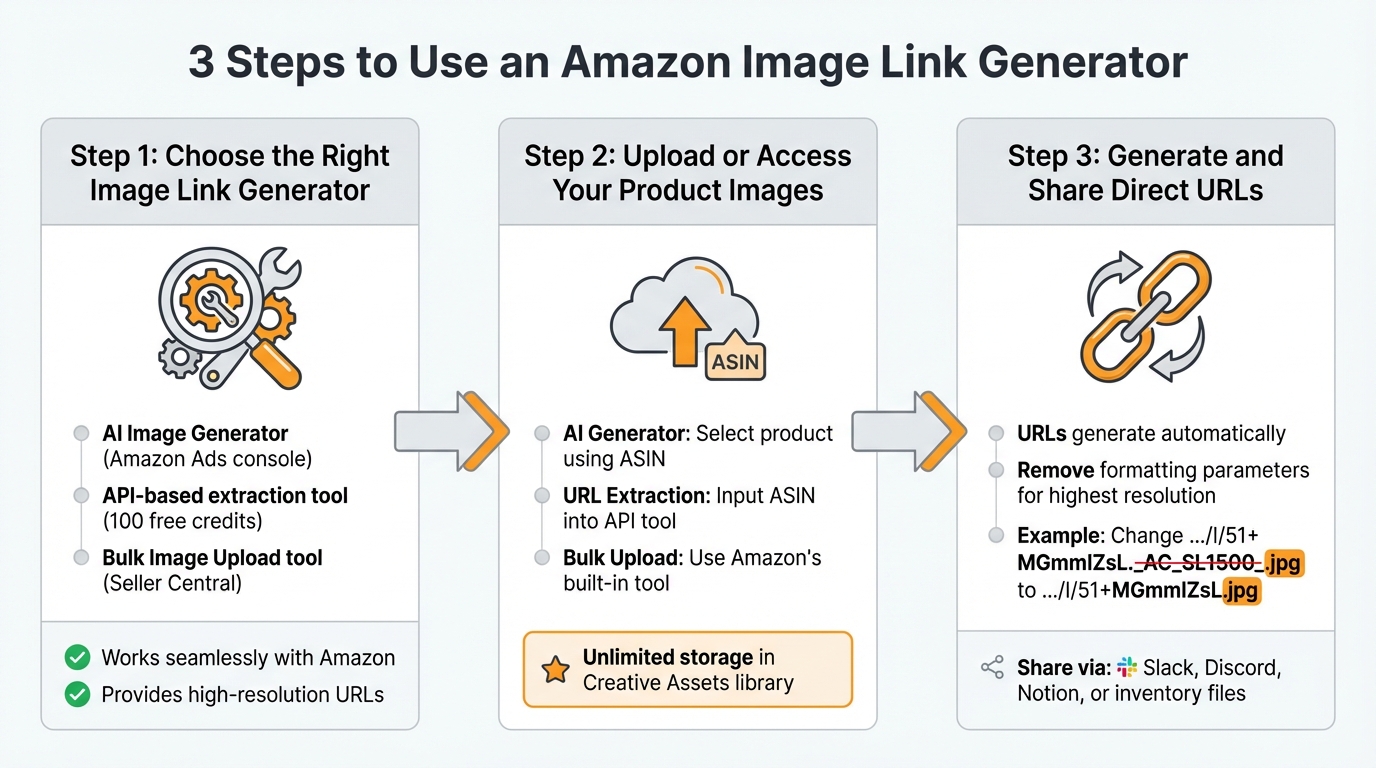
How to Use Amazon Image Link Generator in 3 Steps
This guide breaks down the steps to help you make the most of image link generators. It’s a straightforward process with just three key steps.
Step 1: Choose the Right Image Link Generator
Start by identifying what you need from the tool. If your focus is creating lifestyle images with AI, try the free AI Image Generator available in the Amazon Ads console for select markets [1]. Need to extract image URLs from Amazon’s Content Delivery Network (CDN) for catalog purposes? An API-based extraction tool with a free trial (100 credits, no credit card required) might be your best bet [7]. For uploading images to your own listings, Amazon’s Bulk Image Upload tool in Seller Central is a simple, built-in option that doesn’t require external hosting [3].
Look for tools that work seamlessly with Amazon and offer an intuitive interface. The best tools should simplify the process, allowing you to create or manage images in just a few clicks – no technical skills needed [1]. Also, ensure the tool you choose provides high-resolution image URLs.
Step 2: Upload or Access Your Product Images
How you access images depends on the tool you’ve chosen. With Amazon’s AI Image Generator, you can select a product using its ASIN, and the tool will automatically pull product details to create or enhance images [1]. These images are saved in a Creative Assets library with unlimited storage, making them easy to reuse for campaigns.
For URL extraction, input the ASIN into an API tool to retrieve all associated images directly from Amazon’s CDN [7]. If you’re hosting images externally, third-party storage sites are an option, but Amazon’s Bulk Image Upload tool eliminates the need for external hosting [3].
Step 3: Generate and Share Direct URLs
Once your images are uploaded or retrieved, generating URLs is usually automatic. Amazon stores product images on its CDN [7]. To ensure the highest resolution, you can tweak the URL by removing the formatting parameters. For example, change .../I/51+MGmmIZsL._AC_SL1500_.jpg to .../I/51+MGmmIZsL.jpg [7].
For AI-generated images, use clear and descriptive prompts to create contextual visuals (e.g., "A sandal on a beach") [1]. When sharing URLs, simply copy and paste them into your preferred communication or project management tools. If you’re managing structured data, many APIs provide JSON responses with organized variant codes (e.g., MAIN, SIDE, BACK), making database integration a breeze [7].
Best Practices for Using Image Links in Amazon Listings
Meeting Image Quality and Compliance Standards
Amazon has strict rules for product images, and failing to follow them can result in your listing being suppressed. For your main image, you must use a pure white background (RGB 255, 255, 255) – not off-white or any other shade. The product itself should take up at least 85% of the image frame, and you’re not allowed to include text, logos, watermarks, or props.
"Listings with high-quality, compliant images convert at 2-3x the rate of those with mediocre visuals – and Amazon doesn’t just prefer good images, they’ll actively suppress your listing if you break their rules." – BulkImagePro [8]
To enable the zoom feature, images should be at least 1,000×1,000 pixels, though 2,000×2,000 pixels is even better. Save images in JPEG format with a quality setting of 85, which keeps the image sharp while reducing file size by 40–60%. Ensure the color mode is RGB (not CMYK), and use the sRGB color profile for consistency. Fill all 7–9 image slots with a mix of lifestyle photos, infographics (using fonts no smaller than 30pt), and scale references to visually address customer questions.
How to Organize and Name Image Files
After ensuring your images meet Amazon’s standards, keeping them organized is the next step. Use a clear naming convention based on your SKU or ASIN, followed by a variant code. For example:
B098FKXT8L.MAIN.jpgfor the primary imageB098FKXT8L.SIDE.jpgfor side viewsB098FKXT8L.PT01.jpgthroughB098FKXT8L.PT09.jpgfor lifestyle shots and close-ups [7]
This system helps prevent errors during bulk uploads and keeps your files easy to manage. If you’re working with AI-generated images, document the prompts that worked well so you can maintain a consistent look for your brand [1].
Monitoring and Updating Image Links
For long-term listings, it’s best to host your images on Amazon’s servers. You can do this using the Bulk Image Upload tool in Seller Central or by using services like AWS S3 [2][3].
After uploading, check your listings within 24 hours, as suppression notices may not appear immediately in Seller Central. Regular image management supports a smooth catalog strategy and reduces operational hiccups. Set reminders to update temporary URLs with permanent ones before they expire to avoid disruptions [2].
Keep an eye on advertising metrics like click-through rates, ACOS, and ROAS to identify when an image might need refreshing [1]. Amazon Ads’ Creative Assets library also offers unlimited storage, making it easier to reuse visuals across campaigns and Brand Stores [1]. By following these steps, you can maintain consistent, high-quality image links throughout your Amazon catalog.
Conclusion
Amazon image link generators simplify the process of managing product images by removing the need to upload each image manually. Instead, you can use generated URLs to update hundreds of listings at once by pasting them directly into inventory files [9].
"Image generation can produce product- and brand-oriented creative in seconds, speeding up creative production and campaign activations." – Amazon Ads [1]
With our free Amazon image link generator, you can instantly create shareable URLs without relying on paid services. Whether you’re tweaking URLs to extract high-resolution images or generating AI-powered lifestyle visuals, this tool helps make your workflow more efficient.
For bulk updates, prioritize generating permanent URLs that work seamlessly with flat files. If you’re experimenting with creative variations, AI tools can quickly produce brand-focused images [1]. Keep in mind that some free platforms may generate links that expire after 30 days, which is fine for draft listings or team collaboration [2].
To ensure smooth catalog management, establish a consistent file naming system, double-check your links within 24 hours of upload, and keep your source files organized to avoid broken images [10]. Incorporating these practices into your routine will help maintain a reliable and efficient Amazon catalog management process.
FAQs
Will these image URLs ever expire?
Pre-signed URLs for images typically expire within 12 hours or even less if configured for a shorter duration. If you need URLs that don’t expire, you can switch to standard object URLs that don’t include expiration settings. Alternatively, you can regenerate pre-signed URLs to extend their validity as needed.
Can I use Amazon-hosted URLs in flat files?
Yes, you can include Amazon-hosted URLs in flat files by using tools provided by Amazon or AI-powered generators to create valid image links. These tools generate shareable product image URLs directly hosted on Amazon, eliminating the need for external hosting and simplifying the process of managing your product listings.
Why are my images being suppressed on Amazon listings?
Amazon may suppress listings if the image URLs are invalid or don’t meet their guidelines. This typically happens when the URLs aren’t direct links to the image file or if the images aren’t hosted on approved platforms. To prevent this, double-check that your image URLs align with Amazon’s requirements.