
Amazon sellers need image URLs for bulk uploads. When using flat file templates, you can’t upload image files directly. Instead, you need publicly accessible URLs that Amazon’s system can fetch. This is where the FlatFilePro Free Image URL Generator helps.
Key Benefits:
- Generates Amazon-compliant URLs: Creates links in the required format (e.g.,
https://bucket-name.s3.region.amazonaws.com/image.jpg). - Supports bulk processing: Upload multiple images or folders at once.
- Automatic adjustments: Compresses large files and resizes images over 4K resolution to meet Amazon’s standards.
- Error prevention: Ensures URLs are permanent, public, and formatted correctly to avoid upload issues.
How It Works:
- Upload images: Drag and drop files or folders into the tool.
- Generate URLs: The tool creates public links instantly.
- Copy and paste: Use these URLs directly in your Amazon flat file.
This tool saves time, avoids errors, and simplifies managing large product catalogs.
Features of the FlatFilePro Free Image URL Generator

Creates Amazon-Compliant URLs Instantly
FlatFilePro simplifies your workflow by generating Amazon-compliant URLs in the virtual-hosted style (https://bucket-name.s3.region.amazonaws.com/image.jpg), so you don’t have to worry about manual formatting. Plus, these URLs ensure images are accessible directly in a browser without needing login credentials, which is crucial for Amazon’s crawlers to properly display your product images.
The tool also handles image compression and resizing automatically – compressing files over 5MB and resizing photos larger than 4K. This prevents listing errors while ensuring your images load quickly and look sharp, making it ideal for bulk processing.
Bulk URL Creation for Multiple Products
With FlatFilePro, you can generate URLs for multiple files or even entire folders in one go, saving you from the tedious task of creating links for each individual SKU.
As noted in the S3 Browser documentation:
The Web URL Generator allows you to easily generate web URLs for your files. You can use this tool to create links for multiple files, an entire folder, or even an entire bucket [2].
Once the URLs are created, you can copy all of them to your clipboard with a single click, ready to paste into your Amazon flat file. This bulk functionality integrates seamlessly with Amazon’s listing templates, making your workflow faster and more efficient.
Direct Integration with Amazon Flat Files
FlatFilePro’s precision in URL formatting ensures smooth integration with Amazon’s inventory files. The tool generates links that are perfectly formatted for Amazon, ending in file extensions like .jpg, .png, .gif, or .webp. This eliminates common errors caused by improperly formatted URLs [1].
The generated URLs can be directly inserted into key columns in Amazon’s flat files, such as Main_Image_URL and Other_Image_URL1, without any additional adjustments. This saves time, avoids rework, and ensures your bulk uploads go off without a hitch.
sbb-itb-ed4fa17
HOW TO CREATE IMAGE URL FOR AMAZON FLAT FILES! QUICK AND EASY
How to Use the FlatFilePro Free Generator
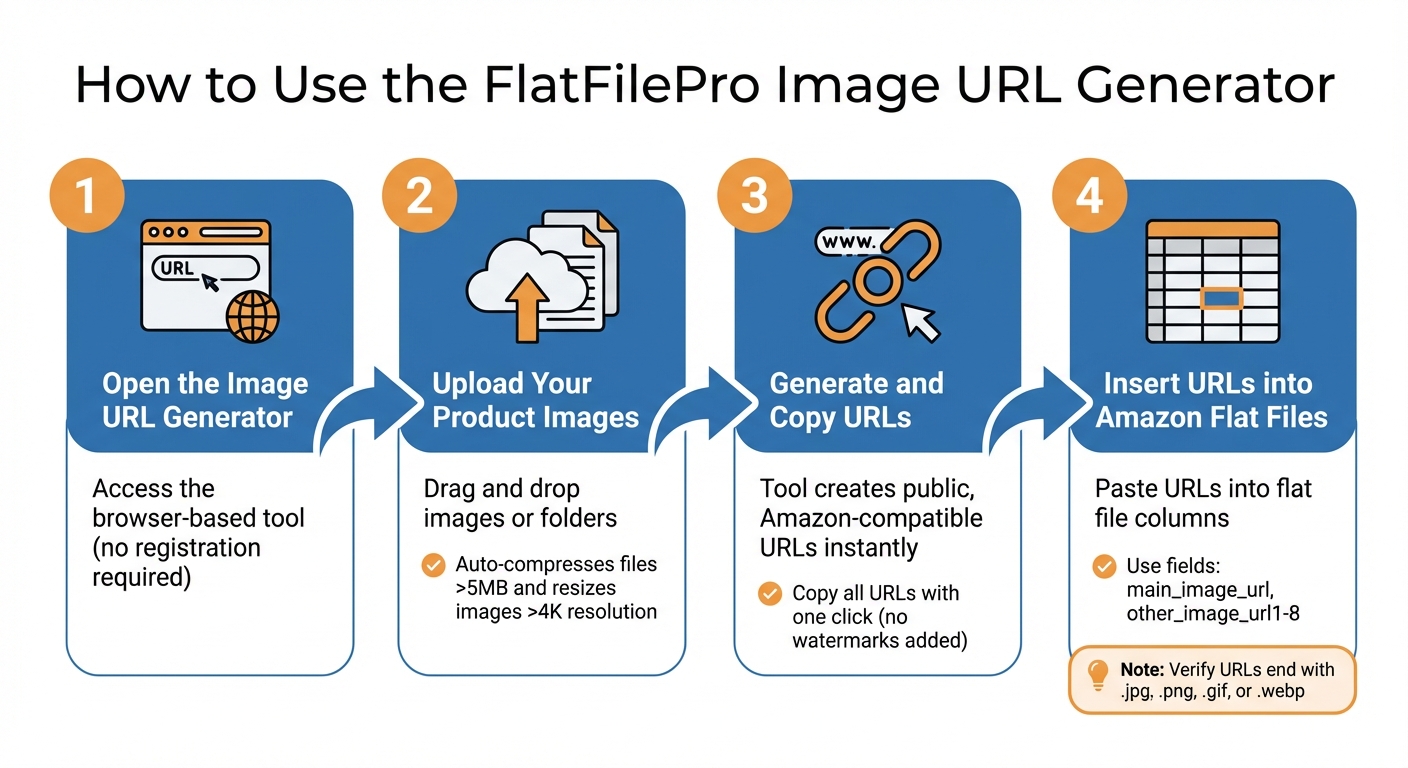
How to Generate Amazon Image URLs in 4 Steps
Here’s how you can quickly create and integrate Amazon-compliant image URLs using the FlatFilePro Image URL Generator.
Step 1: Open the Image URL Generator
The FlatFilePro Image URL Generator is a browser-based tool that doesn’t require registration. Just head to the generator page, and you’re ready to go. Start by uploading your product images directly to the platform.
Step 2: Upload Your Product Images
Drag and drop your product images onto the page or select them directly from your device. The tool supports all Amazon-approved image formats and takes care of adjustments for you. For instance, it compresses files larger than 5MB and resizes images exceeding 4K resolution to ensure they meet Amazon’s technical standards.
Step 3: Generate and Copy URLs
After uploading, the generator creates public, Amazon-compatible URLs for your images. You can copy these URLs with a single click. Rest assured, the images are uploaded without any watermarks or branding. Once copied, you can integrate the URLs into your inventory file.
Step 4: Insert URLs into Amazon Flat Files
Open your Amazon inventory flat file template and paste the generated URLs into the appropriate fields, such as main_image_url and other_image_url1 through other_image_url8. Before uploading the file to Seller Central, double-check that each URL ends with a valid extension like .jpg, .png, .gif, or .webp. Also, ensure there are no spaces or unencoded special characters in the URLs.
As noted by Seller_E54UocTxGrfq8 in the Amazon Seller Forums:
Amazon does not accept URLs from Google Photos or Google Drive. You’ll need to find somewhere else to host the images and then use that URL in your inventory file.
Common Image URL Problems and How to Fix Them
Even seasoned Amazon sellers can encounter image URL issues that disrupt uploads or break listings. Understanding these challenges is key to avoiding costly mistakes. Building on Amazon’s image URL requirements, let’s explore common problems and how the tool’s features address them.
Common Amazon Image URL Errors
One frequent issue is expired links. Free image hosting services often generate URLs that expire after 30 days[1]. If you rely on these temporary links for permanent product listings, your images will eventually vanish. Similarly, pre-signed URLs from Amazon S3 expire after seven days, making them unsuitable for long-term use[2].
Another common problem is permission errors. If your hosting service restricts access or requires a login, Amazon’s system won’t be able to retrieve your images during a flat file upload.
Deprecated URL formats can also cause headaches. Amazon S3 is phasing out path-style URLs like s3.region.amazonaws.com/bucket/file.jpg in favor of virtual-hosted style URLs such as bucket.s3.region.amazonaws.com/file.jpg[2]. Using outdated formats may result in errors when Amazon attempts to fetch your images.
Lastly, file size and resolution issues can trigger upload failures. Images larger than 5MB or exceeding 4K resolution may be rejected or fail to load altogether, requiring time-consuming manual resizing or compression[1].
Fixing these issues is essential to keep your product listings running smoothly by following Amazon listing best practices.
How FlatFilePro Prevents URL Errors
FlatFilePro addresses these challenges by automating compliance checks and generating permanent, publicly accessible URLs. These URLs don’t expire or require login credentials, ensuring your images remain accessible for the lifetime of your listings[1][2].
The tool also optimizes image size and quality to prevent upload errors. Every URL it creates uses virtual-hosted style formatting and HTTPS encryption, aligning with Amazon’s updated standards and avoiding deprecated formats[2]. Additionally, it supports Amazon-approved formats like PNG, JPEG, GIF, and WebP, making the upload process seamless[1].
Conclusion
Key Points
Handling Amazon image URLs doesn’t have to be complicated. The Free Image URL Generator simplifies the process by creating Amazon-compliant URLs instantly. Its drag-and-drop interface makes it easy to use, while features like automatic compression for images over 5MB and format validation (PNG, JPEG, GIF, or WebP) ensure your images meet Amazon’s standards[1]. This takes the hassle out of uploads, preventing delays and keeping your product listings error-free.
Getting Started with FlatFilePro
Beyond image management, FlatFilePro offers a suite of tools to streamline your Amazon catalog management. Features like bulk editing, variation management with a 95% success rate, and the Reflection Engine – which checks your listings nightly for unauthorized changes – make it a comprehensive solution for sellers[3].
You can start using the free generator right away. For those managing over 300 listings and needing advanced catalog control, FlatFilePro’s paid plans start at $99.00 per month, with a free trial available. Whether you’re fixing image URL issues for a few products or overseeing a large catalog across multiple marketplaces, FlatFilePro is designed by Amazon sellers who understand the challenges of maintaining flawless listings.
FAQs
Will my image URLs ever expire?
Image URLs generated by tools like FlatFilePro are generally stable and don’t expire. However, starting July 31, 2025, Amazon will introduce a requirement to update image URLs via the Listings Items API. This change underscores how critical it is to manage your image URLs effectively to stay compliant and maintain product visibility on the platform.
For businesses, especially those with large catalogs, it’s a good idea to regularly review and update your URLs. This proactive approach can help you avoid disruptions and ensure your listings remain visible to potential customers.
Which Amazon flat file fields require image URLs?
The Product Image URL fields in Amazon flat files are where you input image URLs for your product listings. These fields play a key role in uploading images and making sure they display properly in your Amazon store.
How do I fix an image URL Amazon can’t fetch?
To resolve an issue where Amazon can’t fetch an image URL, make sure the URL is valid, publicly accessible, and aligns with Amazon’s image guidelines. Problems often stem from broken links, improper formatting, or hosting restrictions. Double-check the URL, ensure it’s accessible to everyone, and use high-resolution images (minimum 1,000 x 1,000 pixels). If necessary, consider using tools that create Amazon-compliant image URLs to streamline the process for your listings.