
Managing Amazon product images can be tedious and error-prone. Mistakes like broken URLs or non-compliant images often lead to suppressed listings, costing sellers significant revenue. FlatFilePro offers a solution by automating the process of generating Amazon-compliant image URLs. Here’s why this tool is essential:
- Saves Time: Bulk process up to 25,000 SKUs in minutes instead of hours.
- Error-Free: Automatically ensures URLs meet Amazon’s strict image standards.
- Protects Listings: Detects and resolves image-related issues before they impact sales.
- Easy Integration: Syncs directly with Amazon Seller Central via API.
FlatFilePro simplifies catalog management, reduces errors, and prevents revenue loss. With features like version control and role-based access, it’s a reliable tool for scaling your Amazon business. Ready to try it? FlatFilePro offers a 14-day free trial to get started.
HOW TO CREATE IMAGE URL FOR AMAZON FLAT FILES! QUICK AND EASY
Amazon’s Image Requirements Explained
Amazon has strict image standards that directly affect your product’s visibility in search results. Meeting these requirements isn’t just about following rules – it directly impacts your revenue and how customers perceive your products. FlatFilePro simplifies this process by ensuring your image URLs meet Amazon’s standards automatically. Let’s break down what Amazon expects.
Amazon’s Image Specifications
Amazon’s technical guidelines leave little room for error. For instance, your main image must have a pure white background (RGB 255,255,255). Any slight variation, like off-white shades (#FEFEFE), will be rejected [3].
"Small images scream ‘amateur hour.’ Plus, they disable the zoom feature, which means customers can’t see your product details." – Ailee [3]
Images should be at least 1,000 x 1,000 pixels, though 2,000 x 2,000 pixels is recommended to enable Amazon’s zoom feature. This zoom functionality can increase conversion rates by up to 30% [3]. Additionally, your product needs to fill at least 85% of the image frame to ensure it stands out in search results [3]. File sizes must stay under 10 MB, and acceptable formats include JPG or PNG [3].
Main images cannot contain text, logos, watermarks, borders, or props that aren’t part of the product [3]. For bulk uploads, image URLs must be correctly formatted using HTTP or HTTPS to avoid upload issues [2].
What Happens When Images Don’t Meet Requirements
Failing to meet Amazon’s image standards can have serious consequences. Non-compliant images lead to listing suppression, which means your products disappear from search results. No visibility equals no sales until the issue is resolved.
Even if your listings aren’t suppressed, poor-quality or incorrectly formatted images can hurt your search rankings. Amazon’s algorithm penalizes such listings, pushing them lower in search results. This reduces organic traffic and click-through rates. And even if your images are compliant, low-quality visuals can still hurt conversions – especially on mobile devices or high-resolution screens [3].
How to Use FlatFilePro‘s Amazon Image URL Generator

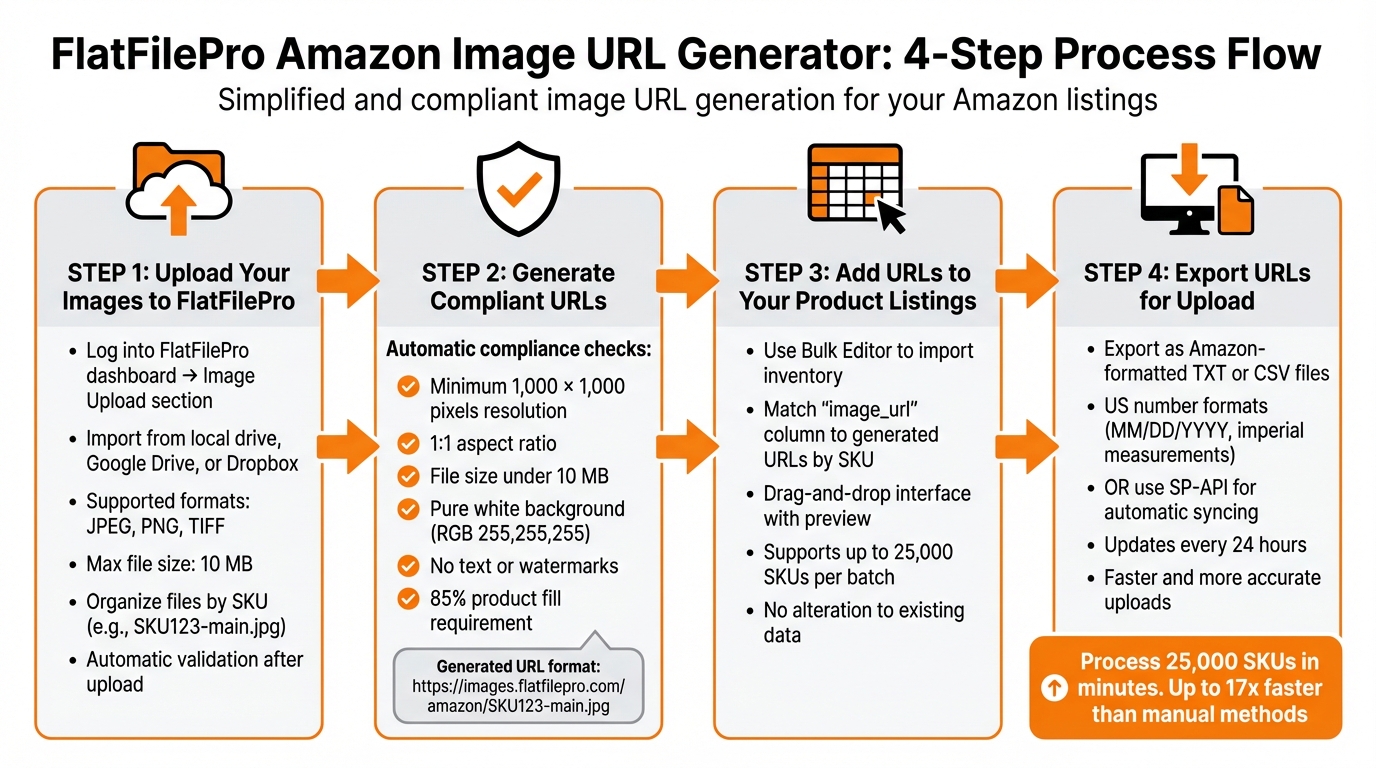
4-Step Process to Generate Amazon-Compliant Image URLs with FlatFilePro
FlatFilePro’s image URL generator connects directly to Amazon Seller Central through a simple one-click API. This eliminates the hassle of manual uploads and extra logins. Once connected, the platform automatically syncs your catalog and uses its Reflection Engine to detect image-related errors – issues that 93% of sellers often overlook [1]. Here’s how you can streamline your image URL generation in just four steps.
Step 1: Upload Your Images to FlatFilePro
Start by logging into the FlatFilePro dashboard and heading to the Image Upload section. You can import images directly from your local drive or cloud platforms like Google Drive or Dropbox. The system supports JPEG, PNG, and TIFF formats, with a maximum file size of 10 MB to comply with Amazon’s guidelines [5].
To save time, organize your files by SKU (e.g., SKU123-main.jpg). For larger inventories, grouping images into folders by SKU can make the process even more efficient. Once uploaded, FlatFilePro automatically validates the images.
Step 2: Generate Compliant URLs
After uploading, the platform checks each image to ensure it meets Amazon’s requirements, such as a minimum resolution of 1,000 x 1,000 pixels, a 1:1 aspect ratio, file size under 10 MB, a pure white background (RGB 255,255,255), and no text or watermarks. Non-compliant images are either flagged or resized automatically.
FlatFilePro then generates URLs in the format:
"https://images.flatfilepro.com/amazon/SKU123-main.jpg"
These URLs are ready for immediate use in Seller Central and ensure your images meet Amazon’s specifications, including the 85% product fill requirement [5].
Step 3: Add URLs to Your Product Listings
Using the Bulk Editor to edit Amazon listings, you can import your inventory and match the "image_url" column to the generated URLs based on SKU. The drag-and-drop interface allows you to preview the assignments. FlatFilePro supports up to 25,000 SKUs per batch, and the process won’t alter your existing data.
"This is the tool that powers our ops and analytics teams. We used to do everything manually, such a pain! Now we don’t have to think about anything and our listings update like magic!" – Jack Haldrup, Founder, Dr. Squatch [1]
Step 4: Export URLs for Upload
Finally, export the URLs as Amazon-formatted TXT or CSV files, using US number formats. Alternatively, leverage the SP-API for automatic syncing, which updates every 24 hours. This ensures faster and more accurate uploads, following US standards like MM/DD/YYYY dates and imperial measurements.
sbb-itb-ed4fa17
FlatFilePro Image URL Generator Features and Benefits
Automatic Compliance Checking
FlatFilePro’s validation system ensures that every image URL meets Amazon’s strict requirements before it even reaches their servers. It checks for proper encoding, verifies that images meet the minimum dimensions (like 1,000 x 1,000 pixels), confirms file sizes are under 10 MB, and ensures backgrounds adhere to Amazon’s white background standard (RGB 255,255,255). By using Amazon’s SP-API, this tool offers a more reliable solution compared to manual uploads. If an image doesn’t meet the criteria, the system flags it and either fixes the issue automatically or provides clear instructions for correction[1].
The Reflection Engine adds another layer of protection by monitoring your catalog for discrepancies between your intended image URLs and the ones live on Amazon. If any changes or errors occur, you’ll get an alert within 24 hours, giving you the chance to fix issues quickly and avoid disruptions to your sales.
Next, see how FlatFilePro simplifies bulk processing to save you even more time.
Bulk Processing Saves Time
Manually handling hundreds of product variations can take hours, but FlatFilePro reduces this process to mere minutes. Tasks that might take 2–3 hours manually can be completed in just 5–10 minutes, making it up to 17 times faster than traditional methods[4]. This is especially useful for updating seasonal catalogs or promotional image sets. For sellers managing 5,000 SKUs, this feature can save between 20–40 hours every month compared to manual URL generation[6].
The platform’s user-friendly interface eliminates repetitive tasks. Once you upload your organized image files, the system matches them to SKUs, validates compliance, creates correctly formatted URLs, and populates your flat file columns – all without the need for tedious copy-pasting. This automation boosts accuracy, reducing error rates from the typical 5–15% seen with manual processes to over 99%[6].
And it doesn’t stop there – FlatFilePro’s integration features take catalog management to the next level.
Integration with Other FlatFilePro Tools
FlatFilePro’s Image URL Generator works seamlessly with other tools in the platform to ensure your catalog stays consistent. For instance, it integrates with the Variations Manager to maintain parent–child relationships when updating images across product families. If you’re managing a clothing line with various colors and sizes, the tool ensures that each variation gets the correct image URL, preserving the structure of your catalog. This integration achieves a 95% success rate in updating variations[1].
Role-based permissions make it easy to assign specific tasks to team members. For example, a graphic designer can handle image uploads without accessing sensitive data. The Activity Log further enhances control by tracking all changes with timestamps and user details, giving you complete oversight of every modification.
Fixing Common Image URL Problems
Common Issues and How FlatFilePro Solves Them
FlatFilePro doesn’t just streamline catalog management – it also tackles common image URL issues that can trip up even seasoned sellers.
Image URL problems can lead to suppressed listings and lost sales, often without sellers realizing it. FlatFilePro eliminates the hassle of manual troubleshooting by identifying and fixing these issues automatically.
One major challenge sellers face is silent listing failures. Your images might appear fine in Seller Central, but Amazon could be rejecting them behind the scenes. FlatFilePro’s Reflection Engine detects these hidden problems within 24 hours. It either resolves them automatically overnight or provides clear, actionable alerts to guide you.
Here’s a quick look at common image URL issues and how FlatFilePro addresses them:
| Issue | FlatFilePro Solution |
|---|---|
| Invalid link format (HTTPS vs HTTP) | Automatically converts to Amazon-compatible links |
| Suppressed listings post-upload | Reflection Engine flags and fixes them nightly |
| Image size rejections | Pre-validates and compresses images to under 10MB |
| Bulk upload delays | Direct API push bypasses flat file queues |
These automated solutions not only simplify catalog management but also speed up the process significantly. While traditional uploads can take time due to queue delays, FlatFilePro’s API integration ensures changes go live immediately. And if something goes wrong, version control allows you to restore the last working version with just one click.
For sellers managing large inventories, these features are a game-changer. Tasks that previously took 2–3 hours of manual effort can now be completed in just 5–10 minutes – up to 17 times faster than traditional methods[4].
Conclusion
Key Takeaways
Getting your image URLs right is crucial to avoid suppressed listings and lost sales. FlatFilePro takes the hassle out of the process by validating and optimizing your image URLs automatically. What used to take hours can now be done in just minutes. Plus, its automated tools help ensure your catalog stays error-free.
From the moment you upload an image to the final publication of your listing, FlatFilePro streamlines the entire workflow. Features like version control let you quickly undo changes if needed, and role-based permissions allow your design team to update images without risking accidental edits to pricing or other critical data.
Give FlatFilePro a Try
FlatFilePro simplifies catalog management with automation and efficient tools. And the best part? You can try it without risk. They offer a 14-day free trial – no credit card required[1]. Use the Amazon Image URL Generator on your product catalog and see the difference for yourself.
Brands like Dr. Squatch and Yuca Brands already trust FlatFilePro for their Amazon operations. Jack Haldrup, Founder of Dr. Squatch, shares:
"This is the tool that powers our ops and analytics teams. We used to do everything manually, such a pain! Now we don’t have to think about anything and our listings update like magic!"[1]
Ready to make Amazon catalog management easier? Start your free trial today and experience the transformation firsthand.
FAQs
How does FlatFilePro help ensure Amazon image requirements are met?
FlatFilePro simplifies the process of ensuring your product images meet Amazon’s strict standards by creating secure HTTPS URLs that match Amazon’s rules for image size, JPEG format, and accessibility.
It also takes care of formatting and compliance checks automatically, helping you avoid errors and saving valuable time when listing products. Whether you’re handling bulk uploads or using an API integration, FlatFilePro ensures your catalog stays compliant with Amazon’s requirements with minimal effort.
How do I integrate FlatFilePro with Amazon Seller Central?
To get started with integrating FlatFilePro and Amazon Seller Central, begin by creating an account on FlatFilePro. Then, prepare your product data using Amazon’s flat file templates. It’s crucial to ensure your data – such as images, SKUs, and prices – is formatted correctly to meet Amazon’s specific guidelines.
FlatFilePro simplifies the process with tools that help you generate Amazon-compliant image URLs and make creating and editing flat files much easier. Once your file is polished and ready, you can upload it through the bulk upload feature in Amazon Seller Central. FlatFilePro also includes error detection tools to catch any issues before submission, saving you from potential headaches.
For ongoing catalog management, FlatFilePro offers automation features that let you update and monitor your listings effortlessly. These tools ensure your listings remain synchronized with Amazon’s platform, making it easier to keep your catalog organized and up to date.
How does FlatFilePro make bulk image uploads easier for Amazon listings?
FlatFilePro makes bulk image uploads a breeze with its Amazon Image Link Generator, which transforms hosted files into Amazon-compliant image URLs in no time. This ensures your product images are formatted correctly and ready to integrate smoothly with Amazon’s platform.
By automating URL generation, the tool helps eliminate errors and guarantees compatibility with Amazon’s strict requirements. Whether you’re handling extensive catalogs or updating product listings, FlatFilePro simplifies the entire process, saving you time and minimizing potential upload headaches.