
If you’re selling on Amazon, managing product images can feel overwhelming. Amazon has strict rules for image URLs, and manual handling often leads to errors that harm your sales. Here’s why an image link generator is essential:
- Amazon’s Requirements Are Strict: URLs must follow specific formats like
B08XYZ1234.MAIN.jpg. Mistakes mean failed uploads or suppressed listings. This is a common challenge when you manage Amazon inventory with flat files manually. - Manual Management Is Risky: Errors like mismatched images or non-compliant formats can confuse customers and hurt your revenue.
- Time-Consuming Process: Handling URLs for large catalogs manually wastes hours that could be spent growing your business.
An image link generator automates the process, ensuring compliance with Amazon’s rules, reducing errors, and saving time. Tools like FlatFilePro simplify bulk uploads to Amazon, validate URLs, and flag problems before they impact your listings. This means you can focus on scaling your business, not fixing image issues.
Common Problems in Amazon Image Management
Problems with Manual URL Creation
Handling image URLs manually is a minefield of technical challenges. For example, incorrect file naming – discussed earlier – can cause uploads to fail instantly [2]. But naming is just the tip of the iceberg.
Technical compliance issues often derail the process. Images uploaded in the CMYK color format or those failing to meet the 1,000-pixel minimum resolution requirement can create significant problems, directly impacting conversion rates [2][3]. When sellers use flat files for bulk uploads, even a single invalid URL or incorrect format can prevent Amazon’s system from retrieving images altogether [4].
Even after successfully uploading images, the process remains unpredictable. It can take up to 72 hours for images to appear on listings. Worse, many sellers report a baffling issue: compliant images that initially upload correctly are mysteriously replaced by outdated, non-compliant ones after three days [4][5]. Another headache arises when the same ASIN is used across multiple marketplaces. A violation in one region can result in performance notifications and image deletions globally [3].
These technical hurdles disrupt workflows and often come with steep financial consequences.
Business and Financial Impact
Technical errors with images don’t just slow things down – they hit your revenue hard. Amazon enforces a "Search Suppressed" status on listings with non-compliant images, completely removing them from search results [5]. This means no organic traffic and zero sales for that product until the issue is resolved. Daniel Rozario, Lead Content Specialist at AMZ Prep, sums it up perfectly:
"There is nothing more frustrating than seeing ‘Search Suppressed’ on your best-selling product because of your product image." [5]
The time lost is just as damaging. Sellers spend over 100 hours managing extensive product catalogs manually [1]. Every hour spent fixing avoidable image issues is time that could be better spent on marketing, product development, or customer service. And when sellers turn to Amazon Seller Support for help, they often encounter generic responses that fail to resolve the problem, leading to weeks of lost sales [4][5].
The fallout doesn’t stop there. High return rates and negative reviews frequently result from mismatched or poor-quality images, leaving customers disappointed when the product doesn’t meet their expectations [2][5]. These issues not only harm your account health but also erode the trust of your customers – something that’s critical for long-term success on Amazon.
sbb-itb-ed4fa17
How an Image Link Generator Solves These Problems
Core Features of an Image Link Generator
An image link generator takes the hassle out of hosting images and creating secure URLs that align with Amazon’s flat file requirements [9]. It ensures that URLs are HTTPS-compliant and meet Amazon’s technical standards, all while managing bulk uploads with ease.
These tools also include built-in compliance checks through content moderation, minimizing risks before images are sent to Amazon’s servers [7][8]. On top of that, advanced features can pull metadata directly from your images, automatically identifying key product details like dimensions, materials, and styles [8]. This makes catalog updates smoother and simplifies product management. Some generators even go a step further by offering AI-driven tools for background removal or creating lifestyle images, boosting the visual appeal of your listings through conversion-focused best practices [7].
By automating these tasks, image link generators not only make the upload process easier but also provide real, actionable benefits for Amazon sellers.
Benefits for Amazon Sellers
For sellers, using these tools means saving time and effort. Bulk processing and automation let you get products listed faster and update entire catalogs in no time [9]. Thanks to their serverless architecture, these generators can scale seamlessly, managing anywhere from 50 to 5,000 images without breaking a sweat [10].
HOW TO CREATE IMAGE URL FOR AMAZON FLAT FILES! QUICK AND EASY
What to Look for in an Image Link Generator
To keep things running smoothly and meet Amazon’s strict requirements, your image link generator needs to cover several key areas.
Secure and Scalable Hosting
Amazon insists on HTTPS image URLs, and using insecure links can lead to missing images or listing errors [12]. This means your image link generator must offer reliable HTTPS endpoints. Ideally, it should also be supported by a global CDN to ensure fast loading times for customers, whether they’re in the United States or beyond.
Reliability is another must-have. During high-traffic events like Prime Day or the holiday season, your image URLs need to stay live. Look for hosting with high uptime guarantees and the ability to handle sudden traffic spikes without slowing down. Permanent URLs are also crucial – if your generator changes URLs when files are reorganized, you’ll end up constantly updating flat files, which increases the risk of broken links and flat file errors in live listings.
Another important feature to look for is bulk processing, which can save you time and reduce errors.
Bulk Processing and Automation
Managing a large catalog of images can quickly become overwhelming and error-prone [11]. A good image link generator should allow you to upload entire folders in one go, whether through drag-and-drop functionality or CSV file uploads. It should then generate compliant URLs for your entire catalog within minutes.
The best tools take it a step further by linking filenames or SKUs directly to ASINs. This makes it easier to populate flat file columns like main_image_url and other_image_url1. If the generator offers API access or integrates with your existing listing tools, you can automate the syncing of image URLs whenever your catalog is updated. This kind of automation not only speeds up the process but also minimizes manual errors when launching new products or updating existing ones.
Validation is equally important to ensure every image meets Amazon’s detailed requirements.
Validation and Error Detection
Amazon has specific rules for product images: they must have a pure white background (RGB 255, 255, 255), the product should take up at least 85% of the frame, and the images need to measure between 1,000 and 10,000 pixels on the longest side [11]. Images that don’t meet these standards can result in listing suppression, which directly impacts your product’s visibility and sales.
Your image link generator should include automated validation checks before you upload flat files. It should verify that URLs return valid HTTPS responses, confirm acceptable file formats (like JPEG, PNG, TIFF, or non-animated GIF), and ensure dimensions and color space align with Amazon’s guidelines. Advanced tools can even flag issues like off-white backgrounds or text overlays. Ongoing monitoring is another valuable feature – tools that alert you when an image URL goes down or no longer complies with Amazon’s rules can help you fix problems before they hurt your revenue. With enforcement expected to become stricter in the future [11], these features are more critical than ever.
Using Image Link Generation with FlatFilePro

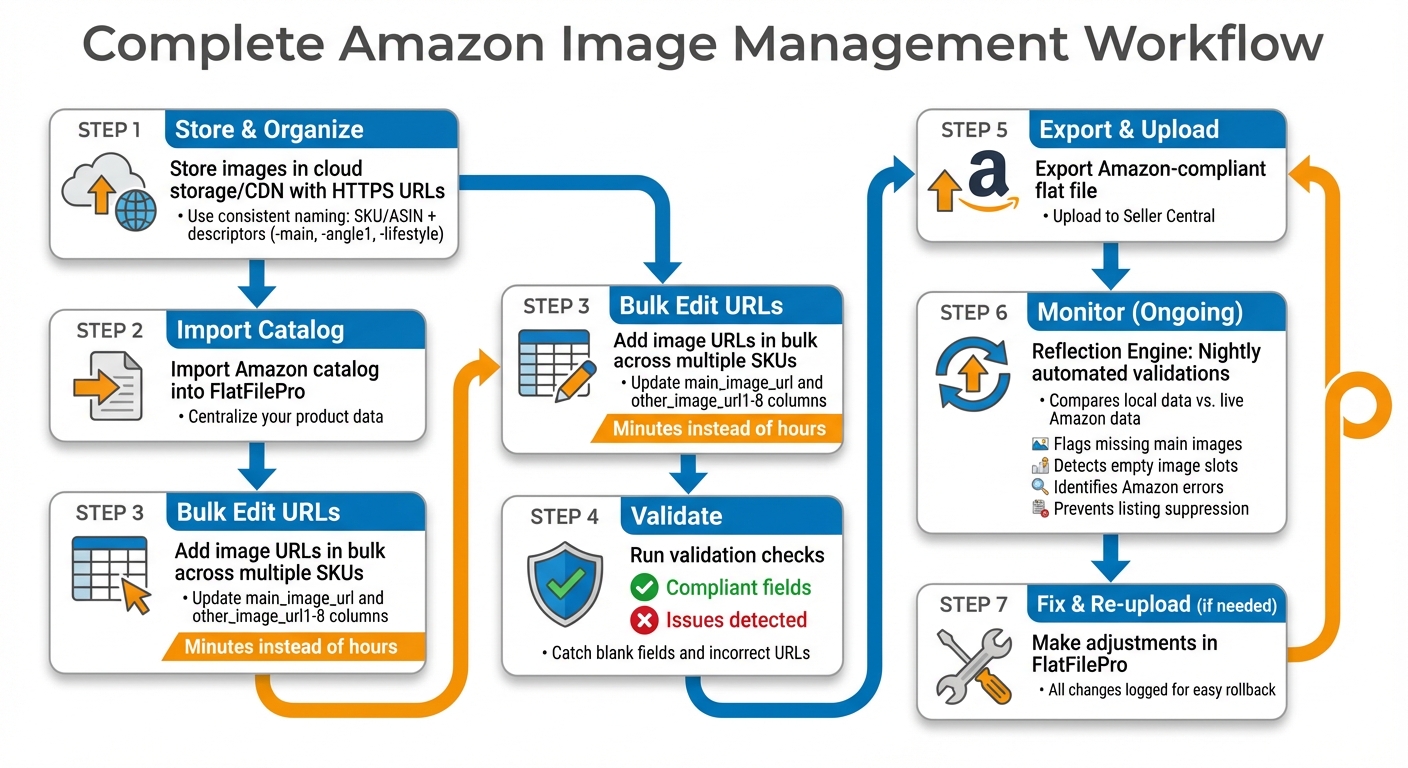
Complete Amazon Image Management Workflow with FlatFilePro
FlatFilePro takes automated URL generation to the next level by integrating seamlessly with external image hosting and URL workflows. Once you’ve created HTTPS URLs using your preferred hosting solution, FlatFilePro acts as your central hub for organizing, validating, and efficiently pushing those URLs to Amazon at scale.
How FlatFilePro Simplifies Image Management
Managing image URLs can be a headache, but FlatFilePro makes it manageable with bulk editing tools and nightly validations powered by its Reflection Engine. Instead of tediously pasting URLs into Amazon’s Seller Central one listing at a time, you can import your entire catalog into FlatFilePro and quickly add image URLs in bulk. Just paste or import them into the correct flat-file columns – main_image_url and other_image_url1 through other_image_url8 – for hundreds or even thousands of SKUs in one go.
The Reflection Engine takes over from there, automatically checking your listings every night. It compares your local catalog data with the live data on Amazon, flagging any discrepancies. For example, it highlights missing main image URLs, empty additional image slots (which can leave your listings exposed to competitors), or errors flagged by Amazon in prior uploads. With clear visual cues like green checkmarks for compliant fields and red X’s for issues, you can quickly spot and resolve image-related problems. This proactive approach helps prevent suppressed listings and potential revenue losses, ensuring your catalog is always in top shape.
Complete Workflow Integration
To get started, store your product images in a dependable cloud storage or CDN that provides stable HTTPS URLs. Keep things organized with consistent file naming conventions, such as using SKU or ASIN identifiers paired with descriptors like -main, -angle1, or -lifestyle. Import your Amazon catalog into FlatFilePro, use its bulk editing tools to update or replace image URLs across multiple SKUs, and run validation checks to catch issues like blank fields or incorrect URLs. Export the corrected, Amazon-compliant flat file and upload it to Seller Central. If Amazon flags any errors, you can feed those back into FlatFilePro, make adjustments, and re-upload. The entire process takes minutes instead of hours, and every change is logged, so you can easily roll back if needed.
FlatFilePro eliminates the pain of manual, error-prone processes by turning them into streamlined, automated workflows. If you’re refreshing a large catalog – like testing lifestyle images against plain product shots – FlatFilePro’s bulk editing and validation features make it easy to swap out hundreds of image URLs and monitor the results through the Reflection Engine. This kind of efficiency is simply out of reach when working directly in Seller Central, one listing at a time.
Conclusion
Handling Amazon product images doesn’t have to feel like a tedious chore. Tools like image link generators tackle the common pitfalls of manual URL creation – no more typos, and bulk catalog updates become a breeze. Automating URL management can save you a lot of time and effort.
When it comes to driving sales, accurate image URLs are a game-changer. High-resolution images (at least 2,000 pixels) activate Amazon’s zoom feature, which builds customer confidence and encourages conversions. Plus, compliant images help you avoid listing suppressions that can hurt your visibility and sales. As Lisa J, Amazon Strategist at Seller Labs, explains:
"Your product images are your silent sales team. They’re the first thing shoppers notice and often the deciding factor in whether they click ‘Add to Cart’ or keep scrolling" [6].
FlatFilePro takes these benefits a step further by streamlining your workflow. With its automated bulk editing and nightly validations, you can easily manage image URLs across your entire catalog. The Reflection Engine flags issues – like missing main images or empty additional image slots – before they impact your listings. Green checkmarks signal compliant fields, while red X’s highlight problems, giving you clear visual feedback to keep everything in check.
FAQs
What’s the fastest way to generate Amazon-compliant HTTPS image URLs in bulk?
If you’re looking to quickly generate Amazon-compliant HTTPS image URLs in bulk, an automated tool like the FlatFilePro Amazon Image Link Generator can be a game-changer. This tool takes your hosted images and converts them into secure URLs that meet Amazon’s requirements. It’s designed to handle bulk processing, flag any formatting issues, and even integrates seamlessly with Amazon’s API. By using it, you can save time, minimize errors, and streamline the management of extensive product catalogs with ease.
How can I prevent “Search Suppressed” listings caused by image issues?
To keep your listings visible and avoid the dreaded "Search Suppressed" status on Amazon, it’s crucial to ensure your images meet their requirements. Here’s what you need to know:
- Background: Use a pure white background (RGB 255, 255, 255) for all main images.
- Size: Images should be at least 1,000 pixels on the longest side to allow for zoom functionality.
- No Overlays: Avoid adding promotional text, logos, or watermarks to your images.
For smooth management, tools like FlatFilePro can help you monitor and resolve image-related errors quickly. Additionally, hosting your images on reliable platforms and generating compliant URLs ensures your listings stay visible and aren’t suppressed due to broken or non-compliant images. A little attention to these details can go a long way in maintaining your product’s visibility.
What validations should I run before uploading image URLs via flat files?
Before you upload image URLs via flat files to Amazon, it’s crucial to make sure they align with Amazon’s guidelines. Here’s what to check:
- URL Requirements: The URLs must use HTTPS, be publicly accessible, and hosted on dependable servers. They should provide direct access to the image without redirects or additional steps.
- Image Specifications: Images should be in JPEG format, with a resolution of at least 1,000 pixels on the longest side. Additionally, the file size should not exceed 10MB.
- Testing Links: Always test the URLs in a browser to confirm they load properly. Broken links can lead to errors or even listing suppression, which could impact your product visibility.
Taking these steps ensures a smoother upload process and helps maintain your listings’ integrity.