
An Amazon Image URL Generator is a tool that simplifies creating Amazon-compliant image links for product listings. For sellers managing bulk catalogs, it automates the process of formatting and hosting product images, ensuring they meet Amazon‘s strict technical requirements. This saves time, prevents listing errors, and helps avoid issues like broken links or non-compliant images, which can lead to suppressed listings and lost sales.
Key benefits include:
- Time-Saving: Automates bulk image URL creation and updates, reducing hours of manual work.
- Error Prevention: Ensures compliance with Amazon’s image rules, avoiding penalties or suppressed listings.
- Sales Boost: High-quality, compliant images improve visibility and conversions.
FlatFilePro is a standout tool in this space, offering features like API integration, real-time monitoring, and bulk editing for seamless catalog updates. By automating image URL management, sellers can focus on scaling their business while maintaining professional, compliant listings.
Amazon’s Image Requirements for Product Listings
Amazon Product Image Requirements: Complete Technical Specifications Guide
Amazon has strict rules for product images to ensure a polished and consistent look across its marketplace. Meeting these standards is non-negotiable for sellers.
Amazon’s Image Guidelines Explained
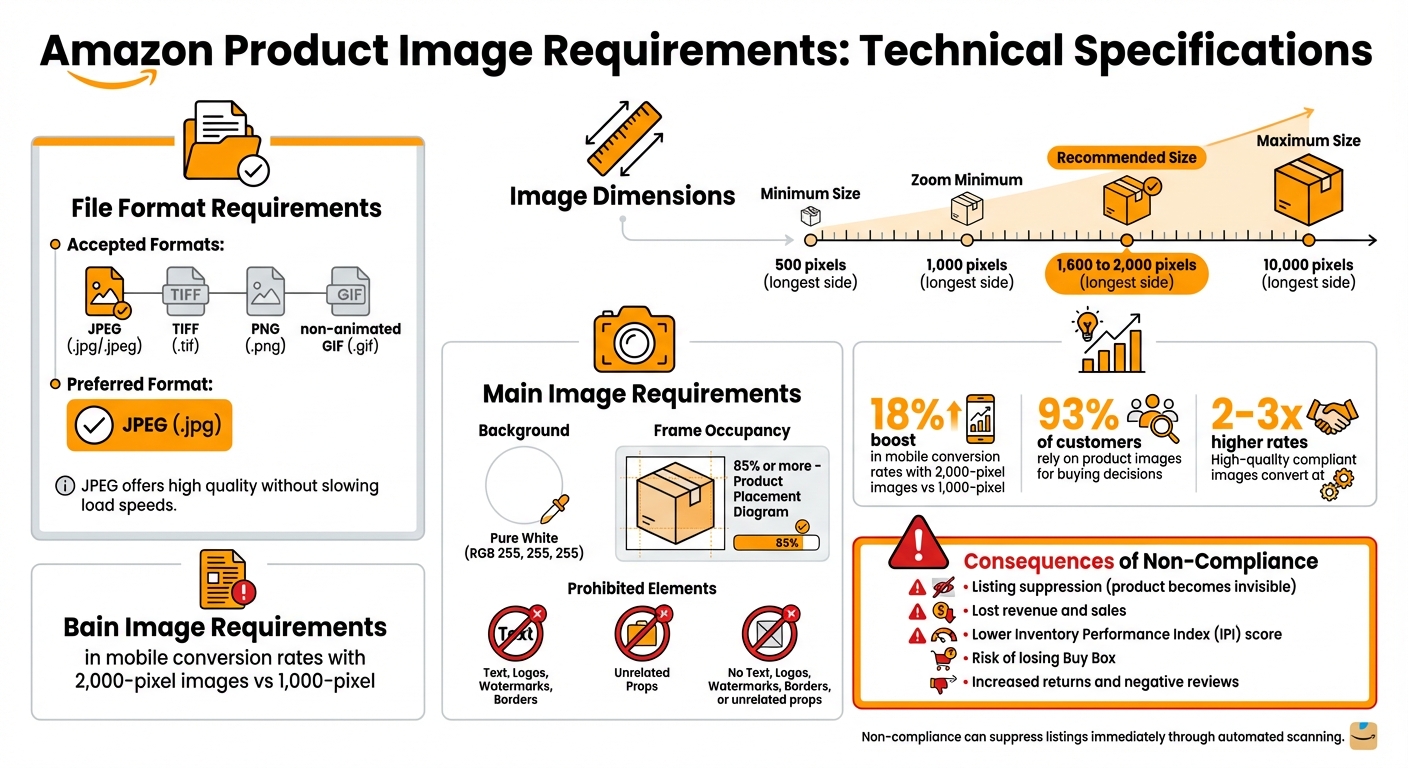
Amazon’s primary image requirements leave little room for interpretation. The background must be pure white (RGB 255, 255, 255) – not a shade close to white, but the exact RGB value. The product should occupy at least 85% of the image frame, without any added text, logos, watermarks, borders, or unrelated props.
Here’s a breakdown of Amazon’s technical image requirements:
| Requirement | Specification |
|---|---|
| Accepted Formats | JPEG (.jpg/.jpeg), TIFF (.tif), PNG (.png), non-animated GIF (.gif) |
| Minimum Size | 500 pixels (longest side) |
| Zoom Minimum | 1,000 pixels (longest side) |
| Recommended Size | 1,600 to 2,000 pixels (longest side) |
| Maximum Size | 10,000 pixels (longest side) |
| Main Image Background | Pure White (RGB 255, 255, 255) |
| Frame Occupancy | 85% or more |
These specifications are more than just guidelines – they’re tied to performance. For instance, listings with 2,000-pixel images see an 18% boost in mobile conversion rates compared to those using the minimum 1,000-pixel size [4]. File format also matters. While Amazon accepts TIFF, PNG, and non-animated GIFs, JPEG (.jpg) is the preferred choice because it offers high quality without slowing down loading speeds.
Certain categories come with additional rules. Take footwear, for example: the main image must display a single shoe, angled left at 45 degrees. For adult clothing, models must be standing, while children’s clothing should be laid flat. These specific requirements help maintain uniformity across Amazon’s vast product catalog [7].
Failing to follow these standards isn’t just a minor error – it can have serious consequences.
What Happens When You Don’t Meet Image Requirements
Ignoring Amazon’s image rules can lead to immediate and severe penalties. Automated systems scan for issues like non-white backgrounds or added text. If violations are detected, your listing is suppressed, making it invisible to shoppers [5]. The product remains in your Seller Central account but won’t generate any sales until corrected.
"Image compliance is a leading reason for suppression on Amazon, meaning even your best-selling product can be hidden from shoppers due to a single photo mistake." – Photoroom [7]
The impact of suppression goes beyond visibility. No sales mean lost revenue, and repeated violations can harm your account health. This may lower your Inventory Performance Index (IPI) score, attract formal warnings, and even result in losing the Buy Box – even if you’re the sole seller of that product [6].
Poor image quality can also hurt customer satisfaction. If buyers can’t clearly see what they’re purchasing, they’re more likely to return the item or leave negative reviews. On the flip side, listings with high-quality, compliant images convert at rates 2-3x higher than those with subpar visuals [5]. Since 93% of customers rely on product images to make buying decisions [8], following Amazon’s image standards isn’t just about compliance – it’s about optimizing your Amazon listings to maximize your sales potential.
Why Use an Image URL Generator
Managing images manually for a growing product catalog can quickly become a time-consuming headache. An image URL generator simplifies this process by automating the creation, updating, and compliance of image links. It’s a game-changer for handling large volumes of product images efficiently.
Managing Images in Bulk
Uploading images one at a time through Seller Central might work if you’re managing a few listings. But as your catalog expands, this approach becomes impractical. Image URL generators streamline the process by enabling bulk updates through flat file integration. This means you can update hundreds – or even thousands – of listings in one go. What used to take days can now be accomplished in a fraction of the time, making it an essential tool for scaling your operations.
Meeting Amazon’s Standards Automatically
Amazon has strict image requirements: specific file formats, precise pixel dimensions, pure white backgrounds, and properly hosted URLs. An image URL generator takes care of all these details for you. It ensures your images meet Amazon’s standards without the need for manual checks. These tools can also detect errors automatically and extract high-resolution URLs, which are vital for features like Amazon’s zoom functionality. By addressing compliance issues upfront, you safeguard your product rankings and avoid the risk of suppressed listings that can lead to lost sales.
Better Listing Visibility and More Sales
High-quality images do more than just meet Amazon’s technical requirements – they can directly boost your sales. For example, click-through rates for mobile Sponsored Brands ads can jump by 40% when lifestyle images are used instead of plain white-background photos [10]. Additionally, over 35% of Amazon sales come from site widgets like "frequently bought together" cards, which can be optimized with the right URL structures [9]. By consistently applying high-quality URLs, you not only enhance your listings but also drive engagement and conversions. This automation ensures a smoother workflow and supports advanced features like those offered by FlatFilePro.
How FlatFilePro Generates Amazon Image URLs

FlatFilePro integrates directly with your Amazon Seller Central account through API integration, making catalog updates faster and more accurate. It streamlines the entire process, from validating images to generating updated URLs.
With a one-click sync, the platform pulls all your listing data into its dashboard. From there, it automatically detects and resolves any image-related issues, updating your image URLs seamlessly. This API-powered system dramatically reduces processing time, enabling bulk inventory updates for over 500 listings in as little as 15 minutes. This efficient automation sets the foundation for the more comprehensive catalog update strategies covered later.
Jack Haldrup, the founder of Dr. Squatch, shared his experience using FlatFilePro back in 2026:
"This is the tool that powers our ops and analytics teams. We used to do everything manually, such a pain! Now we don’t have to think about anything and our listings update like magic!" [11]
FlatFilePro also offers role-based permissions, allowing you to control who can edit specific fields. For example, designers can be granted exclusive access to modify image content, while copywriters or finance team members are restricted from making changes. This targeted access improves both efficiency and team coordination.
Another standout feature is the Reflection Engine, which monitors your listings nightly to ensure your image updates remain intact and compliant. This is especially valuable given that "catalog rot" – where listing changes mysteriously vanish – affects 93% of Amazon sellers. By catching and addressing these issues in real time, FlatFilePro safeguards your investment in professional product images and prevents costly disruptions to your sales [11]. This ongoing monitoring ensures your listings maintain the quality and reliability essential for success on Amazon.
How to Use FlatFilePro’s Image URL Generator
Setting Up FlatFilePro
Getting started with FlatFilePro is simple and efficient, ensuring your listings meet Amazon’s standards. First, create and verify your FlatFilePro account – a process that takes just 5–10 minutes. Once logged in, head to "Integrations" or "Account Settings" to connect your Amazon Seller Central account. You can do this by entering your credentials or generating an API token through Amazon’s developer console, establishing a secure OAuth connection for inventory synchronization.
To use the Image URL Generator, you’ll need Professional or higher Amazon Seller Central access, as this level supports full inventory management APIs. Upload your product images to a compatible storage option, such as FlatFilePro’s cloud storage or an AWS S3 bucket. Then, import your SKU data using a CSV file or the direct sync feature. Make sure your CSV includes the necessary columns: ASIN, image_file_path, and main_image_url, so your images properly align with their respective ASINs.
Creating Image URLs in Bulk
From your FlatFilePro dashboard, navigate to "Bulk Operations > Image URL Generator." Upload a CSV template containing the required columns, ensuring your images meet Amazon’s guidelines. Once uploaded, map your columns correctly and click "Generate URLs." FlatFilePro processes up to 10,000 SKUs in batches, creating compliant https://m.media-amazon.com/ URLs. After reviewing the preview, you can either download the updated file or directly upload the URLs to Seller Central. This bulk operation drastically reduces the time spent on listing updates while improving product visuals, which can lead to better sales performance.
For example, a mid-sized electronics seller with 2,000 SKUs used FlatFilePro to bulk-generate URLs for seasonal product images. They uploaded 5,000 photos in one batch, cutting their manual upload time from 20 hours to just 45 minutes. Their listing completion rate shot up to 98%, and they saw a 15% increase in sales thanks to improved product images.
Once your URLs are generated, you can use FlatFilePro’s tools to monitor and update them as needed.
Tracking and Updating Image URLs
After generating your image URLs, FlatFilePro’s Image URL Tracker helps you monitor their status and make updates easily. Under the "Image URL Tracker" tab, you can see real-time statuses for each SKU, such as active, broken, or updated. The dashboard also includes filters by ASIN or date, along with metrics like load times and 404 errors. An activity feed logs all changes (e.g., "URL for ASIN B07NQ2MBSW updated on 02/03/2026"), making it easier to audit large catalogs.
To update or replace image URLs in bulk, switch to "Bulk Edit" mode under the Image URL Generator. You can upload a new CSV with updated image paths or manually select SKUs using the search function. Then, click "Replace URLs" to generate new compliant links. FlatFilePro also allows you to version your URLs, schedule weekly checks, and use auto-optimization to ensure compliance with Amazon’s 85% white background rule. Sellers who regularly update and maintain their image URLs have reported a 25% increase in sales, thanks to keeping their product visuals in top shape.
sbb-itb-ed4fa17
FlatFilePro Features for Image URL Management
Reflection Engine for Real-Time Monitoring
FlatFilePro’s Reflection Engine works nightly to keep your Amazon listings in check. It compares your intended listing data with what’s actually live on Amazon, using clear visual cues – green checkmarks for accurate data and red X’s for discrepancies. This helps identify where "catalog rot" might be hurting your inventory with an Amazon listing analysis tool, an issue that affects about 93% of sellers[11]. If an image URL stops working or unexpected changes pop up, you’ll get instant alerts. Plus, this monitoring pairs seamlessly with FlatFilePro’s bulk editing tools, making fixes quick and simple.
One-Click Bulk Editing
FlatFilePro’s one-click bulk editing takes the hassle out of managing image URLs. Instead of editing each listing manually, you can update URLs across multiple listings in seconds. This method is 17 times faster than traditional inventory file processes[12]. Ian Sells, Founder of Million Dollar Sellers, puts it best:
"With FlatFilePro, I’ve been able to streamline my Amazon listing process significantly. What used to take hours now takes just minutes. It’s a game-changer for my business."[11]
Thanks to its direct integration with Amazon’s SP-API, you’ll get real-time updates on your changes, ensuring your listings remain accurate and compliant.
Activity Log and Version Control
FlatFilePro goes beyond quick updates by keeping a detailed log of every change. Each modification to your image URLs is recorded with timestamps and user details, giving you full visibility over your catalog. Keith Mander, Founder of Yuca Brands and Bagels.io, shares his thoughts:
"Nifty bit of kit. Love that it saves all the changes my team makes across listings."[11]
If something goes wrong, the version control feature allows you to roll back to previous versions effortlessly. To add an extra layer of security, only authorized team members can make edits, and all data is backed up using AES 256-bit encryption and FIPS 140-2 validated cryptographic modules[12].
Common Image URL Mistakes and How FlatFilePro Fixes Them
Broken or Invalid URLs
Broken image URLs often happen when sellers manually input ASINs or copy-paste links without double-checking their accuracy. Even a tiny typo in an ASIN path can lead to a 404 error, leaving your product images missing. This doesn’t just look bad – it can reduce your search visibility by up to 35%, as Amazon favors complete listings over incomplete ones[1][3]. When Amazon’s system can’t locate an image, your listing displays a blank placeholder, which can severely hurt your conversion rates.
FlatFilePro solves this problem with real-time validation during bulk URL generation. It automatically verifies ASIN accuracy and checks link integrity against Amazon’s servers before anything gets uploaded. Plus, its Reflection Engine scans for 404 errors every night, flags invalid links in your bulk feeds, and regenerates proper canonical URLs automatically[1]. This ensures broken links are caught and fixed before they can affect your live listings.
Mistakes in image formatting can also cause major disruptions to your product listings.
Non-Compliant Image Formatting
Amazon has strict image requirements, and formatting errors are a frequent issue for sellers. Common mistakes include uploading PNG files when JPEG is required, using vertical 2:3 ratio images in square main image slots (causing distortion), or submitting low-resolution images under 1,000×1,000 pixels that appear pixelated on modern screens. Adding text overlays or watermarks that violate Amazon’s guidelines can also lead to automatic rejections during the upload process[3].
These errors have serious consequences. Over 35% of Amazon sales come from image-heavy features like "Frequently Bought Together", and non-compliant URLs can disrupt these bundles, costing you sales[1][3]. On top of that, seller forums report that 40-50% of bulk uploads fail compliance checks due to URL and formatting issues[1][3].
FlatFilePro eliminates these headaches by embedding Amazon’s image guidelines directly into its generator. The system automatically converts images to JPEG format, ensures resolutions exceed 1,000 pixels, adjusts aspect ratios to fit Amazon’s standards, and removes any elements that violate Seller Central rules[3]. With FlatFilePro, your images are always compliant – no manual effort required.
Adding Image URL Generation to Your Catalog Workflow
Simplify your Amazon catalog management by automating the process of generating image URLs. Instead of wasting time manually copying and pasting links into flat files, FlatFilePro takes care of it for you. It instantly generates Amazon-compliant URLs and updates the system, eliminating delays when managing hundreds – or even thousands – of SKUs. This automation paves the way for smoother and more efficient catalog updates.
By integrating image URL generation into your workflow, you can update product photos alongside pricing, keywords, and inventory. With FlatFilePro’s bulk editing feature, you can refresh all product images at once, ensuring brand consistency across your catalog. This is especially helpful during seasonal promotions or product launches, where aligning visuals with marketing copy needs to happen fast.
| Workflow Step | Manual Process | Integrated URL Generator Process |
|---|---|---|
| Image Hosting | Manual hosting | Automated, compliant hosting |
| URL Creation | Copy-pasting or guessing patterns | One-click bulk generation |
| Compliance Check | Manual review of Amazon guidelines | Automatic formatting to meet standards |
| Listing Updates | Individual ASIN editing | Bulk flat file integration |
| Error Handling | Fixing broken links reactively | Real-time monitoring and alerts |
These streamlined steps also improve error detection and resolution. Static URL patterns often lead to invalid images, but FlatFilePro’s Reflection Engine monitors your image URLs nightly. It catches broken links before they impact your live listings and alerts you immediately, ensuring issues are resolved quickly.
For sellers managing catalogs across multiple Amazon marketplaces – whether in the US, UK, Germany, or beyond – centralized URL management is key. With this system, compliant images can be pushed globally in a single step, meeting each region’s specific requirements without the need for manual reformatting. This scalability is a game-changer for high-volume sellers, setting them apart from those still relying on outdated, manual workflows. Automating image URL generation not only saves time but also positions your catalog for quick updates during peak sales seasons.
Conclusion
Managing Amazon product images manually can be a time-consuming hurdle, especially for sellers with extensive catalogs. Automating this process not only saves time but also ensures compliance, fixes broken links, and streamlines bulk updates – all of which can directly boost sales.
FlatFilePro simplifies catalog management by taking the guesswork out of image handling. It instantly generates Amazon-compliant image URLs and uses real-time monitoring to catch and address issues before they affect your sales. Plus, its one-click bulk editing makes updating your entire catalog for seasonal promotions or new product launches a breeze.
Here’s why automation matters: Amazon data shows that advertisers using image generation tools saw their campaign submissions increase by over 20% [2]. Additionally, compliant images improve visibility, click-through rates, and conversions – key factors when you consider that over 35% of Amazon sales come from widgets like "frequently bought together" [1]. These numbers highlight the impact of automated image management on your bottom line.
FlatFilePro offers a risk-free way to upgrade your catalog management. Start with a free 2-week trial – no credit card needed – and continue for just $99/month, covering unlimited ASINs and full platform features. With a 100% ROI guarantee, you can test the platform with your entire catalog and get a full refund if you don’t see measurable results in six months. If manual workflows, catalog errors, and lost sales are holding you back, it’s time to automate your image URL management and focus on growing your business.
FAQs
How can an Amazon Image URL Generator help boost my sales?
An Amazon Image URL Generator simplifies the process of managing product images, which play a huge role in attracting buyers and driving conversions. These tools ensure your images comply with Amazon’s strict requirements for resolution, format, and background. This reduces the chances of errors or listing issues that could impact your sales. Plus, high-quality, properly formatted images make your products look more appealing and reliable, encouraging potential customers to click and buy.
Another major perk? These generators make bulk image uploads a breeze. Instead of handling each image manually, you can automate the creation and management of compliant image URLs. This saves time and ensures your entire catalog maintains a polished, professional look. The result? A better shopping experience for your customers, improved product visibility, and – most importantly – higher sales.
What makes FlatFilePro a valuable tool for managing Amazon product images?
FlatFilePro makes managing product images on Amazon easier with features designed to meet sellers’ specific needs. One standout feature is its ability to generate Amazon-compliant image URLs quickly, which speeds up bulk updates. This is a game-changer for handling large catalogs, allowing you to process hundreds or even thousands of images at once. The result? Less time spent and fewer mistakes.
Another helpful feature is its built-in error detection, which flags issues like formatting errors or violations of Amazon’s image guidelines. Plus, it integrates directly with Amazon’s Seller Central using the SP-API, ensuring image URLs are synced effortlessly across different marketplaces. These tools work together to boost listing quality and simplify catalog management.
Why is it important to follow Amazon’s image requirements?
Sticking to Amazon’s image requirements isn’t just about following rules – it’s about making your product listings stand out. Amazon has specific technical standards, like a minimum image size of 1,000 x 1,000 pixels and accepted file formats such as JPEG, PNG, TIFF, or GIF. Meeting these ensures your images are zoomable and display in high resolution, giving shoppers a better view of your product. And let’s face it, better visuals mean more buyer interest.
Ignoring these standards can lead to serious problems. Think suppressed listings, lower search visibility, or even account suspension. Any of these can take a toll on your sales. But when you use high-quality, compliant images, you not only avoid these issues but also build trust with customers. Professional-looking images can make all the difference in converting browsers into buyers.
Need help managing this? Tools like FlatFilePro’s Amazon Image URL Generator make it easier to create shareable, properly formatted URLs that meet Amazon’s requirements. It’s a simple way to ensure your images check all the boxes.