
FlatFilePro‘s Image URL Generator simplifies managing product image URLs for Amazon sellers. It automates URL creation, ensures compliance with Amazon‘s strict image requirements, and saves hours of manual work. By reducing errors like broken links and mismatched images, it helps maintain listing health and boosts sales performance.
Key Features:
- Bulk Automation: Generate URLs for thousands of SKUs in one upload.
- Amazon-Ready Output: URLs are formatted to fit directly into Amazon flat files.
- Validation: Flags errors like non-HTTPS links or incorrect file types before export.
- Integration: Syncs with cloud storage, PIMs, or ERPs for seamless updates.
Benefits:
- Save up to 70% time on image updates.
- Reduce listing errors, improving performance and visibility.
- Enhance shopper trust with compliant, high-quality images.
For sellers managing large catalogs, this tool is a game-changer for streamlining workflows and maintaining Amazon listing best practices.
HOW TO CREATE IMAGE URL FOR AMAZON FLAT FILES! QUICK AND EASY

sbb-itb-ed4fa17
Amazon’s Image Requirements Explained
Before diving into how FlatFilePro’s Image URL Generator works, it’s important to understand Amazon’s image standards and how they can impact your product listings.
Core Amazon Image Guidelines
Amazon has strict rules for product images. For the main product image, the background must be pure white, the image should only show the product being sold, and it cannot include text overlays, watermarks, or lifestyle imagery [1]. Beyond the main image, sellers can upload up to 8 additional images (using fields like other_image_url1 through other_image_url8). These extra images can include lifestyle shots, infographics, close-ups, or size comparisons [1][2].
Image resolution is another critical factor. To enable Amazon’s zoom feature – a key tool for increasing customer engagement – images must be at least 1,000 pixels on the longest side [1]. High-quality images not only meet these technical requirements but also play a significant role in boosting conversion rates [1].
Technical Standards for Image URLs
When using Amazon’s flat file templates, you’re not uploading image files directly. Instead, you provide URLs that link to the image files. These URLs must meet specific criteria:
- The link must be publicly accessible and stable.
- It must point directly to the image file, such as
https://yourdomain.com/products/widget-blue.jpg. - The URL must use the secure HTTPS protocol and end with a valid file extension, such as
.jpgor.png[2].
Amazon will reject URLs that redirect, require authentication, or point to a webpage instead of the image file itself. Also, the main_image_url field is mandatory for new listings. If this field is left empty or contains an invalid URL, the entire listing submission will fail [2].
Failing to meet these technical requirements can seriously hurt your listing’s performance, making compliance essential.
What Happens When Images Don’t Comply
Non-compliance with Amazon’s image rules can lead to "quiet" suppression. This means your product remains in your inventory but is removed from search results [1]. It can also cost you the Buy Box or even deactivate your offer entirely [1]. Additionally, Amazon’s A9 algorithm deprioritizes listings with image issues, making them less visible to customers [1].
To avoid these problems, regularly check the "Suppressed" filter in the Manage Inventory section of Seller Central. If your listing is flagged, replacing a non-compliant main image is often the quickest fix. The Listing Quality Dashboard is another helpful tool for identifying and fixing common Amazon product listing errors like missing or low-quality images, ensuring your catalog stays in good shape [1].
| Compliance Issue | Likely Outcome |
|---|---|
| Non-white background on main image | Listing suppressed from search results |
| Image below 1,000px on longest side | Zoom feature disabled; lower buyer trust |
| Broken or inaccessible image URL | Image fails to display on product page |
| Redirect URL instead of direct file link | Amazon cannot process the image |
Empty main_image_url field |
Entire flat file submission fails |
How FlatFilePro‘s Image URL Generator Works

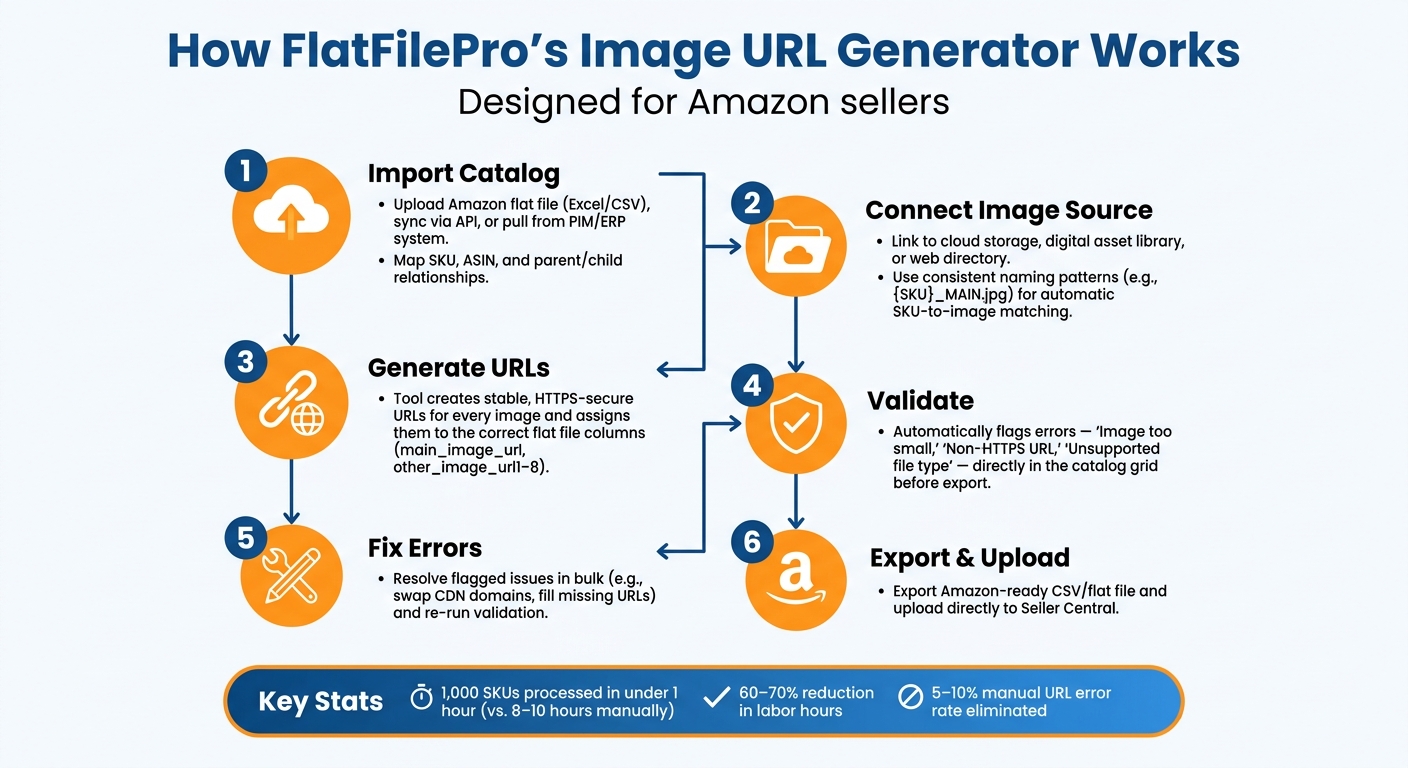
How FlatFilePro’s Image URL Generator Works: Step-by-Step Workflow
Now that you’re familiar with Amazon’s requirements, let’s dive into how FlatFilePro’s Image URL Generator aligns with those standards.
Step-by-Step Workflow
The process kicks off by importing your product catalog into FlatFilePro. You have a few options here: upload an Amazon flat file (Excel or CSV), sync your existing Amazon catalog through an API, or pull data from a PIM or ERP system. Once your products are in the system, you map essential fields – like SKU, ASIN, and parent/child relationships – so the tool knows exactly how to match products with their respective images.
Next, you connect the Image URL Generator to your image source. This could be a cloud storage folder, a digital asset library, or a web directory. By sticking to consistent file naming patterns (e.g., {SKU}_MAIN.jpg), the tool ensures each image is correctly matched to its SKU. It then creates stable, HTTPS-secure URLs for every image and assigns them to the proper columns in the flat file. This structured process ensures smooth integration into your Amazon listings.
Before you export, the tool performs a pre-export validation. It checks every URL against Amazon’s technical requirements and flags any issues – like "Image too small", "Non-HTTPS URL", or "Unsupported file type" – directly in the catalog grid. You can fix these errors and re-run the validation before finalizing the export.
Key Functions of the Tool
FlatFilePro’s Image URL Generator goes beyond basic URL creation with features designed to simplify catalog management for large U.S. sellers:
- Bulk Editing: Make changes across thousands of rows in one go. Whether you’re replacing an old CDN domain, filling in missing URLs for a color variation family, or swapping staging URLs for production ones, you can do it all without manually editing each cell.
- Reflection Engine Integration: This feature keeps your catalog updated automatically. If you rename a SKU, switch image hosts, or add new child variants, the Reflection Engine detects these changes and updates the affected URLs based on your predefined rules.
- Variations Manager Integration: Managing parent-child image logic becomes effortless. Parents are assigned a representative main image for the product family, while children get variant-specific images based on attributes like color or pattern (e.g.,
{SKU}_{COLOR}.jpg). This ensures every image type – main, swatch, or additional – lands in the correct flat file column, avoiding mismatches.
These capabilities streamline catalog workflows and reduce the potential for errors.
Benefits for Amazon Sellers
The most obvious advantage is the time saved. For example, a catalog manager handling 1,000 SKUs manually might spend 8–10 hours updating image URLs. With FlatFilePro’s rule-based generation and bulk editing, that same task can often be completed in under an hour.
Error rates also decrease significantly. Manual flat file work often results in 5–10% URL errors (broken links, missing file extensions, or misaligned columns), which can lead to image rejections or listing suppressions on Amazon. FlatFilePro’s built-in validation catches these issues before the file is exported, saving sellers from dealing with repeated upload attempts and Amazon notifications about corrections.
For sellers managing large catalogs, the time saved adds up quickly. Over a year, with multiple product launches and catalog updates, these efficiencies free up hours that can be spent on higher-priority tasks like improving listing content, running ad campaigns, or introducing new products. By automating these tedious steps, FlatFilePro helps sellers maintain high-quality, compliant Amazon listings while focusing on growth.
Adding the Tool to Your Amazon Workflow
Using the Tool When Launching New Products
Run the Image URL Generator right after your images are approved but before you start building your flat file. Once your final image files are stored in your connected folder or cloud directory, use the generator to create HTTPS URLs for each SKU in your launch batch. These URLs can then be exported directly into the necessary columns of your Amazon category flat file, such as main_image_url and other_image_url1 through other_image_url8. Afterward, upload the updated file to Seller Central.
For instance, if you’re launching a variety of product types with multiple variants, the tool can generate main and lifestyle image URLs for all child SKUs at once. This process can cut down listing preparation time from several hours to under 30 minutes. Prioritizing new listings ensures you avoid image-related issues that could delay indexing or suppress early sales.
The same approach applies when updating established products during catalog refreshes or rebranding efforts.
Updating Images for Catalog Refreshes and Rebranding
Rebranding or refreshing your catalog often requires updating image URLs across numerous ASINs, a task that can be both time-consuming and error-prone if done manually. Start by exporting a list of all affected SKUs and organizing the corresponding image files by SKU and role in a consistent folder structure. Then, use the Image URL Generator in update mode to create replacement URLs while maintaining your naming conventions.
Rather than uploading a full listing overwrite, generate a partial inventory update file containing only the SKU/ASIN and updated image URL columns. Test the changes with a small batch of 20–50 ASINs first to confirm Amazon accepts the new images and everything aligns correctly. Once you’ve verified the updates, proceed with the full upload. Afterward, monitor for suppressed listings and track impressions and conversions over the next 2–4 weeks to ensure the refresh achieves the desired results.
Routine Maintenance and Monitoring
Image URLs need regular monitoring to avoid issues like broken links, expired assets, or accidental overwrites, which can disrupt your listings without immediate warning. For large catalogs (1,000+ SKUs), schedule weekly scans, and for smaller catalogs, aim for monthly scans using FlatFilePro’s automated monitoring. This system identifies broken links, non-HTTPS URLs, and images that no longer meet Amazon’s resolution requirements, ensuring your catalog stays compliant.
After any bulk update or rebranding effort, validate the affected SKUs. Exception reports make it easier to pinpoint errors, allowing your team to focus only on the SKUs that need adjustments. By staying proactive, you’ll keep your catalog in top shape and avoid unnecessary disruptions.
Measuring the Results of Using FlatFilePro’s Image URL Generator
Time Saved on URL Management
One way to measure the effectiveness of FlatFilePro’s Image URL Generator is by looking at the time saved on managing URLs. Before using this tool, sellers handling large catalogs often spent days refreshing their listings – manually uploading images and fixing spreadsheets. FlatFilePro simplifies this process with automated bulk processing and ready-to-upload CSV exports, cutting that time down to just one day for a batch of 2,000 SKUs. This translates to a 60–70% reduction in labor hours[3].
To see how much time you could save, try tracking the time spent on a smaller sample, such as 200 SKUs, with your current process. Break it down step by step: gathering images, mapping them to SKUs, generating URLs, and exporting the final file. Then compare it to the time spent using FlatFilePro. Multiply the time saved by your team’s hourly rate to calculate labor cost savings. Plus, this streamlined process reduces operational errors, saving even more time in the long run.
Fewer Errors and Better Listing Health
FlatFilePro also helps minimize errors that can harm the health of your listings. Common issues like broken links, non-HTTPS protocols, malformed URLs, and mismatched SKUs are drastically reduced. These errors can trigger image-related error codes in Amazon’s flat file reports or even cause listings to be suppressed.
To measure improvement, start by recording metrics before your first upload. Track the number of image-related error codes and the count of SKUs with suppressed or inactive status due to image issues. After several upload cycles with FlatFilePro, compare these metrics. Look for a higher first-pass success rate, where more listings go live on the first attempt, and fewer suppressed ASINs. Fewer errors not only improve listing health but also create a solid foundation for stronger sales performance.
Impact on Sales and Conversion Rates
Better efficiency and fewer errors can have a direct impact on sales. Compliant and polished images boost shopper confidence. When main images and additional views are consistent and high-quality, click-through rates (CTR) from search results often improve because the products appear more professional and reliable. Accurate and complete image sets can also lead to higher conversion rates once shoppers land on the product detail page.
To evaluate this, select a group of ASINs where image URLs were updated using FlatFilePro. Over a 30–60 day period, monitor performance metrics like sessions, CTR, and unit session percentage. Compare these results to a control group of ASINs that didn’t receive updates. If you notice an increase in units sold, multiply that number by the average selling price to estimate the financial gain for your catalog. This data can provide a clear view of how improved image management contributes to your bottom line.
Conclusion
Key Takeaways
FlatFilePro’s Image URL Generator simplifies the process of managing Amazon image URLs by automating bulk tasks and ensuring compliance with Amazon’s image standards. It handles the creation of bulk URLs, ensures HTTPS links and proper file types, and guarantees stable hosting. This not only speeds up catalog updates but also helps small teams save hours on repetitive work while providing a scalable solution for larger catalogs. The result? Cleaner image URLs lead to fewer suppressed listings, improved listing health scores, and more polished product pages that shoppers trust.
Get Started with FlatFilePro
Integrating this tool into your workflow is straightforward. A great way to see its impact is by testing it on a small batch of products. U.S. sellers can sign up for a free trial of FlatFilePro, use the Image URL Generator on 50–100 SKUs, and then compare the results to their current process – tracking upload errors, time spent, and overall listing health.
No advanced technical skills are needed. If you’re familiar with flat files, ASINs, and SKU-level image assignments, this tool fits seamlessly into your existing workflow. You don’t have to overhaul your entire catalog right away. Start small – perhaps with your next product launch or a seasonal update.
Reduce image errors and speed up your catalog updates – try FlatFilePro for free today.
FAQs
What file naming pattern should I use to match images to SKUs?
To correctly associate images with products, include your product identifier (like ASIN, ISBN, EAN, JAN, or SKU) along with a variant code in the file name. Avoid using spaces, dashes, or special characters, as these can interfere with Amazon’s display system. Here are some examples of proper file naming:
B098FKXT8L.MAIN.jpgB098FKXT8L.PT01.jpgSKU12345-02-lifestyle.jpg
Maintaining a consistent naming structure helps ensure images are accurately linked to their respective product listings.
Can I update only image URL columns without overwriting my whole listing?
Yes, you can! If you need to update only the image URLs in your Amazon listings, you don’t have to worry about altering the rest of your data. Here’s how:
- Use the Partial Update option in the Update Delete column when uploading a flat file to Amazon. This ensures only the image data gets updated, leaving the rest of your listing untouched.
- Alternatively, platforms like FlatFilePro allow you to push updates through the API. This method specifically targets image fields while preserving all other catalog details.
Both options are efficient and help you avoid unnecessary changes to your listings.
How do I prevent broken image links after a rebrand or host change?
To prevent broken image links during a rebrand or when changing hosts, try using FlatFilePro to re-upload your images. This tool guarantees permanent URLs that comply with Amazon’s standards. Additionally, the Reflection Engine keeps an eye on your catalog, detecting any unexpected URL changes and providing real-time alerts. If something goes wrong, the one-click rollback feature can instantly restore your verified image states. Plus, API-based integration ensures a secure and reliable connection, removing the risks associated with manual hosting errors.