
Amazon sellers, this tool is for you. FlatFilePro’s free Image Link Generator simplifies creating Amazon-compliant image URLs, saving time and reducing errors. Here’s what it offers:
- Bulk Image Link Generation: Process and verify hundreds or thousands of image URLs instantly.
- Automated Compliance Checks: Ensures URLs meet Amazon’s strict image requirements.
- Easy Integration: Syncs with Amazon Seller Central and FlatFilePro’s dashboard for seamless catalog updates.
- Free Access: No sign-up or payment needed to get started.
Organize your images, upload them in bulk, and export ready-to-use URLs in minutes. This tool is perfect for sellers managing large inventories or preparing for big sales events. Test it today and streamline your catalog management.
HOW TO CREATE IMAGE URL FOR AMAZON FLAT FILES! QUICK AND EASY

sbb-itb-ed4fa17
How to Use FlatFilePro‘s Image Link Generator

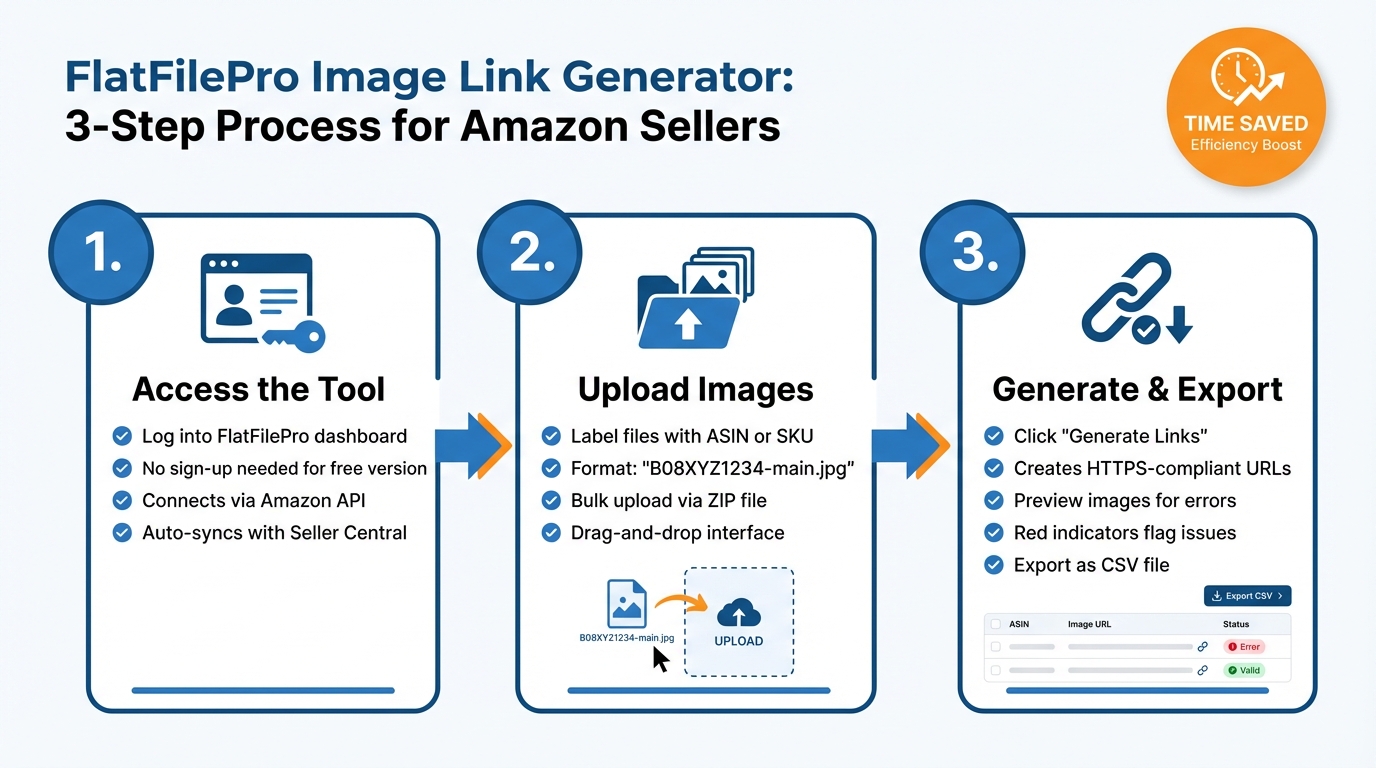
How to Use FlatFilePro Image Link Generator in 3 Steps
Step 1: Access the Image Link Generator
Start by logging into your FlatFilePro account through the main dashboard. If you’re using the free version, you don’t even need to sign up – no payment details are required to access the Image Link Generator. Once inside, locate the Image Link Generator in the left-hand menu. This tool connects directly to your Amazon Seller Central account using Amazon’s API, syncing your catalog data automatically. This ensures each generated link is correctly tied to its respective ASIN or SKU, making it easier to manage product images and updates.
After setting up access, you’re ready to organize and upload your images.
Step 2: Prepare and Upload Images
Before uploading, make sure your image files are labeled clearly with their corresponding ASIN or SKU. Use a naming format like "B08XYZ1234-main.jpg" or "SKU12345-alt1.jpg" to help the tool match each image to the correct product. For larger catalogs, you can save time by bundling your labeled images into a ZIP file and uploading them in bulk using the drag-and-drop interface. FlatFilePro processes these bulk uploads automatically, which is particularly helpful for sellers managing extensive inventories.
After your images are uploaded, you can move on to generating and verifying the image links.
Step 3: Generate and Verify Image Links
Once your images are uploaded, click Generate Links to create HTTPS-compliant URLs for each one. The tool formats these URLs to meet Amazon’s latest technical specifications and provides a preview of each image alongside its URL. Use this preview to check for errors, such as mismatched images or resolution problems. FlatFilePro highlights any non-compliant images with red indicators, making it easy to identify and fix issues. Once everything checks out, export the image links as a CSV file. This file is ready to upload directly to Amazon Seller Central. Plus, it integrates seamlessly with FlatFilePro’s bulk editing features, allowing you to update your entire catalog quickly while keeping your workflow smooth and efficient.
Main Features of FlatFilePro’s Image Link Generator
Automated Compliance with Amazon’s Image Requirements
FlatFilePro’s Image Link Generator uses its Reflection Engine to automatically check your image uploads against Amazon’s latest requirements. If there’s an issue, it flags non-compliant attributes with clear indicators, allowing you to fix them with just one click. This feature cuts troubleshooting time from hours to mere seconds.
Bulk Processing for Large Catalogs
On top of automated compliance, FlatFilePro simplifies bulk processing for large inventories. Whether you’re managing thousands of product images or preparing for a big sales event, the Image Link Generator can handle massive uploads effortlessly. Jordi Ordonez, an Amazon Listing Optimization Expert, highlighted its efficiency:
"tasks that previously took hours now take minutes" [1].
This bulk processing capability is especially handy for seasonal promotions or launching new product lines.
Integration with FlatFilePro’s Bulk Editing Tools
Once your image links are ready, they integrate seamlessly with FlatFilePro’s bulk editing grid. This connection to Amazon’s API ensures instant updates without the delays or errors that often come with manual uploads. You can update images alongside other product details – like titles, bullet points, and pricing – all in one place. Features like version control, rollback options, and role-based access make collaborative catalog management smoother and more reliable, all from a single dashboard.
Best Practices for Managing Amazon Product Images
Organizing Images for Bulk Management
A solid file structure can save you loads of time when handling bulk uploads. Name each file using your ASIN or SKU – for example, B08XYZ1234-01-main.jpg or SKU-12345-02-lifestyle.jpg. This naming method ensures you can quickly identify and retrieve files when updating specific listings [2][3].
To keep things tidy, create folders based on product categories, seasonal collections, or photo shoots. For variations like color or size, use subfolders to organize parent-child relationships. Tools like Adobe Bridge make it easy to batch rename files, cutting down on manual work [2]. If you’re managing a large inventory, consider using digital asset management tools to apply metadata tags and color labels. This makes finding the exact image you need much faster.
A well-organized system is the backbone of successfully meeting Amazon’s strict image standards.
Meeting Amazon’s Image Guidelines
Once your images are organized, the next step is ensuring they meet Amazon’s guidelines. The rules for main images are clear but strict. For starters, the background must be pure white (RGB 255, 255, 255) – even slightly off-white (like RGB 250, 250, 250) can lead to suppression [4]. The product itself should fill at least 85% of the frame, and the image must not include text, logos, or watermarks [4].
| Specification | Requirement |
|---|---|
| Minimum size | 1,000 x 1,000 px (for zoom functionality) |
| Recommended size | 2,000 x 2,000 px |
| Maximum size | 10,000 x 10,000 px |
| Accepted formats | JPEG (.jpg), PNG, TIFF, GIF (non-animated) |
| Color profile | sRGB (RGB mode) |
Stick to square images to avoid Amazon adding white padding, which can make products appear smaller in search results. Save your files at JPEG quality 85 – this keeps the images sharp for zoom functionality while keeping the file size under 1MB [4]. Double-check everything before uploading, as certain fields become difficult to change once your listings are live [3].
Using Tools for Ongoing Monitoring
Managing image quality doesn’t stop after uploading. Amazon has been known to revert images or make updates automatically. Tools like FlatFilePro’s Reflection Engine can help by running nightly checks to compare live listings with your backend data. Any non-compliant images are flagged with red X’s for easy fixes [5][1].
Daily inventory audits in the "Manage Inventory" section are another great way to catch suppressed listings caused by image errors [6]. Features like version control and rollback options allow you to restore previous images if something goes wrong [5][1]. By monitoring your listings consistently, you can avoid "catalog rot" – the gradual buildup of small errors that can chip away at your revenue [7].
Conclusion
Main Benefits Summary
The free Image Link Generator simplifies the process of creating Amazon-compliant image URLs in bulk. There’s no need to sign up, and you can skip the hassle of uploading files one by one or dealing with formatting mistakes.
It also works seamlessly with Amazon bulk editing tools, allowing you to manage product photos, fix compliance issues, and oversee your entire catalog all from one dashboard. No more juggling multiple tools – everything you need is in one place.
With these advantages, you’ll be better equipped to manage your catalog efficiently and with confidence.
Next Steps for Sellers
Take advantage of these time-saving features by starting small. Test the free Image Link Generator with a handful of products to see how quickly it generates compliant URLs. Once you’re comfortable, scale up to include your entire catalog.
Next, consider using FlatFilePro’s Reflection Engine. This tool performs nightly checks on your listings, comparing your uploaded content with what’s live on Amazon. It helps you catch any unauthorized changes early, ensuring your catalog stays accurate and your visual content remains secure.
FAQs
What Amazon image issues can this tool catch before I upload?
This tool spots problems such as unsupported image formats, sizes smaller than Amazon’s 1,000-pixel minimum, broken or inaccessible URLs, and images that don’t align with Amazon’s background or resolution guidelines. Identifying these issues early helps ensure your images comply with Amazon’s standards and avoids upload errors.
How should I name my files so links match the right ASIN or SKU?
To keep image links aligned with the correct ASIN or SKU, make sure file names clearly connect to the relevant SKU or ASIN. For instance, use names like SKU12345-main.jpg or ASINB00123456-01.jpg. This consistent naming approach simplifies bulk uploads by making URL generation or mapping more straightforward, ensuring products are matched correctly during catalog management.
Can I generate links for thousands of images in one upload?
FlatFilePro’s Amazon Image Link Generator is designed to handle large-scale image processing with ease. You can upload thousands of images at once, and the tool will generate Amazon-compliant image URLs in just seconds. This feature is perfect for sellers managing extensive product catalogs, as it simplifies bulk updates and significantly reduces the time spent on inventory management.