
Bad Amazon listing management software can quietly drain your business. It leads to revenue loss, operational inefficiencies, and reputational damage. Sellers often overlook these hidden costs, focusing only on subscription fees. Here’s what you need to know:
- Revenue Loss: Suppressed listings, data errors, and inflated FBA fees can cost you up to 30% of your potential income. Listings with errors may lose up to 40% of their traffic.
- Operational Issues: Manual workflows, broken variations, and catalog inconsistencies waste time. Sellers managing 200 SKUs can spend 624 hours annually just fixing errors.
- Reputation Risks: Outdated or inaccurate product details hurt customer trust. Inconsistent branding across marketplaces and missed alerts about listing changes further damage credibility.
Key takeaway: Investing in top-rated listing software with automated monitoring, bulk editing, and change tracking can save time, protect revenue, and maintain brand integrity.
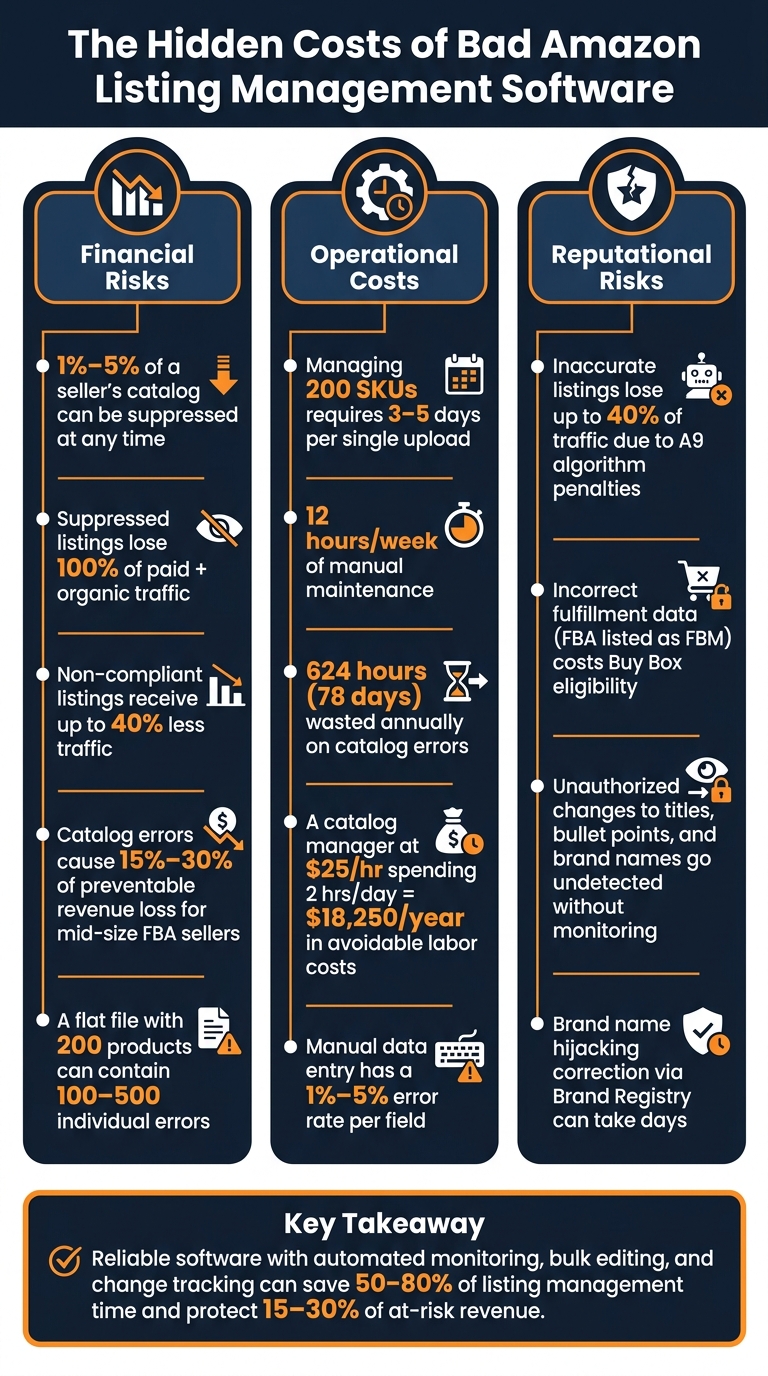
Hidden Costs of Bad Amazon Listing Software: Key Stats
Amazon Listing Hijack Exposes Brand Control Weakness
sbb-itb-ed4fa17
Financial Risks: Revenue Losses from Poor Tools
Inefficient software does more than just disrupt your listings – it can significantly impact your bottom line.
Suppressed Listings and Lost Sales
When a SKU gets suppressed, it essentially disappears from view, causing days or even weeks of lost sales [3][5]. During this time, your sales grind to a halt, leaving an opening for competitors to climb the search rankings.
"Few disruptions sting as sharply as a suppressed ASIN. One day, your top-selling ASIN is driving revenue… The next, it vanishes – shoppers can’t find it; conversions plummet." – Precision eControl [4]
This issue is more common than many realize. At any moment, 1% to 5% of a seller’s catalog could be suppressed [5]. Suppressed ASINs aren’t just removed from organic searches – they’re also disqualified from Sponsored Product ads, cutting off both paid and organic traffic [6]. Even listings that avoid full suppression can see traffic drop by as much as 40% due to algorithmic penalties for issues like non-compliant images or title violations [5]. For mid-size FBA sellers, catalog errors, including suppressed listings and broken variations, contribute to 15% to 30% of preventable revenue loss [6]. And that’s just the visibility side of the equation.
While suppressed listings are obvious revenue drains, data errors can quietly chip away at profitability.
How Data Errors Eat Into Margins
Data errors might not grab your attention immediately, but they can have a surprisingly large impact on your margins. For example, incorrect weight or dimensions in your product data can result in inflated FBA fees and higher shipping costs, quietly increasing your operating expenses [2].
There are also specific error types with direct financial consequences. Take variation mismatches (Error 8016), where a VariationTheme conflict between parent and child SKUs can completely break a listing’s structure. Or compliance errors (Error 5661), which occur when regulatory documents like Safety Data Sheets are missing, potentially halting sales for entire product lines [6]. In a flat file with 200 products and 50 columns, manual data entry can produce anywhere from 100 to 500 individual errors [1], each one representing a hit to your revenue.
On top of these technical issues, manual processes can pile on additional hidden costs.
Higher Labor Costs from Manual Workflows
Managing a catalog of just 200 products can require 3–5 days for a single upload and 12 hours of maintenance every week – adding up to 624 hours (78 days) annually [1]. When you consider current wage rates, this becomes a significant payroll expense, with no direct contribution to growth.
Every hour spent troubleshooting error codes or re-uploading files is time taken away from activities that actually drive growth, like sourcing new products, optimizing PPC campaigns, or exploring new markets. And for sellers relying on outdated tools, scaling the catalog only compounds the issue – manual workflows grow in direct proportion to the number of SKUs [1].
Operational Problems: Inefficiency and Catalog Disarray
Operational inefficiencies may not always show up as glaring issues, but they can quietly undermine the reliability of your catalog. Poor listing software is often at the heart of these problems, creating daily disruptions, fragmenting workflows, and ultimately damaging the integrity of your catalog.
Broken Variations and Orphaned Listings
Variation structures are fragile by nature, and bad software only makes things worse. If a tool fails to maintain consistency in the VariationTheme across parent and child SKUs, the entire family structure can fall apart. This leads to orphaned child listings – listings detached from their parent ASIN. When this happens, these listings lose the benefits of shared reviews, sales history, and search visibility, making the variation far less effective.
Errors like Error Code 8016 (VariationTheme mismatch) and Error Code 8542 (duplicate Product ID) are some of the most complex catalog issues sellers encounter [6]. Without automated tools to detect these errors, they often go unnoticed until sales take a hit.
Data Inconsistencies Across Large Catalogs
Managing consistent product data across hundreds – or even thousands – of SKUs is a monumental task. Poor tools make it nearly impossible. Something as small as a typo in the parent_sku field or inconsistent variation_theme values can destroy the catalog structure entirely [1]. Manual data entry, which has an error rate of 1% to 5% per field [1], only adds to the risk, as even minor updates can lead to cascading issues.
But the real challenge lies in undetected errors. For instance, a listing might appear "Active" in your inventory dashboard but still be suppressed in search results. This usually happens because the tool failed to update a mandatory attribute required by a new category schema [7]. As one expert explains:
"Suppression is rarely solved by random editing. It is solved by identifying which catalog layer is rejecting the listing data." – Soldscope [7]
Without dependable software to flag these issues, teams waste countless hours comparing inventory status with actual search visibility and Buy Box eligibility. These discrepancies don’t just slow down daily operations – they also undermine trust in the reliability of your listings.
No Version Control or Change Tracking
Amazon treats listings as shared catalog assets, meaning sellers don’t have full control over their content [8]. Listings can be altered by compliance bots, catalog merges, retail overrides, or even third-party contributions – all without any notification. If your software doesn’t track changes, you’re left in the dark about what was changed, when it happened, or who was responsible. This lack of visibility can lead to a phenomenon known as "Live Page Drift" – where the detail page customers see no longer matches your backend data. Without an activity log, troubleshooting becomes a frustrating process of trial-and-error [8].
As an industry saying goes:
"An alert without a root cause is just anxiety with a timestamp." – ave7LIFT.AI [8]
Tools like FlatFilePro tackle this problem head-on with features like an Activity Log, which records every change made to a listing, along with timestamps and the responsible party. Their Reflection Engine takes it a step further by automatically comparing your intended listing data to what’s live on Amazon every night. This level of visibility allows teams to fix problems in minutes instead of wasting days trying to pinpoint the issue.
These operational inefficiencies don’t just disrupt workflows – they set the stage for reputational harm and long-term challenges.
Reputational Damage: Customer Trust and Brand Integrity
Operational hiccups can disrupt internal workflows, but reputational damage hits where it hurts most – your relationship with customers. When listing management tools fail, the fallout is evident on your product pages, in customer reviews, and ultimately in your brand’s credibility. Below, we’ll explore how inaccuracies, inconsistent branding, and missing alerts can harm your reputation.
Inaccurate or Outdated Product Information
Reputational damage doesn’t just affect your bottom line – it also weakens the effectiveness of your product catalog. For many shoppers, your product listing is their first interaction with your brand. If they encounter misleading titles, poor-quality images, or error-filled bullet points, their confidence in your brand can plummet before they even consider making a purchase.
For example, non-compliant listings receive up to 40% less traffic because Amazon’s A9 algorithm demotes them [5]. Technical glitches, like character encoding errors that transform "Größe" into "GröÃe" [1], make listings appear unprofessional and reduce conversions. Incorrect fulfillment data adds another layer of risk: if a tool mistakenly lists FBA inventory as FBM, customers see inaccurate delivery estimates. This not only costs you the Buy Box but also invites negative reviews [9].
Inconsistent Branding Across Channels
Consistency is key to building trust, and fragmented branding can quickly erode it. Without centralized controls, your brand’s voice can become inconsistent across your listings. One product might be described as "premium", while another is labeled "budget-friendly." Titles may follow different naming conventions, and even your brand name might appear with varying capitalization. To U.S. shoppers, these inconsistencies can raise red flags – or worse, make them suspect the listing is fraudulent.
This issue becomes even more pronounced when selling across multiple marketplaces. If there’s no single source of truth for your product data, updates made for Amazon US might never reach Amazon UK or Canada. Teams often resort to managing separate spreadsheets, leading to discrepancies between markets and undermining the cohesive brand image you’ve worked hard to establish. As CaptenAMZ aptly explains:
"Your catalog is the engine of your Amazon business. When that engine misfires… you lose more than sales. You lose momentum, customer trust, and competitive position." – CaptenAMZ [6]
FlatFilePro tackles this challenge head-on with its international marketplace support. It allows sellers to manage listings across Amazon US, UK, Germany, and other regions from one dashboard, ensuring your brand remains consistent no matter where customers shop.
Missing Alerts for Competitor or Amazon Changes
Unnoticed changes to your product data can quietly erode customer trust. One of the biggest risks is an unmonitored alteration that undermines your credibility. Since Amazon treats listings as shared catalog assets, other parties – including Amazon itself, vendors, or even brand-registered competitors – can modify your product data. Titles, bullet points, and even brand names can be overwritten by higher-authority contributors, and without proper monitoring, these changes might go undetected [6].
Without real-time alerts, competitors could stealthily adjust your product titles, or Amazon’s automated systems might lock an attribute with incorrect data. You might not realize the issue until customers start complaining or sales take a sudden dip. Brand name hijacking, where an incorrect brand name appears on your listing, often requires navigating Amazon’s Brand Registry correction process – a time-consuming ordeal that can take days [6].
FlatFilePro’s Reflection Engine addresses this by running nightly comparisons between your intended product data and what’s live on Amazon, immediately flagging any discrepancies. Paired with its Activity Log, which timestamps every change, sellers can quickly identify unauthorized edits and take action before these issues cause lasting damage to customer trust.
Key Features That Reduce Hidden Costs
The financial, operational, and reputational risks discussed earlier all share a common thread: they’re largely avoidable with the right software features. These tools directly tackle and minimize hidden costs. Here’s what to focus on.
Automated Listing Monitoring and Error Detection
Keeping up with a live Amazon catalog manually is nearly impossible. Take this example: a U.S. seller earning $3,000/day from a top product is at risk the moment that listing gets suppressed. If suppression happens on a Friday evening and isn’t resolved until Monday, that’s about $9,000 lost over the weekend. An automated alert system that detects the issue within an hour can reduce the financial hit significantly.
Effective monitoring software performs daily scans on all active and inactive ASINs. It looks for issues like suppressed listings, missing main images, incorrect category assignments, pricing violations, and incomplete attributes. FlatFilePro’s Reflection Engine is an example – it compares your stored product data to what’s live on Amazon every night, catching discrepancies and notifying you immediately. This means you’ll know about changes before they start impacting your sales.
On top of monitoring, efficient bulk editing tools can make catalog management even smoother.
Bulk Editing and Variation Management
Managing hundreds or thousands of SKUs through one-at-a-time edits in Seller Central isn’t just slow – it’s risky. Bulk editing and automation can cut listing-management time by 50–80% for large catalogs. For instance, a catalog manager spending 2 hours a day on manual checks at $25/hour incurs about $18,250/year in labor costs – most of which can be avoided with automation.
With bulk editing, you can update titles, bullet points, prices, search terms, and attributes like weight or dimensions across thousands of SKUs in one go. Another critical feature is visual variation management. When child SKUs become disconnected from their parent ASINs, reviews scatter, conversion rates drop, and product pages become confusing. A drag-and-drop interface can help you quickly regroup SKUs without dealing with raw files. Fixing broken variation families can boost a product family’s sales by 20–30%, as reviews and traffic consolidate under one parent listing. FlatFilePro’s Variations Manager handles these updates with a 95% success rate.
Good bulk tools also come with safety measures: preview modes to review changes before they go live, validation checks to catch missing fields or incorrect prices, and rollback options to undo errors – like accidentally changing $29.99 to $2.99 across your entire catalog.
Activity Logs, Access Controls, and Multi-Marketplace Support
These features not only speed up troubleshooting but also ensure consistency across channels. When a listing loses traffic or receives negative reviews, the first question is: what changed? A detailed activity log provides the answer instantly. It shows who made each change, what was modified, and when, along with before-and-after values. For example, a timestamp like 05/15/2026 02:34 PM can pinpoint exactly when an issue began. FlatFilePro’s Activity Log offers this granular detail, saving hours of guesswork.
Role-based access controls add another layer of security. Not everyone on your team – or any external agencies – should have the same editing permissions. For instance, an Admin can approve bulk price changes and manage marketplace connections, while a Content Editor can update copy and images but not touch pricing or brand fields. This structure prevents the accidental or unauthorized changes that can damage listings.
For U.S. sellers expanding into other regions like Amazon.ca, Amazon.mx, or EU marketplaces, multi-marketplace support from one dashboard is essential. It ensures branding, pricing, and compliance stay consistent across regions – without juggling separate spreadsheets for each market.
Conclusion: Choosing the Right Tools for Long-Term Success
Recap of Hidden Costs and Risks
Software errors can quietly drain your business in multiple ways – financially, operationally, and reputationally. Financially, undetected issues like suppressed listings and data errors directly reduce revenue. Operationally, manual processes, orphaned listings, and missing change history force your team to focus on fixing issues instead of growing your catalog. Reputationally, inconsistent product content and missed alerts about changes on Amazon or competitor activity can erode customer trust in your brand.
What Amazon Sellers Should Do Next
Now that you understand how these challenges can harm your business, it’s time to act. Take a close look at your current workflow: Does your software help you catch errors early, enable safe bulk updates, and track every change? If not, those gaps are likely costing you both time and money.
For sellers managing 100 or more SKUs, tools that integrate automated monitoring, bulk editing, variation management, and activity logging can make a world of difference. For example, FlatFilePro offers nightly checks for listing issues, a Variations Manager with a 95% success rate, and role-based access controls – all designed to safeguard your catalog and revenue.
Choosing the right software isn’t just about convenience – it’s about protecting your revenue, maintaining brand consistency, and staying agile when problems arise. In today’s competitive market, having these tools isn’t optional – it’s a necessity for long-term success.
FAQs
How can I tell if an “active” listing is actually suppressed?
To find out if an active listing is suppressed, head to the Manage Inventory section in Seller Central and filter by Suppressed status. Alternatively, you can use the Search Suppressed and Inactive Listings link. The Listing Quality Dashboard is another helpful tool, as it points out missing attributes. For further confirmation, download the Inventory Health Report and check the listing status field.
What listing data mistakes most often increase FBA fees?
Some of the biggest culprits behind unnecessary FBA fees are inaccurate product dimensions, incorrect weights, and misclassified categories.
If your product’s dimensions or weight are listed incorrectly, Amazon might calculate fees using dimensional weight. This often pushes items into higher fee brackets, even if the product doesn’t belong there. For example, a small discrepancy in measurements could make a big difference in what you pay.
Misclassifying products is another costly mistake. Listing a bulky item as a standard-sized product might seem harmless, but it can trigger inflated fees when Amazon adjusts the classification later.
To avoid these pitfalls, make sure your listing data is always accurate and up-to-date. Double-check dimensions, weights, and categories regularly – these small steps can save you from paying more than you should.
What features should I require before switching listing software?
When moving to new listing software, it’s crucial to focus on tools that offer real-time error detection. This feature helps identify missing fields or compliance problems before they can disrupt your listings. Look for software that supports bulk editing via API, making large-scale updates faster and easier, and drag-and-drop variation management, which simplifies maintaining parent-child relationships. Another must-have is version control, allowing you to quickly revert to previous versions if needed. Finally, ensure the software includes automated nightly monitoring to notify you of suppressions or unauthorized changes as soon as they occur.