
Managing Amazon listings manually isn’t practical anymore – especially if you have a large catalog. The right software can save you time, improve your listings, and boost sales. Here are five must-have features for effective Amazon listing management:
- Bulk Editing & Variation Management: Update titles, prices, and descriptions across hundreds of SKUs in minutes. Group product variations (like sizes or colors) to consolidate reviews and streamline shopping.
- Automated Error Detection: Spot suppressed listings, pricing errors, or missing details automatically. Daily health checks and real-time alerts ensure your catalog stays error-free.
- SEO Optimization Support: Optimize listings with relevant keywords to rank higher in Amazon search results. Tools like reverse ASIN lookups help you stay competitive.
- Marketplace Synchronization: Keep listings consistent across multiple regions (e.g., U.S., UK, Germany) with automated updates and localized content adjustments.
- Performance Analytics: Track listing changes, monitor sales trends, and generate automated reports for smarter decision-making.
Quick Tip: Tools like FlatFilePro simplify these tasks, offering features like API integrations, real-time monitoring, and drag-and-drop interfaces. Starting at $99/month, they can handle catalogs of any size.
These features help sellers maintain accuracy, improve search visibility, and manage their Amazon catalogs efficiently. If you’re scaling your business or selling internationally, these tools are essential for staying competitive.
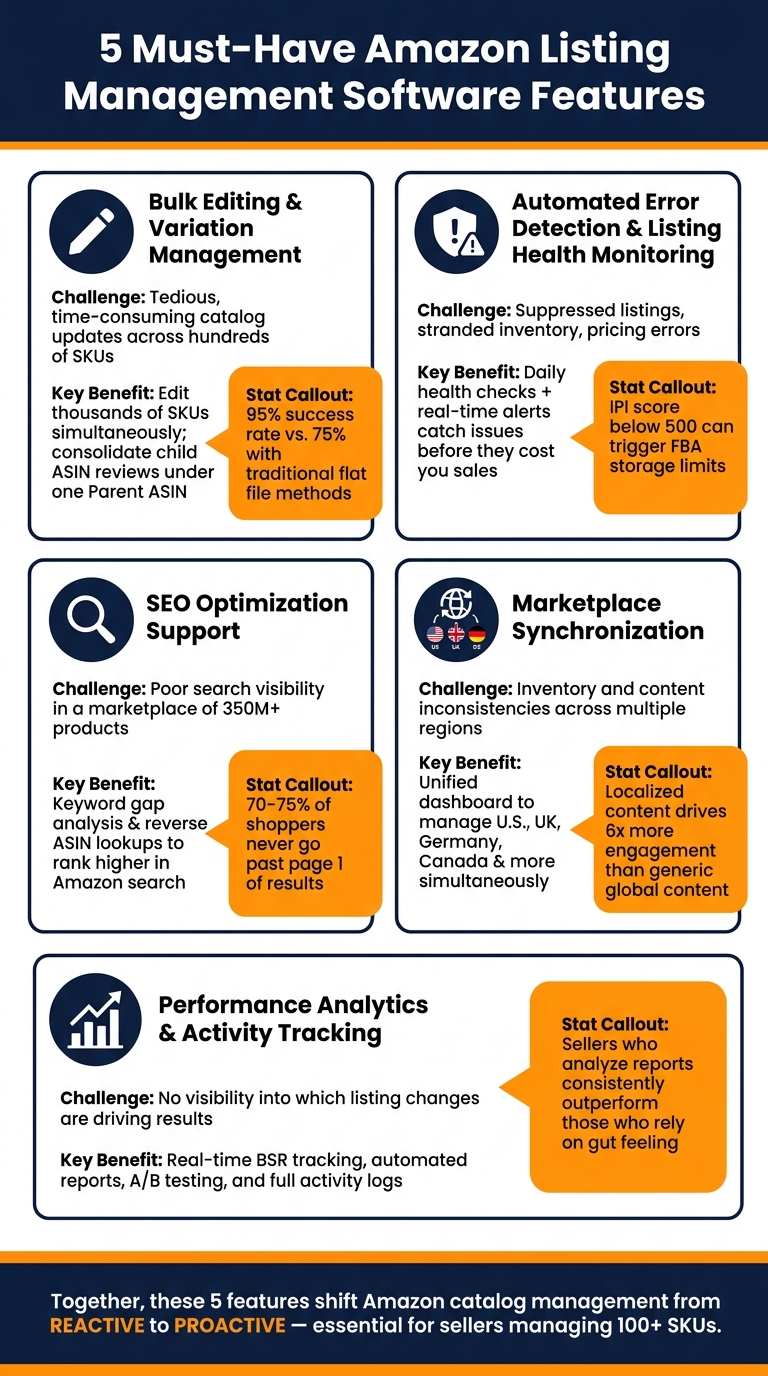
5 Must-Have Amazon Listing Management Software Features
Custom Amazon Listings & Analytics Platform | VASO Group x Deltologic
sbb-itb-ed4fa17
1. Bulk Editing and Variation Management
In the fast-paced Amazon marketplace, where both speed and accuracy are key to driving sales, bulk editing has become a game-changer.
Manually managing thousands of SKUs is simply impractical. Bulk editing tools allow sellers to update product titles, bullet points, descriptions, and prices all at once. For example, FlatFilePro integrates directly with Amazon’s API, transforming hours of manual work into just minutes.
Scaling Across Large Catalogs
Once your catalog grows beyond 100 SKUs, manual updates can become a major hurdle. Imagine needing to adjust pricing or update brand messaging across hundreds of listings – doing so one by one would be incredibly time-consuming. With bulk editing, you make the change once, and it instantly applies to all relevant listings. This is especially useful during seasonal promotions, compliance updates, or rebranding efforts. Not only does it save time, but it also sets the stage for managing product variations more effectively.
Saving Time with Automation
Variation management simplifies your catalog by grouping similar products (like different sizes, colors, or flavors) under a single Parent ASIN. This not only makes it easier for shoppers to browse but also boosts sales by consolidating reviews from all the child ASINs under the Parent ASIN.
"When you variate similar products, all of the individual reviews get combined under the new Parent ASIN, which bolsters the review counts as opposed to them being separated. For certain brands, that can mean the difference between hundreds of reviews and thousands." – Jessica Sunderland, Director of Amazon Accounts, MuteSix [2]
FlatFilePro’s drag-and-drop Variations Manager simplifies parent–child relationships without the need for spreadsheets. Updates can be completed in under 5 minutes with a 95% success rate, far outpacing the typical 75% success rate of traditional flat file methods. These tools are especially helpful for managing global catalogs efficiently.
Supporting U.S. and International Markets
Bulk editing becomes even more critical when selling across multiple marketplaces. Manually updating listings for each marketplace significantly increases your workload. A powerful listing management tool allows you to handle all storefronts from a single dashboard. You can easily copy optimized content between markets and ensure consistent pricing. This is crucial because price discrepancies across channels can hurt your organic ranking on Amazon [2].
2. Automated Error Detection and Listing Health Monitoring
Managing a large catalog on Amazon can be tricky. Even with bulk editing tools, issues like suppressed listings, missing images, or pricing errors can slip through the cracks. That’s where automated error detection steps in to save the day.
Catching Errors Across Large Catalogs
Amazon listings can run into trouble for many reasons. Suppressed listings, for instance, are hidden from search results when mandatory fields are missing or guidelines aren’t followed. Stranded inventory is another headache – products sitting in fulfillment centers without an active listing, racking up storage fees. Then there are duplicate ASINs that split reviews, incomplete details like short titles (under 80 characters), and pricing mistakes that can knock you out of the Buy Box competition [1][2].
If you’re managing hundreds or thousands of SKUs, finding these problems manually is nearly impossible. FlatFilePro’s automated error detection scans your entire catalog, categorizing issues into areas like Product Identity, Details, Shipping, and Safety. This way, you can zero in on the problems that need attention most urgently.
To keep things running smoothly, daily automated health checks are a must.
Automating Daily Health Checks
FlatFilePro’s Reflection Engine takes the hassle out of monitoring. Every night, it compares your listing data with what’s live on Amazon. Any discrepancies are flagged with simple visual markers – green checkmarks for correct data and red X’s for items that need fixing. This system eliminates guesswork, helping you focus on what matters.
Daily checks are crucial because Amazon’s A9 algorithm evaluates over 350 million products based on factors like sales velocity and availability [2]. If a listing drops from search results, it can lose momentum, affecting sales. Plus, maintaining an Inventory Performance Index (IPI) score above 500 is essential. Falling below this threshold can result in lower search rankings, reduced FBA storage, and even the loss of Prime status [2].
But daily checks aren’t enough on their own. Real-time alerts are the next layer of protection.
Real-Time Alerts and Issue Prevention
Real-time alerts act as your safety net, flagging problems before they spiral out of control. Waiting to fix issues after the fact can cost you sales, but proactive alerts tackle problems as they arise.
"The right type of automation can speed up tasks and simplify your day-to-day operations." – Amazon [1]
FlatFilePro sends instant alerts for suppressed listings, stranded inventory, or unauthorized changes. This real-time monitoring also protects against listing hijacking, where content is altered without permission. By keeping an eye on changes and ensuring all content slots are filled, you minimize vulnerabilities. And don’t underestimate the power of complete descriptions – following Amazon listing best practices like adding A+ content alone can boost sales by 3–10% on average [2].
3. SEO Optimization Support for Amazon Search
Once you’ve nailed operational efficiency, the next big step is optimizing your listings for Amazon’s search engine. Keeping your listings healthy with real-time alerts and error detection is just the beginning. To truly stand out, you need strong search visibility. And here’s the kicker: even the most polished listings won’t perform well without the right keywords. With about 70–75% of Amazon shoppers never venturing beyond the first page of search results [5][6], ranking high is non-negotiable, especially if your Amazon product is not showing up in search results.
Optimizing Listings at Scale
Amazon’s A10 algorithm takes a hard look at factors like keyword relevance, sales history, and organic conversion rates to determine rankings [5][7]. That means every detail counts: titles, bullet points, descriptions, and even backend search terms, which are capped at 250 characters [7][8]. Overlooking even small details can cost you valuable rankings.
As your product catalog grows, manually reviewing dozens – or even hundreds – of SKUs becomes a logistical nightmare. This is where listing management software steps in. Tools like these evaluate your listings against Amazon’s best practices, flagging issues like short titles, missing bullet points, or low-quality images [8][3].
"If you still treat Amazon like ‘just a marketplace,’ you’re leaving profit on the table. Treat it like a search engine, and Amazon SEO optimization turns into your most reliable growth channel." – Jake Schwarzbaum, Co-Founder and CEO, Velocity Sellers [9]
Automating Content Gap Identification
Reverse ASIN lookups are a game-changer. They let you pull keywords your competitors are ranking for and compare them to your own strategy. Combine this with insights from industry leaders, and you can uncover untapped opportunities for search traffic [5][8]. FlatFilePro’s system takes it a step further by integrating keyword gap analysis directly into its platform. This shifts the process from guesswork to a data-driven strategy, turning routine error checks into actionable SEO improvements.
Monitoring Listing Changes in Real Time
SEO isn’t a "set it and forget it" kind of deal. Search trends shift, competitors tweak their content, and Amazon can even make changes to your listings without warning. While a full audit every 60–90 days establishes a good baseline [9], continuous monitoring is essential for catching issues between reviews.
FlatFilePro’s Reflection Engine is designed to flag unauthorized changes to your listings the moment they happen. This feature is crucial for maintaining SEO performance. A hijacked title or altered bullet point can strip away carefully placed keywords in an instant, causing your rankings to plummet. Keeping an eye on every content field ensures your search visibility stays intact.
4. Marketplace Synchronization and International Expansion
Strong SEO might help you shine on Amazon.com, but what about Amazon.co.uk, Amazon.de, or Amazon.co.jp? For U.S. sellers looking to expand internationally, one major challenge is keeping product listings accurate and consistent across multiple marketplaces. This is where integrated management becomes crucial, ensuring every aspect of your Amazon operations runs smoothly on a global scale.
Managing Large Catalogs Across Marketplaces
Handling hundreds of SKUs across multiple Amazon marketplaces can quickly become overwhelming. A unified dashboard simplifies this process by allowing you to update listings across all markets – such as the U.S., UK, Germany, and Canada – at once. This saves time and eliminates the need to log in to each marketplace individually. At the same time, it ensures you can address the unique requirements of each region.
Automating Cross-Market Updates
Amazon’s Build International Listings (BIL) tool is a helpful starting point for syncing offers across global stores in regions like the Americas, Europe, and Asia-Pacific [10]. However, while BIL handles basic offer creation, it doesn’t account for the differences in content that each market may require. This is where listing management software steps in. These tools automate updates across marketplaces, ensuring that core product details stay consistent without manual intervention. Not only does this save you time, but it also ensures your listings remain accurate and aligned across all regions.
Localizing Content for U.S. and International Markets
Localization is about more than just translating text. True localization adjusts every detail to match local preferences, such as currency symbols, date formats, and measurement units – like converting inches to centimeters or pounds to kilograms [10][11]. It also involves rethinking your keyword strategy, as search terms often vary between regions, even within the same language.
"Customers tend to prefer making purchases in their first language because it’s easier for them to understand and evaluate the product you’re offering." – Mickey Toogood, Sr. Content Marketing Manager, Amazon [10]
Here’s an eye-opening fact: less than 33% of the global population speaks English [10]. That means localization is absolutely critical for reaching international audiences. And the effort pays off – localized content generates six times more engagement compared to generic, global content [11]. Don’t forget to localize text embedded in product images and videos, as these elements are often overlooked by standard sync tools, which typically focus on titles and bullet points [10]. By tailoring your content to fit each market, you maximize the reach and effectiveness of your global catalog management efforts.
5. Performance Analytics and Activity Tracking
Optimizing and syncing your listings is just the first step. The real question is: Are those updates making an impact? Without reliable analytics and activity tracking, you’re essentially flying blind.
Tracking Changes Across Large Catalogs
Every tweak to a listing generates data you can act on. For instance, if visitor sessions are high but conversions remain low, it could mean your new images, bullet points, or pricing aren’t connecting with shoppers [12]. On the flip side, low visitor sessions paired with strong conversions might indicate a visibility problem – something you can tackle with better SEO or targeted ads.
An activity log helps you connect these dots by keeping a timestamped record of every change. This is particularly useful when working in teams. FlatFilePro’s activity log, for example, tracks every update. If someone accidentally deletes a keyword or changes a price incorrectly, you can quickly revert to a previous version. Dillon Carter, Co-Founder and COO of Aura, emphasizes the importance of this approach:
"Sellers who analyze their sales statistics and business reports consistently outperform sellers who rely on gut feeling." [12]
This kind of tracking allows you to make data-driven adjustments and use winning strategies to outperform competitors on Amazon.
Automating Reporting and Data Export
Once your tracking is in place, automating your reports takes things to the next level. With scheduled exports or integrations with tools like Google Sheets or Looker Studio, you can keep your data up-to-date and analyze trends over 30, 60, or 90 days. This makes it easier to identify declining performance early – before it hits your bottom line [4][12].
For those managing extensive catalogs or multiple accounts, FlatFilePro’s Enterprise plan offers a custom PostgreSQL database with BI views. This setup lets you funnel Amazon catalog data directly into your reporting systems, eliminating the need for manual CSV uploads. It gives your teams – whether in finance, operations, or marketing – a unified performance overview.
Monitoring Listing Performance in Real Time
Even with detailed reports, real-time monitoring is essential to catch issues before they snowball into revenue losses. For example, discovering a suppressed listing a week late can be costly. Tools that track Buy Box wins, sales rank, and listing health on an hourly basis allow you to address problems the same day they arise [4].
Amazon’s "Manage Your Experiments" feature is another great tool. It lets you A/B test titles, images, and A+ Content, using hard data to determine which version converts better [12]. A good rule of thumb is to let experiments run for at least four weeks to ensure the results are statistically reliable [12].
| Metric | What It Signals | How to Fix It |
|---|---|---|
| High sessions + low conversion | Content or price issue | Update images, bullet points, or pricing [12] |
| Low sessions + high conversion | Visibility issue | Improve SEO or increase ad spend [12] |
| Buy Box % below 90% | Competitive issue | Adjust pricing or fulfillment method [12] |
| ODR above 1% | Account health risk | Focus on product quality or customer service [12] |
Comparison Table
Below is a side-by-side look at five key features, the problems they tackle, and the direct advantages for U.S. sellers managing extensive catalogs.
| Feature | Challenge It Solves | Key Benefit |
|---|---|---|
| Bulk Editing & Variation Management | Tedious and time-consuming catalog updates | Edit thousands of SKUs simultaneously; combine reviews under a single Parent ASIN to enhance social proof [1][2] |
| Automated Error Detection & Listing Health Monitoring | Suppressed listings and low Inventory Performance Index (IPI) scores | Identify problems early to avoid storage or search ranking issues; an IPI below 500 can lead to FBA storage limits [2] |
| SEO Optimization Support | Poor search visibility in a competitive marketplace | Optimize listings for Amazon’s A9 algorithm; with over two-thirds of shoppers sticking to the first page, ranking high is essential [2] |
| Marketplace Synchronization | Inventory inconsistencies across regions | Maintain stock uniformity to improve Buy Box eligibility [2] |
| Performance Analytics & Activity Tracking | Lack of insights into sales trends and listing updates | Use real-time BSR tracking, automated reports, and detailed activity logs to make smarter decisions |
These features shift catalog management from a reactive approach to a proactive one, ensuring long-term success on Amazon.
For U.S. sellers handling 100+ SKUs, these tools are indispensable for keeping catalogs competitive, visible, and well-maintained – essential for staying ahead in a crowded marketplace.
Conclusion
Managing an Amazon catalog manually just doesn’t cut it anymore. With Amazon’s A9 algorithm ranking over 350 million products – and more than two-thirds of shoppers never venturing past the first page of search results [2] – the stakes are incredibly high. Even small mistakes can have a big impact.
The five features discussed earlier transform catalog management from a reactive scramble into a proactive process. Without these tools, manual management isn’t just slow – it’s risky. Unaddressed issues can quietly eat into your revenue before you even realize there’s a problem. These features work together to resolve listing errors before they cost you.
FlatFilePro is built to handle these challenges head-on. Its nightly Reflection Engine catches listing inconsistencies automatically, while the drag-and-drop variation manager boasts a 95% success rate. These tools not only save time but also protect your catalog from costly mistakes. Pricing starts at $99/month with no long-term commitment, and a free trial lets you see how it performs with your own catalog.
Keep your Amazon listings accurate, competitive, and visible – try FlatFilePro today and take back your time.
FAQs
What’s the fastest way to update hundreds of SKUs without breaking variations?
The fastest way to update hundreds of SKUs while keeping variation relationships intact is by using bulk editing tools. Start by exporting your catalog, making the necessary changes, and re-importing it with Amazon’s templates. Use commands like "PartialUpdate" to ensure smooth updates. Tools in Seller Central, such as "Optimize Listings" and "Improve Listing Quality in Bulk", can further simplify the process and reduce the risk of errors while maintaining variation structures.
How can I prevent suppressed listings and stranded inventory before they cost sales?
To keep your listings active and avoid problems like suppressed listings or stranded inventory, make use of error prevention tools and schedule regular audits with your Amazon listing management software. For example, FlatFilePro provides nightly error scans and variation management tools to catch and fix issues such as missing details or stranded inventory before they become a problem. By consistently reviewing your listings, you can ensure they stay accurate and compliant, helping your products remain visible and reducing the risk of lost sales.
How can I tell if a listing change improved performance?
To determine whether a listing change has boosted performance, focus on tracking core metrics such as traffic, conversion rates, and sales trends both before and after the update. Leverage dashboards to monitor search performance metrics – like impressions, clicks, and click-through rates – and profitability metrics – including sessions, page views, and buy box wins. If you see growth in these areas, it’s a good sign the changes had a positive effect.