
Managing a large Amazon catalog can be overwhelming, especially when dealing with hundreds or thousands of SKUs. Manual updates are slow, error-prone, and inefficient. Tools like FlatFilePro, Reflection Engine, and One-Click Bulk Editing Tools simplify the process, helping you update product details, fix errors, and manage listings across multiple marketplaces quickly and accurately. Here’s what you need to know:
- FlatFilePro: Speeds up bulk edits by 17x, offers error detection, version control, and secure API integration. Costs $99/month after a 7-day free trial.
- Reflection Engine: Validates changes before submission, reduces errors, and supports global marketplace synchronization.
- One-Click Tools: Automates inventory updates, pricing rules, and category assignments with error-checking and rollback options.
Quick Comparison
| Feature | FlatFilePro | Reflection Engine | One-Click Tools |
|---|---|---|---|
| Bulk Editing | Titles, descriptions, images | Validates category-specific | Inventory, pricing, nodes |
| Error Detection | Automated validation, rollback | Flags invalid inputs | Advanced workflow controls |
| Marketplace Sync | Centralized dashboard | Global synchronization | Multi-market support |
| Pricing | $99/month (7-day trial) | Not specified | Varies |
These tools are ideal for sellers managing large inventories, saving time while reducing mistakes. FlatFilePro stands out for its speed and robust features, but all three options cater to different needs.
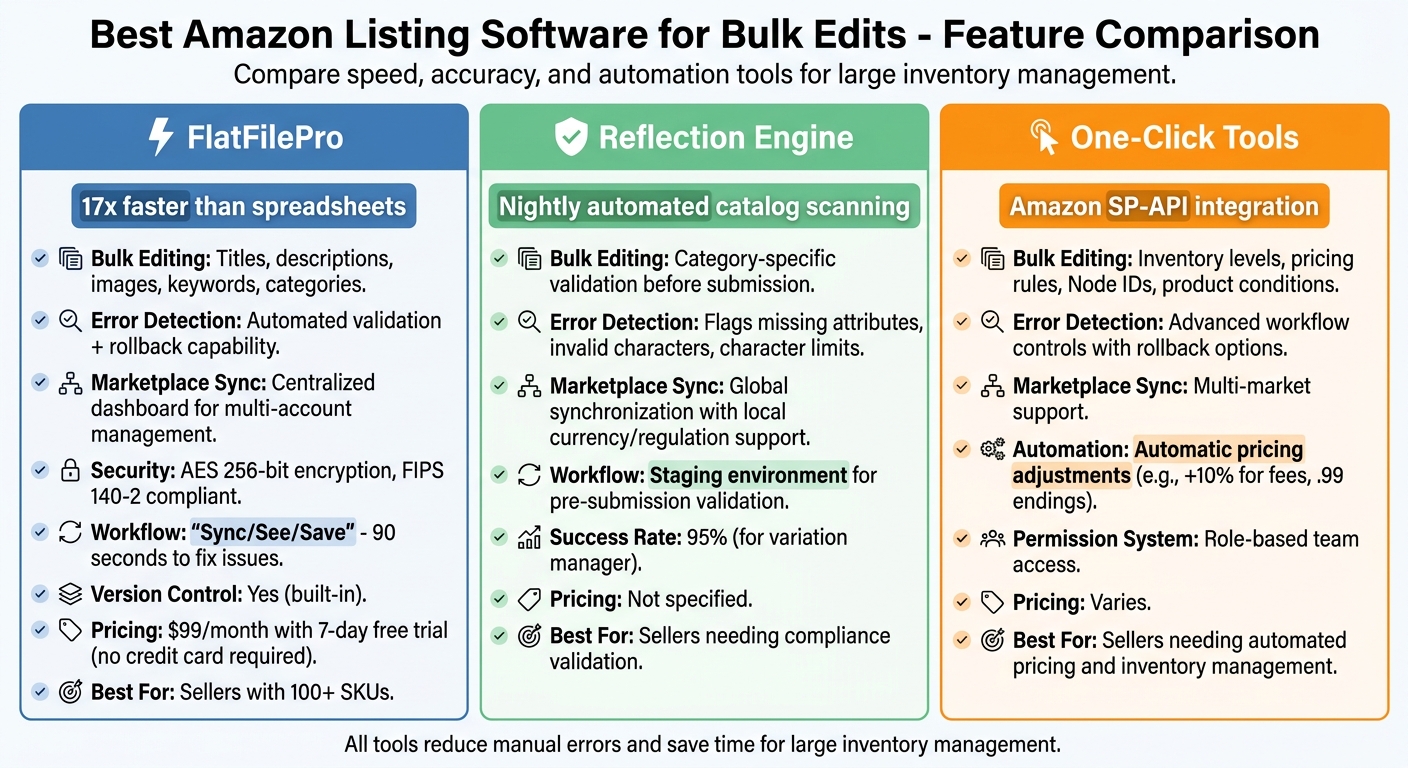
Amazon Listing Software Comparison: FlatFilePro vs Reflection Engine vs One-Click Tools
1. FlatFilePro

Bulk Editing Capabilities
FlatFilePro makes managing your product catalog a breeze by allowing bulk edits to essential product details – titles, descriptions, bullet points, images, keywords, and listing categories – across your entire inventory [1]. You can update hundreds or even thousands of SKUs up to 17 times faster than using Amazon inventory spreadsheets. With just one click, these updates are pushed directly through the Amazon API [1].
The platform also includes built-in version control, making it easy to apply seasonal changes or revert to previous drafts if needed. Accidentally uploaded incorrect data? No problem – recover lost information instantly without having to file support cases or wait for Amazon assistance [1].
Let’s take a closer look at how FlatFilePro keeps your data safe while catching errors before they happen.
Error Detection and Risk Mitigation
Speed is only part of the equation – FlatFilePro also protects your listings with automated data validation. This feature ensures errors are flagged and fixed before they go live [1]. Using the intuitive "Sync/See/Save" workflow, you can spot and correct listing issues in as little as 90 seconds.
Security is a top priority, too. The platform relies on AES 256-bit encryption and FIPS 140-2 validated cryptographic modules to safeguard your data, all while staying compliant with Amazon’s terms of service [1]. Additional safeguards include an approval workflow, which lets management review and approve edits before they’re finalized, and user-specific permissions that allow team members to make updates without needing access to your primary Seller Central credentials [1].
Marketplace Synchronization
If you manage multiple Amazon Merchant accounts, FlatFilePro’s centralized dashboard simplifies the process. From a single interface, you can oversee listings across multiple marketplaces. Automated backups and version control ensure updates stay consistent, and if errors occur during multi-marketplace updates, you can easily retrieve and override data across all connected accounts [1].
Pricing
FlatFilePro combines powerful features with an accessible pricing structure. You can start with a 7-day free trial, no credit card required. After the trial, the service costs $99 per month, giving you the chance to fully test its bulk editing capabilities on your catalog before committing to a subscription [1].
sbb-itb-ed4fa17
2. Reflection Engine
Bulk Editing Capabilities
Reflection Engine provides a streamlined way to handle bulk edits while ensuring compliance with Amazon’s category-specific requirements. Acting as a staging environment, it allows you to validate changes before submission. This means you can catch issues like missing attributes, invalid characters, or character limits being exceeded – all within a user-friendly interface. Instead of submitting changes blindly, you can address these errors in bulk, saving time and reducing headaches.
Error Detection and Risk Mitigation
Reflection Engine helps reduce submission rejections by flagging potential problems early. It identifies missing required fields, invalid inputs, or values that don’t align with Amazon’s accepted parameters. By catching these errors ahead of time, you can fix them quickly and resubmit without unnecessary delays. This focus on compliance ensures smoother catalog management and fewer disruptions in your workflow.
Marketplace Synchronization
With Reflection Engine, you can synchronize listings and inventory across multiple Amazon marketplaces around the globe. It even incorporates pricing rules that adapt to local currencies and regulations, making it easier to manage international operations seamlessly [2].
3. One-Click Bulk Editing Tools
Bulk Editing Capabilities
One-click bulk editing tools make editing your Amazon listings faster and easier. These tools let you handle tasks like managing inventory levels and setting pricing rules tailored to specific sales channels. For example, you can automatically add 10% to prices to account for Amazon fees or round prices to end in .99 for a polished look.
You can also assign Amazon Node IDs in bulk to categorize products accurately, define product conditions (New, Used, Refurbished), and apply brand names to multiple items at once. Thanks to the use of Amazon’s SP-API, these updates are sent securely and with a higher success rate compared to older methods like flat-file uploads.
Error Detection and Risk Mitigation
Advanced error detection features help catch missing information or invalid data before submission, reducing the chance of common Amazon listing errors. Workflow controls allow for quick rollbacks if needed and include permission-based reviews. This means managers can oversee edits while team members focus on specific parts of the product listings [1].
How to Create 1000 Amazon Listings in Bulk with Flat Files | Amazon Flat Files Made Simple

Advantages and Disadvantages
FlatFilePro offers a range of tools designed to make bulk editing on Amazon faster and more precise. Here’s a closer look at how its features stack up, along with some considerations for sellers.
FlatFilePro’s Bulk Editing Platform
FlatFilePro’s platform is built to handle large inventories with ease. Its Reflection Engine automatically checks your listings every night, flagging any discrepancies that need attention. The drag-and-drop variation manager allows updates in under five minutes, boasting a 95% success rate. While these features are ideal for sellers managing extensive inventories, those with simpler needs might find the platform’s advanced capabilities more than they require. However, for sellers needing ongoing validation of their listings, this tool is a game-changer.
Reflection Engine
This feature minimizes the need for manual monitoring by scanning your catalogs nightly. For sellers with frequently changing listings, this can save significant time and effort. To make the most of it, though, sellers should regularly review the alerts to ensure any flagged issues are addressed promptly.
One-Click Bulk Editing Tools
FlatFilePro’s one-click tools are designed for speed, leveraging Amazon’s API to edit titles, descriptions, bullet points, and more across multiple listings in record time. However, while this feature is efficient, it’s crucial to incorporate these updates strategically within your broader listing management plan to maintain consistency and quality.
FlatFilePro’s pricing reflects its advanced functionality, offering a solution aimed at sellers who need powerful tools to manage their operations. To get the best results, businesses should align the platform’s capabilities with their specific needs, ensuring they maximize both efficiency and value.
Conclusion
FlatFilePro focuses on three standout features: the Reflection Engine for automated nightly monitoring, drag-and-drop variation management, and one-click bulk editing tools that integrate with Amazon’s API for seamless multi-listing updates.
This platform is tailored for businesses managing over 100 SKUs, where manual oversight becomes too time-consuming. Priced at $99/month, it’s a practical choice for handling large inventories that demand frequent validation and quick error fixes.
With built-in error checking and automated backups, FlatFilePro streamlines workflows for teams overseeing complex product catalogs.
FAQs
How do I safely bulk edit listings without breaking existing data?
To make bulk edits to Amazon listings safely, consider using a specialized tool like FlatFilePro. This tool provides helpful features such as error detection and variation management, making the process smoother and less prone to mistakes.
Before diving in, ensure you review and validate your data files to catch potential issues early. It’s also a good idea to upload changes in smaller increments rather than all at once, minimizing the risk of widespread errors. Take advantage of any built-in error correction tools the platform offers to address problems quickly.
Most importantly, back up your current listings data before making any edits. This way, you have a safety net and can easily restore previous versions if something goes wrong. Following these steps can help you avoid disruptions and maintain the integrity of your existing data.
What’s the fastest way to fix Amazon listing errors across hundreds of SKUs?
The quickest way to resolve Amazon listing errors across a large number of SKUs is by using bulk editing tools designed specifically for catalog management. FlatFilePro makes this task easier with features like unlimited SKU updates, nightly error scans, and streamlined variation management. These tools allow sellers to fix issues faster, eliminate the need for tedious manual edits, and maintain compliant, optimized listings – saving time while ensuring a more seamless catalog management experience.
How can I keep listings synced across multiple Amazon marketplaces?
Managing listings across multiple Amazon marketplaces can be a challenge, but multichannel listing software makes it much easier. These tools come with features like inventory synchronization and automated updates, which adjust stock levels automatically whenever an order is placed. This helps prevent overselling while keeping your product data consistent.
Additionally, these tools centralize your catalog management, meaning you can update product information in one place and have it reflected across all platforms. They also simplify order routing, ensuring smoother operations when dealing with multiple marketplaces. In short, they save time and reduce the hassle of managing listings manually.