
FlatFilePro‘s Image Link Generator is a must-have for Amazon sellers managing large inventories. It automates the creation, validation, and application of image URLs, saving you hours of manual work. Here’s what you need to know:
- Bulk Uploads: Generate Amazon-compliant URLs for hundreds of products at once.
- Error Detection: Catch common flat file errors like incorrect URLs or unsupported file types before submission.
- API Integration: Push updates directly to Amazon Seller Central in minutes.
- Compliance: Automatically aligns with Amazon’s strict image requirements, including white backgrounds and resolution standards.
This tool simplifies image management, reduces listing errors, and helps improve your product visibility and sales on Amazon. Whether you’re dealing with a few listings or thousands, FlatFilePro makes the process faster and more efficient.
Why Amazon Sellers Need Proper Image Links
Image links are the backbone of your product’s visibility and sales on Amazon. If your main image isn’t properly linked, your product won’t show up when you create a new listing on Amazon. And no image? No visibility. No visibility? No sales – it’s that simple [3].
Amazon uses advanced AI tools like "Rekognition" and Optical Character Recognition (OCR) to automatically review every image you upload [5]. These systems flag images with issues such as banned text, incorrect backgrounds, or prohibited claims. The result? Immediate search suppression [1][2].
The stakes are high. Beyond losing visibility, repeated violations can lead to account warnings or even permanent suspension of your selling privileges [2]. Amazon is clear about this:
If listings are identified to be purposefully inaccurate, miscategorized, or deceptively described… your account may be subjected to corrective actions, including but not limited to the immediate termination of selling privileges [2].
Meeting Amazon’s Image Requirements
Amazon’s image standards are strict and non-negotiable. Your main image must meet these criteria:
- A pure white background (RGB 255, 255, 255).
- Show the actual product – not a drawing or placeholder.
- Ensure the product fills at least 85% of the frame [1][3].
For functionality, images must be at least 1,000 pixels on the longest side to enable zoom. However, 1,600 pixels is recommended for the best results [3][5]. Amazon’s automated tools also scan for elements like text, logos, watermarks, or inset images on main photos [1][6]. Even phrases like "eco-friendly", "best seller", or "biodegradable" in image text can trigger compliance issues [6].
Considering that over 43% of e-commerce retail sales in the U.S. came from mobile devices in 2023 [4], your main image plays a crucial role in grabbing shoppers’ attention.
How Quality Images Improve Customer Experience
Great images don’t just comply with Amazon’s rules – they also boost sales. About 75% of online shoppers rely on product photos to decide whether to buy, and 83% of U.S. smartphone users say product images are "very" or "extremely" important [7]. While the main image gets the initial click, secondary images help turn that interest into a purchase [9].
Clear, detailed visuals reduce uncertainty and build trust. When shoppers can zoom in and inspect your product, they feel more confident about their purchase. This matters because 22% of product returns happen when the item doesn’t match the photos online. Better images mean fewer returns and fewer negative reviews [8].
Here’s some real-world proof:
- In 2024, YES Bar improved its main product image and saw a 12% increase in listing traffic within two weeks, adding $3,390 in revenue [10].
- Nick Zarlegna, creator of the Truth or Dare Date Night card game, achieved a 133% jump in sales after optimizing his hero images [10].
- Angry Orange saw its revenue grow 10x by refining its product photos [10].
These examples highlight how proper image links and high-quality visuals can directly impact your bottom line. Pairing these improvements with FlatFilePro’s automated image link generation can take your listings to the next level.
sbb-itb-ed4fa17
Main Features of the FlatFilePro Image Link Generator

FlatFilePro simplifies the process of creating, validating, and applying image links, making it easier for sellers to meet Amazon’s requirements. Instead of juggling spreadsheets or manually uploading images through Seller Central, this tool takes care of the heavy lifting.
Automatic Compliance Checks
FlatFilePro’s Reflection Engine keeps a close eye on your catalog, comparing live listings with Amazon’s backend data. It flags issues like missing attributes or incorrect file specs the moment you upload images, ensuring your image URLs are ready to go in seconds. For example, it ensures main images follow Amazon’s white background rule [13]. Amazon Listing Optimization Expert Jordi Ordonez puts it this way:
"FlatFilePro’s Reflection Engine monitors every heartbeat of your catalog, alerting you the moment rot spreads" [11].
Once compliance is verified, bulk processing becomes a breeze, saving you both time and effort.
Bulk Image Link Generation
For sellers managing large inventories, FlatFilePro’s bulk edit feature is a game-changer. You can generate image links for hundreds – or even thousands – of SKUs in just a few clicks. According to reports, this functionality makes listing edits up to 17 times faster, with some issues resolved in as little as 90 seconds [12].
This efficiency ensures your product listings stay up-to-date without unnecessary delays.
One-Click Integration with Product Listings
FlatFilePro integrates directly with Amazon’s API, allowing you to push image updates to Seller Central instantly – no need for cumbersome CSV uploads. Its centralized dashboard gives you control over images across multiple marketplaces and even lets you revert to a previous compliant version using the Version History feature [11]. Plus, it significantly reduces the hassle of dealing with Amazon error codes and cases, cutting them down by 8x compared to manual listing management [12].
This seamless integration ensures your listings remain polished and compliant with minimal effort.
How to Generate Image Links in FlatFilePro
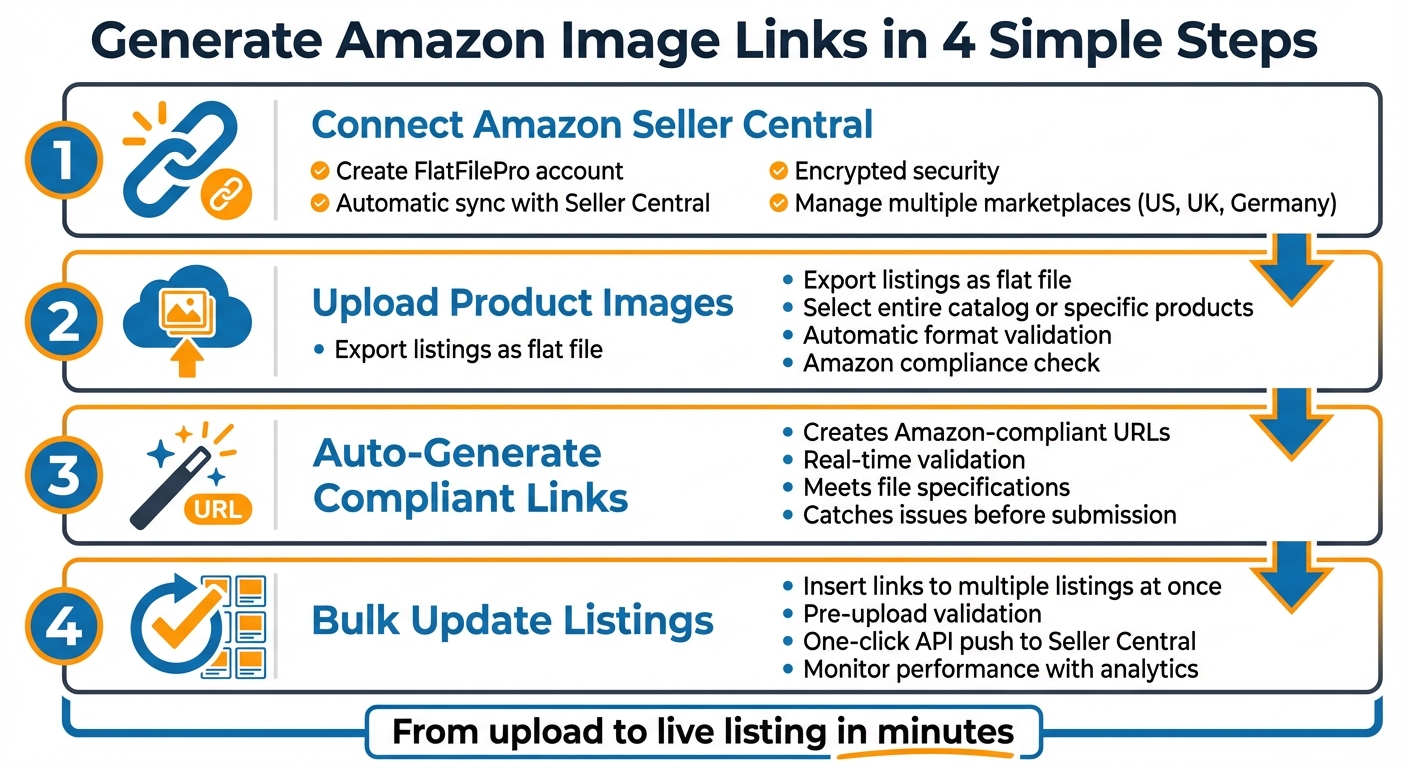
How to Generate Amazon Image Links in 4 Steps with FlatFilePro
FlatFilePro makes creating image links a breeze, handling everything from uploads to validation and deployment in one smooth process.
Connect Your Amazon Seller Central Account

Start by creating a FlatFilePro account and completing the setup process. Once registered, FlatFilePro will immediately sync with your Amazon Seller Central account. This connection is secured with encryption and other advanced security features to keep your data safe. From the centralized dashboard, you can manage product details across various Amazon marketplaces, including the US, UK, and Germany, all in one place.
Upload and Select Product Images
After connecting your account, you can export your product listings as a flat file directly through FlatFilePro. Choose to download your entire catalog or just specific products that need image updates. Review the flat file to identify the listings requiring changes. The platform supports various file formats and automatically checks your images to ensure they meet Amazon’s technical requirements before you proceed. Once you’ve selected your images, you’re ready to generate links.
Generate Image Links Automatically
FlatFilePro takes care of creating Amazon-compliant image links for you. Each link is validated in real-time, ensuring it meets Amazon’s guidelines for file specifications and content rules. This proactive validation helps you catch and resolve issues before they can cause problems.
Apply Links to Listings with Bulk Edit
With the links ready, you can quickly update your listings using FlatFilePro’s bulk editing tools. Insert the generated image links into the correct fields for multiple listings at once through the platform’s intuitive interface. Before making the updates live, use the built-in validation tool to confirm compliance with Amazon’s strict image standards. Then, with a single click, send the updated listings directly to your Seller Central account via Amazon’s API. Afterward, use the detailed reporting and analytics tools to monitor the performance of your updated images across all your listings.
Benefits of Using FlatFilePro Image Links
FlatFilePro offers tools that help sellers improve listing quality and drive better sales results. Let’s break down how it makes a difference.
Better Listing Accuracy and Quality
FlatFilePro’s automated compliance checks eliminate the risk of manual errors. Each image link is validated before upload, ensuring smooth, error-free submissions. This process catches formatting issues that could otherwise lead to listing suppression. By generating image links through FlatFilePro, you get consistent URL formatting and maintain uniform quality across your entire catalog.
Time Savings for High-Volume Sellers
Managing image links manually can be a nightmare for sellers working at scale. FlatFilePro simplifies this by generating compliant image URLs in seconds, cutting down hours of tedious work. Its bulk editing features make updates quick and efficient, while the API-driven system allows seamless catalog management, including bulk changes and error corrections [13].
Higher Sales Performance
Properly optimized image links can directly impact sales by ensuring images load seamlessly. Amazon data shows that streamlined image management increased advertiser campaign submissions by over 20%, thanks to smoother creative testing processes [14]. By adhering to platform guidelines, FlatFilePro helps safeguard your listings’ search rankings and overall performance. These combined advantages make FlatFilePro a crucial tool for staying competitive on Amazon.
Conclusion
Handling image links for Amazon listings doesn’t have to be a hassle. FlatFilePro’s Image Link Generator simplifies the entire process – from ensuring compliance to generating bulk URLs and updating listings with a single click. It guarantees properly formatted image URLs that align with Amazon’s standards every time.
For high-volume sellers, the tool saves hours by instantly generating compliant URLs. Plus, features like automated error detection and bulk editing make catalog management far more efficient, giving you more time to focus on growing your business.
Streamlined image management has a direct impact on your success. When your images load smoothly and your listings meet Amazon’s requirements, you safeguard your search rankings and maintain visibility. This creates a polished storefront that builds customer trust and drives more conversions.
Whether you’re managing a few hundred listings or tens of thousands, FlatFilePro provides the efficiency and control you need to stay ahead on Amazon. Its integration ensures your catalog remains high-quality and compliant at every step, making your workflow faster and more effective.
FAQs
What happens if my main image link is broken?
If your main image link isn’t working, your product listing could be suppressed or flagged by Amazon, which directly impacts visibility and sales. A broken or missing main image often leads to a "Search Suppressed" status, meaning your product won’t show up in search results. To resolve this issue, submit a functional image link that meets Amazon’s guidelines. Regularly reviewing your image links can help you stay compliant and keep your listing visible.
Which Amazon image rules cause suppression most often?
When Amazon suppresses product images, it’s often due to common issues like using non-white backgrounds, having low-resolution images (less than 1,000 pixels on the longest side), missing main images, or breaking rules with things like promotional overlays. Following Amazon’s image guidelines closely can help avoid these problems and keep your product listings visible to shoppers.
Can I roll back image updates after publishing?
Once you update images on Amazon, there’s no built-in way to reverse those changes directly through Amazon Seller Central. However, third-party tools like FlatFilePro can make life easier. These tools include features like version control, which lets sellers manage updates and even revert changes if necessary. While Amazon itself doesn’t offer a straightforward rollback option, tools like these can simplify the process and help avoid delays or complications with image updates.