
Uploading images to Amazon can be tricky, especially with strict requirements for size, format, and content. A compliant image link is essential to ensure your product listings appear in search results and meet Amazon’s standards. Here’s the good news: tools like FlatFilePro automate this process, saving time and reducing errors.
Key Takeaways:
- Amazon requires high-resolution images (at least 1,000 px for zoom) with specific formats like JPEG and pure white backgrounds for main images.
- Non-compliance (e.g., incorrect backgrounds or broken links) can suppress your listings.
- FlatFilePro simplifies image management by generating compliant URLs, hosting images, and syncing them with Amazon listings.
- It also monitors for broken links and fixes them instantly without manual re-uploads.
Why This Matters:
High-quality images influence buying decisions, and Amazon encourages sellers to fill all 9 image slots for better product visibility. FlatFilePro ensures your images meet Amazon’s technical and policy rules while streamlining updates across your catalog.
How It Works in 4 Steps:
- Upload your images to FlatFilePro.
- Generate Amazon-ready URLs automatically.
- Add these URLs to your listings via bulk editing tools.
- Sync and verify changes using real-time feedback.
With tools like FlatFilePro, you can focus on selling while ensuring your images are always compliant and optimized for maximum impact.
Amazon‘s Image Requirements

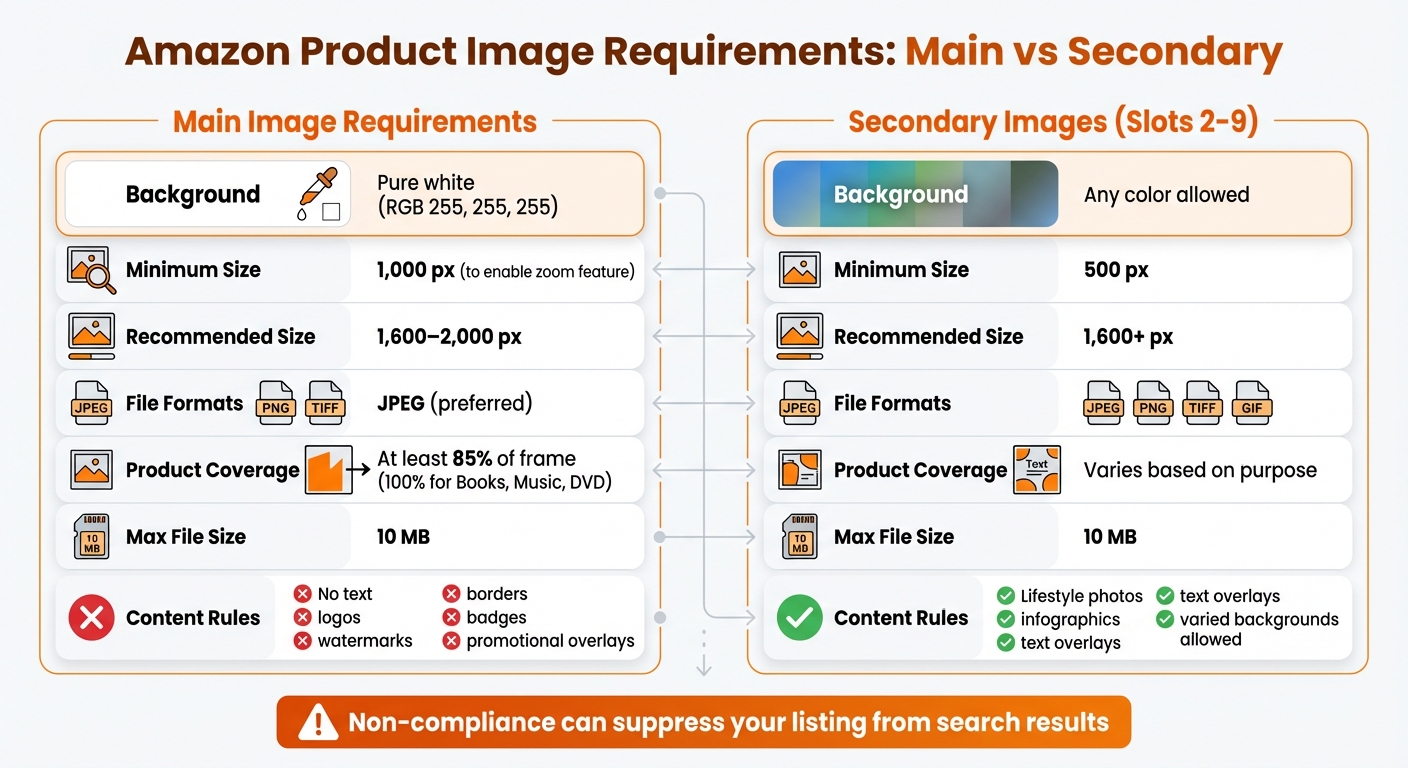
Amazon Product Image Requirements: Main vs Secondary Images Specifications
Amazon has strict rules for product images, both in terms of technical specs and content. If you’re using FlatFilePro’s automated tools, understanding these requirements is key to making the most of its image link generator.
Technical Specifications for Images
Amazon’s system expects images to meet specific technical criteria to display correctly. The smallest acceptable size is 500 pixels on the longest side, but to activate the zoom feature, the image must be at least 1,000 pixels. For the best results, aim for images between 1,600 and 2,000 pixels, with a maximum size of 10,000 pixels.
The preferred file format is JPEG (.jpg) because it balances quality and file size well. Other acceptable formats include TIFF, PNG, and non-animated GIFs. All images should use RGB color mode – CMYK can cause color issues when viewed on screens.
For main images, the background must be pure white with RGB values of exactly 255, 255, 255. Even a slight deviation can trigger Amazon’s automated systems, potentially removing your listing. Use a digital color picker to double-check. Additionally, the product should occupy at least 85% of the frame (100% for Books, Music, and Video/DVD categories).
| Specification | Main Image | Secondary Image |
|---|---|---|
| Background | Pure white (RGB 255, 255, 255) | Any color |
| Minimum Size | 1,000 px (to enable zoom) | 500 px |
| Recommended Size | 1,600–2,000 px | 1,600+ px |
| File Formats | JPEG (preferred), PNG, TIFF, GIF | JPEG, PNG, TIFF, GIF |
| Product Coverage | At least 85% of the frame | Varies based on purpose |
| Max File Size | 10 MB | 10 MB |
Policy Rules for Image Content
Amazon enforces strict content policies to maintain the quality of its listings. For main images, avoid adding text, logos, watermarks, borders, inset images, or promotional badges like "Best Seller" or "Amazon’s Choice." The product itself should be visible outside of its packaging unless the packaging is a key selling feature.
"Amazon’s main image requirements are strict and automatically enforced. One off-white pixel, one text overlay, one badge that seemed helpful – and your listing vanishes from search results."
– Expert opinion
Certain categories have additional requirements. For example:
- Adult apparel: Must feature a standing human model.
- Kids’ and baby clothing: Requires flat-lay photography.
- Footwear: Should display a single shoe angled left at 45 degrees.
- Jewelry: Must show the item clearly, without props (except for necklaces).
Secondary images (slots 2–9) allow more creative freedom. These can include lifestyle photos, infographics, text overlays, or varied backgrounds, as long as the content is appropriate and free from Amazon-specific branding.
Amazon uses advanced AI to scan for non-compliance. If an image breaks the rules, your listing could be suppressed until the issue is fixed. By following these guidelines, FlatFilePro’s image links can ensure your listings meet Amazon’s standards without any hiccups.
sbb-itb-ed4fa17
How to Use Image Link Generators with FlatFilePro
FlatFilePro’s Image Link Generator simplifies the process of uploading, hosting, and managing product images. Instead of manually creating URLs or navigating complicated Amazon flat file templates, this tool takes care of the technical work, allowing you to focus on crafting top-tier Amazon listings. Here’s how to seamlessly integrate compliant image URLs into your Amazon listings.
Step 1: Upload Images to FlatFilePro
Start by logging into your FlatFilePro dashboard and heading to the image management section. You can upload your product images one at a time or in bulk by dragging and dropping them into the designated area. The tool supports JPEG, PNG, TIFF, and non-animated GIF files – formats that align with Amazon’s requirements.
To ensure smooth processing, name your files using the product identifier (ASIN, UPC, or EAN), followed by a variant code and the file extension (e.g., B000123456.MAIN.jpg). FlatFilePro automatically checks each image against Amazon’s technical standards, which is crucial since over 70% of Amazon traffic now comes from mobile devices [2].
Step 2: Generate Image URLs
After uploading, FlatFilePro’s image link generator creates Amazon-compliant URLs for your images. The tool manages hosting and formatting details in the background, delivering high-resolution links structured to meet Amazon’s specifications.
This feature can handle hundreds of images in seconds, eliminating concerns about URL formatting, character limits, or hosting compatibility.
Step 3: Add Image URLs to Listings
Once you have your URLs, use FlatFilePro’s bulk editing tools to update your Amazon listings efficiently. Open the bulk editor in your dashboard, select the listings you want to modify, and insert the URLs into the appropriate image slots (e.g., Main, PT01 through PT08 for secondary images).
FlatFilePro also includes automated error detection to catch issues like broken links, incorrect formatting, or low resolution. This ensures your images comply with Amazon’s technical and policy guidelines. Updating all image slots maximizes your listing’s visual impact and helps maintain a professional product presentation [2][3].
Step 4: Sync and Verify Changes
Push your updates using FlatFilePro’s API-driven interface. Unlike traditional flat file uploads that can take hours to process, this method works faster and provides real-time feedback on the status of your submissions. You’ll know immediately which listings were accepted and which may require further attention.
Once synced, FlatFilePro’s Reflection Engine verifies that your images display correctly on live Amazon listings. The engine performs nightly checks, comparing your submissions to what’s visible on Amazon. A green checkmark means your images are live and accurate, while a red X flags any discrepancies. Keep in mind that Amazon may take up to 24 hours to display newly uploaded images on product detail pages [1].
Best Practices for Managing Image Links with FlatFilePro
Fill All Available Image Slots
Amazon gives sellers up to nine image slots per listing – one for the main image and eight for additional photos. Using all these slots is a smart move. It allows you to showcase your product from different angles and in various contexts, giving potential buyers a better understanding of what they’re purchasing. Plus, filling all slots helps protect your listing from unwanted changes. Leaving slots empty can leave your listing vulnerable to alterations, which might confuse customers and hurt your brand’s image.
To make things easier, you can use bulk tools to update multiple listings at once. This not only saves time but also ensures your listings are secure and optimized for better sales performance. Once your images are in place, it’s important to keep an eye on them regularly to avoid any issues down the line.
Monitor Image Links with Reflection Engine
Image links can sometimes break or become outdated, which can hurt your sales. FlatFilePro’s Reflection Engine is designed to solve this problem by keeping a constant watch over your catalog. It compares your current data with what’s live on Amazon, ensuring everything stays up to date. In fact, 93% of sellers face issues with outdated image links, which can negatively affect their sales[4].
FlatFilePro explains the importance of this feature clearly:
"Our Reflection Engine alerts you immediately when issues arise." – FlatFilePro[4]
The system uses green checkmarks to indicate compliant images and red X’s for any discrepancies. If an image link breaks or gets overwritten, the engine notifies you right away. With just one click, you can restore the correct version – no need to re-upload files manually. This quick recovery process helps keep your listings running smoothly and minimizes disruptions.
Conclusion
FlatFilePro simplifies image link management for Amazon listings, making bulk updates a breeze compared to the time-consuming manual edits in Seller Central.
By ensuring your images align with Amazon’s technical standards – like using a pure white background (#FFFFFF) and filling at least 85% of the frame for main images – you can avoid listing suppressions that might impact your sales. High-quality, compliant images are critical for boosting conversions, especially when 75% of online shoppers depend on product photos to make purchasing decisions, and over 70% of Amazon traffic comes from mobile devices[2].
The Reflection Engine adds another layer of convenience by continuously monitoring for broken links and allowing instant restoration with just one click. With bulk editing tools and a detailed Activity Log, you can easily keep all nine image slots optimized.
Whether you’re managing a small catalog or a massive inventory, FlatFilePro ensures your listings stay professional, compliant, and effective at turning browsers into buyers. This efficient approach not only reduces listing issues but also drives better conversion rates.
FAQs
Do I need to host my Amazon images somewhere first?
Yes, hosting your Amazon images is a necessary step. Platforms like Google Drive, Dropbox, or Amazon S3 are great options for uploading your images and generating direct URLs. Make sure these URLs follow Amazon’s guidelines: they must use HTTPS, be in JPEG or PNG format, and have a resolution of at least 1,000 pixels on the longest side. Once ready, you can embed these URLs into your product listings to ensure they comply with Amazon’s standards and are easy to manage.
Why are my listings suppressed even though my images look fine?
Amazon can suppress product listings even if your images appear to meet the standards at first glance. This often happens because of their strict image requirements. Common reasons include not having a pure white background, using images with a resolution lower than 1,000 pixels on the longest side, or violating policies by adding overlays or promotional text. Sometimes, even images that look fine might not meet Amazon’s technical criteria. To avoid these issues, tools like FlatFilePro’s image link generator can help ensure your images are compliant, reducing the risk of suppression.
How can I fix broken image links without re-uploading images?
To address broken image links without the hassle of re-uploading, try using FlatFilePro’s Amazon Image Link Generator. This tool helps you create secure, Amazon-compliant URLs in bulk, ensuring they meet Amazon’s standards and link directly to .jpg or .png files.
If your images are hosted on external platforms like Google Drive, you can also convert shareable links into direct access links with HTTPS formatting. Both approaches allow you to seamlessly replace broken links while avoiding the need to re-upload images to Amazon.