
Managing Amazon listings can be overwhelming, especially with millions of products competing for visibility. The right software simplifies this process, helping you save time, reduce errors, and boost sales. Here’s what you need to know:
- Assess Your Needs: Consider your catalog size, growth plans, marketplace reach, and budget.
- Key Features to Look For:
- Bulk editing for efficient updates.
- Error detection to avoid listing suppressions.
- Real-time inventory tracking and API integration.
- Pricing: Costs range from $15/month for basic tools to $695/month for enterprise solutions. Free trials are often available.
- Testing: Use trial periods to evaluate time savings, error detection, and customer support.
Streamline your Amazon operations by selecting software based on your business size, goals, and future growth. Proper tools ensure your listings stay optimized and compliant, driving better results with less effort.
Determine Your Business Requirements First
Before diving into software comparisons, take a moment to assess your current operations. A tool that works for a small private label brand with 50 SKUs won’t cut it for a wholesale business juggling thousands of supplier catalogs. The wrong software can drain resources and slow your growth as your business scales.
To start, map out three key factors: your catalog size and growth expectations, the marketplaces you currently sell on (or plan to expand into), and your budget with clear ROI goals. These elements will guide you in choosing between basic editing tools and enterprise-level automation. Once you’ve outlined these parameters, you can evaluate software options based on how well they handle catalog management, marketplace integration, and budget alignment.
Review Your Catalog Size and Expected Growth
The size of your current catalog directly impacts the kind of software you’ll need. For instance, private label sellers with 20–100 products benefit most from tools focused on keyword research and listing optimization. Wholesale sellers managing 5,000+ SKUs need bulk scanning and margin analysis capabilities. Arbitrage sellers, on the other hand, prioritize tools that offer fast profitability checks and mobile-friendly barcode scanning [4].
Think ahead. If you’re managing 200 SKUs today but anticipate growing to 2,000 in the next 18 months, choose software that scales with you. Some platforms can process up to 1,000,000 items per hour [4], which is crucial for handling large catalogs across multiple fulfillment methods. By understanding your current and future catalog needs, you can avoid the hassle of switching platforms later.
Once you’ve considered catalog size and growth, think about the geographic and platform reach your business will require.
Determine Your Marketplace Coverage
Selling on a single platform, like Amazon US, has different software requirements than managing listings across Amazon’s 21 international marketplaces or additional platforms like Walmart, eBay, and Etsy [2][3]. Multi-marketplace sellers need tools that sync inventory in real time to prevent overselling penalties. For instance, Shopee’s Late Shipment Rate threshold was tightened from 5% to 4% in 2026, making instant updates essential [5].
To simplify decision-making, apply the "top-3 channels by GMV" rule: ensure the software you choose integrates seamlessly with your top revenue platforms [5]. Keep in mind that tools optimized for US sellers may lack necessary regional connections. If you’re selling internationally, look for features like multi-currency support and landed-cost calculations. This is especially critical after the US eliminated the $800 de minimis threshold for many international parcels in 2026 [5].
Set Your Budget and ROI Goals
Software costs vary widely, depending on the features you need. Entry-level tools range from $15–$29 per month for basic functions. Mid-tier options, offering AI repricing and advanced inventory management, cost between $49–$99 per month. For enterprise-level features like multi-account consolidation or high-volume ad spend management, expect to pay $250–$695 per month [1][2][4].
To calculate ROI, consider how much time automation can save you. For example, tools that eliminate manual spreadsheet updates can free up 10–15 hours a week for strategic tasks. Use free trials (14–30 days) to measure these savings and efficiency gains. Some users report outcomes like a 40% reduction in ACOS and a 56% increase in Buy Box wins [6].
Be mindful of additional fees. Certain advertising tools charge a base monthly fee plus a percentage of ad spend once you exceed a threshold [6]. Scott Needham, Founder of SmartScout, highlights the value of specialized tools:
"The best Amazon sellers use specialized tools. SmartScout handles the research. Nova handles the profit tracking. Together you cover the full lifecycle from product discovery to profitability" [2].
Before subscribing to multiple tools, audit your needs to avoid redundancy. Compare feature sets to ensure you’re not paying twice for overlapping functions like keyword research or inventory synchronization [4]. A strategic approach to budgeting ensures you’re investing wisely without duplicating costs.
sbb-itb-ed4fa17
Required Features in Amazon Listing Management Software
When choosing Amazon listing management software, it’s essential to focus on features that streamline your workflow, prevent costly errors, and ensure your catalog stays compliant with Amazon’s ever-changing standards. Without these capabilities, you risk wasting time on manual fixes and troubleshooting issues that could have been avoided with automation.
Bulk Editing and Variation Management
Handling listings one by one isn’t practical when you’re managing hundreds – or even thousands – of SKUs. That’s where bulk editing features come in handy. These bulk listing tools allow you to make updates to titles, bullet points, descriptions, and prices across multiple ASINs at once, whether through spreadsheet uploads or a centralized dashboard.
Some software includes specialized listing builders, which make managing parent-child relationships much easier. For example, you can move a child ASIN between parent listings or add new size or color variations without digging through complex spreadsheets. By using intuitive visual interfaces, you reduce the chances of creating orphaned listings or running into suppression errors.
Error Detection and Compliance Monitoring
Automated error detection can be a lifesaver, especially when it comes to avoiding listing suppressions that could derail your sales. Look for software that scans your catalog for missing required fields, policy violations, and technical issues like incorrect image specifications. For instance, Amazon requires product images to have at least 1,000×1,000 pixels with a 1:1 aspect ratio and recommends including at least six images per listing [1]. Automated audits ensure these requirements are met without the need for time-consuming manual checks.
Real-time alerts are another critical feature. These notifications can inform you immediately if a listing gets suppressed, an unauthorized seller shows up on your product page, or there’s a change in your Buy Box status. Staying on top of these updates not only keeps your listings compliant but can also improve sales – timely corrections and updates have been shown to boost sales by up to 56% [1]. Additionally, seamless integration with Amazon’s systems ensures smooth operations and fewer disruptions.
Amazon Seller Central API Integration

Direct API integration is a game-changer for managing your catalog efficiently. It allows your software to automatically pull key metrics – such as revenue, profit, ad spend, and order data – and update Amazon in real time. This eliminates the need for manual CSV uploads or switching between multiple dashboards, ensuring that inventory levels, pricing, and listing statuses are always in sync.
When evaluating software, consider tools listed in the Amazon Selling Partner Appstore. These tools have been vetted for compliance with Amazon’s security and operational standards, giving you added peace of mind that your software is reliable and aligned with Amazon’s requirements.
Compare Pricing Models and Growth Capacity
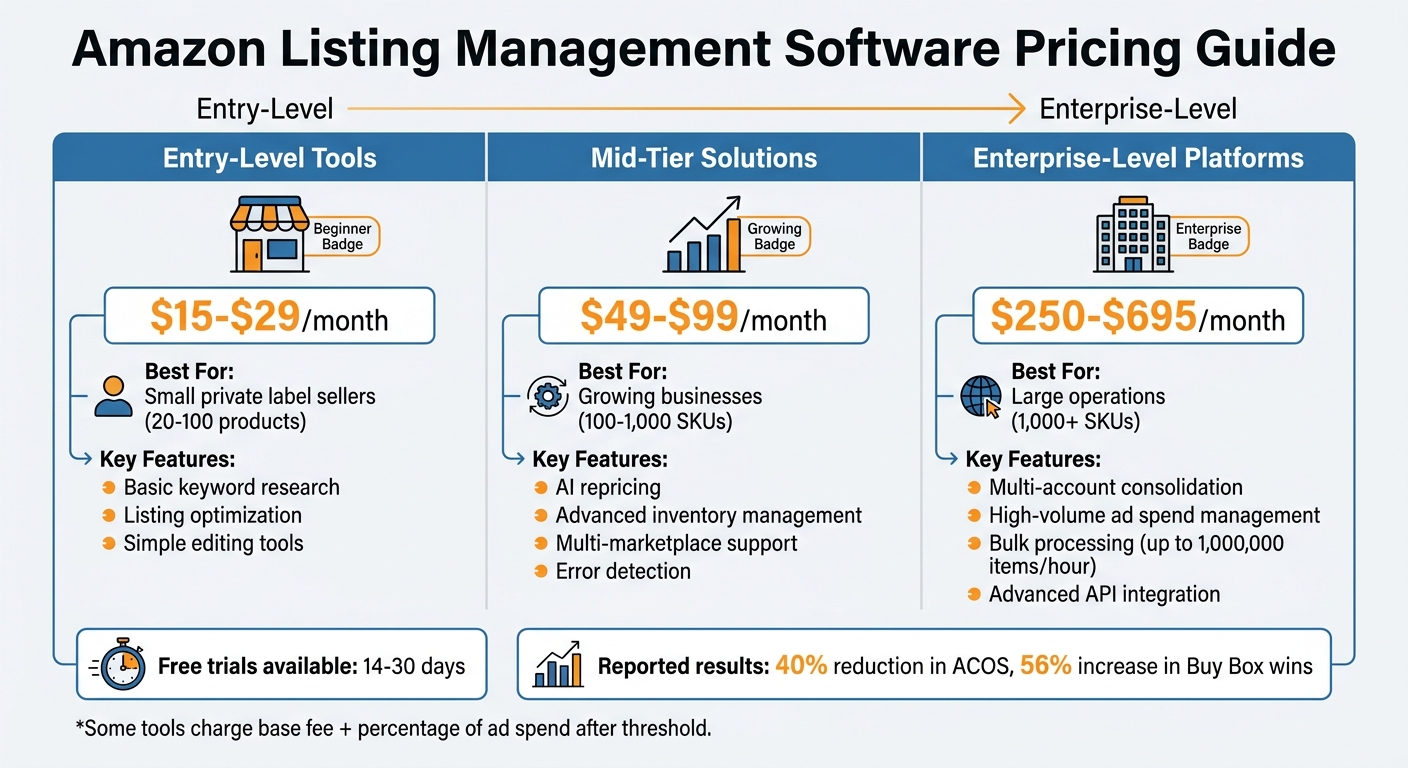
Amazon Listing Management Software Pricing Tiers and Features Comparison
Pricing models play a key role in maintaining cost control and predictability, especially during peak seasons. It’s important to assess the available options and figure out which approach aligns with your operational needs.
Flat-Rate vs. Usage-Based Pricing
Flat-rate pricing provides a consistent monthly fee without overage charges. This model works well for businesses that maintain high listing volumes, even if there are times when resources are underutilized [7].
On the other hand, usage-based pricing charges you based on consumption. This eliminates the need for long-term contracts and adapts costs to meet demand fluctuations. Many of these plans include volume discounts, so the cost per SKU or transaction decreases as your catalog grows. As AWS puts it:
"With a pay as you go model, you can adapt your business depending on need and not on forecasts, reducing the risk of overprovisioning or missing capacity" [7].
If your Amazon business experiences seasonal demand spikes, usage-based pricing can save costs by charging only for the capacity you use during busy periods. Meanwhile, flat-rate plans offer predictable monthly expenses, making them ideal for businesses that prioritize budgeting stability.
Confirm the Software Can Scale with Your Business
Cost structure aside, it’s critical to ensure your software can grow alongside your business. Look for tools that can handle increasing SKU counts and manage multiple marketplaces – key features for expanding into international markets [1][8]. Scalable software spares you the headache of migrating to a new system as your business evolves.
Pay close attention to how pricing adjusts as you add more SKUs or marketplaces. Some providers charge separately for each marketplace connector, while others offer tiered plans that bundle features. Be aware of usage limits that may trigger plan upgrades to avoid unexpected cost jumps [7].
Test Software Through Demos and Free Trials
Once you’ve evaluated pricing models and scalability, the next step is putting the software to the test. A feature list or a pricing page can only tell you so much. To truly understand how the tool performs, connect it to your live Amazon Seller Central account. Hands-on testing is the only way to determine if the software delivers on its promises or simply looks appealing in its marketing materials.
Request Full-Access Trial Periods
Always request a trial that provides full access to all features, not just a limited demo. By linking the software to your live Seller Central account, you can see how it handles your actual listings, uncovering specific issues or opportunities within your catalog [1]. This method gives you a clear picture of how the tool will function with real-world data.
During the trial, test everything. Update product variations, check processing speeds, and evaluate how well the software detects errors. Make sure to confirm whether it sends real-time alerts for critical notifications. If you operate in multiple marketplaces, see if the tool can optimize listings across all of them simultaneously [1]. This hands-on experience will help you understand how the software fits into your workflow.
Measure Time Savings and Support Quality
Track how long it takes to complete key tasks compared to your current process [1]. For example, time how quickly you can update product descriptions for 50 SKUs or resolve image compliance issues flagged by the software. Document the exact time savings – this information will be valuable when presenting the tool’s benefits to your team or stakeholders.
Customer support is another critical factor to evaluate during the trial. Submit a question and note how long it takes to receive a response. When you’re managing thousands of dollars in daily sales, fast and reliable support is non-negotiable. Additionally, ensure the software’s dashboard can track essential metrics like sales performance, ad spend, or inventory levels [1]. This ensures the tool meets your reporting needs and supports your overall business operations.
Make Your Final Selection
After testing the software, base your decision on the data you’ve gathered. The aim isn’t to pick the tool with the most features – it’s to choose one that solves your specific challenges and stays within your budget. Using a structured approach can help you avoid costly mistakes and ensure your investment directly benefits your business.
Create a Scoring Matrix for Comparison
Build a scoring matrix to rank your options based on your business priorities. Focus on features that address your biggest pain points. For example, if reducing wasted ad spend is a priority, give extra weight to tools that automate PPC adjustments.
Include a column for data reliability. Pay attention to any delays in profit reporting (24–48 hours), as these can be disruptive during fast-paced events like Prime Day or flash sales. For instance, a pet supplies brand used real-time Slack alerts to identify an inventory gap 19 days before running out of stock, saving $150,000 in potential sales. Also, evaluate how well each tool integrates with your current tech stack. Does it sync directly with platforms like Shopify or your 3PL warehouse? Tools requiring manual data exports might lead to integration errors and wasted time. Additionally, consider vendor lock-in risks by checking how easily you can export your data, especially if the platform uses proprietary formats for tasks like keyword research or tracking listing history [10].
Focus on features that deliver a measurable return on investment, as determined during your evaluation process. Once you’ve scored your options, shift your attention to implementing the software effectively.
Plan Your Implementation and Team Training
After selecting your software, plan the implementation carefully to get the most out of it. Start with a month-to-month plan to ensure the integration goes smoothly.
Set up clear Standard Operating Procedures (SOPs) before rolling out the software. For example, establish Slack alerts that managers must address within four hours. One apparel seller found that weekly audits uncovered margin discrepancies, and fixing those issues significantly boosted profitability. During the first 90 days, conduct weekly data export audits to catch problems early and build trust in the new system. Additionally, make sure your team can access the vendor’s learning materials, tutorials, and support channels. Responsive customer support is crucial, especially when managing high daily sales volumes [10].
Conclusion
Selecting the right software boils down to understanding your specific needs. Begin by outlining your business requirements – think about factors like catalog size, marketplace reach, and budget. From there, prioritize features that tackle your key challenges, such as bulk editing, error detection, and API integration.
The right choice can save you time, reduce mistakes, and help your business grow. As Claire Oswald, Product Marketing Manager at soona, puts it:
"Every single one of these tools shares the amazing benefit of taking care of your day-to-day campaign management tasks, giving you more time to focus on optimizing your strategy" [1].
This shift from routine tasks to strategic thinking is often what separates businesses stuck at $100,000 in revenue from those scaling past $1 million annually [9].
By following the steps in this guide – from identifying your needs to testing software hands-on – you’ll be ready to make a well-informed decision. Use full-access trials to evaluate time savings, apply a scoring system, and ensure the tool aligns with your goals. Effective listing management is crucial for keeping your products visible and compliant, especially when first-page visibility can make or break conversions.
The right software isn’t just about managing your listings – it’s about driving growth while cutting down on administrative work. Take the time to evaluate your options and choose a platform that grows with your business. With the steps outlined here, you can find a tool that sets the stage for long-term success.
FAQs
How do I know if a tool will scale with my SKU growth?
When choosing a tool to keep up with your growing SKU list, it’s crucial to check how well it handles an expanding inventory. Look for features like bulk editing, automation, and error prevention systems. The right tool should manage large inventories seamlessly, without slowing down, and allow for unique SKUs for every product. This ensures your business can keep pace as your catalog grows.
What API permissions should I require for Seller Central access?
API permissions play a key role in managing Amazon listings through Seller Central. It’s important to have access to permissions that cover listing management, order processing, inventory updates, and performance monitoring. These permissions allow you to handle tasks such as updating product listings, processing orders efficiently, and keeping track of performance metrics. For detailed guidance, check Amazon Seller Central’s developer documentation or API guidelines.
What should I test during a free trial to avoid surprises later?
When exploring a free trial of Amazon listing management software, focus on testing essential features like bulk editing, automation tools, error prevention systems, and integration with Amazon Seller Central. Check how well the software handles time-saving tasks, such as listing multiple items efficiently. Also, evaluate whether automation runs seamlessly and if error detection catches potential problems. This trial period is your chance to ensure the software aligns with your needs and avoids surprises down the line.