
Managing product images for Amazon can be time-consuming, especially when dealing with bulk updates via flat files. Amazon requires direct image URLs instead of uploading image files, which can lead to broken links, errors, and delays. FlatFilePro’s Free Image Link Generator solves this by creating Amazon-compliant URLs in seconds, ensuring high-resolution, permanent links that meet Amazon’s requirements.
Key Benefits:
- Quickly generate image URLs for bulk catalog updates.
- Eliminate hosting issues with reliable, permanent links.
- Reduce errors and streamline flat file uploads.
- Compatible with all Amazon marketplaces.
How It Works:
- Upload images (PNG, JPEG, WebP) to the tool.
- Generate direct URLs automatically.
- Copy and paste URLs into your Amazon flat file.
- Upload the flat file through Seller Central.
This tool simplifies catalog management, saves time, and minimizes errors, letting you focus on growing your business instead of troubleshooting image issues.
HOW TO CREATE IMAGE URL FOR AMAZON FLAT FILES! QUICK AND EASY
sbb-itb-ed4fa17
Why Amazon Sellers Need Direct Image Links
Amazon’s flat file system requires direct image URLs instead of traditional file uploads [1]. These "hot links" must follow specific formatting rules, streamlining the process for quicker, more reliable catalog updates.
The difference between manual image uploads and using direct links is huge. Manual uploads via Seller Central require selecting and uploading images one product at a time, which quickly becomes overwhelming when managing a large number of SKUs. On the other hand, direct links in flat files allow for bulk updates, making it possible to handle hundreds of products at once [2].
Steven Pope, Founder of My Amazon Guy, emphasizes: "Loading photos via links is often the easiest and best solution" [2].
Faster Bulk Image Uploads
Direct image links remove the hassle of uploading images individually. Whether you’re replacing a primary image or adding secondary ones across your catalog, you can simply update the URLs in your flat file and process everything in one go [2]. Amazon’s system automatically retrieves the images, saving time and eliminating manual steps [1].
This approach speeds up Amazon product management, letting you update multiple listings simultaneously and cutting down on delays [1][2].
Fewer Errors in Product Catalogs
Relying on direct URLs also helps reduce mistakes caused by repetitive manual uploads. By maintaining a spreadsheet that maps image links to SKUs, you create a reliable backup system that minimizes mix-ups [2]. This becomes especially important if Amazon’s catalog experiences glitches or images go missing – you can quickly restore them using your saved links [2].
For best results, ensure your URLs end with proper file extensions (like .jpg or .png) and have open access permissions to avoid errors [2][3]. Combining faster uploads with accurate links creates a smoother listing process and helps keep your catalog running efficiently.
How to Use FlatFilePro‘s Free Image Link Generator

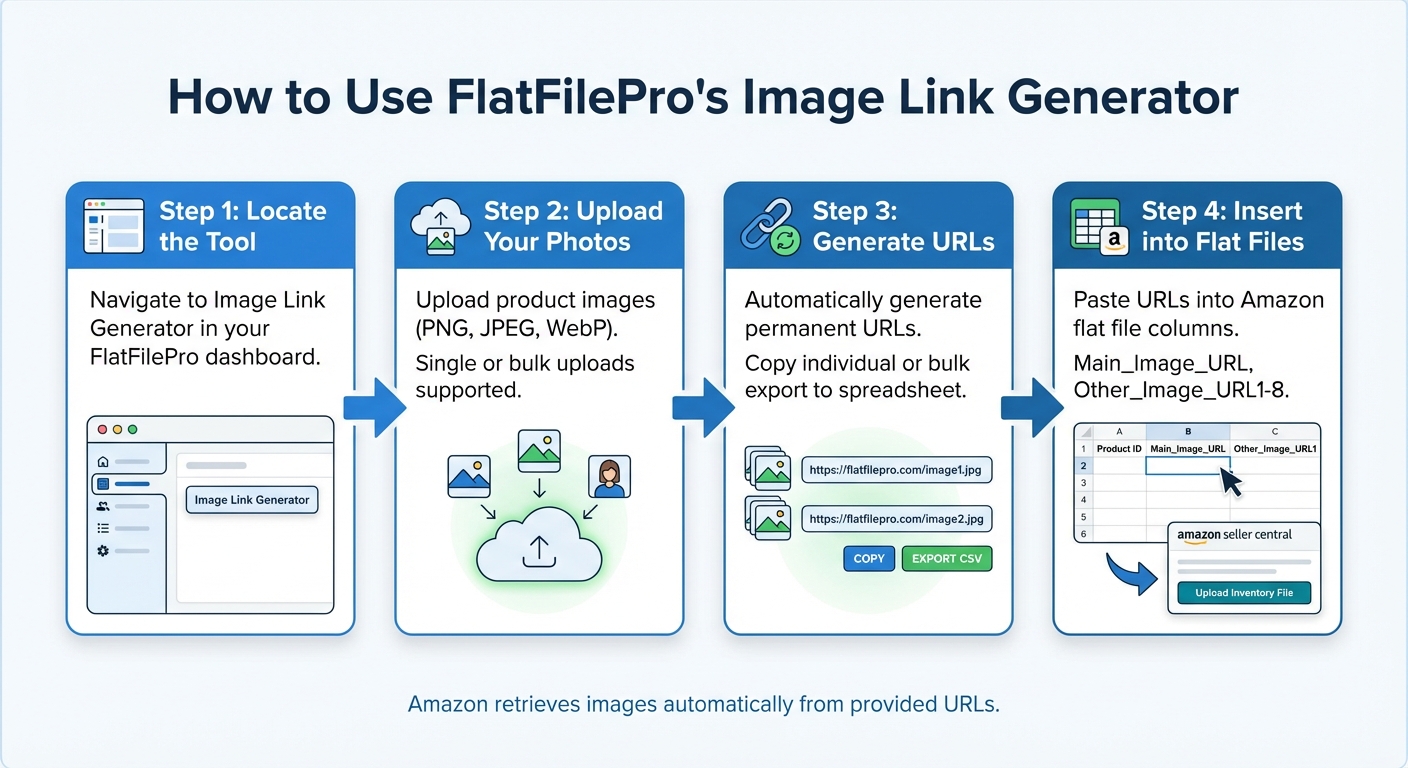
How to Generate Amazon Image Links in 4 Steps
FlatFilePro’s Image Link Generator simplifies the process of turning product photos into permanent URLs for Amazon listings. This tool manages everything – from uploading images to creating direct links – so you can avoid the hassle of hosting images elsewhere or manually formatting URLs. Here’s how to use it step by step.
Step 1: Locate the Image Link Generator
Start by navigating to the Image Link Generator in your FlatFilePro dashboard. You’ll find it in the main menu alongside other tools for managing listings. Once you click it, the upload interface will appear, ready for use.
Step 2: Upload Your Product Photos
Click the upload button to add your images. The tool supports PNG, JPEG, and WebP formats, ensuring compatibility with Amazon’s requirements. You can upload one image at a time or select multiple files for bulk uploads – perfect for updating several SKUs or adding extra images to a product line.
Step 3: Generate and Copy Direct Links
Once your images are uploaded, FlatFilePro automatically generates permanent URLs that work across all Amazon marketplaces. You can copy individual links directly or use the bulk copy feature to export all URLs into a spreadsheet for easy access.
Step 4: Insert Links into Amazon Flat Files
Take the URLs and paste them into the appropriate columns in your Amazon flat files, such as Main_Image_URL or Other_Image_URL1. Save the file and upload it through Seller Central using the Add Products via Upload option. Amazon will then retrieve the images from the provided URLs and update your listings automatically. This method ensures efficient and accurate bulk updates to your catalog.
Fixing Common Image Link Problems
Even after generating your image links, you might run into a few hiccups during uploads. Here’s how you can tackle some of the most common issues:
Broken or Expired Links
Temporary hosting services often delete files or change URLs, leading to broken links when Amazon tries to retrieve your images. The solution? Re-upload your images using FlatFilePro. It provides permanent, Amazon-compliant URLs that reduce the risk of broken or expired links.
Seller Central Upload Errors

Sometimes, upload errors occur due to issues like unsupported file types, special characters in URLs, or links with redirects.
FlatFilePro simplifies this by creating clean, direct image links in formats Amazon accepts, such as PNG, JPEG, and WebP. Make sure to double-check the placement of these URLs in fields like Main_Image_URL and Other_Image_URL1-8. If you’re facing delays, try splitting your uploads into smaller batches for smoother processing.
Images Missing from Live Listings
Even if your upload is successful, images might not show up if required fields are empty, URLs are misplaced, or Amazon’s processing isn’t complete. Another common issue is a mismatch between your flat file template and Amazon’s current requirements.
To troubleshoot, check the FlatFilePro Activity Log to confirm when Amazon processed your changes. If images are still missing after 24 hours, revisit your flat file to ensure every product has a valid entry in the Main_Image_URL column and that additional images are properly sequenced. Re-uploading the corrected file typically resolves the issue within a few hours.
What FlatFilePro’s Free Image Link Generator Does for You
FlatFilePro’s free image link generator does more than just simplify URL creation – it transforms how you manage your product catalog. Here’s how it helps:
Update Hundreds of Products Quickly
Need to update a large catalog? FlatFilePro makes it easy. With its bulk upload feature, you can generate Amazon-compliant image URLs for hundreds of products at once. This means you can update main images and additional visuals across your entire product lineup in one go. Say goodbye to tedious manual updates and hello to a faster, smoother workflow [4].
Better Accuracy and Fewer Mistakes
Mistakes in flat files can be a nightmare, but FlatFilePro has your back. It formats image links automatically, catching and correcting common errors before they happen. Plus, it validates URLs before submission, which reduces the chance of mistakes that could hurt your search rankings or lead to listing suppressions. This level of automation keeps your listings accurate and error-free [4].
Works Across All Amazon Marketplaces
Selling in multiple regions? FlatFilePro simplifies managing image links across Amazon marketplaces worldwide. From the US and UK to Germany and beyond, you can handle regional listings from one centralized dashboard. This ensures your image URLs are error-free and consistent, helping you maintain a unified brand presence while localizing content for different markets [4]. It’s a smart way to streamline global operations and improve efficiency.
Conclusion
By following the steps and troubleshooting tips outlined earlier, the importance of direct image links becomes apparent. They simplify catalog management by speeding up updates, minimizing errors, and maintaining consistent listings. For sellers managing dozens – or even hundreds – of products, manually handling images through Seller Central can quickly turn into a frustrating bottleneck.
FlatFilePro’s Free Image Link Generator helps eliminate this issue by instantly creating Amazon-compliant URLs, validating links, and handling bulk updates with ease. Whether you’re managing a small catalog or thousands of SKUs, this tool adapts to your needs without sacrificing accuracy or efficiency.
This tool can completely reshape your daily workflow. Instead of spending hours formatting URLs and fixing errors, you can focus on what truly matters – growing your business. FlatFilePro ensures high-resolution images, flags potential issues, and integrates seamlessly with your flat file uploads. The result? Faster updates, fewer listing suppressions, and the assurance that your product images display correctly on live listings. It’s the difference between struggling to manage your catalog and taking full control of it.
Take the hassle out of catalog updates starting today.
FAQs
What makes an image URL “Amazon-compliant” in a flat file?
An image URL that complies with Amazon’s requirements in a flat file must meet the following rules:
- Direct Link: The URL should end with
.jpgor.png. - Secure Access: It must use HTTPS and be accessible without restrictions.
- Size Standards: The image should have at least 1,000 pixels on its longest side.
- Background Requirements: Main images must feature a pure white background.
These guidelines are essential for ensuring the image works seamlessly with Amazon’s platform and meets their listing standards.
How many product images can I add per SKU using flat file URL columns?
You can include up to 8 product images per SKU using flat file URL columns. The primary image is usually labeled as "Main", while additional images are assigned to columns labeled "PT1" through "PT7". This structure makes it easy to display various angles or versions of your product effectively.
Why don’t my images show up after a successful flat file upload?
If your images aren’t showing up, it might be due to issues with the URLs. To fix this, make sure the links are properly formatted, use HTTPS, and point directly to JPEG or PNG files hosted on platforms that meet Amazon’s standards. Double-check that the URLs align with Amazon’s guidelines and are accessible without restrictions.
Tools like FlatFilePro’s Amazon Image Link Generator can simplify the process by creating links that comply with Amazon’s requirements, helping to minimize potential errors. Additionally, ensure your images meet Amazon’s specifications for size and format to avoid any display problems.