
Managing product images for Amazon can be a headache, especially for large catalogs. FlatFilePro‘s Amazon Image Link Generator simplifies this process by creating direct, Amazon-compliant image URLs in seconds. This free tool eliminates manual uploads, reduces errors, and speeds up bulk updates, saving time for sellers managing extensive catalogs.
Key Features:
- Direct Image URLs: Generates secure, Amazon-ready links for product images.
- Bulk Processing: Handles thousands of listings at once, perfect for large catalogs.
- Error Detection: Flags potential issues before updates go live.
- Version Control: Easily revert changes if needed.
- Global Management: Update images across multiple Amazon marketplaces from one dashboard.
How It Works:
- Sign Up: Create a free FlatFilePro account (14-day trial, no credit card required).
- Connect Your Account: Securely link your Amazon Seller Central account via SP-API.
- Sync Listings: Import your entire product catalog.
- Generate Links: Create and export image URLs or push updates directly to Amazon.
This tool is ideal for sellers, agencies, and teams looking to streamline catalog management and avoid the hassle of manual updates. Start for free at FlatFilePro and upgrade for advanced features like error-checking and global marketplace updates for $99/month.
How to Use the Amazon Image Link Generator
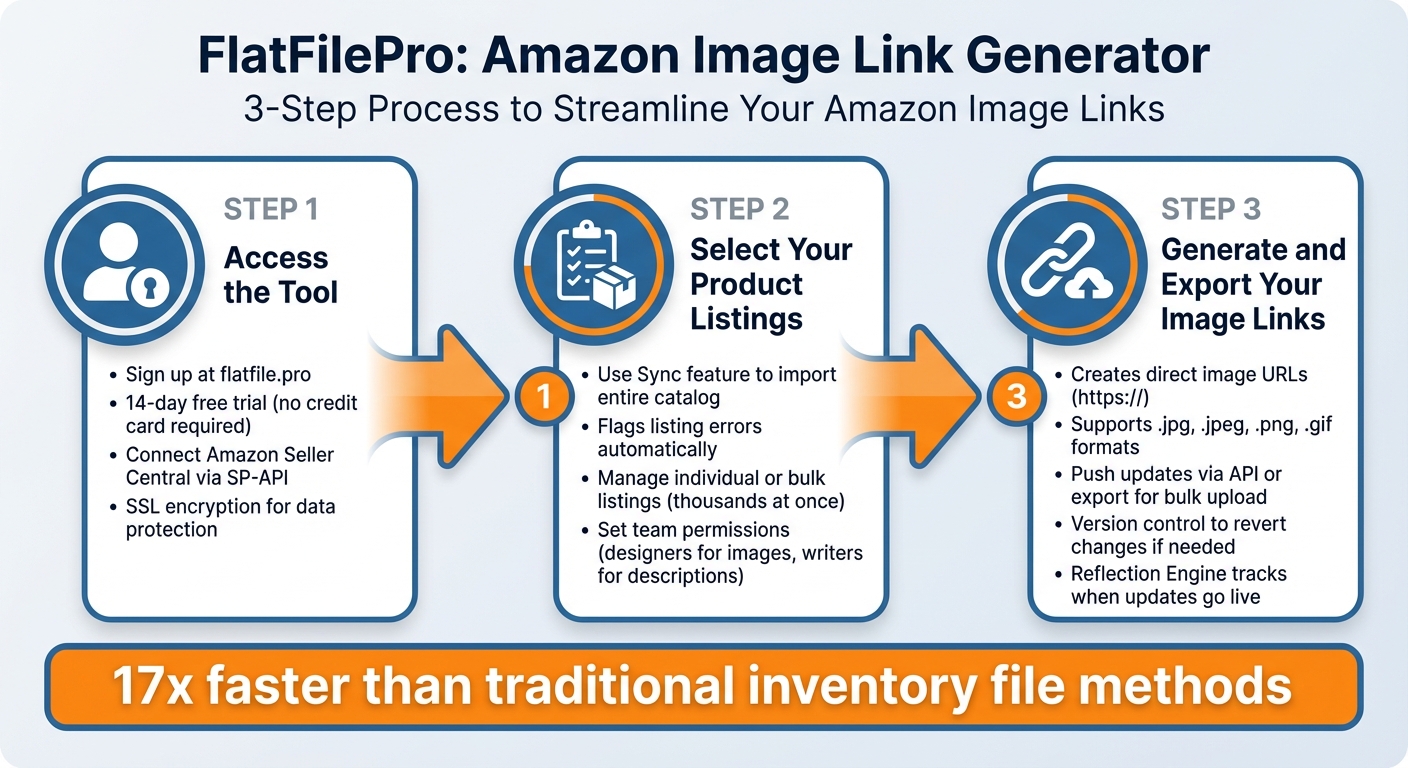
How to Generate Amazon Image Links in 3 Steps with FlatFilePro
Start by connecting your account, syncing your listings, and generating image URLs in just a few minutes.
Step 1: Access the Tool
Begin by signing up for a FlatFilePro account at flatfile.pro. They offer a 14-day free trial with no credit card required[1]. Once registered, securely connect your Amazon Seller Central account using SP-API, ensuring your data is protected with SSL encryption.
After linking your account, you’ll be directed to the FlatFilePro dashboard. Here, you can manage your listings and generate image links with ease. Next, sync your listings to import your complete product catalog.
Step 2: Select Your Product Listings
With your account connected, use the Sync feature to pull all your Amazon listings into the dashboard. This tool not only imports your entire catalog in one click but also flags any listing errors and organizes your products. This makes it easy to choose which listings need image links.
You can manage individual products or handle bulk updates for hundreds – or even thousands – of listings at once. If you’re working with a team, FlatFilePro allows you to assign user permissions. For example, designers can focus on images while writers handle product descriptions. This setup minimizes mistakes during large updates and is especially helpful for agencies managing multiple clients or brands preparing for seasonal campaigns.
This efficient workflow reflects FlatFilePro’s goal of simplifying bulk image management for Amazon sellers.
Step 3: Generate and Export Your Image Links
Once your listings are selected, you can generate image links in seconds. The tool creates direct image URLs with the correct protocol (https://) and image file formats (.jpg, .jpeg, .png, or .gif), all compatible with Amazon’s flat file requirements.
After generating the links, you can either push the updates directly to Amazon via the platform’s API or export the URLs for bulk flat file uploads. The Reflection Engine keeps track of catalog changes, letting you see when updates go live. If adjustments are needed, FlatFilePro’s version control allows you to revert to earlier image versions – an invaluable feature if a bulk update doesn’t perform as planned.
Keith Mander, Founder of Yuca Brands and Bagels.io, shared his thoughts on this functionality:
"Nifty bit of kit. Love that it saves all the changes my team makes across listings."
With this process, you can complete your image updates in no time.
Features and Benefits of the Image Link Generator
This tool brings a new level of efficiency to catalog image management, making it easier for sellers to handle their product listings with precision and speed.
Bulk Image Link Generation
Manually processing images can eat up hours of your day. The Image Link Generator changes that by quickly handling bulk listings, removing the need for tedious manual entry for each ASIN[1]. In fact, it’s 17 times faster than traditional inventory file methods[2]. Tasks that used to take an entire afternoon can now be completed in just minutes.
Jack Haldrup, Founder of Dr. Squatch, shared how this tool transformed his team’s workflow:
"This is the tool that powers our ops and analytics teams. We used to do everything manually, such a pain! Now we don’t have to think about anything and our listings update like magic!"[1]
The secret to this speed lies in its 100% API-based system, which updates images directly on Amazon. This eliminates the delays often caused by slow flat file uploads[2].
Better Catalog Management
The generator gives you full control over how your product images appear across your listings. With intelligent error-checking features, it flags potential issues before they go live, helping you avoid suppressed listings[3].
To streamline team collaboration, the tool includes role-based permissions. This allows you to assign tasks like image updates to specific team members without risking accidental changes to pricing or product descriptions[1]. For instance, a designer can focus solely on updating photos, while a copywriter handles text. If a bulk update doesn’t perform as expected, the complete listing history and version control make it easy to roll back any changes with just one click[1].
This level of control ensures your image updates are both compliant and optimized for performance.
Simple Interface and Free Access
The tool’s user-friendly design removes technical hurdles. Forget about complicated spreadsheet formulas or workarounds – the generator automatically creates Amazon-compliant direct image URLs with the correct protocol (https://) and supported file formats (.jpg, .jpeg, .png, .gif)[4].
FlatFilePro also offers a free version that grants access to essential bulk listing and catalog management features[3]. This simple interface underscores FlatFilePro’s focus on making catalog management as seamless as possible.
Ian Sells, Founder of Million Dollar Sellers, highlighted the impact:
"With FlatFilePro, I’ve been able to streamline my Amazon listing process significantly. What used to take hours now takes just minutes. It’s a game-changer for my business."[1]
sbb-itb-ed4fa17
How Sellers Use the Image Link Generator
Amazon sellers are always under pressure to keep their catalogs updated and compliant with Amazon’s guidelines. The Image Link Generator steps in to make this process faster and easier, cutting down on the time and effort sellers usually spend on these tasks. Here’s how it helps with speeding up updates, managing global images, and ensuring compliance.
Faster Bulk Product Listing Updates
When you’re managing a massive catalog, updating products manually isn’t just tedious – it’s nearly impossible. The Image Link Generator simplifies this by generating direct URLs for entire catalogs in just minutes. Its API-based system updates Amazon instantly, eliminating the delays that come with manual entry[2].
This speed is a game-changer for sellers running seasonal promotions. For instance, instead of spending days updating holiday-themed images across your catalog, you can handle everything in one session. And if something goes wrong? The version control feature lets you revert to previous images with just one click[1].
Managing Images Across Multiple Marketplaces
Selling in multiple countries comes with its own set of challenges, especially when it comes to maintaining a consistent brand image. The Image Link Generator’s centralized dashboard allows sellers to manage images for Amazon marketplaces in the US, UK, Canada, and beyond – all from one place[1]. With just a few clicks, you can push verified image content from one marketplace to another, ensuring your products look the same whether someone’s shopping in New York or London.
This feature also acts as a safeguard against "Black-Hat attacks", where competitors might upload non-compliant images to your listings in different regions[1]. By filling all available image slots across every marketplace, you retain control over your brand’s presentation worldwide.
Meeting Amazon’s Image Requirements
Speed and bulk updates are great, but staying compliant with Amazon’s image requirements is just as crucial. The Image Link Generator automatically creates Amazon-compliant direct image URLs, complete with the correct protocol (https://) and supported file formats like .jpg, .jpeg, .png, and .gif[4].
Its built-in error-checking system flags potential compliance issues before you submit any changes, helping you avoid the dreaded listing suppressions[2]. This is especially important given that about 93% of Amazon sellers encounter “catalog rot,” where listing changes or images mysteriously disappear without warning[1]. The tool’s Reflection Engine continuously monitors your catalog, catching these silent failures before they can hurt your sales[1]. Once changes are submitted successfully, they typically appear on your public product listing within about 15 minutes[5].
Get Started with the Image Link Generator
Starting with the Image Link Generator is straightforward and brings both efficiency and security to your workflow.
Why Choose FlatFilePro‘s Image Link Generator

This free tool is designed to handle bulk listings effortlessly, using Amazon’s secure SP-API for seamless integration. Its user-friendly interface ensures every team member can navigate it with ease [2].
FlatFilePro users consistently give the platform a 5 out of 5-star rating, praising how it simplifies listing workflows and saves time. Plus, they offer a bold promise: a 100% ROI guarantee within six months [1].
How to Access the Tool
Getting started is easy. Head over to the FlatFilePro website and sign up for the free trial – no credit card needed [1]. For step-by-step guidance, check out the "Step 1: Access the Tool" section, which explains how to connect your Amazon Seller Central account and sync your listings.
If you’re collaborating with a team, use the permission settings to manage access. For instance, you can allow designers to work solely on images while keeping financial data restricted [1]. After the trial, the standard subscription costs $99 per month and includes advanced features like version control, error-checking, and global marketplace management [1].
FAQs
How can the Amazon Image Link Generator help make catalog management easier?
The Amazon Image Link Generator makes managing your product catalog easier by automatically generating direct image URLs for your listings. This means you no longer have to create links manually, saving you time and minimizing the risk of mistakes.
With support for bulk uploads into flat files, this tool simplifies handling large product catalogs. It ensures your listings comply with Amazon’s image requirements quickly and without unnecessary complications.
What are the advantages of using FlatFilePro’s Amazon Image Link Generator for managing product images?
FlatFilePro’s Amazon Image Link Generator takes the hassle out of creating direct image URLs for Amazon product listings. Instead of manually handling this task, the tool uses Amazon’s API to automatically pull image links, ensuring they meet Amazon’s requirements while reducing the chances of errors or broken links.
One of its standout features is the ability to generate image URLs in bulk. This makes it incredibly convenient to update multiple listings across Amazon marketplaces or other platforms that support CSV uploads. The result? Less repetitive work, a more consistent brand presence, and greater buyer confidence.
Thanks to its fully automated and API-driven setup, the generator scales effortlessly and keeps links valid for longer periods. By simplifying your workflow, it not only enhances catalog management but also supports better sales performance – while cutting down on potential returns caused by outdated or incorrect images.
How does FlatFilePro ensure the security of my Amazon Seller Central account connection?
FlatFilePro integrates directly with your Amazon Seller Central account through Amazon’s approved API and secure authentication methods. This approach ensures that all data transfers stay protected within Amazon’s secure and trusted framework.
Unlike web-scraping, which can expose your data to potential risks, this method uses Amazon’s own infrastructure to keep your information safe, so you can use the tool with confidence.