
If your Amazon A+ image specs are off, your upload can get rejected. The main checks are simple: use RGB images in .jpg, .bmp, or .png, keep each file under 2 MB, and set images to at least 72 dpi.
Here’s the short version:
- Basic A+ uses a 970 px layout and allows up to 5 modules
- Premium A+ uses a 1,464 px layout and allows up to 7 modules
- Comparison charts use 150 × 300 px product images and support up to 5 products
- Brand Story specs were not listed, so I’d check Seller Central
- Video and interactive modules sit inside Premium A+ and usually appear in “From the Manufacturer”
In other words, the baseline rules stay the same, but the layout size, image dimensions, and module count change by content type. That’s what affects how your page looks on desktop and mobile, and it’s often where upload errors start.
Quick Comparison
| Content Type | Main Image/Layout Spec | Limit | Notes |
|---|---|---|---|
| Basic A+ | 970 px module width | 5 modules | Common images include 600 × 180 px logo and 970 × 600 px header |
| Premium A+ | 1,464 px canvas | 7 modules | Old Basic A+ assets often need to be rebuilt |
| Brand Story | Not provided | Not provided | Check Seller Central before building |
| Comparison Charts | 150 × 300 px per product image | 5 products | Static image links to product pages |
| Video / Interactive | Part of Premium A+ | Varies by Premium setup | Usually shown below the fold |
I’d use this page as a short pre-upload check: file type, color mode, file size, resolution, module width, and page limits.
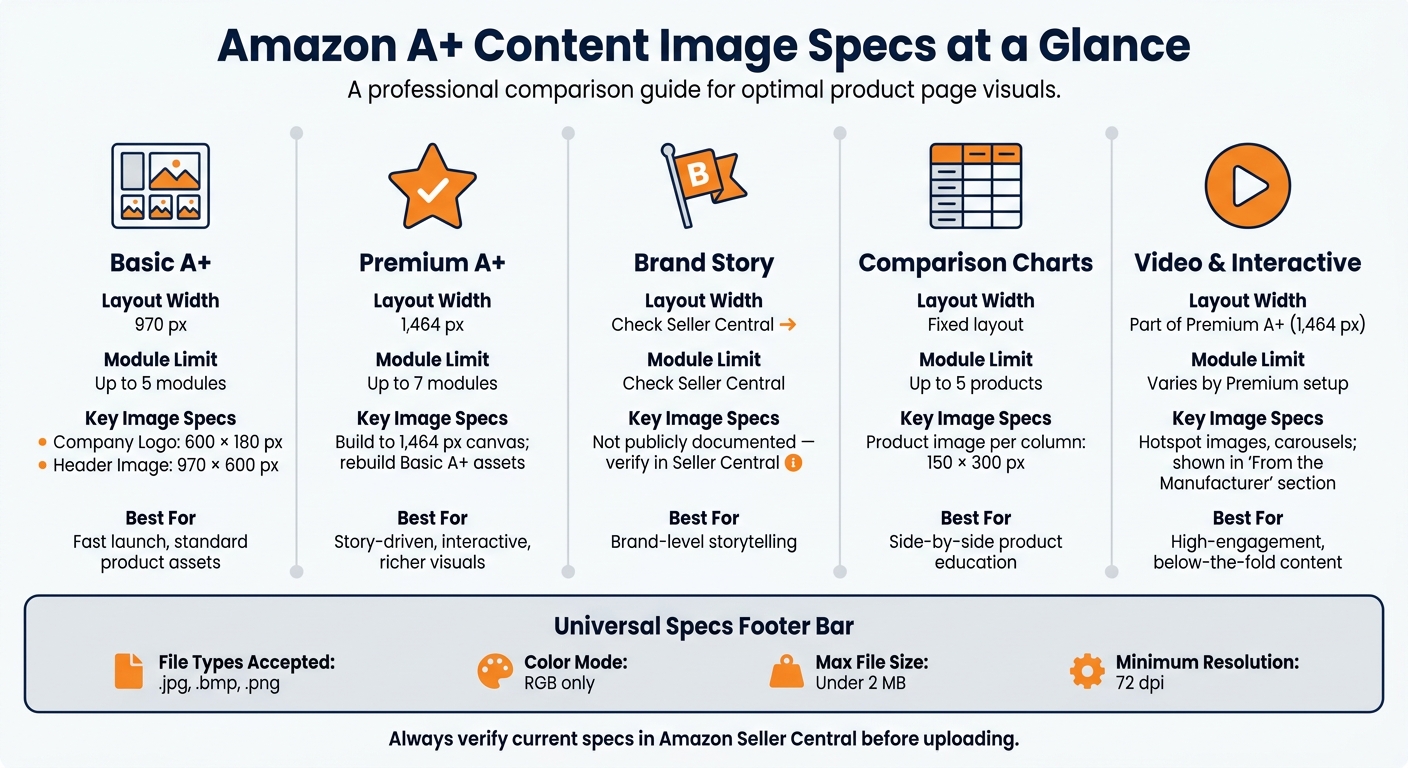
Amazon A+ Content Image Specs: Quick Comparison Guide
Dimensions & Specs for Basic A+ Content on Amazon
1. Amazon Basic A+ Content
Basic A+ Content is Amazon’s entry-level A+ option for brand-registered sellers. It gives you pre-built modules for images, text, and comparison charts that go beyond the standard bullet points and product description.
Image Dimensions
All Basic A+ Content modules use a standard width of 970 pixels. The height changes based on the module. Two common specs are:
| Module | Dimensions |
|---|---|
| Company Logo | 600 × 180 px |
| Full Image (Header) | 970 × 600 px |
Placement Behavior
A+ Content uses a responsive layout. On desktop, modules display at 970 px wide. On mobile, those same modules stack vertically.
Module Limits
Basic A+ Content is limited to 5 modules per product detail page. That makes each slot matter, so every module needs to do a clear job.
Next, Premium A+ gives you more room to work with and changes how these image specs come into play.
2. Amazon Premium A+ Content
Premium A+ takes the Basic A+ layout from 970 pixels to 1,464 pixels.
That extra width gives you more room to work with. But it also means you can’t just drop in the same assets and hope they still look right. In most cases, you’ll need to rebuild Basic A+ creatives so they fit the wider canvas cleanly.
Image Dimensions
Create source images for the 1,464-pixel canvas.
If you already have Basic A+ assets, plan to remake them for Premium A+. A design that looked fine at 970 pixels can feel stretched or awkward once the layout gets wider.
Module Limits
Premium A+ supports up to 7 modules per detail page.
That gives you 2 more modules than Basic A+, which can help if you need extra space for product details, comparison sections, or richer visuals.
Next, Brand Story shifts from product-detail modules to brand-level storytelling, with different image rules.
3. Amazon Brand Story
Verified Brand Story image specs are not included in the source material, so check Seller Central for the current requirements before you build anything.
At this point, you’ve got the high-level view of Brand Story. Next up: Amazon product comparison charts, where image layout rules and module limits get a lot tighter.
4. Amazon Product Comparison Charts
Comparison charts are where space gets tight. Unlike larger A+ hero layouts, these charts are smaller, fixed, and tied to specific products. That means image size and module capacity matter a lot more, and small layout mistakes stand out fast.
Image Dimensions
Each column uses a 150 × 300 px product image as its header.
Placement Behavior
These images are static and link to product detail pages.
Module Limits
One chart supports up to 5 products. Next, video and interactive modules introduce different media requirements.
sbb-itb-ed4fa17
5. Amazon Video and Interactive Modules
Video and interactive modules are part of Premium A+. This group includes hotspot images and carousel modules.
You’ll usually find them in the product detail page’s "From the Manufacturer" section, below the fold on both desktop and mobile.
That location changes the way shoppers run into this content. They don’t see it right away, so these modules stand out most for their layout and visibility.
Where the Specs Differ Most
The biggest gaps across these content types come down to layout width, image sizing, and how many modules you can use.
Basic A+ uses 970 px modules, with up to 5 modules per page. Premium A+ goes bigger at 1,464 px, and lets you use up to 7 modules.
Comparison charts follow a more fixed setup. Each product column uses 150 × 300 px product images. Brand Story is a little different: you need to check the specs directly in Seller Central before you start building.
Pros and Cons by Content Type
Now that the specs are clear, here’s the tradeoff: speed vs. control.
| Content Type | Pros | Cons |
|---|---|---|
| Basic A+ | Lowest production effort; fastest path to launch; simpler static layout | Least creative flexibility; relies on static image and text modules |
| Premium A+ | Most creative flexibility; supports richer interactive modules | High production overhead; Requires Premium A+ eligibility; more complex specs |
If your main goal is to get pages live fast, Basic A+ is the better fit. It takes less work to produce and uses a simple static layout.
If you want more room to shape the page, Premium A+ gives you that extra control. The tradeoff is more production work, stricter eligibility, and tougher specs.
FlatFilePro helps teams track listing errors and monitor when changes go live.
Conclusion
Each A+ content type has its own role. Basic A+ works for standard product assets. Premium A+ gives you more room for story-driven sections. Brand Story helps shoppers get a feel for the brand. Product Comparison Charts make side-by-side education easier. And Video/Interactive Modules are best when engagement matters most.
Before you upload anything, check the pixels, file format, color mode, size limits, and any module-specific rules. Use the spec table above as your final pre-upload checklist.
FAQs
Why do A+ image uploads get rejected?
A+ image uploads usually get rejected for a simple reason: the files don’t match Amazon’s specs. The most common problems are the wrong dimensions, unsupported file types, or image quality that’s too low.
Checking the exact A+ Content image requirements before you upload can save time and help you avoid a rejection.
Do I need to redesign images for Premium A+?
Premium A+ may require image updates, but that doesn’t always mean you need to redo everything from scratch.
It mostly comes down to how well your current images fit the available module layouts and image rules.
If your existing visuals already match the needed dimensions and support the right message, you may only need a few small tweaks instead of a full redesign.
Where can I find Brand Story image specs?
Brand Story image specs are listed in Amazon’s A+ Content image requirements.
For the exact dimensions and formatting rules, check Amazon’s official guidance for Brand Story images.