
FlatFilePro’s Free Image Link Generator simplifies managing product images for Amazon sellers with large catalogs. It ensures compliance with Amazon’s strict image requirements, like secure HTTPS URLs, proper dimensions (500–10,000 pixels), and naming conventions. The tool automates URL generation and listing management, validates images, and flags errors before submission, saving time and avoiding listing suppression. Key features include:
- Bulk Image Management: Upload and validate multiple images simultaneously.
- Pre-Upload Validation: Detect potential issues early, like broken links or incorrect formats.
- Direct API Integration: Update Amazon listings quickly, bypassing manual uploads.
- Error Detection: Visual indicators (green checkmarks/red X’s) highlight compliant and problematic images.
- Role-Based Access: Teams can securely manage images without risking other listing data.
With a user-friendly interface and built-in compliance checks, FlatFilePro reduces manual work, minimizes errors, and speeds up listing updates. Available with a standard plan for $99/month, it’s a practical solution for sellers managing 300+ listings.
Amazon Image Requirements: A Comprehensive Guide to Amazon Product Listing Image & Photo Guidelines
sbb-itb-ed4fa17
Why Amazon Sellers Need an Image Link Generator
Managing images for an Amazon business can quickly become overwhelming, especially when dealing with a large catalog of products. Amazon enforces strict technical standards for product images, and failing to meet these can result in listing suppression[1]. When a listing is suppressed, even active products might vanish from search results. Handling this manually not only takes up valuable time but also increases the risk of costly mistakes.
Amazon’s Image Requirements Explained
Amazon has very specific rules for product images, and meeting these is non-negotiable. Accepted file formats include JPEG (preferred), TIFF, PNG, or non-animated GIFs[1]. Image dimensions must fall between 500 and 10,000 pixels on the longest side, with at least 1,600 pixels recommended to enable zoom functionality[1]. The main image also needs a pure white background (RGB 255, 255, 255), and the product must fill at least 85% of the frame[1].
There are also strict guidelines for file names. Each image file must use the product identifier (like ASIN, UPC, or EAN) as the name, followed by the correct file extension – for example, B000999999.jpg[2]. Spaces, dashes, or special characters in filenames can cause images to fail to display[2]. Additionally, using sRGB or CMYK color modes ensures consistent image quality across different devices[1]. Sellers who invest in professionally optimized, compliant images often see a conversion boost of 30%–40%, particularly fashion brands[4].
These detailed requirements leave little room for error, making manual uploads a risky and time-consuming endeavor.
Problems with Manual Image Uploads
With so many technical details to manage, manual image uploads are prone to errors. A small mistake – like a non-compliant background, a formatting issue in the filename, or a broken URL – can result in Amazon rejecting the image[3]. Broken links, in particular, can be frustrating to troubleshoot and can delay your listings from going live.
"It’s against Amazon Associates TOS to upload product images into your site. You can only add them to your site via the API and that’s why I use AMZ Images plugin."
– Jon Dykstra, Niche Site Creator[5]
For sellers, the choice often comes down to spending hours on tedious formatting tasks or risking non-compliance that could hurt search rankings and sales. Automated tools offer a much-needed solution, allowing you to format, link, and embed images in just a few clicks, saving time and reducing errors[5].
How to Use FlatFilePro‘s Free Image Link Generator

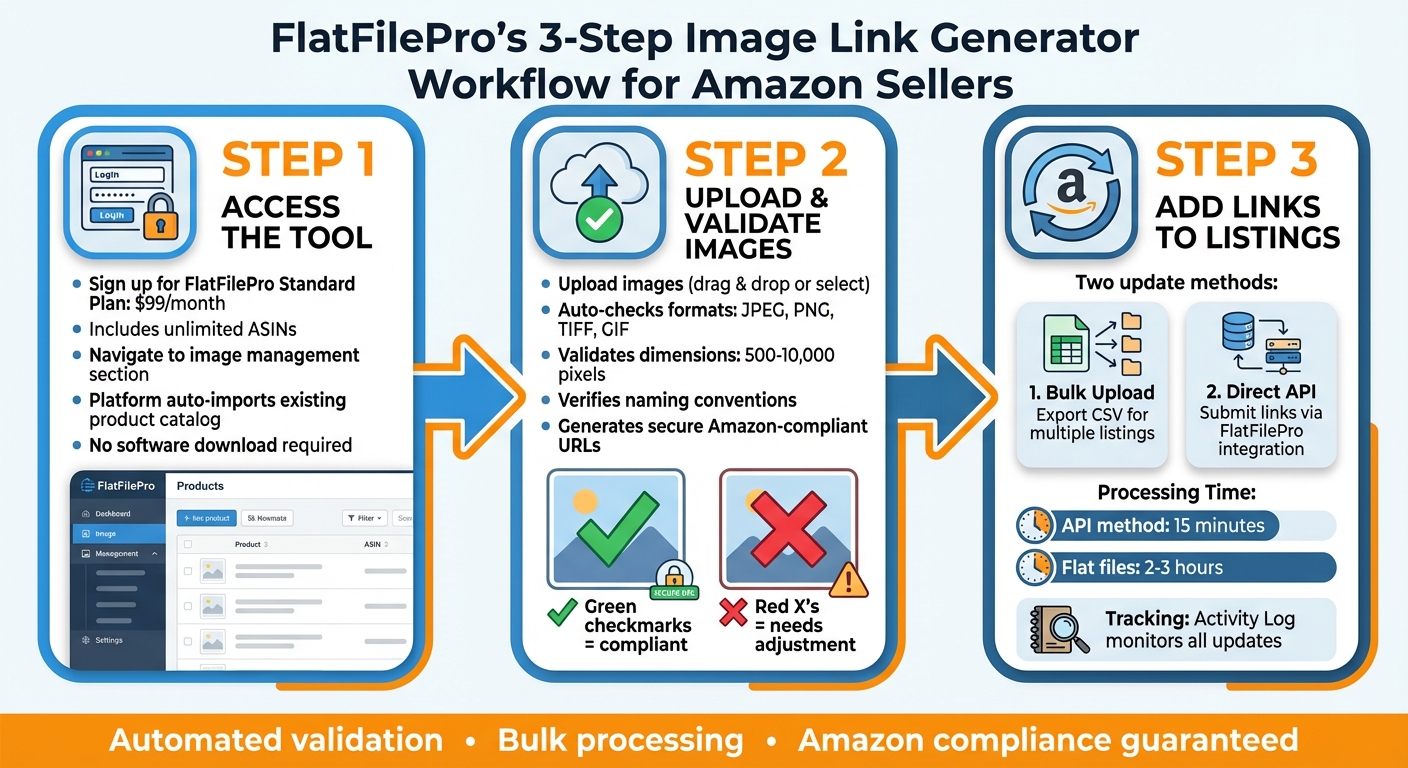
How to Use FlatFilePro’s Image Link Generator in 3 Steps
FlatFilePro’s Image Link Generator makes managing your Amazon product images quick and simple. By connecting directly to your Amazon Seller Central account through Amazon’s API, the tool eliminates the need for any software downloads. Once you log into your FlatFilePro dashboard, you’ll find the Image Link Generator alongside other listing management tools. The process – from uploading images to updating your listings with links – takes just minutes, saving you hours of manual work. It’s a perfect example of FlatFilePro’s focus on efficient and accurate catalog management.
Accessing the Tool
To use the Image Link Generator, you’ll first need a FlatFilePro account. The standard plan costs $99/month and includes unlimited ASINs along with access to all core features, including this tool. After signing up, head to the image management section. The platform’s interface is user-friendly, automatically importing your existing product catalog. This makes it easy to identify which listings need updated images. From there, you can upload images and generate Amazon-compliant URLs effortlessly.
Creating Amazon-Compliant Image Links
Uploading images is straightforward with FlatFilePro. The tool ensures your files meet Amazon’s requirements by checking formats (like JPEG, PNG, TIFF, and GIF), dimensions (500 to 10,000 pixels), and proper naming conventions that use product identifiers. You’ll see green checkmarks for compliant images and red X’s for those that need adjustments. Once uploaded, FlatFilePro generates secure URLs formatted to Amazon’s standards, helping you avoid potential listing errors. With these URLs ready, you’re set to update your Amazon listings without any hassle.
Adding Links to Your Amazon Listings
After generating your image links, you have two ways to update your Amazon listings. You can export the links in a format compatible with Amazon’s bulk upload files, making it easy to update multiple listings at once. Alternatively, you can use FlatFilePro’s API connection to submit the links directly to your Amazon listings. This integration speeds up the process, with changes typically appearing on Amazon within 15 minutes, compared to the 2-3 hours it usually takes with flat files. Plus, the Activity Log keeps track of every update, so you’ll know exactly when your new images go live.
Managing Images for Multiple Products
FlatFilePro simplifies bulk image management, making it just as smooth as handling individual listings.
Processing Multiple Images at Once
With FlatFilePro’s Image Link Generator, managing images for large catalogs becomes straightforward. You can upload files effortlessly – either by dragging and dropping or selecting them manually. The tool processes these images in batches, automatically verifying each URL to ensure it meets Amazon’s compliance standards. Once validated, approved images are marked with a green checkmark, signaling they’re ready to be used in your Amazon listings.
After validation, all generated links can be exported into a single CSV file formatted specifically for Amazon’s bulk upload system. This file organizes the image URLs by SKU, making it easy to pair each link with the corresponding product in your inventory. For sellers managing extensive catalogs, this method is a huge time-saver compared to manually uploading images through Seller Central’s Image Manager. Plus, the tool’s built-in checks ensure every URL aligns with Amazon’s strict guidelines.
Meeting Amazon’s Standards and Avoiding Errors
FlatFilePro takes care of validating all generated links to ensure they meet Amazon’s technical requirements. Each URL points directly to the image file (e.g., .jpg, .png, .tiff, or .gif), reducing the risk of encountering the frustrating "Error 15", where Amazon’s system fails to access an image [6][7]. As Steven Pope, Founder of My Amazon Guy, puts it:
"Loading photos via links is often the easiest and best solution… Be sure to link to the image file, not the webpage" [7].
The tool also checks that your main product images follow Amazon’s display rules, such as featuring the product on a pure white background and ensuring the product fills the frame [6]. Once uploaded through Amazon’s bulk system, images usually appear on your product detail pages within 24 hours [6]. If any links fail validation, the system flags them with red X’s and provides detailed error messages. This proactive approach allows you to address issues before submission, avoiding delays caused by rejected uploads. These validation steps integrate seamlessly into your workflow, ensuring a smooth and efficient process.
Fixing Problems and Following Best Practices
Even with automated validation tools, errors can creep in when uploading image links to Amazon. Knowing how to tackle these problems efficiently can keep your workflow on track. Below, we’ll cover how to resolve common errors and make the most of FlatFilePro’s tools for tracking updates.
Resolving Image Link Errors
One frequent error you might see is "Images could not be associated with this SKU." Interestingly, this issue often stems from product data rather than the images themselves. Problems like a missing Parent SKU or incorrect variation themes are common culprits behind this error [8]. So, double-check your product data for these issues before assuming the image link is the problem.
Another pitfall is using URLs that don’t directly link to image files. Amazon requires links that end with file extensions like .jpg, .png, .tiff, or .gif [9]. For example, www.mysite.com/image.jpg is acceptable, but www.mysite.com/gallery will cause errors. If you host images on your own website, consider storing them in a hidden folder to create permanent, direct links tailored for Amazon [9].
Data mismatches can also lead to errors. For instance, if the item_name in your upload doesn’t match the ASIN’s existing record, Amazon might reject it [8]. To pinpoint specific issues, check the "incomplete drafts" page in Seller Central after an upload attempt. For variation-related problems, Amazon’s Variation Wizard can help. It provides a pre-filled template to ensure your parent/child relationships are formatted correctly [8].
Using FlatFilePro’s Activity Log to Track Changes
Beyond fixing errors, keeping tabs on your updates is equally important. FlatFilePro’s Activity Log makes this easy by recording every image link update you submit. It tracks when changes were made, which links passed validation, and which ones failed.
If a product image isn’t displaying properly on Amazon, the Activity Log can reveal when the link was updated and whether Amazon accepted it. This level of detail helps you resolve issues quickly, minimizing any impact on your listings. Plus, the log acts as an audit trail, allowing you to review past changes and identify what worked versus what didn’t. This transparency ensures you can stay ahead of potential problems while maintaining clean, accurate listings.
Conclusion
Handling image links for a large catalog of Amazon products can be a time-consuming task. FlatFilePro’s tool takes the hassle out of the process by automating URL formatting, ensuring that every link aligns with Amazon’s technical requirements before you upload. With built-in validation, formatting errors are flagged early, reducing rejections and saving you the trouble of troubleshooting listing errors later.
This streamlined approach makes listing management much smoother. For sellers managing a variety of SKUs or dealing with multiple images for product variations, automated validation and bulk processing are game-changers. The Free Image Link Generator takes care of the technical side, allowing you to focus on sourcing high-quality product photos and improving your listings for better conversions. You can process multiple images simultaneously, monitor changes through the Activity Log, and maintain a consistent standard of image quality across all your products.
Whether you’re refreshing seasonal images, adding new products, or repairing listings with missing visuals, having a tool that aligns seamlessly with Amazon’s requirements simplifies the entire process. Clean, properly formatted image links reduce listing suppressions, improve the shopping experience for customers, and give you more time to focus on growing your business. FlatFilePro’s tool ensures that image management becomes a smooth, efficient part of your workflow, helping you create better listings and drive more sales.
FAQs
Do I need to host my images to use this tool?
To use this tool effectively, your images need to be hosted on a public and stable server. This ensures you can generate direct image URLs that comply with Amazon’s guidelines. Make sure the server offers consistent and reliable access to your images to meet Amazon’s standards.
What happens if an image fails Amazon’s rules?
If your image breaks Amazon’s rules, it could be rejected, taken down, or even lead to listing suppression. When a listing is suppressed, your product might vanish from search results, which can seriously hurt its visibility and sales. To prevent this, double-check that all your images follow Amazon’s guidelines before you upload them.
Will my listings go down during image updates?
Updating product images on Amazon usually doesn’t result in listings going offline. In fact, high-quality images can boost both sales and customer confidence. That said, using images that don’t follow Amazon’s guidelines can lead to listing suppression or even removal. To prevent problems, always make sure your images comply with Amazon’s standards.