
Looking for a quick, hassle-free way to create Amazon-ready image URLs? FlatFilePro‘s free Amazon Image URL Generator is the solution. It eliminates the need for manual uploads, saves time, and ensures your URLs meet Amazon’s technical requirements – all without requiring an account or payment.
Key Benefits:
- No Sign-Up Needed: Start using the tool instantly.
- Bulk Processing: Upload and generate URLs for hundreds of images at once.
- Amazon-Ready URLs: Automatically formatted to meet Amazon’s standards.
How It Works:
- Upload Images: Drag and drop files in supported formats (JPG, PNG, etc.).
- Generate URLs: Click ‘Generate’ to create direct links.
- Export CSV: Download a ready-to-use file for Amazon flat files.
- Verify Links: Double-check URLs in your browser before uploading to Seller Central.
This tool is perfect for bulk catalog updates, managing product variations, and reducing flat file errors. Skip the tedious manual process and focus on growing your Amazon business.
HOW TO CREATE IMAGE URL FOR AMAZON FLAT FILES! QUICK AND EASY
Features of FlatFilePro‘s Free Amazon Image URL Generator

FlatFilePro’s free tool transforms your images into Amazon-ready URLs in no time, making bulk product management smoother and error-free.
No Sign-Up Needed
You can dive right in – no need to create an account or enter payment details. Just upload your images and get your URLs in seconds. It’s simple, fast, and hassle-free.
Generate URLs in Bulk
Got a massive product catalog? No problem. This generator can handle dozens or even hundreds of images at once. Whether you’re working with multiple product angles, lifestyle shots, or variations, this feature saves you the headache of processing each image individually.
Built for Amazon’s Standards
Every URL generated meets Amazon’s technical requirements for flat file uploads and API updates. This means fewer errors and no broken image links when submitting your listings. The tool takes care of compliance, so you can focus on other tasks without worrying about rejected uploads or delays.
How to Use FlatFilePro’s Free Amazon Image URL Generator
Step 1: Open the Tool
Head to FlatFilePro and navigate to the free Amazon Image URL Generator. No need for an account or payment details – just jump straight into the tool. It’s quick and hassle-free, taking just seconds to get started.
Step 2: Upload Your Images
Simply drag and drop your image files or select them manually. The tool supports formats like JPG, PNG, GIF, WEBP, and SVG, with individual file sizes ranging from 25MB to 32MB. Whether you’re updating a handful of products or managing a large catalog, you can upload images in bulk to streamline the process. Once uploaded, you’re ready to move on to URL generation.
Step 3: Generate and Export URLs
Hit ‘Generate’ to create Amazon-ready URLs for all your uploaded images. After processing, export these URLs as a CSV file. This file format is a perfect match for Amazon’s flat file templates, making it easy to copy and paste the URLs directly into your inventory spreadsheets without any extra adjustments.
Step 4: Verify and Use the URLs
Before using the URLs, double-check a few by pasting them into your browser to ensure they work. Once verified, add these URLs to the appropriate image fields in Seller Central and confirm that the images display correctly on your product listings.
sbb-itb-ed4fa17
Practical Use Cases for Amazon Sellers
Bulk Catalog Updates
FlatFilePro’s free generator makes bulk catalog updates a breeze, especially during seasonal promotions or rebranding efforts. Need to refresh your product images for the holidays? You can generate all your image URLs in one go and paste them directly into your flat file template. Whether you’re updating lifestyle images or adding promotional badges, this tool lets you revamp hundreds of listings in just minutes.
Managing Variation Families
Handling parent-child relationships for products with multiple variations – like colors, sizes, or styles – can be tricky. Each child SKU needs its own unique image URL, and this is where the image URL generator shines. It processes all your variation images at once and exports them as a CSV formatted for Amazon’s flat file. You’ll get a ready-to-use file where each child SKU is paired with its corresponding image URL. This eliminates manual entry and reduces the risk of errors, saving you time and headaches.
Reducing Flat File Submission Errors
Incorrectly formatted image URLs can cause flat file submissions to fail silently, leading to frustrating issues like images not displaying on your listings. These errors often stem from links pointing to preview pages or broken cloud storage paths instead of direct image files. A dedicated URL generator ensures your links are Amazon-compliant and point directly to the image files. This reduces listing suppressions, cuts down on troubleshooting time, and keeps your product pages running smoothly. With fewer submission errors, you can focus on growing your business instead of fixing avoidable mistakes.
"This is the tool that powers our ops and analytics teams. We used to do everything manually, such a pain! Now we don’t have to think about anything and our listings update like magic!" – Jack Haldrup, Founder, Dr. Squatch [1]
Advantages of FlatFilePro’s Free Generator Over Manual Hosting
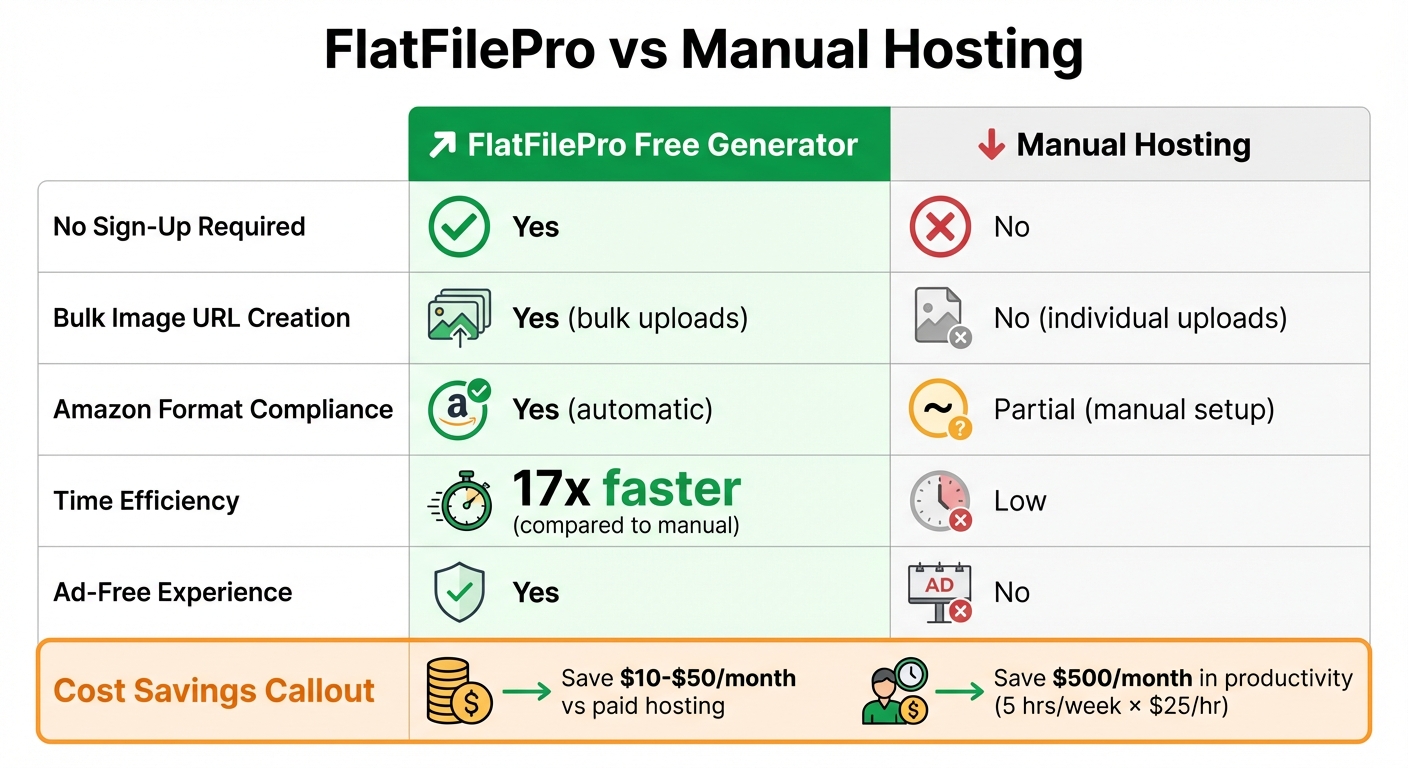
FlatFilePro vs Manual Image Hosting Comparison for Amazon Sellers
Feature Comparison
Hosting images manually often means dealing with multiple platforms, creating various accounts, and tolerating annoying ads. FlatFilePro simplifies this entire process by offering instant, ad-free access without any of those hassles.
Speed is another area where FlatFilePro shines. The tool processes bulk images 17x faster [2] than manually working through spreadsheets. Instead of spending hours copying and pasting individual links, you can generate hundreds of Amazon-compliant URLs in just seconds. All it takes is uploading your entire image set once, and you’ll get a ready-to-use CSV file that integrates directly into your flat file. Check out the table below for a quick comparison of features:
| Feature | FlatFilePro Free Generator | Manual Hosting |
|---|---|---|
| No Sign-Up Required | Yes | No |
| Bulk Image URL Creation | Yes (bulk uploads) | No (individual uploads) |
| Amazon Format Compliance | Yes (automatic) | Partial (manual setup) |
| Time Efficiency | 17x faster [2] | Low |
| Ad-Free Experience | Yes | No |
Cost and Time Savings
FlatFilePro’s free generator doesn’t just save time – it saves money too. Compared to paid hosting platforms that charge for bulk features, you could save $10–$50 per month. But the real hidden cost lies in manual methods. If you’re spending five hours a week on image URL tasks and your time is worth $25/hour, that’s nearly $500 in lost productivity every month.
On top of that, the tool’s automated validation catches formatting errors before submission, sparing you the headache of troubleshooting broken URLs or dealing with suppressed listings. With these tasks streamlined, you can redirect your energy to higher-priority activities, like refining product descriptions or expanding into new markets. FlatFilePro makes it easier to manage your catalog while keeping your workflow efficient and hassle-free.
Conclusion
FlatFilePro’s tool simplifies URL generation, ensures Amazon compliance, and saves valuable time. Managing a large Amazon catalog no longer needs to be a drain on resources. With the Free Amazon Image URL Generator, you can skip sign-ups and tedious manual formatting, while benefiting from bulk image processing that automatically aligns with Amazon’s requirements.
This tool directly tackles the challenges sellers face daily – time-consuming tasks and costly errors. Instead of spending hours creating image URLs, you can produce hundreds of Amazon-ready links in just seconds. Plus, its automated validation feature helps catch formatting issues before they impact your listings.
Here’s what users are saying about it:
"With FlatFilePro, I’ve been able to streamline my Amazon listing process significantly. What used to take hours now takes just minutes. It’s a game-changer for my business." – Ian Sells, Founder, Million Dollar Sellers [1]
Whether you’re managing seasonal updates, handling product variations, or preparing flat file uploads, this tool gets it done – no technical skills or subscriptions required. The free version offers essential features at no cost, making it accessible to everyone.
Take advantage of this tool to save time, optimize your listings, and focus on growing your business. Start simplifying your catalog management today!
FAQs
How does FlatFilePro help ensure Amazon image URLs meet compliance standards?
FlatFilePro simplifies the process of creating Amazon-compliant image URLs by walking you through each requirement. These include using secure HTTPS links, ensuring the images are in JPEG format, setting open access permissions, and meeting a minimum resolution of 1,000 pixels on the longest side.
By following these standards, the tool reduces potential errors and guarantees your product images are top-quality and ready to integrate smoothly into your Amazon listings.
Can I use FlatFilePro to generate image URLs for formats other than JPG and PNG?
FlatFilePro is built to generate Amazon-compatible image URLs, adhering to key requirements like using HTTPS, ensuring open access, and supporting the JPEG format. While JPG and PNG are the most frequently used formats for Amazon product images, the tool doesn’t restrict you to just these. The important thing is that your images align with Amazon’s product listing guidelines.
How does using FlatFilePro’s image URL generator save time and reduce costs?
FlatFilePro’s image URL generator makes creating Amazon-compliant image links a breeze, saving you time and effort. Rather than dealing with the hassle of manually generating image URLs, this tool automates the entire process, ensuring both precision and efficiency.
By minimizing manual errors and streamlining image management, it can also cut down on costs tied to correcting mistakes or dealing with delays. It’s particularly useful for tasks like bulk URL creation, offering Amazon sellers a straightforward way to simplify their workflow.