
Managing product images manually on Amazon can lead to errors that hurt your sales. Broken links, unsupported formats, and non-compliance with Amazon’s image standards often result in suppressed listings and lost visibility. An Image URL Generator simplifies this by creating secure, Amazon-compliant links for your images, ensuring smooth uploads and reducing mistakes.
Key Benefits of Using an Image URL Generator:
- Automates URL creation: Saves time by generating direct, secure links ready for Amazon.
- Ensures compliance: Meets Amazon’s strict image requirements (e.g., white background, size, and format).
- Reduces errors: Prevents broken links, incorrect formats, and listing suppression.
- Streamlines bulk uploads: Handles large catalogs efficiently, cutting manual work significantly.
By integrating tools like FlatFilePro, you can further simplify catalog management, maintain consistency across marketplaces, and monitor live listings for discrepancies. This approach ensures your product images remain accurate and compliant, allowing you to focus on growing your business.
HOW TO CREATE IMAGE URL FOR AMAZON FLAT FILES! QUICK AND EASY
Core Problems with Managing Amazon Image URLs Manually
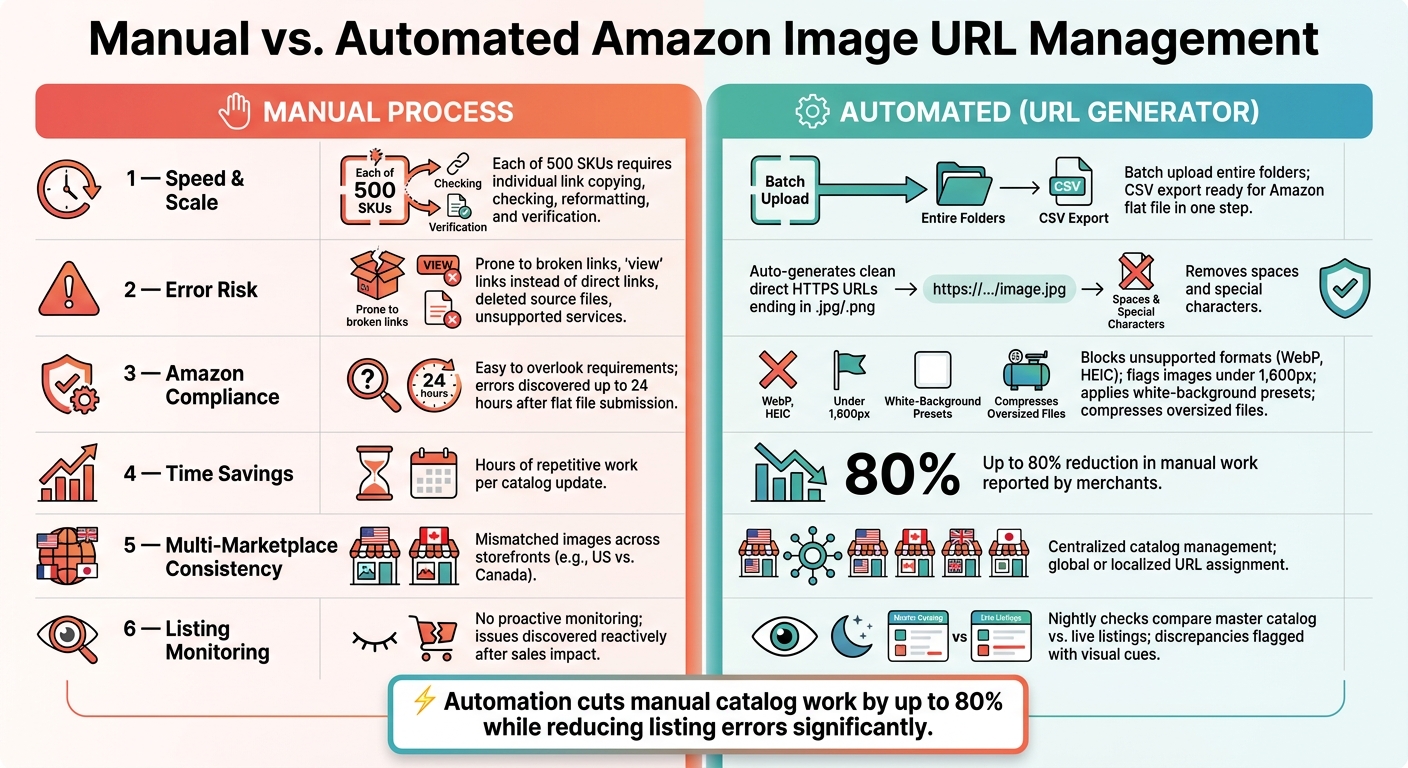
Manual vs. Automated Amazon Image URL Management: Key Differences
Handling Amazon image URLs manually is a tedious process that eats up time and poses a real risk to your sales. It involves downloading images, uploading them to third-party hosting sites, and then copying and pasting each link into a flat file. Every step increases the likelihood of mistakes that can hurt your listings.
Why Manual URL Management Wastes Time
The larger your product catalog, the more overwhelming this task becomes. For instance, if you’re managing 500 SKUs, that means dealing with 500 individual links. Each link needs to be copied, checked, reformatted if necessary, and verified after upload. These repetitive tasks not only slow you down but also open the door to errors that can snowball into bigger problems.
Broken Links and Incorrectly Formatted URLs
Manual methods are prone to creating errors like broken links, incorrect formatting, or improper permissions. For example, a Google Drive "view" link might seem fine, but Amazon requires direct-download links. Below is a breakdown of common manual mistakes and how they impact your listings:
| Manual Error | Root Cause | Impact on Listing |
|---|---|---|
| Invalid URL format | Using a "view" link instead of a direct link | "Invalid URL" error; image fails to upload |
| Permission denied | Source file not set to public | Broken image icon on the product detail page |
| Deleted source file | Image removed from host after upload | Image disappears from the live listing |
| Unsupported service | Using platforms like Google Photos | Amazon’s crawler can’t fetch the image |
"If you delete the images from Google Drive, the direct links will break, and your Amazon product images will not display correctly." – YourSeller [1]
Not Meeting Amazon’s Image Requirements
Beyond the time wasted and technical errors, manual URL management often results in non-compliance with Amazon’s strict image standards. For example, Amazon requires that the main image:
- Has a pure white background (RGB 255, 255, 255)
- Contains no text or watermarks
- Meets a minimum size of 1,000 x 1,000 pixels
- Is under 10MB to ensure smooth processing [1]
Failing to meet these standards can lead to suppressed listings, which directly affects your visibility and sales.
"Amazon’s algorithm favors listings with high-quality images." – Shaival Choksi, Founder, YourSeller [1]
The trouble is, when you’re managing URLs manually, it’s easy to overlook these requirements. Often, you only realize there’s an issue when Amazon rejects your listing – sometimes as late as 24 hours after submitting your flat file [1].
How Image URL Generators Fix These Problems
An image URL generator takes the hassle out of managing images. Instead of tediously uploading files one by one and manually copying links, these tools let you upload a batch of images and automatically generate direct HTTPS URLs for each one. This streamlined process tackles the issues of broken links, formatting errors, and compliance failures discussed earlier. Let’s dive into how these features ensure smoother, error-free listings.
Automatic Generation of Clean, Direct Links
A clean, direct link is simple – it ends with a file extension like .jpg or .png and loads immediately without extra parameters. Image URL generators host files on dedicated servers or CDNs, ensuring these links are straightforward and reliable. They also tidy up file names by removing spaces, special characters, and inconsistent capitalization before creating the URL. The result? A standardized link Amazon can fetch without fail.
Built-In Compliance with Amazon’s Image Standards
Another major perk of these tools is their ability to enforce Amazon’s image standards during URL creation. They automatically block unsupported formats like WebP or HEIC, flag images that don’t meet the minimum 1,600-pixel requirement on the longest side, and even apply white-background presets for main product images. Some tools go a step further by compressing oversized files to avoid rejections. This ensures that every image meets Amazon’s guidelines, making bulk processing smoother and reducing the risk of errors.
Bulk Processing for Large Product Catalogs
For sellers managing large catalogs, bulk processing is a game-changer. Many merchants report cutting manual work by up to 80% while significantly reducing listing errors [2]. Here’s how it works: upload a folder of images with consistent file names (e.g., SKU_main.jpg, SKU_A1.jpg), let the tool generate URLs for each file, and export a CSV file that fits Amazon’s flat file template. Tasks that used to take hours of repetitive work are now completed in one automated step.
sbb-itb-ed4fa17
Using Image URL Generators with FlatFilePro for Better Catalog Management

Creating clean, compliant image URLs is just the beginning. The real challenge is ensuring those URLs are accurately placed in the right fields across your catalog. That’s where FlatFilePro steps in. By combining automated URL generation with its powerful features, FlatFilePro simplifies catalog management. It bridges the gap between your image hosting and live Amazon listings, turning URL generation into a scalable, repeatable process.
Making Bulk Edits and Updates Faster
Amazon’s flat file templates can include 9–10 image URL fields per SKU – one for the main image and up to eight for additional images. Manually updating these fields for hundreds of SKUs is a daunting task.
FlatFilePro makes this process manageable with its spreadsheet-style interface. You can export your SKUs, paste the updated URLs, and use built-in validations to catch empty or incorrect fields. Once everything checks out, upload the changes to Amazon in one smooth operation. What might take an entire day manually can now be handled with precision in a fraction of the time.
This streamlined approach ensures your catalog stays updated efficiently.
Keeping Image URLs Consistent Across Marketplaces
FlatFilePro doesn’t just make bulk edits easier – it helps maintain uniformity across multiple marketplaces. Sellers managing listings on Amazon.com, Amazon.ca, and other regions often face mismatched images between storefronts. For instance, the U.S. listing might have the latest hero image, while the Canadian one still shows an outdated version.
FlatFilePro’s centralized catalog structure solves this problem. It allows you to manage image URLs for all marketplaces in one place. You can decide which URLs should be shared globally and which should be localized, ensuring that product images and infographics remain consistent across regions. This eliminates the need to duplicate efforts for every country.
Once consistency is established, proactive monitoring becomes the next priority.
Spotting and Fixing Image Issues in Live Listings
Even after uploading, issues like supplier swaps or accidental overwrites can disrupt your listings. FlatFilePro’s Reflection Engine addresses this by running nightly checks. It compares your master catalog with what’s live on Amazon, flagging discrepancies with clear visual cues. If a live listing displays the wrong image URL, you can quickly identify the affected SKUs and push corrected links in bulk, preventing the issue from escalating into lost sales.
For larger catalogs, where manually reviewing each ASIN is impossible, this kind of automated monitoring is invaluable. It ensures your listings stay accurate and visually appealing without constant manual oversight.
Practical Tips for U.S. Sellers Using Image URL Generators
Setting up reliable hosting and a consistent URL process is essential for smooth and compliant Amazon listings.
How to Pick a Reliable Image Hosting Solution
When choosing an image host, look for one that offers direct, stable, and publicly accessible URLs. These links should allow Amazon to fetch images without running into login requirements or redirects. The most important aspect? The host must provide permanent URLs that don’t change over time.
Here’s what to check:
- The host should use HTTPS for secure links.
- URLs must not require authentication or include temporary tokens.
- File paths should remain consistent, even after upgrades or migrations.
- Long-term storage for your assets should be guaranteed.
If your hosting provider rotates URLs or alters them after a plan change, it could disrupt multiple listings without warning. By sticking to these basics, you’ll create a solid foundation for generating error-free URLs.
Building a Repeatable URL Generation Process
Having a consistent process for generating image URLs can save you from headaches down the line. Start by uploading your image and confirming its direct URL. Use a standardized naming system, log the URL, and map it to your catalog.
For file names, try something simple and descriptive like brand-ASIN-main.jpg or SKU-lifestyle-2.jpg. This structure makes it easy to find, replace, or audit specific files without combing through a chaotic library. Treat your image URLs as an integral part of your inventory – document your process and review it regularly to avoid issues creeping in.
Once your system is in place, always double-check that each URL works properly before uploading in bulk.
Testing URLs Before Uploading to Amazon
A URL isn’t useful unless it works as intended. Before uploading to Amazon, open each URL in a private browser window to confirm the image loads without issues. Then, check that the image itself meets Amazon’s requirements for format, dimensions, and quality for the specific slot it’s intended for. Even a perfectly structured URL won’t help if the image doesn’t meet Amazon’s standards.
For larger batches, spot-check a handful of URLs and do a small test upload before updating your entire catalog. A single bad URL in your template can cause problems across hundreds of SKUs, so catching mistakes early can save you hours of cleanup later.
Conclusion: Get More Done with an Image URL Generator
Handling image URLs manually might not seem like a big deal – until a broken link disrupts your sales flow. Just one poorly formatted URL can lead to suppressed listings, delayed updates, and lost sales, especially when managing a large catalog. An image URL generator eliminates this risk by automating formatting, ensuring consistency, and creating links that are stable and ready for Amazon.
Manual processes can slow you down, but automation changes the game. With an image URL generator, you can process entire batches in minutes, saving time and reducing errors. Automation also ensures all your links meet Amazon’s requirements, so you can focus on growing your business instead of chasing down formatting issues.
"By using Google Drive links, sellers can… minimize errors in the Amazon flat file image upload process." – Shaival Choksi [1]
FlatFilePro takes these advantages even further by streamlining catalog management at scale. Once your URLs are clean and verified, FlatFilePro enables you to push updates across hundreds – or even thousands – of SKUs without the hassle of manual uploads. Its Reflection Engine keeps an eye on your live listings nightly, alerting you to any broken or altered image links before they impact your sales. This blend of automated URL generation and real-time monitoring makes managing large catalogs far more efficient.
For smooth, error-free catalog management, start with a reliable hosting setup, generate clean URLs, and let FlatFilePro handle your bulk updates with ease.
FAQs
What makes an image URL "Amazon-compliant"?
An Amazon-compliant image URL is a direct link to a publicly accessible image file with a valid extension such as .jpg, .png, or .tif. The URL must lead to the raw image file itself – not a webpage hosting the image.
To meet Amazon’s standards, the image should have:
- A pure white background (RGB 255, 255, 255).
- No added text, logos, or watermarks.
- Dimensions with at least 1,000 pixels on the longest side for optimal performance.
How do I prevent image links from breaking after upload?
To keep image links intact, always use direct links that lead straight to the raw image file, rather than links to a web viewer or sharing page. If you’re using cloud storage, double-check that permissions are set for public viewing, and convert the link to a direct download format when necessary. Make sure the original file stays in its location – moving or deleting it will cause the link to break. Also, steer clear of using special characters or spaces in file names to avoid compatibility issues.
Can I bulk-generate URLs and map them to the right SKUs automatically?
FlatFilePro makes it easy to bulk-generate compliant image URLs and automatically link them to the right SKUs. By integrating your Amazon Seller Central account through the Selling Partner API, the platform seamlessly syncs your product catalog.
Its intuitive field mapping tool ensures your data aligns perfectly with Amazon’s flat file headers, such as main_image_url. Plus, built-in validation checks guarantee everything meets Amazon’s compliance standards before you send updates or export the data as a CSV.