
Managing your Amazon product listings? Here’s the key takeaway:
- Seller Central is Amazon’s default platform for listing management. It’s great for small catalogs (under 100 SKUs) and basic needs. However, it becomes slow and error-prone as your inventory grows.
- Third-party listing management software offers advanced tools like bulk editing, automated error detection, and multi-marketplace support. These tools save time and reduce mistakes, especially for sellers managing 100+ SKUs or operating across multiple regions.
Quick Overview:
- Seller Central: Manual, best for small catalogs, limited bulk capabilities, no advanced error detection.
- Listing Management Software: API-powered, handles large catalogs, automates updates, and flags issues proactively with listing automation.
Quick Comparison:
| Feature | Seller Central | Listing Management Software |
|---|---|---|
| Ease of Use | Manual, basic tools | Automated, advanced features |
| Catalog Size | Best for <100 SKUs | Handles 100+ SKUs easily |
| Bulk Editing | Limited to 600 SKUs per upload | Supports 10,000+ SKUs |
| Error Detection | Reactive, manual fixes | Proactive, real-time alerts |
| Cost | $39.99/month (Professional Plan) | $99+/month (e.g., FlatFilePro) |
For small sellers, Seller Central is sufficient. But if you’re scaling, investing in listing software can simplify your workflow and save hours of manual work.
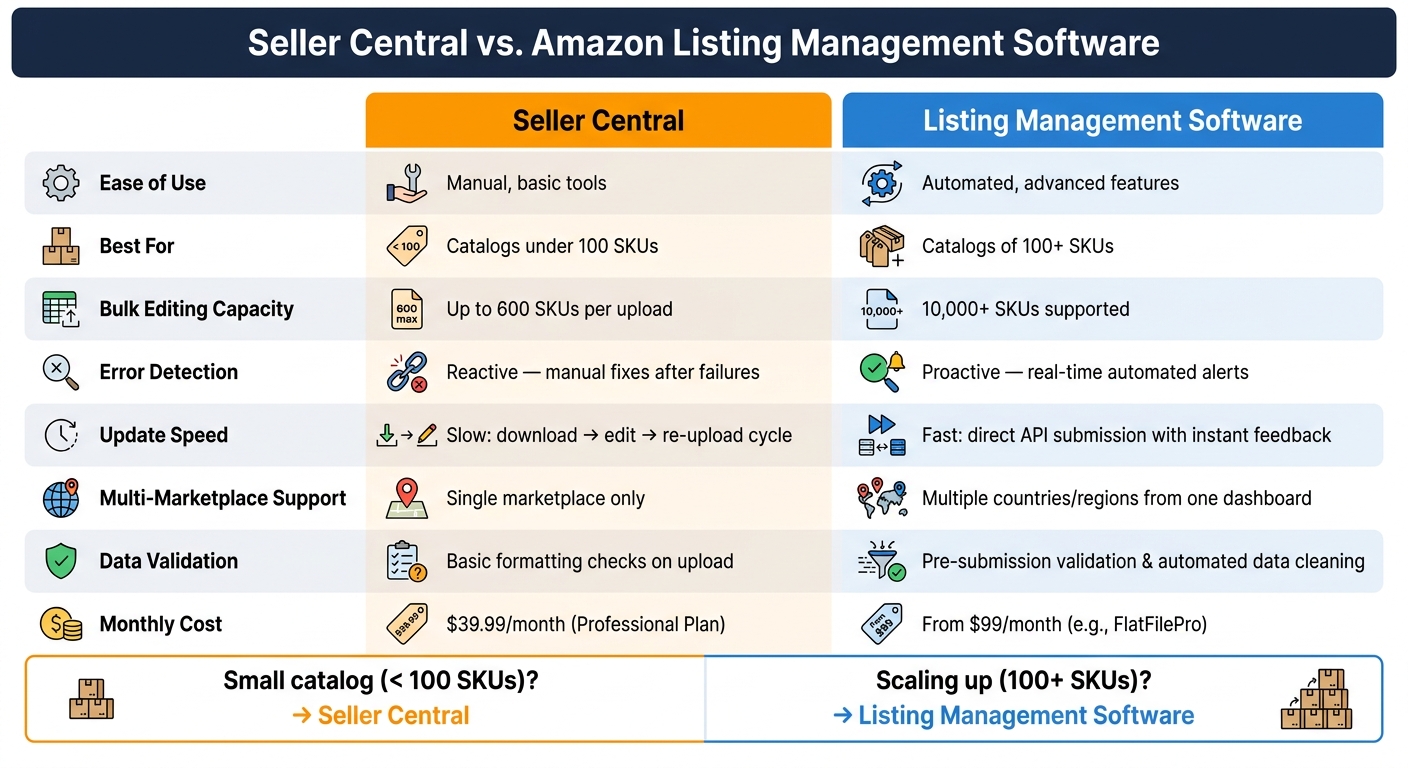
Seller Central vs. Listing Management Software: Feature Comparison
Best Amazon Listing Management Tools in 2025 🛠️📈 | AI, SEO & Multi-Channel Optimization
sbb-itb-ed4fa17
Seller Central for Listing Management: What You Get
Seller Central is Amazon’s built-in platform designed to help sellers manage their accounts. When it comes to listing management, the platform provides two primary methods, each suited to different catalog sizes.
Core Features of Seller Central
The "Add a Product" tool is a simple, browser-based option for creating listings one at a time, making it ideal for catalogs with fewer than 100 products. For larger catalogs, Seller Central offers Inventory File Templates, which allow sellers to upload multiple listings at once using Excel templates. However, these bulk-upload tools are only available with the Professional Selling Plan, which costs $39.99 per month.
In addition to listing creation, Seller Central offers a comprehensive suite of tools for managing inventory, pricing, images, and product variations. Sellers can make quick updates to stock levels and pricing, use the Automate Pricing tool to adjust prices dynamically, and experiment with content through the Manage Your Experiments feature. Brand Registry members also gain access to A+ Content, which allows for enhanced product detail pages. According to Amazon, adding basic A+ Content can boost sales by up to 8% [3].
While these tools work well for smaller catalogs, their limitations become more apparent as inventory grows.
Where Seller Central Works Well
Seller Central is a solid option for sellers managing small or static catalogs. Beyond the monthly cost of the selling plan, there are no additional fees, and the platform connects directly to Amazon without requiring third-party software. The interface is user-friendly, making it easy for most sellers to get started quickly. For businesses with straightforward needs, this simplicity can be a major advantage.
Where Seller Central Falls Short
As catalog size and complexity increase, the platform’s shortcomings become more noticeable. The "Add a Product" tool is limited to creating one listing at a time, which quickly becomes inefficient for larger inventories. Although Inventory File Templates enable bulk uploads, they come with strict formatting requirements. Even minor changes to column order or headers can lead to processing errors, making the process frustrating and time-consuming.
Policy enforcement adds another layer of unpredictability. As Manny explains:
"Amazon requires approval to sell in many categories, brands, and products and in some instances restrictions and policies change. As the Amazon catalog grows, we continuously make new determinations on which products should be restricted." [4]
Listings can suddenly become inactive due to shifting policies, often requiring sellers to provide documentation to substantiate claims like "anti-bacterial" or "100% all-natural." Without proper proof, listings risk removal. For sellers generating higher sales volumes – typically around $10,000 to $25,000 per month – managing inventory through Seller Central’s native tools can become particularly challenging. Issues such as restock limits, inbound shipment complexities, and returns processing further highlight the platform’s limitations [5].
These challenges make it clear that while Seller Central works well for smaller-scale operations, larger businesses may require more advanced tools to handle the demands of scaling and navigating Amazon’s regulatory environment.
Amazon Listing Management Software: What It Does Differently
Managing Amazon listings manually through Seller Central can be time-consuming and prone to errors. This is where listing management software steps in, connecting directly to Amazon’s marketplace via the SP-API to automate and simplify catalog workflows.
By tapping into the SP-API, these tools unlock advanced features. For example, the Listings Items API allows you to update individual SKUs or make bulk changes using the JSON_LISTINGS_FEED format. The Product Type Definitions API ensures you’re always working with Amazon’s latest attribute requirements, helping you stay compliant with their rules. Meanwhile, the Notifications API delivers near real-time alerts for key listing status changes – like when a product becomes suppressed or becomes buyable again [6][7]. Together, these APIs form the backbone of powerful, automated listing management systems.
"The APIs provide building block functionality that help sellers/integrators to automate various listings workflows to effectively create and manage listings in Amazon stores." – Amazon Seller Central Help [7]
Core Features of Listing Management Tools
These tools take the capabilities of the SP-API and turn them into practical features that save time and reduce headaches:
- Bulk editing: Bulk upload products to Amazon to update titles, bullet points, prices, and images for hundreds of SKUs in a fraction of the time it would take manually.
- Variation management: Simplify the flat file process with drag-and-drop interfaces to handle product variations more easily.
- Automated error detection: Get real-time alerts for suppressed or incomplete listings so you can address issues before they impact sales.
- Multi-marketplace support: Manage listings across multiple Amazon stores from one unified dashboard.
What FlatFilePro Brings to the Table

FlatFilePro showcases how specialized tools can take these capabilities to the next level. Designed for sellers with large catalogs, FlatFilePro offers more control and precision than Seller Central alone.
One standout feature is its Reflection Engine, which performs nightly checks to compare your stored listing data against what’s live on Amazon. Discrepancies are flagged with clear green and red indicators, making it easy to spot and address changes that might otherwise slip through the cracks.
FlatFilePro also organizes error detection into categories – such as Product Identity, Details, Shipping, and Safety – so you can focus on the fixes that matter most. Its Activity Log tracks every change made to your listings, giving you a complete audit trail. This shifts your workflow from reactive troubleshooting to proactive management, ensuring smoother operations and fewer surprises.
Seller Central vs. Listing Management Software: A Side-by-Side Look
Creating and Updating Listings
Using Seller Central to create a listing often feels like a manual grind. You either have to enter data field by field or wrestle with an Excel flat file. Updating listings as your catalog grows? That means downloading a template, carefully editing it (without messing up the headers), and re-uploading it – a process that can quickly become a bottleneck.
On the other hand, listing management software connects directly to Amazon through the Listings API. This connection automates data mapping and pushes updates without the need for spreadsheets. Here’s an eye-opener: about 74% of seller listing submissions now come from APIs, and sellers using APIs see a 6.1% boost in Gross Merchandise Sales (GMS) compared to those sticking with manual tools [2]. This shift makes bulk editing faster and far more efficient.
Bulk Editing and Mass Updates
While Seller Central does offer bulk editing, it has its limits. For example, the Inventory Loader tool caps uploads at 600 SKUs, forcing sellers with larger catalogs to split their files into batches. Afterward, you still need to manually review processing reports, which can slow things down.
Listing management software, however, takes bulk editing to another level. Tools like FlatFilePro leverage the API to handle updates across hundreds – or even thousands – of listings in one go. You can tweak titles, bullet points, prices, or images without touching a spreadsheet. Tasks that might take hours in Seller Central can be wrapped up in minutes with these tools.
| Workflow | Seller Central | Listing Management Software |
|---|---|---|
| Listing creation | Manual data entry or Excel flat file upload | Automated field mapping via Listings API |
| Bulk update capacity | Up to 600 SKUs per upload (Inventory Loader) | Handles 10,000+ SKUs |
| Update speed | Slow; requires download, edit, and re-upload cycle | Fast; direct API submission with real-time feedback |
| Error feedback | Manual review of post-upload processing reports | Dashboards with categorized, automated alerts |
| Data validation | Basic formatting checks during upload | Pre-submission validation and automated data cleaning |
These differences make it clear: listing management software is a game-changer for scaling catalogs and streamlining operations.
Error Detection and Resolution
When it comes to resolving errors, Seller Central often feels reactive. Errors typically come to light only after an upload fails or a listing is suppressed. Fixing the issue involves digging through processing reports, decoding error messages, and re-uploading files – a time-consuming process.
Listing management software flips this script. Take FlatFilePro’s Reflection Engine, for instance. It performs nightly checks against live Amazon data, flagging discrepancies before they can hurt your sales. Errors are grouped into categories like Product Identity, Details, Shipping, and Safety, so you can focus on what matters most. This proactive approach not only catches issues early but also speeds up the resolution process.
Picking the Right Tool for Your Business
When Seller Central Is Enough
Seller Central is a great fit for smaller operations where things are still simple and easy to manage. If you have fewer than 100 listings, make updates infrequently, and run things solo or with a tiny team, the built-in tools should do the job just fine. With the Professional Plan, you get direct access to your listings, full control over titles and bullet points, and detailed buyer behavior reports – all without needing extra software. If you’re only checking and updating listings a few times a week, this setup keeps things efficient and straightforward. It aligns with the earlier point that Seller Central is designed to keep things manageable for smaller sellers.
But as your catalog grows, sticking with manual tools can become a bottleneck.
When Listing Management Software Makes Sense
Ryan Cooper from Panda Boom captures the challenge perfectly:
"What Is Amazon Seller Central in reality? It’s a second full-time job. You aren’t just the maker; you’re the janitor. You’re fixing broken listings, fighting ‘Buy Box’ suppression, and obsessing over SEO keywords daily." [1]
If you’re spending way too much time fixing listings and dealing with recurring issues, it’s probably time to upgrade your toolkit. That’s where a solution like FlatFilePro comes in. It’s designed for sellers managing 100+ SKUs, teams with defined roles, or businesses operating across multiple regions. For $99/month, you get powerful features like bulk editing for unlimited ASINs, a Reflection Engine that checks your listings nightly, and a unified dashboard for managing multiple marketplaces.
A Simple Decision Framework for Sellers
Here’s a quick way to figure out which option works best for your needs:
| Factor | Stick with Seller Central | Move to Listing Management Software |
|---|---|---|
| Catalog size | Fewer than 100 SKUs | 100+ SKUs |
| Update frequency | Occasional or ad hoc changes | Frequent or ongoing updates |
| Team size | Solo or 1–2 people | Growing team with defined roles |
| Marketplace reach | Single marketplace | Multiple countries or regions |
| Listing issues | Manageable or none | Recurring errors, suppressed products, or delays |
If most of your answers lean toward the right-hand column, it’s likely that manual tools are holding you back. Investing in software can save you time and help you focus on what matters – growing your business. Automation won’t make decisions for you, but it will handle the repetitive tasks that eat up your day.
Conclusion
Wrapping up our comparison of manual versus automated catalog management on Amazon, it’s clear that Seller Central works well for sellers with smaller catalogs and straightforward needs. It provides the essentials without added costs or complexity. However, as your catalog expands, the manual workload grows too, making it harder to manage efficiently. The main distinction comes down to scale and time: Seller Central gives you complete control but requires significant manual effort, while automation reduces repetitive tasks, freeing up time to focus on growth.
Industry experts capture this shift perfectly:
"The six-figure earners who stick around behave like operators, not lottery winners." – Speed Commerce [5]
This shift in mindset – from manual catalog management to running a streamlined system – is where FlatFilePro steps in. It bridges the gaps left by Seller Central, offering features like nightly listing checks via the Reflection Engine, bulk edit Amazon listings across SKUs, visual error detection, and centralized multi-marketplace management. All of this is accessible from a single dashboard, starting at $99/month, with no long-term commitment.
At its core, the decision comes down to aligning your tools with your business’s current scale and growth objectives – not just opting for the most advanced solution available.
FAQs
Will listing software overwrite my existing Amazon listing data?
Amazon listing management software is generally built to work alongside your existing listing data, rather than overwrite it. These tools are meant to streamline the process of editing, improving, and managing your listings, often offering features like bulk edits and automation. However, if the settings are not configured correctly, unexpected changes could occur. It’s crucial to carefully review any updates before applying them to ensure your current data stays correct and unaffected.
How do I know if suppressed listings are hurting my sales?
To find out if suppressed listings are impacting your sales, keep a close eye on your listing performance and sales metrics. Make it a habit to review your account health in Seller Central to spot any suppressed or inactive listings, and tackle any problems you find. Compare sales data for these affected listings to look for patterns or drops in performance. If you notice a connection between suppressed listings and reduced sales or visibility, addressing these issues and fine-tuning your listings can help limit the damage.
Do I need a developer to use SP-API-based listing tools?
You don’t always need a developer to work with SP-API-based listing tools. Many of these tools are designed with user-friendly interfaces, making automation and bulk management straightforward. They cater to sellers with varying levels of technical expertise, streamlining workflows without requiring coding skills.