
Managing Amazon product listings is tough. Sellers face challenges like bulk editing, variation management, and reducing costly errors. Manual processes are slow and prone to mistakes, often leading to lost sales and suppressed listings.
FlatFilePro offers an automated solution to these problems. Key features include:
- Reflection Engine: Monitors and flags listing issues in real-time.
- Bulk Editing: Updates thousands of listings in minutes, cutting manual work by 17x.
- Variation Management: Simplifies parent-child relationships with a drag-and-drop interface.
- Error Detection: Pinpoints listing issues for quick fixes in seconds.
- International Support: Manage multiple marketplaces from one dashboard.
For $99/month, FlatFilePro helps sellers save time, reduce errors, and scale their businesses efficiently. Below, we dive into how it works and why it stands out.
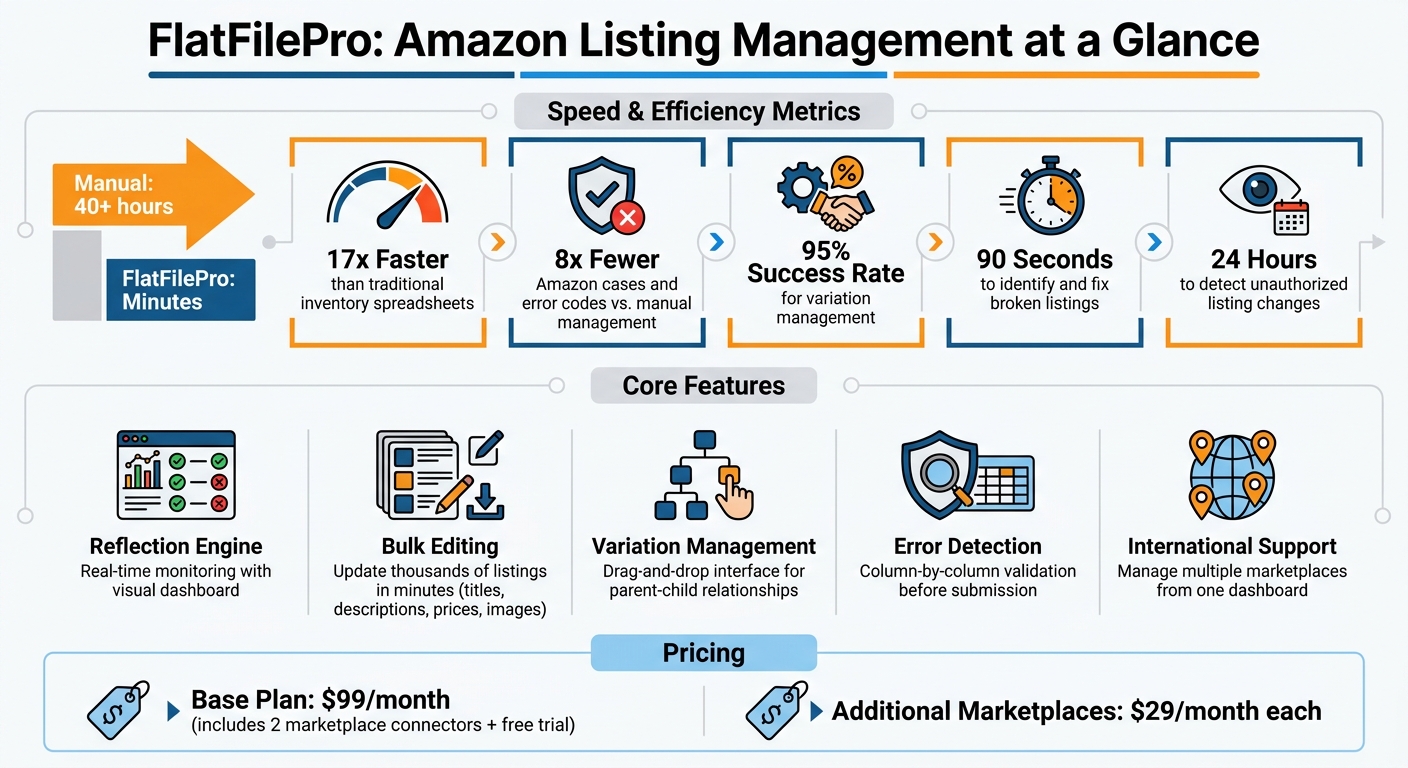
FlatFilePro Key Features and Performance Metrics for Amazon Sellers
FlatFilePro Features for Amazon Sellers

FlatFilePro tackles the headaches of manual updates by offering tools that combine accuracy and efficiency. Designed with automation in mind, these features simplify listing management and address common challenges, whether it’s keeping product details accurate, updating listings quickly, or managing complex variations.
Reflection Engine: Real-Time Listing Monitoring
The Reflection Engine works nightly to compare your FlatFilePro data with what’s live on Amazon. Through a visual dashboard, listings that match are marked with green checkmarks, while mismatches show red X’s, making it easy to identify issues at a glance. It flags problems like rejected updates or unexpected changes immediately.
This feature is a game-changer for protecting your brand. If a competitor alters your bullet points or Amazon modifies your title, you’ll know within 24 hours instead of weeks. The Reflection Engine provides a single, clear view of which listings need attention across your entire catalog, taking the guesswork out of listing management. While it keeps your listings secure, the bulk editing feature ensures updates happen quickly.
Bulk Editing: Faster Catalog Updates
With FlatFilePro’s bulk editing feature, you can update titles, descriptions, bullet points, prices, and images across hundreds – or even thousands – of listings at once. It’s 17 times faster than using traditional inventory spreadsheets[1], cutting tasks that normally take 40+ hours down to just minutes.
Thanks to direct API integration, updates are not only faster but also more accurate. FlatFilePro reduces Amazon cases and error codes by 8 times compared to managing listings manually through Seller Central[1]. It even spots and fixes common Amazon product listing errors before submission, saving you from dealing with frustrating error codes later.
Variation Management: Easier Parent-Child Relationships
Managing parent-child relationships on Amazon – like different sizes or colors of a product – is notoriously complicated. The native system requires precise entries in web forms or Excel spreadsheets with columns like "Parentage", "Parent SKU", and "Variation Theme"[3], and updates can take 24 to 48 hours to process[3].
FlatFilePro simplifies this with a drag-and-drop interface, allowing you to move child products between parent ASINs easily. The tool boasts a 95% success rate for managing and updating product variations in just minutes[2]. Got an orphaned child listing due to a deleted parent ASIN? You can reassign it to an active parent with just three clicks. This prevents lost sales from broken variation families and eliminates the hassle of dealing with "Variation Matrix" errors manually.
sbb-itb-ed4fa17
Benefits of Using FlatFilePro
FlatFilePro goes beyond its core features to deliver real-world advantages for Amazon sellers. It simplifies operations, reduces stress, and helps safeguard your product catalog, making it an essential tool for efficient marketplace management.
Error Detection and Prevention: Fix Listing Issues Quickly
FlatFilePro takes the pain out of managing listing errors by validating every data field before submission. This proactive approach ensures that titles, bullet points, images, and other attributes meet Amazon’s standards, saving you from the frustration of discovering errors after uploading.
When something does go wrong, the software pinpoints the exact issue. As Adam Weiler, CEO of Emplicit, puts it:
"Our system now pinpoints the exact attribute in your Amazon listing that failed – nothing more, nothing less. You can fix just what matters, faster than ever" [4].
FlatFilePro provides detailed column-by-column visibility, showing whether the error lies in your title, a bullet point, or an image link. This level of precision allows you to resolve listing problems in as little as 90 seconds [1], compared to the hours you might spend troubleshooting in Seller Central.
Additionally, the software automatically backs up your product data to an offsite location. If an error or unauthorized change occurs, restoring a previous version is just a click away. Approval workflows can also be set up, allowing senior team members to review edits before they go live, adding an extra layer of security. Beyond error prevention, FlatFilePro also simplifies managing listings across multiple countries.
International Marketplace Support: Streamline Global Operations
Expanding to Amazon’s international marketplaces often means juggling multiple accounts for countries like the US, Canada, Mexico, and European regions. FlatFilePro simplifies this by allowing you to manage all marketplaces from a single dashboard.
Instead of manually updating each country’s catalog, you can push bulk changes across all regions at once. Thanks to API-based synchronization, updates – whether for price adjustments due to currency shifts or seasonal description changes – take effect across all connected stores in minutes. This centralized system eliminates the time-consuming process of maintaining separate flat files for each market [1].
FlatFilePro’s base subscription, priced at $99 per month, includes two marketplace connectors. Additional regions can be added for $29 per month each [2]. For sellers operating in multiple countries like the US, UK, and Germany, this setup provides a unified view of product data while still allowing localized customization. Alongside its international capabilities, FlatFilePro ensures complete transparency with its change tracking system.
Activity Log: Monitor and Manage Listing Changes
FlatFilePro’s activity log offers a detailed record of every change – what was modified, when it happened, and who made the edit. This transparency ensures accountability, whether you’re managing an in-house team or working with external partners.
Forget manual error hunts. The activity log lets you quickly identify who made a mistake and correct it. It also works with the Reflection Engine to track changes made by competitors or Amazon itself, documenting unauthorized edits for easy reversion. User-level permissions can restrict access to specific listing elements, reducing the risk of costly errors from improper edits.
Automated backups act as a version control system, allowing you to restore previous versions instantly. For teams using approval workflows, managers can review the activity log to identify trends in rejected edits and provide targeted guidance. This combination of detailed tracking, permissions, and recovery tools transforms the activity log into a robust system for maintaining catalog accuracy and accountability.
What Makes FlatFilePro Different
FlatFilePro was created by Amazon sellers who understand the exact challenges of managing product catalogs. They built the tool to address the hurdles they faced in their own businesses. This hands-on experience is reflected in every feature, from a user-friendly dashboard to error messages that clearly guide you in fixing listing issues.
Built by Amazon Sellers for Amazon Sellers
FlatFilePro’s core philosophy – "Built by Amazon Sellers for Amazon Sellers" – is more than just a tagline. It directly addresses the pain points of managing extensive catalogs. By eliminating the inefficiencies of spreadsheets, the platform provides precise control while incorporating SEO advantages. Unlike traditional options that force you to pick between clunky spreadsheets or restrictive interfaces, FlatFilePro offers an intuitive user interface while maintaining the accuracy of flat file uploads in Seller Central.
Speed and Accuracy: Faster Updates with Better Results
The platform integrates fully with Amazon’s Selling Partner API, making updates 17 times faster. Changes are sent instantly through Amazon’s official channels, ensuring quick and reliable updates. FlatFilePro also prioritizes security, using AES 256-bit encryption and FIPS 140-2 validated cryptography to protect your data. Its "Sync/See/Save" workflow can identify and fix broken listings in about 90 seconds [5].
Listing Protection: Defend Against Competitor Changes
FlatFilePro goes the extra mile to safeguard your listings. Nightly monitoring detects any unauthorized changes, sending immediate alerts so you can act quickly. Additionally, features like granular permissions and approval workflows ensure that every update is secure, giving you peace of mind as your business grows.
Conclusion
How FlatFilePro Simplifies Amazon Operations
Managing Amazon listings can feel like an uphill battle, but FlatFilePro makes it easier. Its Reflection Engine uses simple visual cues – like red X’s and green checkmarks – to show exactly what needs fixing in your catalog. This eliminates the need for painstaking spreadsheet reviews or navigating the complexities of Seller Central. Instead, everything is managed through a centralized catalog health dashboard.
FlatFilePro also automates time-consuming tasks, cutting update times from hours to just minutes. Variation management, for example, now boasts a 95% success rate and can be completed in a fraction of the time [2]. Features like bulk editing and detailed activity logs further simplify operations. For sellers managing hundreds of listings or agencies juggling multiple accounts, these tools save significant time and improve overall efficiency. These gains in productivity create a solid foundation for growth.
Growing Your Amazon Business with FlatFilePro
FlatFilePro doesn’t just streamline operations – it helps your business scale with ease. By unifying catalogs across the US, Canada, and Europe into one interface, it eliminates the need to constantly switch between accounts. Automated monitoring and built-in error prevention ensure your listings stay in top condition.
Pricing starts at $99.00 per month, which includes two marketplace connectors and a free trial to test the platform. Need more connectors? Add them for just $29.00 per month each, making global expansion more accessible as your business grows [2]. Whether you’re protecting your brand, optimizing team workflows, or exploring new markets, FlatFilePro transforms complex listing tasks into efficient, automated processes. It’s a tool designed to tackle the challenges Amazon sellers face, paving the way for long-term growth and success.
FAQs
How long does it take for FlatFilePro changes to show up on Amazon?
Changes made using FlatFilePro usually show up on Amazon within a few hours to 24 hours after successful processing. Occasionally, updates may take up to 48 hours, depending on the nature of the change and Amazon’s processing times. While delays beyond this timeframe are uncommon, they can happen.
Can FlatFilePro stop competitors from changing my listing content?
FlatFilePro doesn’t stop competitors from making changes to your listing content. What it does do is help you spot issues fast, manage them effectively, and fix any errors or unauthorized edits. This ensures your listings stay accurate and optimized.
What should I connect first when setting up FlatFilePro?
To get started with FlatFilePro, the first step is connecting your Amazon Selling Partner account. This connection is essential because it allows the software to access your product listings, address any errors, and manage bulk updates effectively.