
Need to streamline your Amazon listing updates in 2026? FlatFilePro‘s free Amazon Image Link Generator makes it easy to create direct image URLs tailored to Amazon’s technical standards. Forget manual resizing, clunky email attachments, or cloud storage hassles. This tool automates URL generation for high-quality images, ensuring compliance with Amazon’s requirements.
Key Features:
- Batch Processing: Generate URLs for hundreds of ASINs in one go.
- Custom Sizes: Supports resolutions from 500 pixels to 10,000 pixels.
- Optimized Files: Keeps image sizes under 10MB for faster uploads.
- CSV Export: Perfect for bulk updates using Amazon’s flat file system.
How It Works:
- Input ASINs or product URLs.
- Select image dimensions based on Amazon’s 2026 standards.
- Generate URLs and download them as a CSV.
- Verify links and update your listings.
This tool is perfect for sellers managing large catalogs or agencies handling multiple accounts. It saves time, reduces errors, and keeps your listings compliant with Amazon’s image policies. Start using it today – no login required.
How to Create Amazon Image URLs for Flat Files Quickly | Amazon FBA for Beginners
sbb-itb-ed4fa17
FlatFilePro‘s Free Amazon Image Link Generator

FlatFilePro has developed a tool that simplifies the often tedious process of creating image URLs for Amazon listings. It takes the hassle out of manual image management, making the process faster and more efficient.
How the Tool Works
This image link generator automatically extracts direct image URLs from Amazon ASINs or product page URLs. Once you input an ASIN or product URL, the tool fetches the image data straight from Amazon’s servers and formats it for use in flat files. The URLs generated are tailored to meet Amazon’s 2026 technical standards, ensuring smooth bulk uploads without errors like broken links or failed submissions [3]. This functionality supports sellers in maintaining high-quality Amazon listings with minimal effort.
Main Features
Here’s what the tool offers:
- Batch Processing: Handle hundreds of ASINs at once and export the results in a CSV that aligns with Amazon’s inventory templates.
- Customizable Image Sizes: Generate URLs for images at 500 pixels (minimum), 1,000+ pixels (ideal for zoom), or even up to 10,000 pixels [2]. As Amazon Seller Central highlights:
The optimal zoom experience for product detail pages requires files to be 1,000 pixels or larger on the longest side. Zoom has been shown to help improve sales [2].
- Optimized File Sizes: The tool ensures image files stay under 10MB, reducing upload delays caused by oversized files [3].
These features make it easier to create Amazon-compliant image URLs that enhance your listing quality and efficiency.
Who Should Use This Tool
This tool is perfect for sellers managing large catalogs (300+ listings) who need a quick and reliable way to extract image URLs. Agencies and account managers working with multiple client accounts will also find the CSV export feature invaluable for preparing flat files in bulk.
For sellers who value compliance and polished listings, this generator is a game-changer. It produces URLs that fully meet Amazon’s hosting standards [4], ensuring smooth uploads without rejection errors. By automating the URL creation process, the tool not only saves time but also helps maintain the quality of your Amazon listings.
How to Use FlatFilePro’s Amazon Image Link Generator
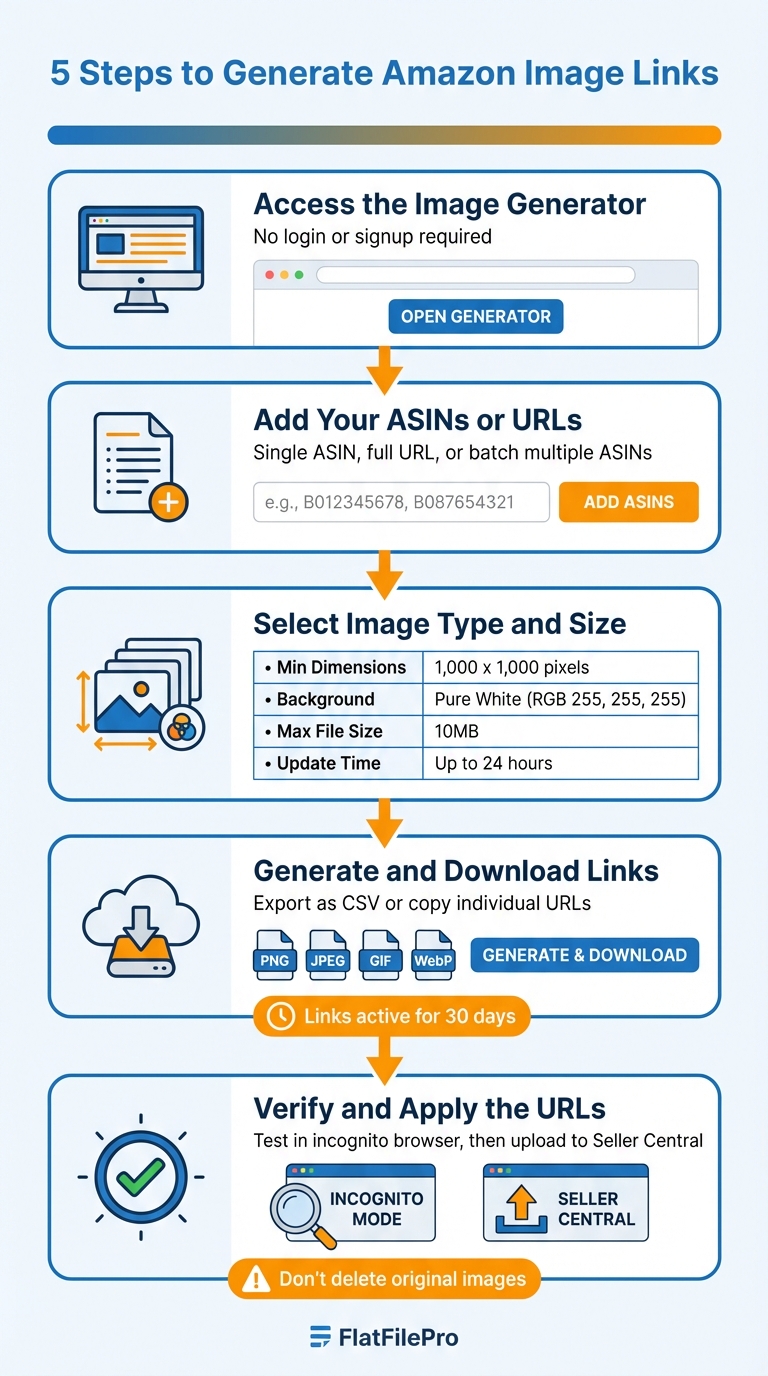
How to Use FlatFilePro Amazon Image Link Generator in 5 Steps
Managing product images efficiently is critical for Amazon sellers. Here’s a step-by-step guide to using FlatFilePro’s Amazon Image Link Generator.
Step 1: Access the Image Generator
Head to FlatFilePro’s free Amazon Image Link Generator in your browser. There’s no need to create an account, sign up, or log in – you can start using it instantly without any setup delays [1]. Once there, input your product details to begin.
Step 2: Add Your ASINs or URLs
Enter your product information into the tool. You can input a single ASIN, a full Amazon product URL, or multiple ASINs for batch processing. For larger catalogs, it’s smart to prepare your ASINs in a spreadsheet, then copy and paste the entire column into the generator for quicker results [3].
Step 3: Select Image Type and Size
Choose the appropriate image dimensions based on Amazon’s updated 2026 standards. The tool supports sizes up to 10,000 pixels and automatically optimizes files larger than 5MB or with resolutions exceeding 4K for faster loading [1] [2]. Before generating links, ensure your source images meet these requirements.
| Requirement | Specification |
|---|---|
| Minimum Dimensions | 1,000 x 1,000 pixels [3] |
| Background Color | Pure White (RGB 255, 255, 255) [3] |
| Max File Size | 10MB (Recommended) [3] |
| Link Permissions | Public / "Anyone with link can view" [3] |
| Update Lead Time | Up to 24 Hours [3] |
Step 4: Generate and Download Links
Click ‘Generate’ to create direct image links formatted for Amazon’s flat file system. The tool supports PNG, JPEG, GIF (with animations intact), and WebP formats [1]. You can either copy URLs individually or export all results as a CSV file, ready for Amazon’s inventory templates. For bulk uploads, paste the CSV column into your flat file.
Note: The generated links stay active for 30 days [1].
Step 5: Verify and Apply the URLs
Test each URL in an incognito browser window to confirm it loads without requiring a login. If the image opens directly, Amazon’s servers will accept it [1]. Ensure your source files are set to public access ("Anyone with link can view") [3] and confirm the URL links directly to the image file, not a cloud sharing page. Once verified, upload your flat file in Seller Central. Processing typically takes up to 24 hours for the changes to appear on your listings [3].
Important: Do not delete the original images from your hosting source after generating links. Doing so will break the URLs and remove images from your listings [3].
Using Generated Image Links to Improve Your Listings
Once you’ve created compliant image URLs using FlatFilePro, the next step is to update your listings efficiently. FlatFilePro’s bulk editing dashboard makes this process simple. Instead of manually updating each listing in Seller Central, you can handle hundreds of product images at once. Just copy the CSV export from the generator, paste the URL column into FlatFilePro’s image field editor, and apply the changes across your entire catalog. What used to take hours can now be done in minutes. Plus, features like bulk updates and compliance checks help reduce your workload significantly.
Updating Images Across Multiple Listings
Bulk updates are especially useful during periods of seasonal changes, rebranding efforts, or when addressing compliance requirements. FlatFilePro’s interface allows you to select multiple ASINs and apply new image URLs in one go. For instance, if you need to update 300 listings to meet the 2026 requirement of 85%–100% image fill [5], you can generate compliant URLs for all your products and roll them out across your catalog in a single session.
The Reflection Engine further simplifies this by verifying updates overnight. It provides clear feedback: green checkmarks confirm successful changes, while red X’s highlight any issues that need attention. This streamlined system ensures your listings stay up to date with minimal hassle.
Maintaining Listing Quality and Compliance
FlatFilePro helps you meet Amazon’s 2026 image standards automatically. These include requirements like a pure white background and a minimum resolution of 1,000 pixels to enable zoom functionality. As Amazon Community Manager Dougal_Amazon explains:
Great product images are one of the most powerful tools in your selling toolkit – they inspire customer confidence and directly impact your sales performance [5].
By standardizing your image generation process, you can avoid common violations, such as adding promotional text, watermarks, or logos to your main images. These mistakes can lead to listing suppressions, so staying compliant is key.
Saving Time and Reducing Errors
Managing images manually can lead to mistakes, like using low-quality photos that disable zoom functionality. Automated link generation eliminates these risks and reduces days of manual work to just minutes. This gives your team more time to focus on higher-value tasks, such as A/B testing product angles or creating lifestyle images for secondary slots – activities that can directly boost conversion rates instead of draining time on repetitive updates.
Conclusion
Managing Amazon product images in 2026 has become simpler and more efficient. FlatFilePro’s free Amazon Image Link Generator takes care of all the technical details for you – ensuring images meet Amazon’s 1,000-pixel minimum for zoom functionality and the required pure white background (RGB 255, 255, 255). Instead of manually uploading files or worrying about compliance, you can create compliant URLs in seconds and update your entire catalog effortlessly.
This efficiency means you can update multiple listings in one session, freeing up valuable time for activities that drive growth, like Amazon listing SEO or experimenting with product angles or creating lifestyle images. Plus, the Reflection Engine works behind the scenes to verify your changes overnight, flagging potential issues with an Amazon listing analysis tool before they affect your sales.
Whether you’re managing a small product catalog or thousands of ASINs across various marketplaces, this tool delivers automated URL conversion, optimized file sizes, and compatibility across all devices, ensuring smooth and effective listing management.
For sellers handling seasonal updates or rebranding, what used to take days can now be completed in just minutes. With these automated features, FlatFilePro’s Image Link Generator puts you in control of your catalog while reducing the effort needed to maintain it. That means more time to focus on strategy and less time spent wrestling with spreadsheets.
FAQs
Will these image URLs keep working after 30 days?
Yes, these image URLs are built to remain active for a minimum of 30 days. The article discusses how to create direct links that align with Amazon’s platform rules, though it doesn’t provide a specific expiration date or timeframe beyond that.
Which flat file fields do I paste the image links into?
When filling out your flat file for Amazon, paste your generated image URLs into the relevant fields. These usually include the Main Image field for the primary product photo and other fields like Additional Image 1, Additional Image 2, and so on for extra visuals.
Make sure the URLs comply with Amazon’s guidelines. For instance, images should measure at least 1000 pixels on the longest side and follow the required formats to ensure proper display on your product listings.
Why does Amazon reject some image links even if they open in a browser?
Amazon has strict technical requirements for product images, and failing to meet them can result in rejected image links. These requirements include having a minimum size of 1000 pixels on the longest side (to enable the zoom feature), using the correct file format, and adhering to background standards. Meeting these criteria is crucial to ensure your images upload successfully and display properly on the platform.