
Struggling with Amazon product categorization? A free pre-made CSV file can simplify the process by giving you instant access to Amazon’s complete category hierarchy. With over 25,000 categories, this tool helps you accurately classify products, avoid errors, and boost visibility.
Key Benefits:
- Save time: Skip manual navigation with a searchable, organized list.
- Reduce errors: Prevent typos and outdated category names.
- Boost efficiency: Compatible with Amazon Seller Central for bulk uploads.
How to Get It:
- Download the free CSV from FlatFilePro’s resources section – no sign-up required.
- Use it with Excel, Google Sheets, or other tools to find the right categories.
- Test a small batch of listings before uploading your full catalog.
Why it matters: Correct categorization improves search visibility and reduces listing delays. Grab the CSV today and streamline your Amazon product uploads!
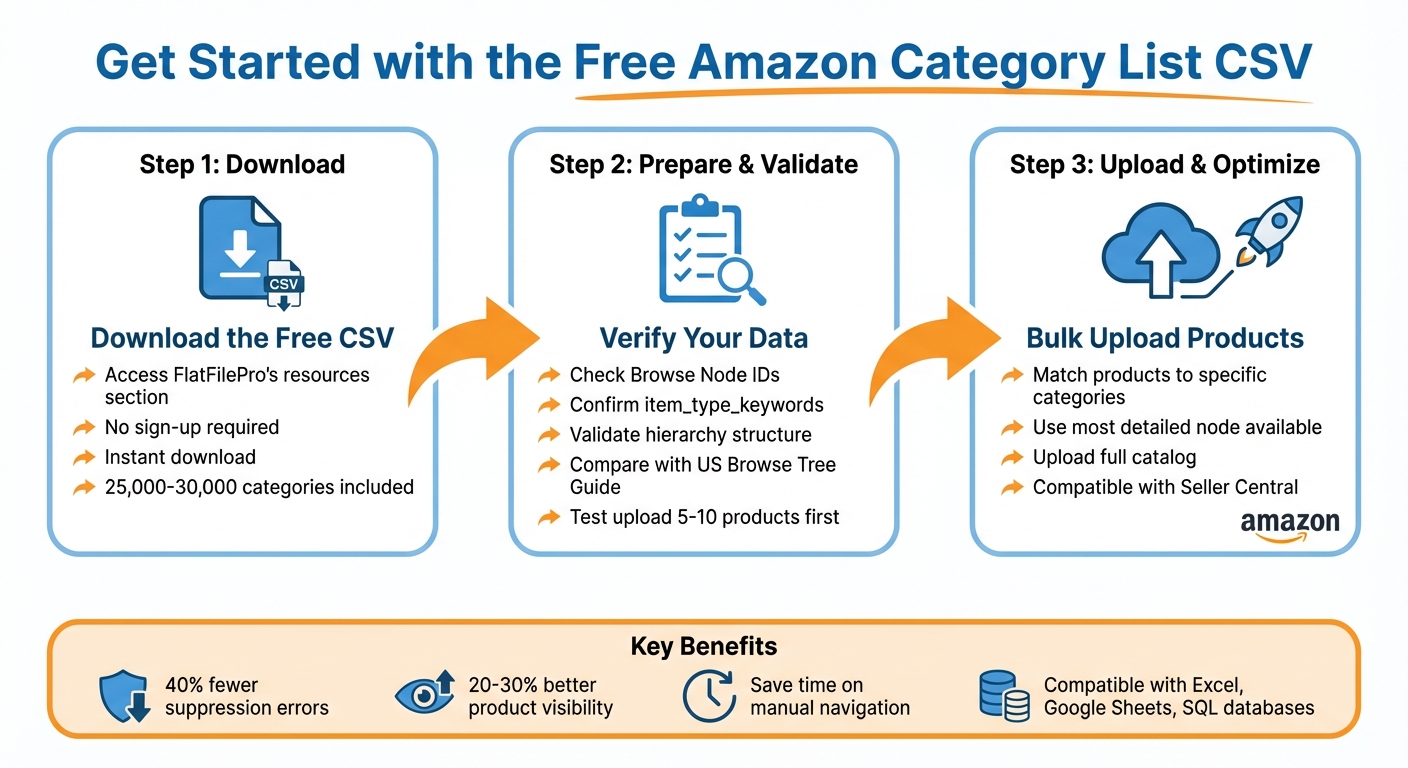
How to Download and Use Amazon Category List CSV – 3-Step Process
How to Download the Free Amazon Category List CSV
Download Instructions
FlatFilePro offers a free category list CSV that you can grab directly from their resources section. Just hit the download button, and the file will save instantly – no need to provide payment or even an email address. For convenience, store the file in a folder where you keep your Amazon selling tools. Since the CSV format works with Excel, Google Sheets, and other spreadsheet programs, you can easily search, filter, and organize categories while prepping your product listings on Amazon. Once downloaded, double-check that the file format aligns with Amazon Seller Central’s upload requirements.
CSV Format and Seller Central Compatibility
FlatFilePro’s category list CSV is tailored for smooth integration with Amazon Seller Central’s bulk upload system, ensuring your flat files meet the necessary standards for hassle-free product listing uploads [2]. This helps avoid formatting issues that could slow down the listing process.
The CSV also supports SQL Tree Hierarchy [3], making it handy for importing category data into your own database or inventory tools. With around 30,000 lines of category data [1], the file is extensive enough to include even the most niche product categories while remaining easy to navigate. Its structured design helps you categorize products accurately and reduces the chances of upload errors.
sbb-itb-ed4fa17
Checklist: Preparing and Validating Your Category CSV
Once you’ve downloaded your category CSV, follow this checklist to ensure everything is accurate and ready to go.
Check Column Headers and Category Hierarchy
Start by opening the CSV in your preferred spreadsheet tool. Look for these key headers: Browse Node IDs, item_type_keywords, and the hierarchy levels.
- Browse Node IDs: These numerical codes determine where your product will appear in Amazon’s storefront [4]. Double-check that these are accurate.
- item_type_keywords: Ensure these values are up-to-date and valid, as they influence required attribute fields.
- Hierarchy flow: Verify that the categories move logically from broad to specific, helping you pinpoint the exact placement for each product.
Confirm US Marketplace Category Alignment
Grab the latest US Browse Tree Guide (BTG) and compare it with your CSV. As Muhammed Al-Refai explains:
BTGs are marketplace-specific. Make sure you download the latest version for your regional Amazon site [4].
Keep in mind that Amazon’s taxonomy varies by region, so a CSV tailored for Amazon.ca won’t necessarily work for Amazon.com. Pay special attention to gated categories like Grocery, Jewelry, and Fine Art, ensuring they meet all necessary criteria. Also, confirm that your CSV’s browse nodes align with the current US structure, as Amazon frequently updates its taxonomy.
Run a Test Upload
Before uploading your entire catalog, test with a small batch of 5–10 products in Seller Central. This step helps you catch any issues early. If errors pop up, consult the BTG to identify missing attributes like pillow_shape or fill_material that may be required for your selected browse nodes [4]. Update your CSV, test again, and once it’s error-free, you’re ready to upload your full product list with confidence.
Using the Category List CSV for Bulk Product Listings
Once you’ve verified that your CSV is error-free, it’s time to put it to work to bulk upload products to Amazon. This step takes you from preparing your data to actively organizing your products. Think of the category list as your guide through Amazon’s massive taxonomy, which includes roughly 25,000–30,000 categories[1].
Match Products to the Right Categories
Open your CSV file in any spreadsheet program and use its search or filter tools to locate keywords related to your product. Since the file is arranged alphabetically, you can easily move from broad categories like Electronics or Home & Kitchen to the specific subcategory nodes that best match your product[1].
To ensure accurate categorization, always pick the most detailed node available. For instance, instead of selecting the broader "Coffee Filters" (Level 6), go for "Permanent Coffee Filters" (Level 7). The CSV lays out the full path for you: Home & Kitchen > Kitchen & Dining > Small Appliance Parts & Accessories > Coffee & Espresso Machine Parts & Accessories > Coffee Machine Accessories > Coffee Filters > Permanent Coffee Filters[1]. This level of precision helps your product appear in the most relevant search results.
Conclusion: Save Time with FlatFilePro‘s Category CSV

Managing thousands of listings doesn’t have to be a headache or lead to costly suppression errors. FlatFilePro’s free category CSV gives you instant access to Amazon’s entire taxonomy, laid out in a straightforward hierarchical format[1]. This makes finding the exact category node for any product a breeze – no more navigating endless menus in Seller Central.
Sellers using this hierarchical CSV report 40% fewer suppression errors and 20-30% better product visibility due to improved search matching[1][5]. Fewer errors mean more active listings and less time spent troubleshooting. This added efficiency not only minimizes mistakes but also speeds up bulk uploads.
When combined with FlatFilePro’s bulk upload tools, the CSV takes things to the next level. You can push updates via Amazon’s API in minutes, skipping the long wait times of flat file processing. Edit hundreds of listings at once, track when changes go live, and catch potential issues before they affect your catalog.
Download the CSV today to create cleaner, more accurate listings. With FlatFilePro’s platform, you can streamline catalog management – from bulk edits to real-time monitoring – giving you more time to focus on growing your business instead of battling with spreadsheets.
FAQs
How do I find the correct Browse Node ID for my product?
To locate the right Browse Node ID, you’ll need to use Amazon’s browse nodes. These nodes are part of a structured system that organizes products into categories, each assigned a unique numeric ID. By downloading datasets of these browse nodes, which include their IDs and hierarchy levels, you can pinpoint the category that aligns with your product. This helps ensure your listing is accurate, streamlining the process and minimizing mistakes during product uploads.
How often should I update the category CSV to match Amazon changes?
Keeping your category CSV up to date is crucial because Amazon frequently updates its category structure. Regular updates ensure your product listings remain accurate, improve their visibility, and make marketplace submissions much smoother.
What should I do if my test upload shows missing required attributes?
If your test upload reveals missing required attributes, start by reviewing Amazon’s upload report to pinpoint the specific missing or incorrect fields. Make sure you’re using the correct CSV template for your product category – this ensures all necessary fields, such as UPCs or ASINs, are filled out correctly and formatted properly. Once you’ve identified the errors, fix them and re-upload the file. Keeping an eye on the processing report regularly can help you catch and address issues quickly.