
Managing Amazon product categories can be overwhelming, but having all 25,000+ categories in one CSV file simplifies the process. This file eliminates the need to scroll through Amazon’s complex dropdowns, helping sellers quickly map products to the correct categories using unique Browse Node IDs.
Why It Matters:
- Faster Product Listings: Avoid delays and errors with bulk uploads.
- Reduced Fees: Correct categorization prevents unexpected charges.
- Better Visibility: Accurate categories improve search placement and eligibility for the Bestseller Badge.
- Competitive Insights: Spot niche subcategories and refine keyword strategies.
Where to Get It:
- Free Sources: Amazon’s Browse Tree Report (via Seller Central) or GitHub repositories (may require technical skills).
- Paid Tools: Services like LetsNarrowDown ($29) and FlatFilePro ($99/month) offer updated data and automation features.
How to Use It:
- Import the CSV into tools like Excel, databases, or inventory systems.
- Streamline bulk uploads by mapping SKUs to accurate categories.
- Organize internal catalogs for better reporting and inventory tracking.
Staying Updated:
Regularly download Amazon’s Browse Tree Guide to keep your data current. Outdated categories can lead to rejected listings, suppressed visibility, or misplaced products.
For sellers managing large catalogs, tools like FlatFilePro automate updates and error monitoring, saving time and ensuring accurate listings. Accurate categorization is key to reducing mistakes, improving search rankings, and boosting sales.
Browse node and Refinements | Amazon Seller University
sbb-itb-ed4fa17
How Amazon Categories Work
Amazon Category Hierarchy Structure: 7-Level Product Classification System
Amazon’s Category Hierarchy Explained
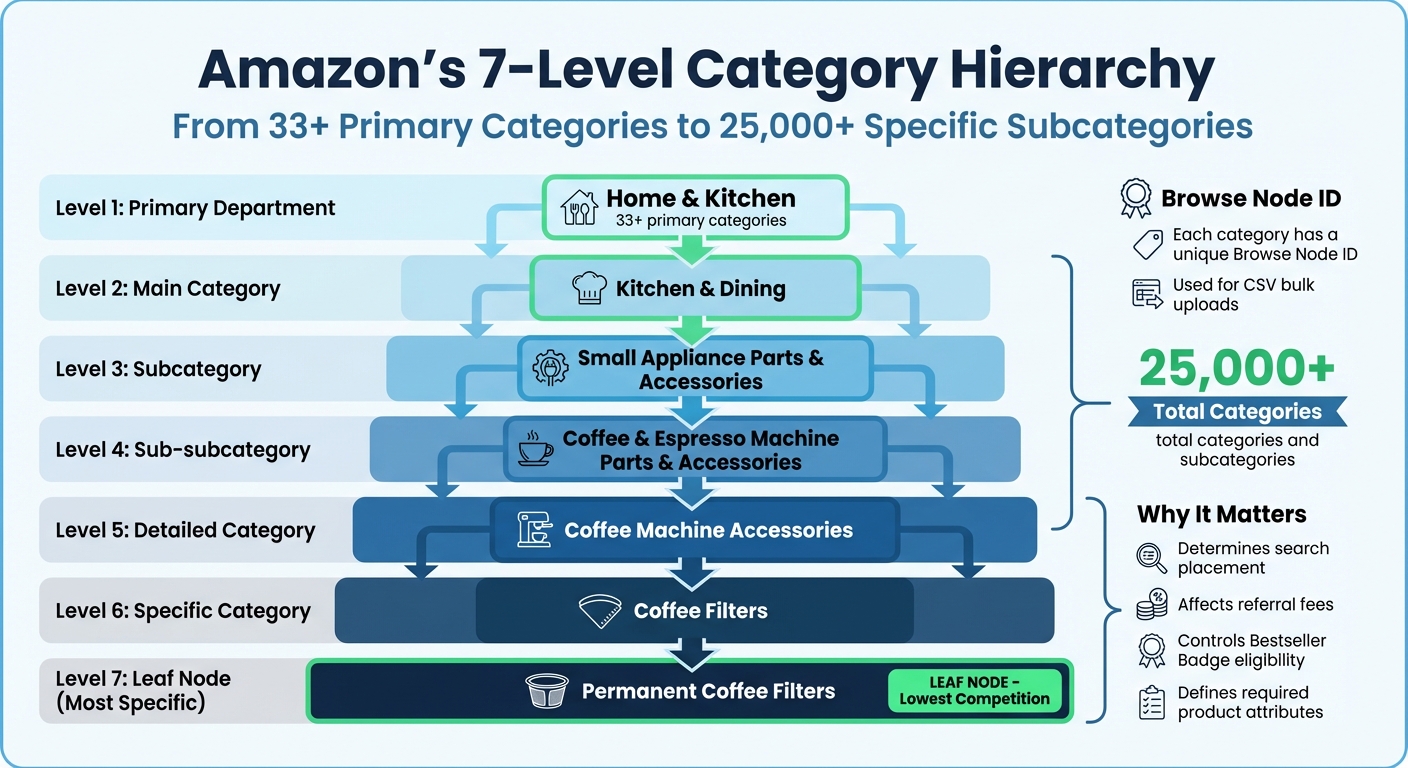
Amazon organizes its vast catalog using a tree-like structure. It starts with broad departments and narrows down into specific subcategories, sometimes going as deep as seven levels. Take a permanent coffee filter as an example – it follows this path: Home & Kitchen > Kitchen & Dining > Small Appliance Parts & Accessories > Coffee & Espresso Machine Parts & Accessories > Coffee Machine Accessories > Coffee Filters > Permanent Coffee Filters [2]. Each step in the hierarchy hones in on the product’s classification.
Behind the scenes, each category and subcategory is linked to a unique code called a Browse Node ID. These IDs help Amazon’s system place products in the correct navigation paths. When sellers upload products via CSV files, they’re essentially mapping their items to these IDs rather than manually selecting categories from drop-down menus [7][8].
Amazon’s catalog starts with more than 33 primary categories, which branch out into thousands of detailed subcategories [7][3]. This layered classification system makes accurate category mapping a critical step. Why? Because it directly impacts search placement, fees, and even how customers perceive your product.
Why Correct Category Selection Matters
Choosing the right category is crucial for making your product visible in relevant search results and filters. It also determines your product’s eligibility for the Bestseller Badge. Amazon uses your category selection to decide where your product appears and which refinement filters (like "Screwdriver Head Style" or "Coffee Maker Type") apply to it [8]. Misplacing a product in the wrong category or skipping required attributes can exclude it from these filters. Products listed in the most specific subcategory, often called the "leaf node", face less competition. This increases the chances of earning the Bestseller Badge, which is awarded to the top-selling product in a subcategory over the past 24 hours [8].
Category selection also impacts referral fees and FBA fulfillment costs. For example, clothing often incurs different fulfillment charges than electronics [7][3]. Certain categories, like Jewelry, Watches, and Music, are "gated", requiring Amazon’s approval before you can list products there [7][3]. The category you choose also determines which mandatory data fields you need to complete. These fields might include safety certifications, material details, or other legal requirements [8]. Mistakes here can lead to rejected listings or approval delays, so getting it right is essential.
Where to Get an Amazon Category CSV File
Free Category Data Sources
If you’re looking for free options, Amazon Seller Central is your best bet. Registered sellers can access the "Browse Tree Report" via the Reports API. This provides up-to-date, official category data straight from Amazon itself. The catch? You’ll need some technical know-how to navigate the API or specific sections within Seller Central effectively [10].
Another option is third-party websites. For example, ASINSpotlight offers a downloadable CSV file with over 25,000 categories and subcategories [2]. You can also explore public repositories on GitHub, where community-contributed category lists are available. However, many of these lists can be outdated or limited in scope [1][6].
Before using free data, always check the "Last Updated" timestamp and confirm that the CSV aligns with your specific Amazon marketplace [9]. If these free resources fall short, it might be worth considering paid services for more robust and regularly updated data.
Paid Tools and Services
For those who need more comprehensive and regularly updated category data, paid tools are the way to go. These services not only provide detailed datasets but also simplify tasks like bulk uploads on Amazon and catalog management.
One option is LetsNarrowDown, which offers a dataset containing 34,872 unique browse nodes (as of February 2026) for $29 [9][11]. This dataset includes the full seven-level category hierarchy and is available in CSV, Excel, and TXT formats, making it easy to integrate into your tools [9][11].
Another excellent tool is FlatFilePro, which takes the hassle out of category management. It integrates directly with Amazon’s API, automatically pulling your listings and category data. Using its Reflection Engine, FlatFilePro monitors your listings nightly, alerting you to category mismatches or errors before they affect your sales. This eliminates the need to manually download and verify CSV files, keeping everything in sync with Amazon’s current structure.
When choosing a paid service, focus on two key factors: how frequently the data is updated and whether the formats provided (like SQL-ready files) match your workflow needs [6][1]. Also, take a close look at the terms of use to ensure there are no restrictions on how you can modify or redistribute the data [6].
How to Use a Category CSV File in Your Workflow
Importing the CSV File into Your Tools
Once you’ve got your hands on an Amazon category CSV file, the first step is to bring it into your workspace. Most sellers start by opening the file in tools like Microsoft Excel or Google Sheets to get a feel for its layout and ensure everything is formatted correctly. Key columns to look for include "Parent Field Name", "Child Field Name", "Parent Value", and "Child Value." These columns outline how departments, categories, and subcategories are connected hierarchically [12].
If your product management or inventory system allows for direct CSV imports, you can map the columns to match your internal identifiers. For those working with databases, you can directly load SQL-ready CSV files into systems like MySQL or PostgreSQL. This preserves Amazon’s category structure, making it easier to run queries or generate performance reports [1].
Using the File for Bulk Product Uploads
Once the CSV file is imported, it becomes a powerful tool for streamlining bulk uploads. Instead of manually assigning categories for each product in Seller Central, you can use the CSV to consistently apply browse nodes across multiple listings. This saves time, reduces errors, and ensures accurate categorization.
When setting up for bulk uploads, make sure to include the Amazon SKU column to align your catalog with Seller Central. According to Amazon’s documentation, feed processing takes about one minute for every 100 items uploaded via API [5]. Keep this in mind:
"The Amazon SKU you provide for each product in your Buy with Prime catalog must match the Amazon SKU found in either your Seller Central or Supply Chain Portal catalog." [5]
Organizing Your Internal Product Catalog
A well-structured CSV file doesn’t just simplify uploads – it also makes managing your internal catalog much easier. Amazon’s category structure includes over 185 niche categories [13], which can complicate reporting and inventory management. To address this, you can group these niche categories into broader parent categories, like Health, Baby, Kitchen, or Home, for easier tracking.
In January 2023, Amit Jotwani, a Developer Advocate at Retool, used ChatGPT to reorganize an Amazon CSV with over 500 items across 185 categories into 12 broader parent categories. He then built a Retool dashboard using JavaScript transformers to visualize spending and inventory trends. This example shows how grouping categories can simplify inventory tracking [13].
If you manage your own databases, consider structuring your CSV with four key columns to enable cascading dropdown menus in your internal systems. This setup allows your team to pick a department and see only the relevant categories and subcategories [12]. Before importing, always validate your CSV file to ensure that field names match your templates and all required values are included [12].
Keeping Your Category Data Current
Why Regular Updates Are Needed
Amazon’s category structure is constantly evolving. As of July 2025, the platform’s taxonomy consists of tens of thousands of browse nodes [14]. Categories are frequently added, retired, or adjusted, making it essential to keep up with these changes. The most reliable way to stay informed is by downloading the latest version of Amazon’s Browse Tree Guide (BTG) from Seller Central. This guide provides the most accurate information on valid category paths, node IDs, and required attributes for each specific marketplace. Since each marketplace has its own taxonomy, always ensure you’re working with the correct version for your region.
To stay compliant, regularly download the updated BTG and check for changes in Amazon flat file templates. These templates outline the required fields for different product types, such as size, material, or color. Any updates to these templates often indicate changes in category requirements. Additionally, monitor the "Amazon Category Requirements" page, as some previously open categories may now require additional documentation or performance metrics to list products. Keeping your data current is essential to avoid misclassification issues, which we’ll delve into next.
Avoiding Listing Errors with Accurate Categories
Using outdated category data can cause a range of listing problems. Incorrect categorization might result in suppressed listings, misplaced products, or reduced visibility in search results [14]. If your CSV file includes outdated nodes, Amazon could reject your entire bulk upload or place your products in irrelevant categories, making it harder for customers to find them.
Amazon’s machine learning system also plays a role in auto-categorizing products. If you notice changes in your listing’s filters or search visibility, it could mean that Amazon has updated its taxonomy or moved your product to a new node. As Muhammed Al-Refai, Content Marketing Specialist at Feedonomics, points out:
Selecting the right category and most specific subcategories ensures your Amazon listing is eligible for the appropriate product attributes, filters, and category-specific rules. [14]
To avoid these issues, ensure your CSV file is updated to align with the latest BTG. Double-check that all category-specific attributes – like pillow_shape or fill_material – are accurate and meet current requirements. Conducting regular audits of your category data helps maintain visibility, compliance, and competitiveness for your listings.
Conclusion
An Amazon category CSV file simplifies catalog management by organizing 25,233 categories and subcategories into one easy-to-use format. With up to seven hierarchy levels, it allows precise product classification without the hassle of navigating Amazon’s intricate structure. Plus, it supports up to 15,000 products per CSV import [2][4], saving time and reducing manual effort. This streamlined approach removes guesswork, minimizes listing errors, and helps your products rank better in search results.
Accurate categorization is key to avoiding suppressed listings, improving search visibility, and reducing the time spent fixing costly mistakes that can impact sales.
FlatFilePro takes this process a step further by integrating directly with your Amazon account. Its bulk editing tools make category management faster and easier, while the Reflection Engine works behind the scenes to monitor your listings nightly. It alerts you to category changes or errors before they affect your sales. With one-click bulk edits, you can push updates through Amazon’s API in minutes, not hours.
Staying up-to-date with category data is essential. Whether you rely on free resources or paid tools, keeping your CSV file current and seamlessly incorporating it into your workflow is vital for success.
For sellers managing large catalogs across multiple marketplaces, FlatFilePro offers a solution that’s both efficient and cost-effective. The Standard plan, priced at $99/month, includes unlimited ASINs, bulk editing features, and the Reflection Engine to ensure your category data stays accurate. By handling the technicalities of Amazon’s category system, FlatFilePro lets you focus on growing your business rather than wrestling with spreadsheets. This practical approach to catalog management turns a complex challenge into an opportunity for growth.
FAQs
What is a Browse Node ID?
A Browse Node ID is Amazon’s way of assigning a unique identifier to each product category. This system helps organize items within Amazon’s extensive hierarchy, making it easier to classify products correctly and improve navigation for users.
How do I find the right “leaf” category fast?
To efficiently locate the right "leaf" category on Amazon, start with a CSV file that outlines all categories in a hierarchical format. Open the file in a spreadsheet program and follow these steps:
- Navigate through the hierarchy: Begin with broader categories and work your way down to more specific subcategories.
- Pinpoint the "leaf" category: Look for the most detailed level of categorization – the one without any further subcategories.
- Use search or filters: Speed up the process by searching for product-related keywords or applying filters to zero in on the relevant categories.
This method saves time and ensures you find the exact category your product belongs to.
How often should I refresh my category CSV?
To meet Amazon’s requirements, make it a habit to update your category CSV at least weekly. Keeping it refreshed ensures your product categorization stays accurate and aligns with Amazon’s most recent guidelines.