
Managing Amazon product images can be tedious and error-prone, especially for large catalogs. Manual processes often lead to broken links, catalog issues, and wasted time. FlatFilePro‘s Amazon Image URL Generator simplifies this by automating image updates directly through Amazon’s SP-API. Here’s what makes it stand out:
- Bulk Updates: Quickly update hundreds or thousands of listings at once, saving hours during busy seasons.
- Error Checking: Built-in compliance tools ensure URLs meet Amazon’s requirements, avoiding listing suppressions.
- Drag-and-Drop Variations: Easily assign images to product variations (e.g., sizes or colors) without spreadsheets.
- Reflection Engine: Monitors live updates, catching silent failures and alerting you to fix issues fast.
- Quick Rollbacks: Instantly revert to previous versions if something goes wrong.
For $99/month (with a 14-day free trial), this tool eliminates manual work, reduces errors, and ensures your listings stay accurate and up to date. Whether you’re managing apparel, electronics, or home goods, FlatFilePro saves time and protects your sales.
What FlatFilePro‘s Amazon Image URL Generator Does

FlatFilePro’s Amazon Image URL Generator is a game-changer for Amazon sellers, eliminating the hassle of slow, error-prone image updates and the headaches of managing product variations. Instead of spending hours manually editing spreadsheets, this tool uses Amazon’s SP-API to update images quickly – often going live in just minutes.
The tool stands out with three main features: bulk operations for your entire catalog, automatic URL validation, and a drag-and-drop interface for assigning images to product variations.
One standout feature is its Reflection Engine, which keeps an eye on your catalog even after updates are live. It catches "silent failures", where Amazon accepts your updates but the images don’t actually appear. With instant alerts, you’ll know right away if something goes wrong, giving you the chance to fix it before it affects your sales.
Let’s dive into how these features translate into real benefits.
Generate URLs for Multiple Products at Once
Forget editing URLs one by one. With FlatFilePro, you can update hundreds of listings in a single go. This is a lifesaver during busy times like seasonal promotions or when refreshing your entire catalog.
The tool speeds up editing Amazon listings by a whopping 17x compared to traditional spreadsheet methods[3]. On top of that, you can assign role-based permissions, ensuring that only specific team members – like your design team – can manage images. This prevents accidental changes to critical details like pricing or product descriptions.
Automatic Compliance Checking
FlatFilePro ensures every URL meets Amazon’s technical requirements. Its built-in error-checking system flags potential issues before they go live, reducing the risk of listing suppressions that could hurt your visibility.
To add another layer of control, the tool includes approval workflows. This means management can review and approve image changes before they’re pushed live via the API[3]. And if something does go wrong, the one-click rollback feature lets you instantly revert to a previous version[1].
While compliance is crucial, the tool also tackles one of the trickiest parts of catalog management: handling product variations.
Assign Images to Product Variations
Managing parent–child product relationships can be a nightmare. FlatFilePro simplifies this with a drag-and-drop interface, making it easy to assign images to specific variations like different colors or sizes.
The tool visually maps images to each child ASIN, removing the guesswork. You can even move images between variations without dealing with flat files. This approach boasts a 95% success rate for variation updates – far better than the typical 75% success rate of manual methods.
How to Use FlatFilePro’s Amazon Image URL Generator
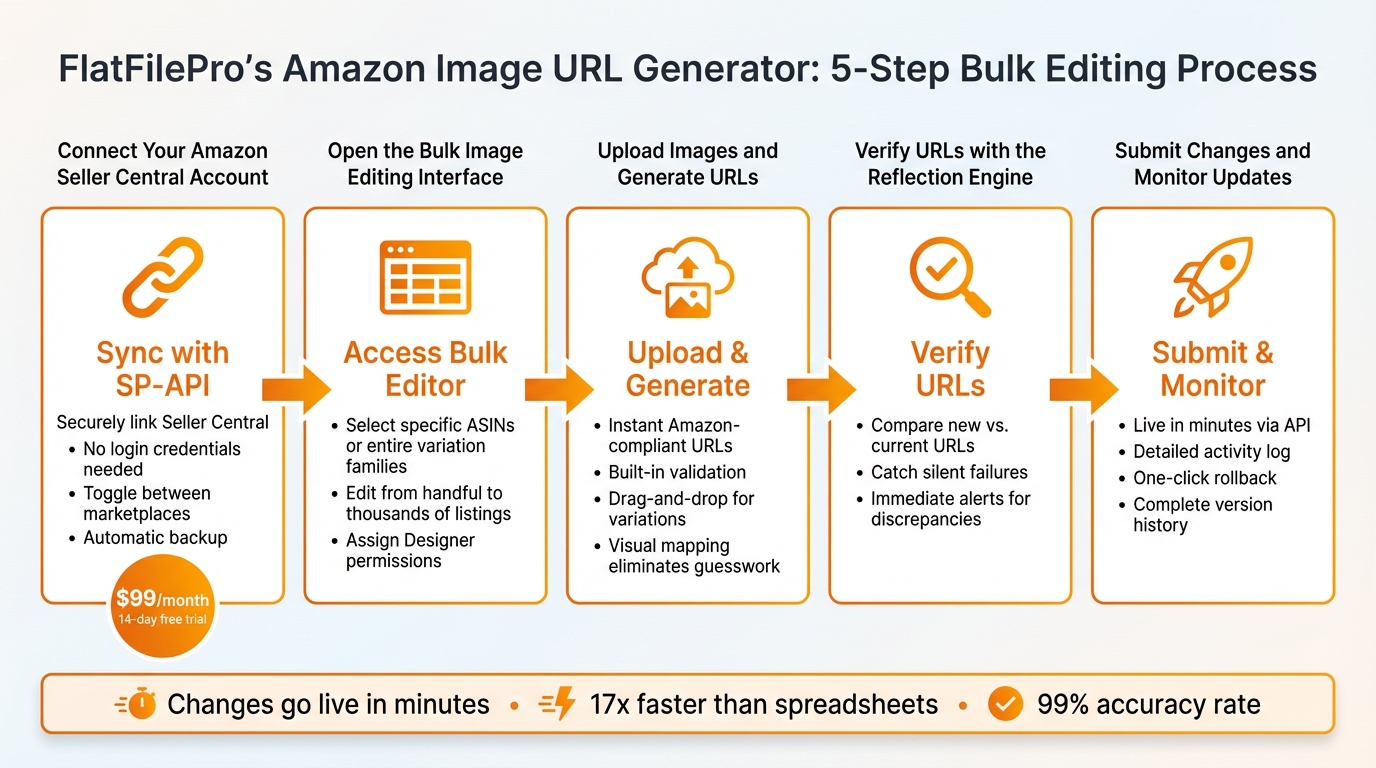
5-Step Guide to Using FlatFilePro Amazon Image URL Generator
Start using FlatFilePro in just a few minutes with its straightforward Sync/See/Save workflow. Here’s how you can generate Amazon-compliant image URLs efficiently.
Step 1: Connect Your Amazon Seller Central Account

Click on Sync to securely link your Amazon Seller Central account using SP-API. This integration pulls in all your product listings with a single click – no need to share your Seller Central login credentials. Plus, you can easily toggle between different marketplaces (like the US, UK, or Germany) directly from the dashboard.
Once connected, FlatFilePro automatically backs up your listing data and begins identifying catalog issues. Everything is designed to protect your sales while simplifying catalog management. The service costs $99/month, but you can explore all its features with a 14-day free trial – no credit card required.
Step 2: Open the Bulk Image Editing Interface
From your dashboard, access the bulk editor. Here, you can select specific ASINs or entire product variation families that need image updates. The tool allows you to edit anywhere from a handful to thousands of listings at once.
If you’re working with a team, you can assign Designer permissions to let others handle image updates without giving them access to sensitive listing details.
Step 3: Upload Images and Generate URLs
Upload your product images, and FlatFilePro will instantly create Amazon-compliant URLs. The system includes built-in validation to catch and flag potential issues before submission, helping you avoid listing suppressions.
For product variations, the drag-and-drop feature makes it easy to assign images to specific sizes or colors. This visual mapping eliminates guesswork. Once your URLs are ready and validated, move on to the next step to ensure live accuracy.
Step 4: Verify URLs with the Reflection Engine
Before making changes live, the Reflection Engine compares your newly generated URLs with the ones currently on Amazon. This quick verification step is designed to catch silent failures – something the Reflection Engine excels at.
If discrepancies are detected, you’ll be alerted immediately, giving you the chance to fix them before they impact your listings.
Step 5: Submit Changes and Monitor Updates
Submit your updates via API with a single click – changes go live in just minutes. The activity log provides a detailed record of every submission, showing exactly when Amazon processes your updates.
If an issue arises after an update, the one-click rollback feature lets you revert to a previous version instantly. FlatFilePro also keeps a complete version history, so you can recover previous states at any time.
"Our ops and analytics teams now experience seamless, near-instant updates compared to manual methods!" – Jack Haldrup, Founder, Dr. Squatch
Image URL Generation Examples by Product Category
FlatFilePro’s tools are designed to simplify image URL generation for Amazon product categories. Here are some specific examples of how it works across different categories, ensuring compliance and saving time.
Apparel: Size and Color Variations
For clothing, accurate representation of color and size is critical. FlatFilePro’s drag-and-drop mapping makes it easy to assign images to child ASINs, cutting out hours of manual spreadsheet updates.
The tool double-checks that your images meet Amazon’s strict apparel guidelines, such as ensuring a pure white background (RGB 255, 255, 255), models standing upright, and main images occupying at least 85% of the frame. It also verifies that images are at least 1,000 pixels on one side to enable zoom functionality. This is crucial, as catalog issues like listing suppressions impact around 93% of sellers on Amazon [1].
If you’re listing a shirt in five colors and three sizes, FlatFilePro’s bulk editor displays all 15 child SKUs at once. You can assign the right image to each variation, and the tool instantly generates compliant URLs. Plus, the Reflection Engine monitors these URLs nightly, catching any silent reverts by Amazon that might disrupt parent-child relationships [1].
Electronics: Multiple Product Angles
High-resolution images showing multiple angles are essential for electronics listings. FlatFilePro’s bulk editor lets you map various image URLs to Amazon attributes (like Main Image, PT01, PT02, etc.) across hundreds of SKUs in one go. Its error detection system scans for flat-file issues, preventing listing suppressions [2].
The tool also handles automatic resizing to meet Amazon’s technical specs, saving you from manual adjustments. For example, a laptop listing might require images of the closed device, open display, keyboard details, port layout, packaging contents, dimensions, and warranty card. FlatFilePro generates and validates URLs for all these images at once, ensuring they comply with Amazon’s current standards.
Home Goods: Lifestyle and Detail Images
For home goods, lifestyle images that show products in real-world settings are just as important as detailed shots highlighting features. FlatFilePro processes both types seamlessly during bulk uploads, generating URLs that Amazon accepts without issue.
The version control feature is a standout here. If a new lifestyle image underperforms, you can revert to the previous version with just one click, thanks to a complete version history. This flexibility ensures you can quickly adapt your listings to maximize performance.
sbb-itb-ed4fa17
Using the Image URL Generator with Other FlatFilePro Features
Complete Catalog Management
FlatFilePro’s Image URL Generator is seamlessly integrated into its catalog management system, making it more than just a tool for creating compliant URLs. It actively improves error detection and works effortlessly with international marketplaces. When paired with the Variations Manager, it achieves an impressive 95% success rate in updating product variations. This means uploaded images are automatically matched to SKUs while maintaining parent–child relationships – a crucial aspect for large catalogs[4].
The Reflection Engine takes it a step further by monitoring your image URLs every night. It flags issues, converts images into Amazon-compatible formats, and pre-validates file sizes to ensure they stay under 10MB. This process pushes accuracy to over 99%[4].
Role-based controls ensure that team members only access what they need, keeping workflows efficient. And if there’s ever a mistake, the version control feature allows you to roll back image updates with a single click, giving you peace of mind.
Manual URL Generation vs. FlatFilePro
Now that we’ve explored FlatFilePro’s capabilities, let’s compare its automated process to traditional manual URL generation. Manual methods often involve painstaking hours spent on spreadsheets, constant refreshing to verify changes, and a higher likelihood of errors, which can lead to compliance headaches.
| Aspect | Manual URL Generation | FlatFilePro URL Generator |
|---|---|---|
| Time Required | Hours | Minutes |
| Error Rate | 5–15%[4] | Over 99% accuracy[4] |
| Bulk Capacity | Limited | Unlimited |
| Compliance Success Rate | Variable | 95% for variations[4] |
FlatFilePro leverages Amazon’s SP-API for direct synchronization with Seller Central, completely eliminating the need for manual uploads. This ensures consistency and saves time across catalog updates[4]. As Jack Haldrup, Founder of Dr. Squatch, shares:
"This is the tool that powers our ops and analytics teams. We used to do everything manually, such a pain! Now we don’t have to think about anything and our listings update like magic!"[1]
Conclusion
FlatFilePro’s Amazon Image URL Generator turns what used to take hours into just minutes – offering processing speeds up to 17x faster and protecting your revenue from silent listing failures that impact 93% of sellers [1][3].
With bulk editing, automated compliance checks powered by the Reflection Engine, and smooth variation management, this tool makes updating images across hundreds – or even thousands – of listings far more reliable than manual methods. Whether you’re rolling out seasonal promotions, uploading lifestyle images, or managing complex product variations, FlatFilePro ensures every update aligns with Amazon’s strict requirements. These features fit effortlessly into your catalog strategy, keeping your listings consistent and error-free.
One Amazon seller shared their experience:
"With FlatFilePro, I’ve been able to streamline my Amazon listing process significantly. What used to take hours now takes just minutes. It’s a game-changer for my business." [1]
Why keep wrestling with spreadsheets when you can simplify your workflow? FlatFilePro offers a free 14-day trial – no credit card needed – and a straightforward $99/month subscription [1][3]. Plus, with a 100% refund guarantee if you’re not satisfied within six months, there’s absolutely no risk in discovering how much easier managing your Amazon listings can be.
FAQs
How does the Reflection Engine simplify Amazon image URL updates?
The Reflection Engine simplifies updating Amazon image URLs by automating the entire process. This reduces the chances of mistakes and ensures all URLs meet Amazon’s technical guidelines. It’s especially helpful for managing bulk updates while keeping product listings accurate and compliant.
By removing the need for manual updates, this tool not only saves time but also guarantees that your product images stay correctly linked, even for extensive catalogs or intricate listing setups.
How does the drag-and-drop feature simplify managing product variations?
Managing product variations just got simpler with the drag-and-drop feature. It allows you to upload and organize multiple images in one go, cutting down on time and eliminating repetitive manual tasks.
This tool also helps you maintain accuracy by letting you visually match the correct images to each variation – a key step for meeting Amazon’s listing guidelines. By streamlining bulk updates and reducing errors, it takes the stress out of catalog management and makes the process far more efficient.
Can I use FlatFilePro’s Amazon Image URL generator for free before subscribing?
Yes, FlatFilePro provides a free trial of its Amazon Image URL generator, allowing you to try out its features without any upfront commitment. Even better, the trial doesn’t require a credit card, so you can get started hassle-free.
This gives you the chance to see how the tool simplifies the process of generating accurate, Amazon-compliant image URLs for your product listings, helping you decide if it’s the right fit for your needs.