
If you’re an Amazon seller struggling to manage product image URLs, you’re not alone. These URLs are essential for maintaining accurate listings, improving visibility, and ensuring customers see high-quality images. However, Amazon’s manual processes can be slow, tedious, and prone to errors.
Key Takeaways:
- Image URLs are critical for product visibility, customer trust, and conversions.
- Amazon’s outdated workflows make managing image URLs frustrating, especially after the Feeds API changes in 2025.
- Missing or incorrect URLs can lower search rankings, suppress listings, and hurt sales.
Solution:
FlatFilePro simplifies this process by connecting directly to Amazon’s SP-API, allowing sellers to:
- Instantly retrieve, view, and export image URLs for all products.
- Manage and update URLs in bulk with minimal effort.
- Automate error detection and track updates in real time.
With FlatFilePro, the time-consuming manual steps are eliminated, helping sellers focus on growing their business instead of fixing listing errors.
HOW TO CREATE IMAGE URL FOR AMAZON FLAT FILES! QUICK AND EASY
Problems Amazon Sellers Face When Getting Image URLs
For Amazon sellers, pulling image URLs can feel like navigating a maze. Seller Central doesn’t exactly streamline the process, especially when you’re handling hundreds – or even thousands – of products. The process is often tedious, prone to errors, and frustratingly time-consuming.
Manual Exports from Seller Central
If you’re trying to extract image URLs manually, brace yourself. The process typically involves downloading product images, uploading them to a third-party host to generate direct links, and then pasting those links into a flat file for Amazon to process [1].
Shaival Choksi from Your Seller describes the challenges:
"Traditionally, many relied on third-party websites to generate direct image links, but these services were often unreliable." [1]
And it’s not just about generating URLs – it’s about getting them in the exact format Amazon accepts. Standard sharing links won’t cut it; they need to be reformatted using specific formulas [1]. Even if you manage to get the format right, the images won’t upload unless the source file has public "view" access enabled [1]. To top it off, Amazon’s system can take up to 24 hours to process and display these images [3].
Things got even trickier after July 31, 2025, when Amazon’s Feeds API stopped supporting the older flat file listing feeds for images. Sellers were forced to switch to JSON-based listing methods [2]. Meanwhile, manual data entry in spreadsheets remains a headache, often leading to typos and errors like "Missing or Invalid Required Attributes" [4].
The result? A process riddled with potential missteps, leaving sellers grappling with missing or incorrect image URLs.
What Happens When Image URLs Are Missing or Wrong
When image URLs go wrong, the consequences are more than just a minor inconvenience. Broken links or incorrectly formatted URLs – like those causing Amazon Error 15 – mean your product images won’t show up on the detail page [3]. And this isn’t just about aesthetics. Amazon’s algorithm prioritizes listings with high-quality, properly formatted images. Missing images can lead to lower search rankings or even suppressed listings [1].
Beyond rankings, missing or incorrect images erode customer trust. They can lead to mix-ups like customers receiving the wrong item, which drives negative reviews and spikes return rates [3]. If errors happen during the upload, you’re stuck troubleshooting and re-uploading, with another 24-hour wait for Amazon to process the fixes. For sellers juggling large product catalogs, manually resolving these issues is a logistical nightmare that drains time, money, and resources [4].
These challenges highlight the pressing need for a more efficient solution, which will be explored in the next section.
How FlatFilePro Solves the Image URL Problem

FlatFilePro takes the hassle out of managing image URLs by linking directly to Amazon’s Selling Partner API (SP-API). Forget about downloading reports or fiddling with URL formats – FlatFilePro provides instant access to all your product image URLs with just a click. Let’s break down how connecting your Seller Central account simplifies this entire process.
Connecting FlatFilePro to Your Seller Central Account

Getting started with FlatFilePro is straightforward. Sign up, hit the "Sync" button, and connect your Amazon Seller Central account. Since the platform uses Amazon’s official API, there’s no need to worry about the risks tied to web scraping. Plus, all data transfers are secured with encrypted connections to keep your information safe.
Once your account is linked, FlatFilePro automatically imports your entire product catalog. Every listing, along with its image URLs, appears on the dashboard in moments. It even creates a backup of your listing data, serving as a reliable "source of truth" that includes a complete history of your images. This eliminates the manual errors and delays you might have faced before. Jack Haldrup, Founder of Dr. Squatch, highlights the impact:
"This is the tool that powers our ops and analytics teams. We used to do everything manually, such a pain! Now we don’t have to think about anything and our listings update like magic!" [6]
Once connected, FlatFilePro makes retrieving image URLs a seamless part of your workflow.
How FlatFilePro Retrieves Image URLs Instantly
FlatFilePro builds on its secure connection to handle the tedious tasks for you. Using the SP-API, it pulls image URLs for all your ASINs, eliminating the need for manual URL management. All your image data is displayed in a user-friendly dashboard, allowing you to view, filter, or export URLs in just seconds.
The platform is 17x faster than using traditional inventory spreadsheets [7]. Tasks that once took hours – like generating direct links, formatting them correctly, and uploading flat files – are now done automatically. Ian Sells, Founder of Million Dollar Sellers, shares his experience:
"With FlatFilePro, I’ve been able to streamline my Amazon listing process significantly. What used to take hours now takes just minutes. It’s a game-changer for my business." [6]
Managing and Exporting Image URLs in Bulk with FlatFilePro
FlatFilePro takes the hassle out of managing large product catalogs by streamlining bulk image URL handling. After syncing your data, the platform’s dashboard consolidates everything into one place, making it easy to manage thousands of ASINs without the usual back-and-forth in Seller Central.
Viewing and Filtering Image URLs in Bulk
In the FlatFilePro dashboard, head to the product catalog view and select the image URL column to instantly access URLs for your entire inventory. Even for catalogs exceeding 10,000 ASINs, the platform loads image URLs in under 30 seconds using optimized API calls and infinite scrolling [8].
The platform also offers powerful filtering options like "Missing URLs", "Invalid HTTP Status", "Resolution < 1000px", and "Marketplace Mismatch." These filters help you quickly identify issues such as broken (404) images or missing secondary images. For example, applying the "Image Count < 7" filter pinpoints variations missing hero images, so you can see exactly where your attention is needed.
FlatFilePro goes a step further by cross-checking URLs against live Amazon endpoints. This real-time validation catches expired or redirected links [8], significantly reducing listing errors. Sellers have reported 25% fewer image-related issues compared to manual checks [9].
Once you’ve resolved any problems, exporting the cleaned-up data is a breeze.
Exporting Image URL Data for All Marketplaces
FlatFilePro makes exporting image URLs simple, offering formats like CSV, Excel, or JSON. The exported files are neatly organized with columns such as ASIN, Marketplace, MainImageURL, SwatchImages, and HiResURLs. This ensures compatibility with tools like Google Sheets, PIM systems, or other applications – no extra formatting required.
Each export includes marketplace-specific URLs directly pulled from Seller Central feeds [9]. You can even create multi-marketplace bundles with a single click, making it easy to manage listings across regions. For instance, one seller exporting 5,000 ASINs across five marketplaces reduced sync errors by 40% with this feature [9]. The organized format also ensures compliance with regional requirements, keeping your image data accurate across all your stores.
sbb-itb-ed4fa17
Automating Image Updates with Reflection Engine
Manually keeping track of image URLs and ensuring they’re up to date can be a daunting task – especially since Amazon rarely notifies sellers when updates fail. That’s where automation steps in to save the day. FlatFilePro’s bulk editing feature simplifies the process, making it easier to manage image updates without the hassle of manual intervention.
Bulk Editing and Updating Product Images
FlatFilePro’s API connection allows you to push image updates directly to Amazon, eliminating the need for tedious manual uploads. With this tool, you can update product images for thousands of ASINs in just a few minutes. It also validates edits against Amazon’s guidelines and tracks changes in real time, drastically cutting down wait times – no more 24-hour delays[10].
To ensure security and brand consistency, FlatFilePro incorporates advanced role-based access controls. This means only authorized team members can make edits, reducing the risk of unauthorized changes that could compromise your brand’s image[6].
Tracking Changes with Reflection Engine
Speed isn’t the only benefit – maintaining data accuracy is just as important. FlatFilePro’s Reflection Engine continuously compares your stored data with Amazon’s live listings. If it detects any discrepancies, such as outdated or missing images, it sends instant alerts[6]. According to FlatFilePro, 93% of Amazon sellers experience what they call "catalog rot" without even realizing it – often noticing only after sales begin to decline[6].
"Our Reflection Engine monitors every heartbeat of your catalog, alerting you the moment rot spreads."
– FlatFilePro[6]
The Reflection Engine also keeps a complete version history of all image changes, allowing you to track exactly what was modified and when. If an update fails or doesn’t meet your standards, you can restore the previous version with a single click[6].
This automated system works across all your marketplaces, ensuring image consistency whether you’re selling in the US, UK, or Germany[6]. By providing continuous oversight, FlatFilePro delivers a reliable solution for managing your catalog efficiently and without errors. This level of automation sets the stage for a closer look at how FlatFilePro’s image management features stack up against Seller Central.
FlatFilePro vs Seller Central for Image Management
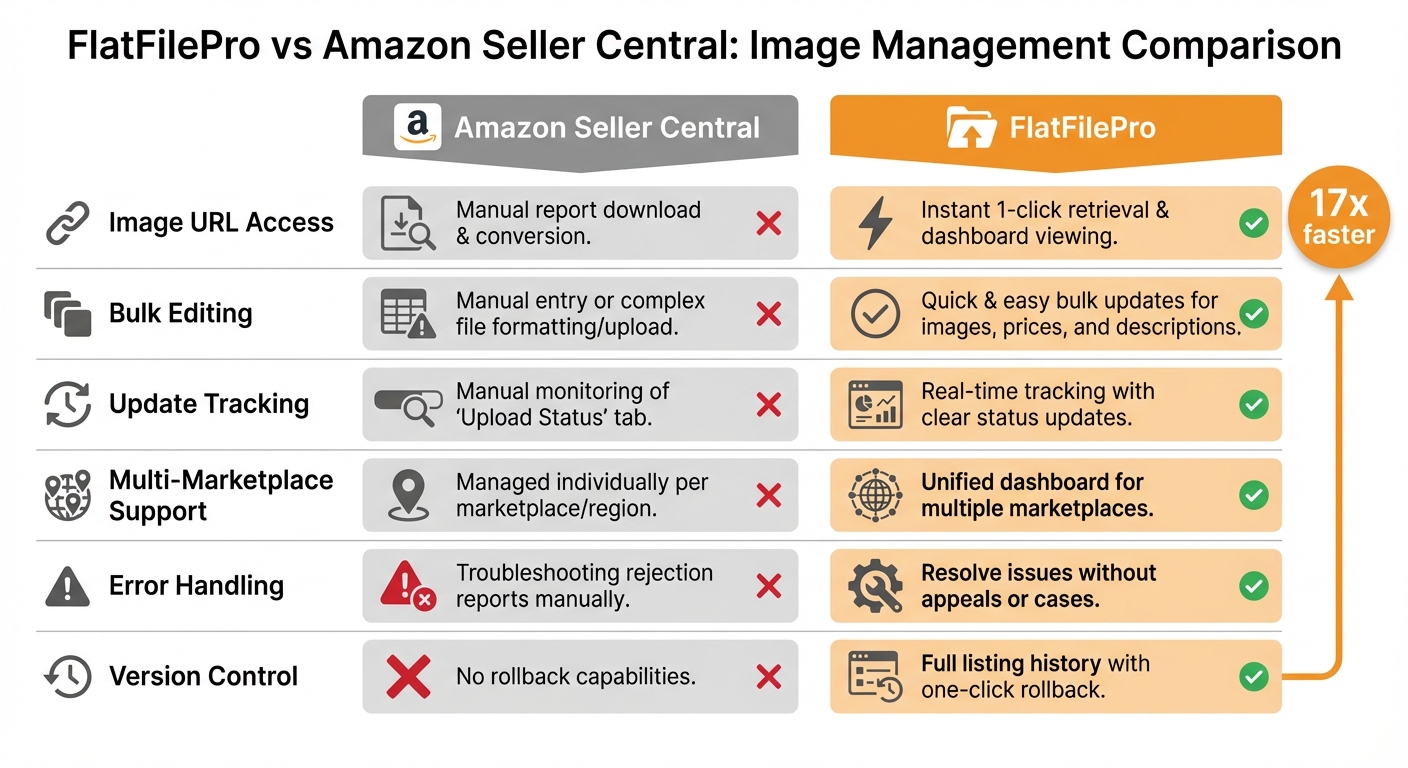
FlatFilePro vs Amazon Seller Central Image Management Comparison
When it comes to managing image URLs, FlatFilePro offers a streamlined and efficient alternative to the manual, often error-prone process found in Seller Central. Seller Central’s approach involves multiple steps – requesting reports, downloading .txt files, and converting them into .csv format – which can lead to delays and mistakes [17, 27]. FlatFilePro simplifies this process by directly linking to your Seller Central account, automatically updating your catalog with the latest image URLs [17, 28].
Updating product listings in Seller Central can be a time-consuming task, requiring manual input or complex file uploads. FlatFilePro, on the other hand, allows you to make bulk updates to images, prices, and descriptions in a fraction of the time – minutes instead of hours [6]. While both systems are subject to Amazon’s processing delay of up to 24 hours for image updates to go live [10], FlatFilePro stands out by offering clear tracking of updates. This means you can easily see when your changes have been submitted and processed, giving you more control and visibility.
Feature Comparison Table
| Feature | Amazon Seller Central | FlatFilePro |
|---|---|---|
| Image URL Access | Manual report download and conversion [17, 27] | Instant 1-click retrieval and dashboard viewing [17, 28] |
| Bulk Editing | Manual entry or complex file formatting/upload | Quick and easy bulk updates for images, prices, and descriptions |
| Update Tracking | Manual monitoring of "Upload Status" tab | Real-time tracking with clear status updates |
| Multi-Marketplace Support | Managed individually per marketplace/region | Unified dashboard for multiple marketplaces [6] |
| Error Handling | Troubleshooting rejection reports manually | Resolve issues without appeals or cases |
| Version Control | No rollback capabilities | Full listing history with one-click rollback [6] |
FlatFilePro also offers additional features that Seller Central lacks. Its Reflection Engine continuously scans your catalog for discrepancies, such as silent listing failures, unauthorized changes, or missing images. By catching these issues early, FlatFilePro helps prevent disruptions that could negatively impact your sales [6].
This side-by-side comparison highlights why FlatFilePro is a more reliable and efficient choice for managing your product images and listings.
Conclusion
Handling Amazon product image URLs doesn’t have to be a headache, especially when you have the right tools at your disposal. FlatFilePro takes the hassle out of manual data management while minimizing errors that could potentially harm your listings.
With its centralized dashboard and automated monitoring features, this platform simplifies your workflow. Instead of juggling complex workflows in Seller Central, you can access everything you need in one place – view, filter, and export image URLs effortlessly. The Reflection Engine keeps a close watch on your catalog, while the built-in error detection system identifies formatting issues before they can cause problems on Amazon.
"FlatFilePro allows you to easily upload and manage large amounts of data in bulk, streamlining the entire process and freeing up valuable time that can be used to focus on other important aspects of your business." [5]
FAQs
How does FlatFilePro help Amazon sellers manage product image URLs more easily?
FlatFilePro makes handling Amazon product image URLs much easier by offering tools that simplify how you extract and organize data. Instead of manually sorting through your catalog, sellers can quickly pull image URLs directly, cutting down on effort and minimizing errors.
With features like bulk data processing and automated reporting, FlatFilePro helps you save time while keeping your inventory in order. This means your product listings stay up-to-date and visually appealing, giving customers a better shopping experience.
What issues do Amazon sellers face with image URLs after the Feeds API update?
As of July 31, 2025, Amazon officially retired its legacy XML and flat-file feeds that many sellers relied on to upload product data, including image URLs. With the Feeds API no longer supporting these formats, sellers now encounter fatal processingStatus errors when attempting to use outdated bulk-upload workflows. This shift means sellers must transition to the Listings Items API or the JSON-based JSON_LISTINGS_FEED, both of which come with new request structures and authentication methods.
For many sellers, this update has disrupted established workflows. Tools and scripts designed for generating flat-file image URLs are now obsolete, leaving sellers to navigate new technical challenges. These include mastering JSON formatting, handling API throttling limits, and resolving unfamiliar errors. Adjusting to this API-driven process for managing image URLs can be a complex and time-intensive task, often requiring additional development resources to stay compliant with Amazon’s updated systems.
How does the Reflection Engine ensure Amazon product image URLs are accurate?
At the moment, there isn’t any detailed information about a tool or feature named the Reflection Engine or how it might handle the verification of Amazon product image URLs. Most conversations around this topic tend to focus on more common methods, such as using flat files, bulk extraction tools, or Amazon’s APIs to efficiently retrieve and manage image URLs.
If you have any specific details or documentation about the Reflection Engine, feel free to share them. That way, we can provide more targeted and helpful guidance.