
Want to rank higher on Amazon in 2025? It all starts with smart keyword placement.
Amazon’s A10 algorithm now prioritizes factors like customer engagement, external traffic, and product quality over just keyword relevance. This means your keywords need to do more than match search terms – they need to drive clicks, sales, and positive experiences.
Here’s a quick summary of what matters most:
- Titles: Include primary keywords in the first five words for maximum visibility, especially on mobile.
- Bullet Points: Use secondary keywords naturally, focusing on benefits and features.
- Backend Search Terms: Add synonyms, alternate spellings, and related terms within the 250-byte limit.
- Avoid Mistakes: No keyword stuffing, irrelevant terms, or exceeding character limits.
- Tools to Use: Amazon Brand Analytics, Search Query Performance Reports, and tools like FlatFilePro for bulk updates.
Why it matters: The top 3 listings grab 64% of clicks, and 70% of shoppers never go past the first page. Proper keyword placement can reduce reliance on ads, improve rankings, and boost sales.
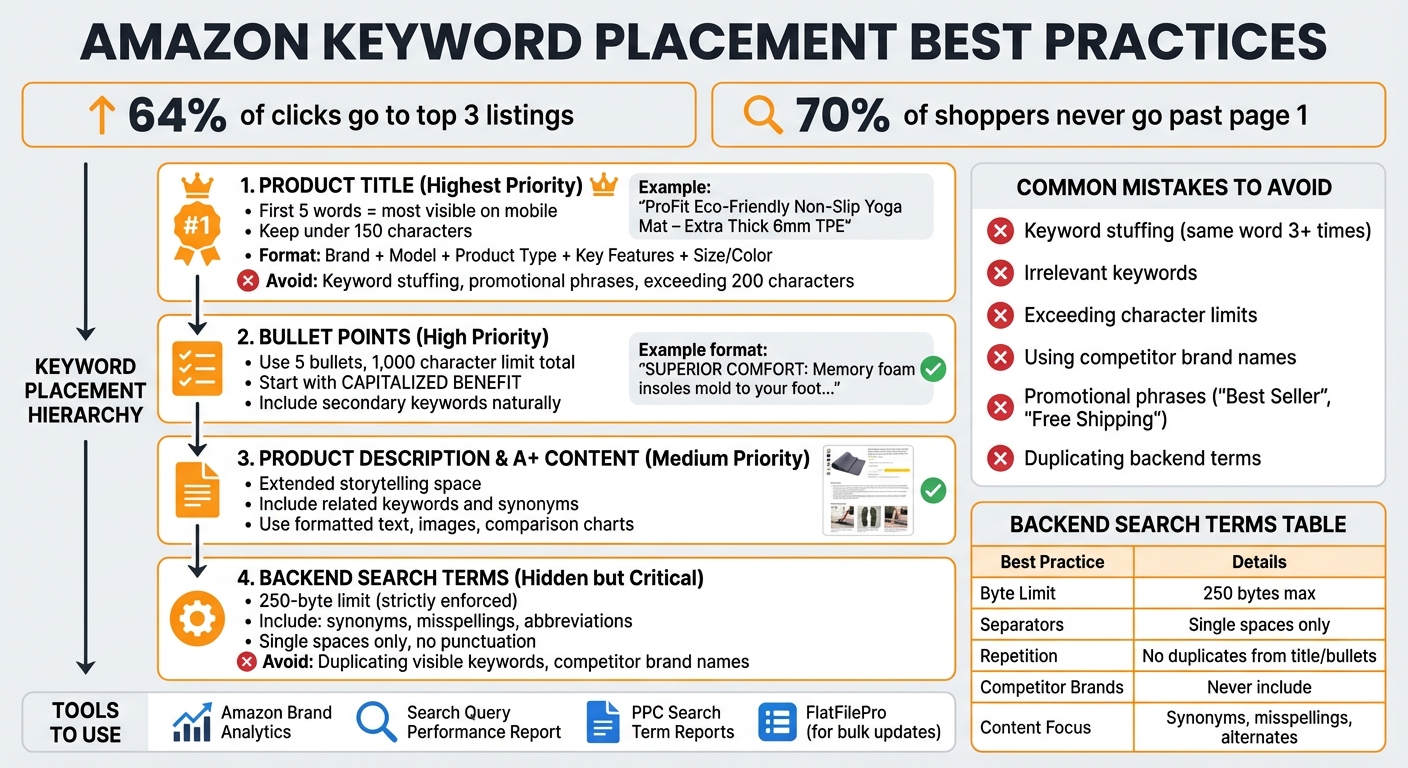
Amazon Listing Keyword Placement Best Practices Guide 2025
The Amazon Seller’s Guide to High-Intent Keywords That Convert
How to Find the Right Keywords
Choosing the right keywords means aligning your selections with what customers are actually searching for. The goal is to find terms with strong search volume and manageable competition to maximize visibility and sales.
Start by leveraging Amazon’s tools, which are built around real customer behavior. For instance, Brand Analytics offers the "Top Search Terms" report, showing which keywords generate the most clicks and conversions in your category [3]. The Search Query Performance Report provides data on search volume, impressions, and conversion rates for specific terms [1]. Additionally, your PPC Search Term Reports reveal which search queries triggered ads and led to sales [3].
Another effective strategy is using reverse ASIN lookups to uncover competitor keyword strategies. These tools reveal the exact terms driving traffic to top-selling products. By analyzing multiple competitor listings, you can spot keyword gaps and identify terms with low title density – keywords that fewer sellers are using in their product titles [1].
"High search volumes and low competition indicate a keyword with solid potential, while the opposite may not be worth targeting." – beBOLD Digital [3]
Focus on long-tail keywords – specific phrases like "eco-friendly non-slip yoga mat" instead of a generic term like "yoga mat." Long-tail keywords often have less competition and higher conversion rates because they match exactly what motivated buyers are searching for [3].
This careful selection of keywords not only boosts organic rankings but also enhances conversion rates. Let’s dive into how Amazon’s tools can help you pinpoint these high-potential keywords.
Using Amazon Search Suggestions and Brand Analytics
Amazon’s search bar is a simple yet powerful research tool. Start typing a seed keyword, and pay attention to the autocomplete suggestions. These dropdown options update in real time, reflecting trends in customer searches [3]. For example, if you type "cutting board," you might see suggestions like "cutting board set with juice groove" or "cutting board bamboo large." These phrases show exactly what customers are looking for.
If you’re a registered brand, the "Top Search Terms" report in Brand Analytics ranks keywords by their clicks and conversions within your category [3]. Meanwhile, the Search Term Optimizer in your Brand Dashboard analyzes your backend search terms and suggests alternatives based on shopper behavior [6].
"The Amazon search term optimizer provides detailed insight on which backend search terms work best for you, what is duplicated in your product content, and also suggests alternatives for search terms from shopper data." – Shannon O’Connell, Amazon Account Manager [6]
Don’t forget about your PPC campaigns. The Search Term Report reveals which customer queries have triggered ads and resulted in sales. If a keyword like "insulated stainless steel water bottle" consistently drives purchases through ads, make sure it’s also included in your product title and bullet points.
Analyzing Competitor Listings for Keywords
Evaluating competitor listings is another way to refine your keyword strategy. Reverse ASIN lookups allow you to input a competitor’s product ID and see the keywords they rank for – both organically and through sponsored ads [8][9][11]. By analyzing the top 10 sellers in your niche, you can create a comprehensive keyword map [10].
"A reverse ASIN lookup provides a shortcut to keyword success." – Jake Schwarzbaum, Co-Founder and CEO, Velocity Sellers [9]
Start by examining competitor titles, especially the first 80 characters, as these carry the most weight in Amazon’s algorithm and are visible on mobile devices [10]. Then, review their bullet points and descriptions to uncover secondary keywords that highlight features, benefits, and use cases [8][10]. Don’t overlook customer reviews and Q&A sections – these often contain natural language that reveals how shoppers describe products and the problems they’re trying to solve [10].
The key to standing out lies in competitor gap analysis. Look for high-value keywords that top sellers rank for but haven’t included in their visible listing copy. Adding these terms to your backend search fields can help you capture untapped traffic [11]. However, avoid using competitor brand names in your listings – it’s a violation of Amazon’s policies and could lead to listing suppression [10][11].
Where to Place Keywords in Your Listings
Once you’ve pinpointed your target keywords, the next step is to position them effectively throughout your listing. Each section of your Amazon listing has a unique role in appealing to both the algorithm and potential buyers. The key is to strike a balance between boosting search visibility and maintaining readability, ensuring your listing ranks well and converts visitors into customers. Let’s break down how to optimize each part of your listing for keyword impact.
Product Title Optimization
The product title is one of the strongest ranking signals on Amazon. Since the first five words are the most visible on mobile devices [1], it’s essential to place your primary, high-traffic keywords early in the title to increase visibility and drive clicks.
"The first five words of your title are the most visible, especially on mobile devices. Make sure they include your most important keywords."
– Noah Wickham, VP of Sales and Marketing, My Amazon Guy [1]
Keep your titles concise – under 150 characters – to stay within Amazon’s guidelines and avoid looking cluttered. A well-structured title should follow this format:
Brand + Model/Product Name + Product Type + Key Features + Size/Color.
For example, instead of a generic title like "Yoga Mat", an optimized version could be:
"ProFit Eco-Friendly Non-Slip Yoga Mat – Extra Thick 6mm TPE Material – 72×24 inches – Includes Carrying Strap."
Here are some other tips for crafting effective titles:
- Use numerals (e.g., "2" instead of "two") to save space.
- Apply title casing by capitalizing the first letter of major words.
- Avoid promotional phrases like "Best Seller" or "Free Shipping", as these violate Amazon’s policies.
- If your brand is less known, consider placing it at the end to prioritize high-volume keywords upfront.
| Category | Recommended Title Elements |
|---|---|
| Electronics | Model number, connectivity, key features, color |
| Beauty | Size/ounces, skin/hair type, intended use, SPF |
| Clothing | Gender, fit, material, key design features |
| Grocery | Flavor, quantity, size/weight, dietary labels |
| Home/Kitchen | Material, pack size, dimensions, color |
Adding Keywords to Bullet Points
Bullet points are the second most important section for ranking on Amazon. Not only do they help the algorithm understand your product, but they also persuade shoppers by emphasizing key benefits. Each bullet should highlight one feature or benefit while naturally including a primary or secondary keyword.
Start each bullet with a capitalized benefit statement that addresses a customer need, followed by an explanation of how the feature meets that need.
"Start each bullet with a capitalized benefit statement addressing a customer pain point, then explain the feature that delivers that benefit."
– Chuck Kessler, Content and SEO Manager, Canopy Management
For instance:
SUPERIOR COMFORT: Our memory foam insoles mold to your foot shape, reducing pressure points during long shifts.
Since many buyers skim the first few bullets, prioritize your most compelling features at the top. Amazon typically allows five bullet points, with a combined limit of 1,000 characters. Use this space to reinforce keywords from the title with complementary terms, and highlight details like materials, benefits, and product attributes. Including a warranty or guarantee in the final bullet can also help build trust.
Product Descriptions and A+ Content
Once you’ve optimized your bullet points, extend your keyword strategy into the product description and A+ Content. These sections give you more room to tell your product’s story and provide in-depth details, all while improving search performance.
For example, a description for a stainless steel water bottle might read:
"Our insulated stainless steel water bottle keeps drinks cold for 24 hours and hot for 12 hours, making it perfect for gym workouts, hiking trips, and daily commutes."
A+ Content takes things a step further by allowing formatted text, images, and comparison charts. This is a great opportunity to incorporate related keywords and synonyms while visually showcasing your product’s features and benefits.
Backend Search Terms
Backend search terms are the hidden powerhouse of your listing. While shoppers can’t see them, these terms play a critical role in ensuring your product appears in relevant search results. Amazon provides a 250-byte field for these terms, where you can include synonyms, misspellings, abbreviations, and related keywords that didn’t fit naturally into the main listing [6].
"The backend keywords or search terms that vendors and sellers can enter on their products are one of many ways to inform Amazon on how best to match your product to shopper searches."
– Shannon O’Connell, Amazon Account Manager, JumpFly [6]
Here are some best practices for backend keywords:
- Avoid duplicating keywords already used in your title, bullet points, or description.
- Use single spaces to separate words, and skip punctuation to conserve space.
- The order of keywords doesn’t matter; Amazon’s algorithm will combine them as needed.
- Do not include competitor brand names or ASINs, as this violates Amazon’s policies.
| Best Practice | Details |
|---|---|
| Byte Limit | Maximum 250 bytes (including spaces and punctuation) |
| Separators | Use single spaces only; avoid commas |
| Repetition | Do not repeat words from the title or bullet points |
| Competitor Brands | Avoid including competitor names |
| Content Focus | Synonyms, alternate spellings, and related attributes |
Also, leave out filler words like "a", "an", "and", "by", "for", "of", "the", and "with" to maximize space. If you’re enrolled in Brand Registry, use the Search Term Optimizer in your dashboard to refine and track the effectiveness of your backend keywords.
Keyword Placement Mistakes to Avoid
Even the best keyword research can fall flat if the keywords are poorly placed. Amazon’s algorithm prioritizes relevance and readability over attempts to manipulate rankings. Knowing the common pitfalls – and steering clear of them – can safeguard your rankings and ensure your listings comply with Amazon’s policies. Let’s explore some of the most frequent mistakes and how to sidestep them for better keyword performance.
Using Irrelevant Keywords and Keyword Stuffing
Stuffing your listing with irrelevant keywords doesn’t just create a bad shopping experience; it can damage your search rankings. When shoppers encounter a listing overloaded with mismatched keywords, they often leave immediately – and Amazon takes note. A high bounce rate signals to the algorithm that your product isn’t meeting shopper expectations, which can lead to a drop in rankings or even make your listing disappear altogether [14].
"The same word cannot appear more than twice in a title to avoid keyword stuffing."
– Noah Wickham, VP of Sales and Marketing, My Amazon Guy [1]
Instead of overloading your content with repetitive keywords, make use of backend search terms. These fields are ideal for including synonyms, common misspellings, and alternative product names that don’t fit naturally into the visible copy.
A great example comes from Tent and Table, a commercial inflatable company. After partnering with My Amazon Guy in June 2022, they revamped their fragmented catalog and improved unoptimized content. The results? A 167% year-over-year revenue growth and conversion rates that increased by 50% to 100%. Advanced SEO techniques, better creative assets, and fixing suppressed listings all played a role [14].
Here’s a quick breakdown of common keyword-related mistakes and best practices:
| Feature | Best Practice | Common Mistake |
|---|---|---|
| Title Length | 80–100 characters (mobile-friendly) | Exceeding 200 characters [1][5] |
| Word Repetition | Use a word once or twice at most | Repeating the same keyword 3+ times [1] |
| Backend Terms | Use synonyms, misspellings, 250 bytes | Repeating title keywords; exceeding the limit [4][13] |
| Special Characters | Stick to alphanumeric (mostly) | Adding symbols like !, $, or ? [1] |
| Promotional Text | Highlight features and benefits | Using phrases like "Best Seller" or "Free Shipping" [1] |
Keyword stuffing isn’t the only issue – improper use of backend features can also undermine your listing’s success.
Breaking Amazon’s Backend Search Term Rules
To maintain high performance, it’s critical to follow Amazon’s backend search term rules. The backend search term field has a strict 250-byte limit (spaces and punctuation included) [4][6]. If you exceed this limit, Amazon will ignore the entire field, which can hurt your product’s discoverability [13]. To make the most of this space, skip punctuation and use single spaces between words. The order of terms doesn’t matter since Amazon’s algorithm aggregates them automatically [6].
"Never use competitor brand names because it violates Amazon policies."
– Channel Supply Experts [4]
Violating Amazon’s policies by including competitor names or ASINs can lead to listing suppression [4]. Similarly, phrases like "Best Seller", "#1 Rated", "Free Shipping", or "Approved" are banned from both titles and backend fields [1][5]. Sellers enrolled in Brand Registry can use the Search Term Optimizer in the Brand Dashboard to identify duplicate terms and get suggestions based on shopper data [6].
To stay compliant and up-to-date, audit your backend search terms every 45–60 days. Check the "Keywords" tab in Seller Central – if you exceed the 250-byte limit, a warning will appear next to the field [6]. Keep in mind that Amazon measures backend terms in bytes, not characters, so some special characters may take up more than one byte, reducing your available space [4][6].
sbb-itb-ed4fa17
Managing Keywords with FlatFilePro

Handling hundreds – or even thousands – of product listings on Amazon can be a daunting task. Relying on manual updates in Seller Central not only eats up your time but also increases the likelihood of errors. To maintain strong search visibility and drive conversions, efficient keyword management is a must.
FlatFilePro simplifies this process by connecting directly to your Amazon Seller Central account via Amazon’s API. It imports your entire product catalog into a user-friendly dashboard, allowing you to edit titles, bullet points, descriptions, and backend search terms across your catalog – or specific product groups – in just minutes. This streamlined approach eliminates the inefficiencies of Seller Central and introduces a powerful way to manage bulk updates.
Bulk Editing for Multiple Listings
One of FlatFilePro’s standout features is its ability to handle bulk keyword updates with ease. Imagine needing to add a seasonal keyword like "Valentine’s gift" to 300 listings. What could take hours in Seller Central can now be done in minutes. This feature is especially handy when Amazon rolls out new guidelines – like the upcoming 2025 policy changes banning promotional phrases such as "Best Seller" or "Free Shipping" [1]. With FlatFilePro, you can quickly clean up your catalog to stay compliant.
The platform also lets you filter listings by category, brand, or custom tags, making it easy to apply updates to selected groups. For backend search terms, FlatFilePro provides a real-time character count, ensuring you don’t exceed limits and accidentally leave valuable keywords unindexed.
Checking Keyword Accuracy with Reflection Engine
FlatFilePro takes bulk editing a step further with its Reflection Engine, which ensures your updates stick. Every night, it checks your listings against the live content on Amazon, flagging discrepancies. Matching updates are marked with green checkmarks, while mismatches get red X’s, so you’ll know if Amazon made changes or rejected your updates.
For instance, if you optimize a product title to include a high-priority keyword within the first five words – critical for mobile visibility [1] – but Amazon reverts the change, the Reflection Engine will flag it. You can then resubmit the update or investigate why it wasn’t accepted. This feature is especially useful for backend search terms, where you’d likely include synonyms, common misspellings, or alternative phrases that don’t fit naturally into visible content [3][6].
"Your customer-facing content and your algorithm-facing keywords must work synergistically to find your ideal shoppers."
– Shannon O’Connell, Amazon Account Manager, JumpFly [6]
Finding Keyword Errors and Staying Compliant
FlatFilePro doesn’t just help with updates – it actively scans for keyword-related issues to keep your listings compliant and optimized. Its error detection system categorizes problems – like Product Identity, Details, Shipping, and Safety – so you can address the most critical fixes first.
Common violations, such as keyword stuffing (repeating the same word more than twice in a title [1]), exceeding the 200-character title limit [1], or duplicating backend terms already used in titles or bullet points [5][12], are flagged automatically. It also identifies missing content that could hurt your competitiveness. Since Amazon’s A10 algorithm favors listings that are keyword-optimized and have strong conversion rates [12], resolving these issues can directly improve your search rankings and boost customer engagement.
FlatFilePro’s Activity Log keeps track of every change made to your listings. If a keyword update negatively impacts performance, you can roll back to the previous version with a single click – no need to recreate content from scratch.
Measuring Keyword Performance
Once you’ve optimized your listings with FlatFilePro, the next step is monitoring keyword performance. Adding keywords is just the beginning – tracking how they perform is essential to turning traffic into sales.
Monitoring Search Query Performance
The Search Query Performance (SQP) dashboard is your go-to tool for evaluating keyword effectiveness. This report follows the customer journey for specific search terms, providing data on impressions, clicks, cart adds, and purchases [7]. As Noah Wickham points out, "Use Amazon’s Search Query Performance Report to see actual search volume, impressions, and conversions" [1].
"The Search Query Performance dashboard shows the top queries leading customers to your brand, along with metrics for impressions, clicks, cart adds, and more."
– Daisy Quaker, Sr. Marketing Manager, Amazon [7]
This dashboard helps you identify which keywords are driving traffic to your listings and how they stack up against competitors. Pay close attention to high-volume terms with low "title density" – these offer great potential for boosting rankings when added to your product title [1]. Additionally, you can uncover backend keyword opportunities by analyzing terms that generate impressions but don’t fit naturally into your visible content [7]. This data not only validates your strategy but also reveals areas where you can refine your titles and backend keywords.
To fine-tune your keyword placement, use the "Manage Your Experiments" feature to run A/B tests. Conduct these tests over at least four weeks to collect meaningful insights on which version generates more clicks and conversions [1]. Keep an eye on metrics like Click-Through Rate (CTR) and conversion rates in Seller Central to ensure your optimized listings are attracting and converting shoppers effectively [15].
Connecting Keywords to Sales Results
While impressions and clicks are important, the real measure of success lies in how well your keywords drive actual sales. Focus on monitoring the conversion rate (CVR) for specific search terms to see if your keywords are attracting high-intent buyers [2][15]. Amazon’s A9 algorithm places significant weight on sales velocity – the speed and consistency of daily sales – when determining search rankings [2].
Here’s a quick breakdown of key metrics and where to find them:
| Metric | Where to Find It | What It Tells You |
|---|---|---|
| Search Query Volume | SQP Report / Product Opportunity Explorer | How often customers search for a specific term |
| Brand Share | Search Query Performance Dashboard | Your brand’s share of clicks and purchases for a keyword |
| Conversion Rate | Seller Central Business Reports | Percentage of sessions resulting in a sale |
| Organic Rank | Manual Search / Third-party SEO tools | Your listing’s position in search results without "Sponsored" tags |
| Add to Cart Rate | Search Query Performance Dashboard | Early indicator of purchase intent for keywords |
With 70% of shoppers sticking to page one and the top three listings capturing 64% of clicks, improving your rankings is critical [2]. If your keywords aren’t performing as expected, adjust your strategy. Use PPC campaigns to test new keywords, and incorporate high-performing ad terms into your organic listings to boost SEO [3].
Conclusion
Mastering keyword placement is a cornerstone of Amazon SEO in 2025. Your product title remains the most influential ranking factor, with top keywords ideally placed within the first five words to maximize visibility on mobile devices[1][5]. Use bullet points to craft benefit-focused copy that incorporates secondary keywords[4], and make the most of backend search terms by including synonyms, misspellings, and alternative names within the 250-byte limit[6][7]. Keep in mind, Amazon’s algorithm doesn’t favor keyword repetition, so avoid duplicating terms across visible fields and backend data[5][6].
Be cautious of common pitfalls like keyword stuffing, exceeding character limits, or using irrelevant terms, as these can hurt your conversion rates and even lead to compliance issues[1][4].
"Amazon’s ranking algorithm doesn’t consider backlinks or user engagement. Instead, it prioritizes factors like PPC sales, organic sales, and conversion rates."
- Francisco Valadez, My Amazon Guy[16]
For sellers juggling 100+ listings, FlatFilePro offers a practical solution for bulk updates to titles, bullet points, and backend terms. Its Reflection Engine scans listings nightly to catch unauthorized changes, while error detection organizes compliance issues by category. Starting at $99 per month, with a free trial available, it’s a smart choice for sellers managing large catalogs. (Check out the "Managing Keywords with FlatFilePro" section for more details.)
Strategic keyword placement is the key to sustained sales growth. Better rankings lead to more sales, which in turn boost your organic visibility[5]. When you combine precise keyword strategies with regular monitoring and timely adjustments, you’ll not only align with Amazon’s algorithm but also create compelling content that turns browsers into buyers.
FAQs
What are the best ways to find high-potential keywords for my Amazon listings?
To find the best keywords for your Amazon listings, start with Amazon’s autocomplete feature. Simply type a relevant word or phrase into the search bar, and you’ll see suggestions based on what shoppers are actively searching for. These suggestions can be goldmines for keywords to include in your titles, bullet points, descriptions, and backend search terms to enhance your product’s visibility.
Don’t overlook the backend keyword fields in Seller Central, such as “Search Terms” and “Platinum Keywords.” These sections provide space for up to 250 characters of keywords that influence your search rankings without appearing on your product page. Use this space wisely by including long-tail keywords, modifiers (like size, color, or specific use cases), and other relevant terms to attract more traffic.
If your brand is registered, take advantage of Brand Analytics to identify keywords that are driving traffic and sales to both your listings and your competitors’. Pair this data with insights from your Amazon advertising campaigns to pinpoint high-converting terms. By combining autocomplete suggestions, backend keyword optimization, and analytics tools, you can craft a keyword strategy that not only increases visibility but also drives sales.
How can I optimize backend search terms on Amazon while staying compliant with their policies?
Optimizing backend search terms can significantly improve your product’s visibility on Amazon without altering the customer-facing content. Amazon currently allows up to 250 bytes for these terms, so make sure to use this space wisely with relevant, high-traffic keywords that aren’t already included in your product title, bullet points, or description. For best results, avoid repeating words, using punctuation, or adding line breaks – stick to single spaces between terms.
To expand your reach, include singular and plural forms, common misspellings, and synonyms. However, steer clear of brand names, competitor trademarks, or anything prohibited, such as offensive language or promotional claims. Focus on keeping each term concise and relevant. Irrelevant or overly stuffed keywords can violate Amazon’s policies and may even result in listing suppression. By following these guidelines, you can enhance your product’s discoverability while staying compliant with Amazon’s rules.
How can I track the success of my Amazon keyword strategy?
To measure how well your keyword strategy is working, start by setting a baseline for key metrics like organic ranking, sales velocity, click-through rate (CTR), and conversion rate. Once you’ve updated your product titles, bullet points, descriptions, or backend search terms, keep an eye on these metrics over the next 2–4 weeks. If your strategy is on point, you should see better rankings, which often lead to higher CTRs and more sales or revenue.
Amazon offers tools like the Search Term Report and Brand Analytics (for brand-registered sellers) to help pinpoint which keywords are driving impressions and purchases. To make tracking easier, consider using a listing management tool such as FlatFilePro. Its Reflection Engine checks your listings every night to ensure updates are live and accurate. Pairing data from Amazon reports with FlatFilePro’s Activity Log lets you monitor changes in rankings, sales, and conversions. If the results don’t meet expectations, tweak your keywords and test again to achieve better performance.