
If you’re selling automotive parts on Amazon, ensuring accurate fitment data is critical. Fitment data links your products to specific vehicles, powering tools like Amazon’s "Part Finder" and "Garage" features. Accurate data boosts visibility, reduces returns, and protects your account from penalties. Here’s what you need to know:
- Fitment Data Basics: Compatibility data (ACES) connects parts to vehicles using attributes like year, make, model, and engine type. Amazon requires ACES version 3.2 for submissions.
- Why It Matters: Inaccurate data leads to lost visibility, high return rates, and account risks. Monthly updates to the Vehicle Configuration Database (VCdb) mean regular validation is essential.
- Common Errors: Outdated data, mismatched brand names, missing details like trim level, and schema validation failures are frequent issues.
- Validation Methods: Manual validation requires VCdb and PAdb subscriptions, but automation tools like FlatFilePro simplify the process with features like bulk editing, nightly checks, and error detection.
To stay competitive, regularly update your fitment data, validate submissions, and use tools to streamline the process. Accurate fitment ensures your listings appear in searches, drives conversions, and keeps your business running smoothly.
Auto parts eCommerce must haves for 2021
ACES and PIES Standards for Fitment Data
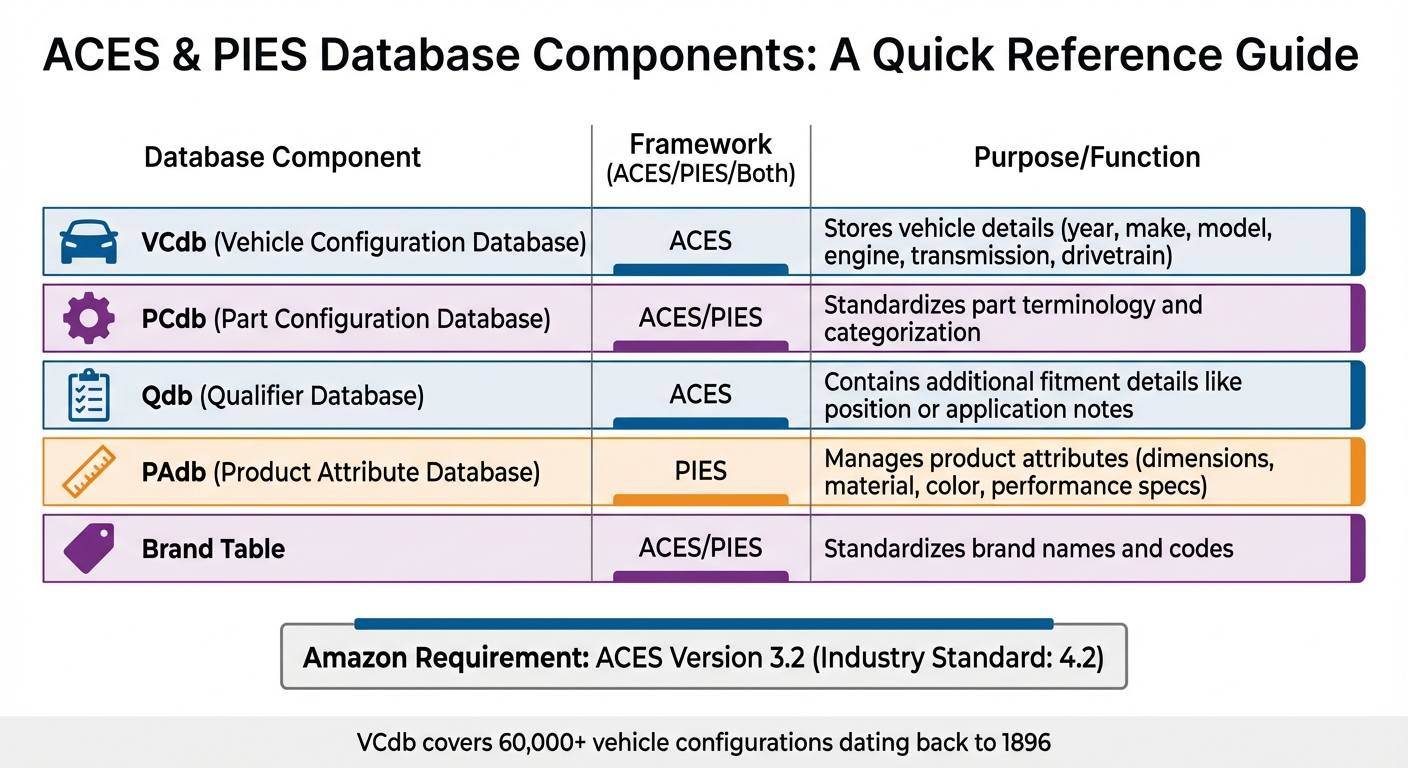
ACES and PIES Database Components for Amazon Automotive Fitment
ACES determines vehicle compatibility, while PIES handles product details. Both rely on XML (and increasingly JSON) to create a standardized format that makes data exchange between platforms and partners seamless, eliminating the need for manual re-entry [10][12]. For Amazon sellers, ACES plays a key role, powering the "Check if this fits your vehicle" widget and the Parts Finder tool, both of which are crucial for customers shopping for automotive parts [12].
How ACES and PIES Frameworks Work
Let’s break down how these frameworks function in practice.
ACES uses the Vehicle Configuration Database (VCdb) to translate vehicle details into standardized numerical codes. This database includes attributes like year, make, model, engine type, transmission, and drivetrain [5][3]. Covering over 60,000 specific year/make/model configurations, the VCdb even includes vehicles dating back to 1896 for U.S.-manufactured models [9].
"Selling auto parts online without standardized data is like trying to build a race car without a blueprint – technically possible, but inefficient and prone to serious problems." – Tom Bukevicius, Scube Marketing [12]
PIES complements ACES by managing product details through the Product Attribute Database (PAdb). This database contains technical specs like dimensions, color, material, and performance categories [9][12]. For example, when you see detailed specs like weight or material composition on an Amazon listing, it’s often pulled from PIES-compliant data.
Amazon has specific requirements that differ from general industry standards. While the automotive aftermarket typically uses ACES version 4.2, Amazon mandates fitment data submission in ACES version 3.2 [11][12]. Submitting the wrong version will result in validation failures, preventing your fitment details from appearing on your listings.
| Database Component | Framework | Purpose |
|---|---|---|
| VCdb | ACES | Stores vehicle details (year, make, engine, etc.) |
| PCdb | ACES/PIES | Standardizes part terminology and categorization |
| Qdb | ACES | Contains additional fitment details like position or notes |
| PAdb | PIES | Manages product attributes (dimensions, material, etc.) |
| Brand Table | ACES/PIES | Standardizes brand names and codes |
Familiarity with these components is crucial for avoiding common data compliance errors.
Common ACES and PIES Compliance Errors
Even with standardized systems, compliance errors can still occur. Here are some of the most common pitfalls:
- Data obsolescence: The Auto Care Association updates the VCdb every month to add new vehicles and correct records [9]. If your fitment data isn’t updated regularly, gaps or "holes" can form, leaving out configurations your parts actually fit. Newly added records won’t automatically link to your existing parts, which can lead to missed opportunities.
- Brand name mismatches: Amazon requires the brand name in your ACES file to exactly match the name in Seller Central, including punctuation and capitalization [5]. For instance, if your brand is registered as "ACDelco" but your ACES file says "AC Delco" or "AC-Delco", the submission will fail.
- Incomplete fitment identifiers: Omitting crucial details like trim level, engine type, or drivetrain disrupts the Part Finder’s accuracy [3][2]. For example, if a brake pad only fits the V6 version of a vehicle, leaving out the engine specification could lead to customers with V8 engines mistakenly thinking the part fits – resulting in returns and bad reviews.
- Manual entry errors: Typing fitment data manually for hundreds or thousands of parts increases the risk of typos, transposed numbers, and missed configurations [6]. Automation tools can help minimize these errors.
- Schema validation failures: Even accurate data won’t pass if your XML file doesn’t conform to Amazon’s specific ACES schema requirements [4]. Always validate your XML file against Amazon’s schema before uploading it through the Amazon Merchant Transport Utility (AMTU).
The U.S. automotive aftermarket is expected to hit $855 billion by 2028 [12]. Using PIES standards alone can cut catalog setup time by 30% to 50% when launching products on new platforms [12]. Mastering these frameworks is essential for keeping your fitment data accurate and ensuring your Amazon listings perform at their best.
Manual Fitment Data Validation Methods
Getting fitment data right is essential, and while automated tools are helpful, manual validation plays a critical role in ensuring accuracy. To perform manual validation, you’ll need subscriptions to the VCdb and PAdb through the Vehicle Information Portal (VIP) [13][9]. For Auto Care Association members with annual revenue under $1 million, a light-duty VCdb subscription costs around $2,500 per year, while PIES database access ranges from $1,050 to $7,763, depending on company size [9].
When validating, replace text-based vehicle names (like "Chevy") with the corresponding VCdb numerical codes for better machine-readability [15][1]. The VCdb includes over 60,000 detailed combinations of year, make, and model [9].
Using VCdb and PAdb to Verify Fitment
Accurate fitment requires more than just broad categorizations. For instance, listing a part for a "2015 Ford Mustang" using only a BaseVehicleID can lead to issues, as it assumes compatibility with all submodels and engine types. Instead, use specific VCdb identifiers that include Year, Make, Model, Submodel, and Engine type [16]. This approach minimizes errors and reduces return rates.
The PAdb complements this by focusing on part-specific attributes like dimensions, materials, and performance specs [9][14]. After mapping vehicle compatibility with the VCdb, ensure your part’s physical characteristics match the vehicle. For example, if you’re selling brake rotors, verify that their diameter and thickness align with the exact vehicle configuration.
The Qualifier Database (Qdb) is another key tool. It provides application notes that help prevent incorrect fitment claims [14][15]. For instance, if your brake pads only work with vehicles that have rear disc brakes, this qualifier must be included. Without it, customers with drum brake systems might end up buying the wrong part.
Gap analysis is also essential. This process identifies missing fitment information by comparing your catalog with the complete list of vehicle configurations in the VCdb [9][16]. Since new vehicle records are added monthly, they won’t automatically link to your existing parts. Regular audits of fitment data from distributors help ensure it includes detailed identifiers like SubmodelID, EngineID, and BedTypeID [16].
"If you commit a mistake when submitting fitment information, the error can result in compatibility issues. This will automatically increase return rates and leave many of your customers dissatisfied." – PCFitment [8]
By following these practices, you can ensure consistency and accuracy in fitment mapping. Next, let’s go over a checklist to confirm everything is in order before submission.
Manual Validation Checklist
Here are the key elements to double-check:
- Brand synchronization: Match brand names exactly with Amazon’s Brand Registration Portal using the AAIA Brand Table to get the correct 4-digit code [5][4][8]. Even minor differences, like "ACDelco" versus "AC Delco", can lead to submission failures.
- Part number accuracy: Standardize part numbers to avoid errors like misplaced punctuation or leading zeros [11]. Run them through normalization before cross-referencing ASINs with ACES records [8].
- Category placement: Ensure your product is listed under the "Automotive" primary category [8]. If it’s not, the Part Finder widget won’t display your fitment data, no matter how accurate it is.
- XML validation: Use tools like Notepad++ to validate your ACES file against Amazon’s schema before submission [4][1]. Amazon requires ACES version 3.2, and file sizes must be under 1GB [11]. Test a sample of 5–10 records to catch formatting errors early [4].
- Database updates: Regularly update your fitment data to align with the latest AutoCare database. This should ideally happen every month to keep your records searchable [3][8].
For easier manual review, convert XML data into a flattened Excel format. This makes it simpler to spot errors that might go unnoticed when reviewing raw numerical codes [15]. If you encounter missing or incorrect records in the industry-standard databases, submit change requests through the VIP Portal [13].
sbb-itb-ed4fa17
Automating Fitment Data Validation with FlatFilePro
Switching from manual methods to automation can make a world of difference when managing large automotive catalogs. Manual validation is simply too slow and inefficient for keeping up with constant updates, especially when automotive standards like the ACES Vehicle Configuration Database (VCdb) are revised. Automation not only speeds up the process but also helps prevent "data decay" by ensuring your listings stay accurate and up-to-date whenever standards change[3].
FlatFilePro simplifies this process by connecting directly to your Amazon Seller Central account via Amazon’s API. It imports your entire catalog into a centralized dashboard, eliminating the hassle of manually checking each listing or uploading spreadsheets. With FlatFilePro, you can validate and update fitment data across unlimited SKUs in one go.
Reflection Engine for Data Accuracy
The Reflection Engine is a game-changer for maintaining data accuracy. It runs nightly automated checks, comparing your submitted fitment data with what’s live on Amazon. Matches are marked with green checkmarks, while discrepancies get flagged with red X’s, alerting you to any issues within 24 hours. For example, if Amazon modifies a Year-Make-Model compatibility or conflicting information is submitted, you’ll know about it before it becomes a bigger problem.
Bulk Editing and Error Detection Features
FlatFilePro’s bulk editing tools make updating your catalog fast and efficient. You can modify fitment attributes across your entire inventory in minutes, achieving a 95% success rate – far faster than using Seller Central.
The platform’s error detection system categorizes issues into groups like Product Identity, Details, Shipping, and Safety, helping you address the most critical problems first. It automatically flags missing fields, incorrect VCdb codes, and compliance gaps that could impact your listings. On top of that, FlatFilePro reads Amazon’s processing reports – often generated within just 2 minutes of submission – so you can track the status of your updates in real time[3]. These tools work seamlessly with its daily monitoring features, making the entire process smoother.
Activity Logs and Daily Syncs for Change Tracking
FlatFilePro also keeps a complete record of every change made to your fitment data through its Activity Log. This feature is invaluable for managing complex catalogs, especially when multiple team members are involved. If someone adds an incorrect VCdb code or accidentally removes a qualifier, you can quickly identify when the change occurred and roll it back instantly.
To ensure accuracy, FlatFilePro syncs your listing data multiple times a day. This means your dashboard always reflects the latest state of your Amazon listings, ensuring that ACES submissions are processed correctly and that you’re always working with the most current data. Frequent syncs and detailed tracking make it easier to stay ahead of any potential issues.
Best Practices for Fitment Data Validation
Building a Fitment Data Validation Workflow
Maintaining consistent and accurate fitment data starts with a solid workflow. One key step is to use a separate Seller Central account for submitting fitment data – Amazon requires this account to be distinct from your primary selling account[1][2].
Begin by validating 5–10 XML records against Amazon’s ACES 3.2 schema. Tools like Notepad++ can help with this process[4]. Use a sample file to confirm the XML structure and review the Processing Report generated. Keep in mind that this report only checks the XML structure; it won’t verify if your brand name matches Amazon’s records or if part numbers align with the Manufacturer Part Number (MPN)[18].
Fitment data doesn’t stay accurate forever. As myFitment aptly puts it:
"Your fitment data will go bad approximately the same way milk does in your refrigerator after a while. And the longer you wait to update it, the worse it gets."[3]
To combat this, schedule regular revalidation whenever the VCdb updates. This ensures your data remains reliable and up-to-date.
Once your workflow is established, the next step is safeguarding the integrity of your fitment data.
Preventing Unauthorized Changes to Fitment Data
Incorrect fitment data is a leading cause of automotive product returns, accounting for nearly 20% of them[19]. Protecting this data is essential. Amazon gives priority to fitment data submitted directly by manufacturers and brand owners[17], but it also accepts data from multiple sources for the same product.
Ensure your brand name matches Amazon’s records exactly – including punctuation and capitalization – or your fitment won’t appear. As myFitment warns:
"If you registered your brand name at the Auto Care Association website incorrectly, your fitment will not appear on Amazon, and Amazon will not tell you that there is an error."[18]
To stay ahead of potential issues, implement automated monitoring systems that revalidate your catalog whenever ACES or VCdb standards are updated[3]. FlatFilePro’s Reflection Engine, for example, performs nightly checks and flags discrepancies within 24 hours. This allows you to address unauthorized changes before they affect your sales. If you discover incorrect fitment data, remove it immediately. High return rates due to fitment errors can lead to account penalties or even suspension[18].
With your data secured, the next focus should be managing variation families effectively to maintain consistency.
Managing Fitment Data in Variation Families
Variation families require careful management to ensure data consistency. Instead of manually entering fitment details for each child SKU, use inheritance tools. These tools allow you to assign fitment data to a parent part number, which then automatically applies to all child SKUs[3]. This not only saves time but also reduces errors across your product family.
When managing variations, confirm that all data complies with ACES standards. Use numerical brand codes from the AAIA Brand Table and vehicle codes from the VCdb[4]. FlatFilePro’s drag-and-drop Variations Manager can streamline updates, completing them in under five minutes with a 95% success rate. This is a significant improvement compared to hours of manual work in Seller Central. Additionally, the Activity Log tracks all changes, making it easy to identify and reverse any incorrect VCdb codes or removed qualifiers.
Be aware that newly submitted fitment data can take up to a week to sync with existing products. For newly manufactured goods, the process may take up to three weeks[3][2]. Plan your updates accordingly and monitor Processing Reports after submission to catch any errors early[5]. As Shawn Livengood, a Digital Marketing Strategy Expert at RSM US, explains:
"Providing clear signals that a part fits a specific vehicle improves consumer confidence. If they’re assured that the part will work, a customer will be more likely to convert."[4]
Conclusion
Ensuring accurate fitment data validation through ACES standards is key to boosting your product’s visibility, ranking, and sales on Amazon[1]. When customers see that reassuring green "check-fit" stripe confirming a part matches their vehicle, their confidence grows – and so do your conversion rates[4][7].
On the flip side, high return rates caused by fitment errors can lead to account penalties or even suspensions[4]. Plus, monthly VCdb updates can leave gaps in your listings, especially for newer models, if you’re not staying on top of validation[6][7]. Regular checks help you avoid these costly pitfalls.
This is where FlatFilePro steps in to simplify things. Its Reflection Engine runs nightly checks to catch discrepancies before they impact your sales. The drag-and-drop Variations Manager lets you complete updates in under five minutes with an impressive 95% success rate. Meanwhile, the Activity Log keeps a record of every change, making it easy to spot and fix issues. Bulk editing tools allow you to manage thousands of SKUs at once – no more tedious manual XML edits. These tools don’t just streamline your workflow; they create a solid foundation for ongoing validation.
To build an effective validation process, consider using a dedicated Seller Central account for testing, validate your XML files against the ACES schema, and schedule revalidations regularly to stay aligned with VCdb updates[1][2][4]. Act quickly on Processing Reports, as Amazon usually responds within two minutes[5]. For variation families, take advantage of inheritance tools to apply fitment data from parent parts to all related SKUs automatically[7].
FAQs
What happens if I use outdated fitment data for automotive parts on Amazon?
Outdated fitment data can spell trouble for Amazon sellers. If your listings include parts that don’t fit the vehicles they’re supposed to, you’re setting yourself up for customer complaints, increased return rates, and negative reviews – all of which can damage your hard-earned seller reputation. On top of that, these errors can lead to inventory discrepancies, missed sales opportunities, and even penalties or suspensions from Amazon if the issues aren’t addressed.
The solution? Make it a priority to regularly review and update your fitment data. Keeping it accurate and aligned with Amazon’s guidelines can save you from these headaches and help protect your business.
How does FlatFilePro help Amazon sellers validate fitment data more efficiently?
FlatFilePro takes the hassle out of managing fitment data for automotive listings on Amazon by automating the validation process and reducing manual errors. Its Reflection Engine works behind the scenes, scanning your listings every night to spot any discrepancies between your catalog and Amazon’s displayed data. Whether it’s missing or incorrect details about a vehicle’s make, model, or year, these issues are flagged early – helping you avoid problems like returns or rejected listings.
The tool’s Error Detection feature goes a step further by categorizing these issues, making it easier to focus on and resolve the most critical errors first. Plus, with bulk editing capabilities and an activity log, you can update thousands of SKUs in one go, monitor when updates take effect, and ensure your fitment data remains accurate and consistent across all platforms. By automating these tasks, FlatFilePro not only saves time but also helps sellers minimize returns, safeguard their listings, and build stronger customer confidence.
Why does Amazon require fitment data submissions in ACES 3.2 format?
Amazon mandates that all fitment data be submitted in ACES 3.2 format, as it’s the only version their system supports. This requirement ensures the data aligns with Amazon’s validation rules and integrates smoothly with the Part Finder tool.
Using ACES 3.2 allows Amazon to handle fitment data with greater precision, making it easier for customers to locate the correct automotive parts while reducing mistakes in product listings.