
Selling internationally on Amazon? Localization is the key to success. Simple translations won’t cut it – you need to tailor your A+ Content to fit regional preferences. This means adapting imagery, measurements, currencies, and even the tone of your messaging to match local expectations.
Why bother? Localized A+ Content can increase sales by up to 20% for Premium versions. With fewer than 30% of people worldwide speaking English, presenting content in the local language and format is critical for connecting with global audiences.
Here’s the process in five steps:
- Research the Market: Understand buyer behavior, demand, and Amazon’s rules for each region.
- Go Beyond Translation: Adjust for local keywords, units, currencies, and dates.
- Refine Visuals and Storytelling: Use images and narratives that resonate with the target audience.
- Publish and Manage Efficiently: Use tools like FlatFilePro to streamline updates across marketplaces.
- Track Performance and Optimize: Monitor conversions, reviews, and returns to improve over time.
Localization isn’t a one-time task – it’s an evolving strategy that builds trust and drives conversions. If done right, it can transform your global sales performance.
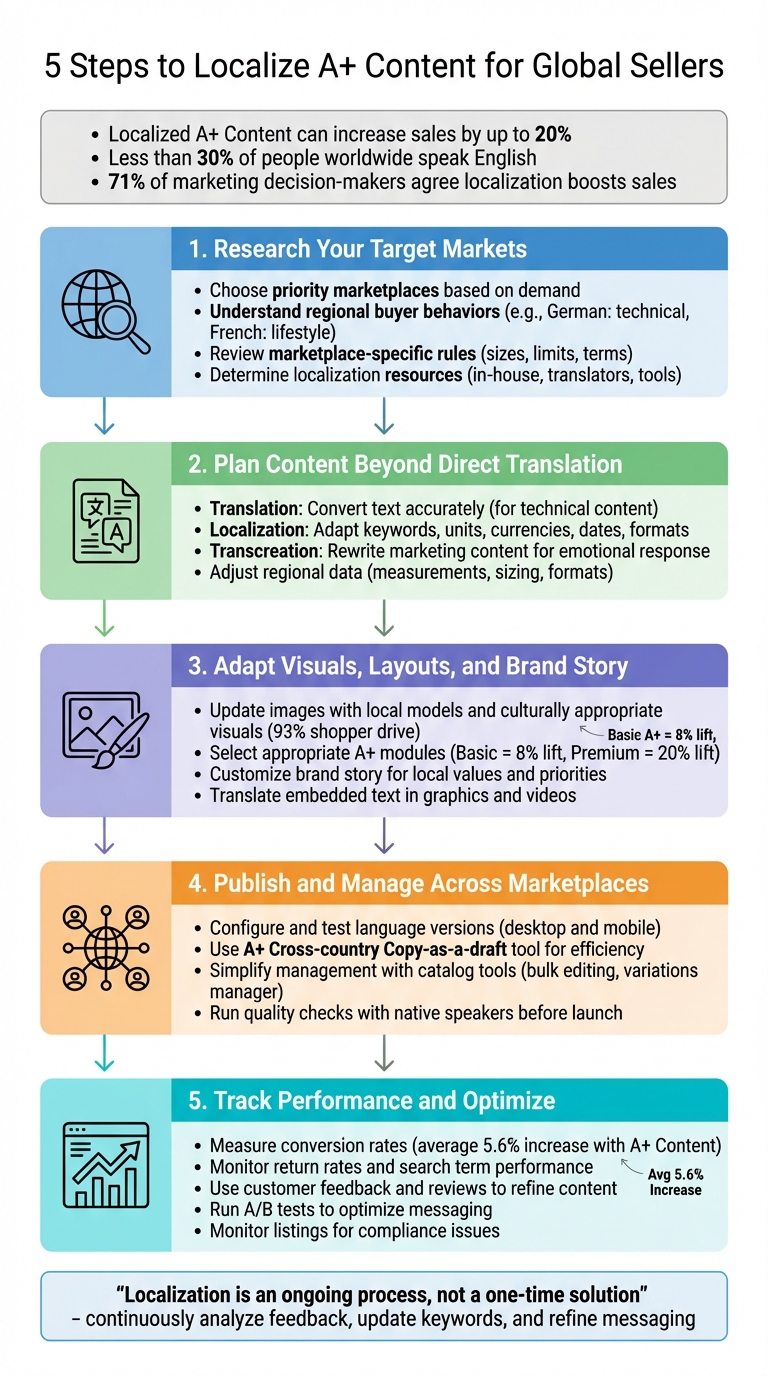
5-Step Process to Localize A+ Content for Amazon Global Sellers
Step 1: Research Your Target Markets and Their Requirements
Choose Your Priority Marketplaces
Before diving into localization, figure out which markets are worth your time and investment. For instance, a swimming pool filter might be a hit in Florida but would likely see much less demand in the UK, where pools are less common. Start by assessing whether there’s genuine interest in your product category in each potential market.
Each country has its own shopping habits and preferences. Take Amazon Europe as an example – it spans over nine countries, each with distinct buyer behaviors. German customers tend to focus on technical details and precision, while French shoppers often connect better with lifestyle-focused imagery and storytelling. To gauge demand, tools like the SellerApp Chrome Extension can help you analyze your product’s potential. Additionally, Amazon’s "Sell Globally Dashboard" in Seller Central provides insights into expansion opportunities based on your current sales data. This groundwork is essential for tailoring your approach to meet each market’s expectations.
Research Marketplace-Specific Rules
Amazon’s rules for A+ Content vary by marketplace, and understanding them is critical. Language translation is a must – all product detail pages need to be in the local language of the country’s store. But it doesn’t stop there. Each marketplace has specific requirements for character limits, image sizes, and more. For example, banners must be 970×300 pixels, logos 600×180 pixels, and standard image modules 970×370 pixels. Submitting images that don’t meet these standards will lead to rejection.
There are also strict guidelines on what you can and can’t include. Terms like "best-selling", "top-rated", "cheap", "bonus", or "free" are prohibited in both text and images. You also can’t include pricing details, promotions, shipping info, QR codes, external links, or contact details. If you mention awards or certifications, you must name the certifying body and include the year awarded. Amazon typically takes up to seven business days to approve A+ Content submissions, so plan ahead to align with your launch timeline. Knowing these rules will help you avoid unnecessary delays.
Determine Your Localization Resources
When it comes to localization, you have several options: in-house teams, professional translators, or catalog management tools. Keep in mind that machine translation often fails to capture cultural subtleties, so it’s not ideal for high-priority markets. For a more reliable solution, consider Amazon’s Service Provider Network, which connects you with vetted e-commerce localization agencies.
If you’re managing a large catalog, tools like FlatFilePro can simplify the process. Its Reflection Engine identifies discrepancies between your content and live listings daily, helping you avoid localization mistakes. Plus, its Activity Log tracks every change, giving you full visibility into your updates. These tools can save time and ensure consistency across regions.
Step 2: Plan Content That Goes Beyond Direct Translation
Understand Translation vs. Localization vs. Transcreation
When it comes to creating content for global audiences, understanding the differences between translation, localization, and transcreation is key.
- Translation involves converting text from one language to another. It’s ideal for technical content like instruction manuals, where accuracy is critical [9][1].
- Localization takes things further by tailoring content to fit regional nuances. This includes adapting keywords for local SEO, converting units of measurement, updating currencies, and reformatting dates. While translation focuses on words, localization ensures the message resonates with local audiences. As professional translators often note, even a flawless translation won’t drive traffic if it lacks proper localization [8][4].
- Transcreation goes even deeper, blending "translation" with "creation." It’s about rewriting content – particularly marketing materials like slogans or brand stories – to evoke the same emotional response in the target culture. Nataly Kelly, VP of Localization at HubSpot, explains:
"The idea with transcreation is that you’re not exclusively translating, and you’re not only adapting either… In many cases, you’re rewriting from scratch to get the same concept or message across" [7].
Each method has its place: use translation for technical documents, localization for product descriptions, and transcreation for brand messaging. Once you understand these approaches, ensure your regional data stays consistent across markets.
Adjust Regional Formats and Data
Adapting content for international audiences means paying attention to the details that build trust – like formats for measurements, currencies, and dates. For example:
- Measurements: Convert between systems (e.g., inches and pounds in the U.S. vs. centimeters and kilograms in Europe).
- Apparel Sizing: Use conversion charts, as sizes vary widely by region. Asian sizes, for instance, are often smaller than U.S. sizes [4].
- Currencies and Dates: Display prices in the local currency, including taxes and duties, to create transparency. Remember, date formats differ: U.S. customers interpret 9/7/2025 as September 7th, while U.K. customers see it as July 9th.
Here’s a quick comparison of formatting differences across regions [10]:
| Locale | Number Format | Date Format | Time Format |
|---|---|---|---|
| EN-US | -123,456,789.988 | 9/7/2025 | 2:32 pm |
| EN-UK | -123.456.789,988 | 7 September 2025 | 2:32 pm |
| FR (France) | -123.456.789,988 | 7 septembre 2025 | 14:32 |
| DE (Germany) | -123.456.789,988 | 7. September 2025 | 14:32 |
| JP (Japan) | -123,456,789.988 | 2025年9月7日 | 14:32 |
Also, keep in mind that some languages, like German or Turkish, require about 30% more space than English text [10]. Leave extra room in your designs to avoid awkward line breaks or cut-off words. Don’t forget to translate any text embedded in videos or graphics – these elements are often overlooked by machine translation tools [1].
Create Templates for Global and Local Content
Reusable templates can streamline your workflow while keeping your branding consistent. A modular template structure works best, with fixed global elements (like your logo, product names, and brand colors) and flexible sections for localized content. For example:
- Global Elements: Your logo, core product names, and brand colors should remain the same across all markets.
- Local Elements: Customize calls to action, lifestyle imagery, and campaign headlines to align with regional preferences [11][12].
Using centralized Digital Asset Management (DAM) systems makes it easier for local teams to adapt content while staying true to your brand [12]. For A+ Content, create master templates for modules like comparison charts, lifestyle images, and technical specifications. Include placeholder sections for localized adjustments. Tools like FlatFilePro’s Activity Log can track which template versions are live in each marketplace, so you can quickly identify and update outdated content.
Create language variations for your Amazon A+ Content
Step 3: Adapt Visuals, Layouts, and Brand Story
Once you’ve planned your content and templates, it’s time to adjust your visuals and brand story to truly connect with local audiences.
Update Images and Icons for Each Region
Visuals play a huge role in influencing purchase decisions – 93% of shoppers say they’re driven by appearance when deciding what to buy [5]. That means your images need to reflect the people and cultures you’re targeting. For example, use models that mirror the local demographics, like European models for European markets or Latin American models for Mexico. This allows customers to see themselves using your product.
Be mindful of cultural nuances. A gesture like a "thumbs up" might be friendly in the U.S., but it’s offensive in parts of the Middle East [4]. To avoid missteps, have native experts review your imagery to flag potential issues early.
Also, consider the local lifestyle and environment. CamelBak, for instance, adapts its marketing by region – focusing on winter gear in the UK and trail imagery in Germany to align with local outdoor activities [4]. Ensure your backgrounds, settings, and even climates in your visuals feel relevant to the region you’re targeting.
Don’t forget to translate any text embedded in visuals like infographics or videos. Tools like Amazon’s Build International Listings only handle titles and bullet points, so you’ll need to manually update visual elements [1]. And always include local measurement units in sizing charts to avoid confusion.
Finally, choose A+ Content modules that align with your localized visuals and enhance your brand narrative.
Select Appropriate A+ Modules and Layouts
Picking the right A+ modules can make a big difference in how your content performs across languages. Basic A+ Content can lift sales by up to 8%, while Premium A+ Content has been shown to boost sales by as much as 20% [2,5]. Here’s how to select the most effective modules:
- Brand Story module: This is a great way to build trust. With a carousel of up to 19 pre-designed cards, you can share your brand’s history and values across all listings [5].
- Comparison charts: These are especially useful for highlighting region-specific products. Premium versions even let customers add items to their cart directly.
- Interactive modules: For complex products, Premium features like Interactive Hotspots and Navigation Carousels allow customers to explore details at their own pace [3,5]. A localized Q&A section within Premium A+ can also address customer-specific questions effectively [2,5].
- Technical specifications module: Always include this to provide localized product details, like plug types, battery requirements, or certifications (e.g., CE marks for the EU) [4,5].
And don’t overlook video. Nearly 96.3% of customers say videos are essential for product research, and those who watch them are 3.6 times more likely to make a purchase [5].
Customize Brand Story for Local Audiences
Pair your localized visuals and A+ Content with a brand story that resonates deeply with each market. Tailor your narrative to reflect local values and priorities. As Jason Panzer, President of HexClad, puts it:
"HexClad is a premium product, so A+ Content is where we convey the story of how our product adds value, showcase content that demonstrates how to use our product and point out unique features" [2].
Highlight certifications that matter in the region, tweak slogans, and emphasize aspects like sustainability or fair trade if they resonate locally [4,5]. Ensure your Brand Story module aligns with the "About Us" page on your local ecommerce storefront for a consistent message, and update it regularly based on customer feedback [4,5].
To refine your messaging, work with native copywriters who understand local humor, etiquette, and emotional triggers better than automated tools [4]. Think of your Brand Story as a dynamic asset – it should evolve with market insights.
Focus on showcasing your flagship products for each region rather than spreading your efforts across your entire catalog. This targeted approach, combined with localized storytelling, builds trust – a key factor when 7 out of 10 shoppers prefer buying from brands they trust [3].
sbb-itb-ed4fa17
Step 4: Publish and Manage Localized Content Across Marketplaces
Once your content has been tailored for specific markets, the next step is to publish and manage it effectively across all marketplaces. Localized content should reflect the unique technical and cultural details of each region, and this process ensures it’s implemented smoothly.
Configure and Test Language Versions
Begin by duplicating your existing A+ Content in the A+ Content Manager, creating a customizable template for each language variation [2]. After adapting the content for a specific market, use the "Apply ASINs" feature to link it to the appropriate products before submitting it for review [2].
For sellers operating in multiple regions, the "A+ Cross-country Copy-as-a-draft" tool can save significant time. This feature automatically creates drafts of your A+ Content for all connected marketplaces, eliminating the need to recreate it manually for each country [3]. If you’re using the Brand Story module, you can also bulk upload it across your entire catalog, linking it to all ASINs at once [3].
Before submitting your content, always preview it on both desktop and mobile devices. This step helps identify potential issues like formatting errors, blurry images, or text that doesn’t display correctly. Incorporating A/B testing can further optimize your localized content by revealing which versions resonate best with each market [2][6].
Simplify Management with FlatFilePro
Handling A+ Content manually across numerous marketplaces can be time-consuming, but FlatFilePro simplifies the process. This tool allows you to manage all your Amazon listings from one centralized dashboard, so you don’t need to log into Seller Central for each region separately.
FlatFilePro’s Reflection Engine automatically reviews your listings every night, flagging any discrepancies between your content and what’s live on Amazon. This feature is particularly useful for localized A+ Content, as it alerts you to unauthorized changes – whether by Amazon or competitors – that could impact your messaging. Additionally, the Activity Log tracks every update, providing a clear record of what was modified and when, which is crucial for keeping teams and regions aligned.
For sellers with extensive catalogs, FlatFilePro’s bulk editing feature is a game-changer. It allows you to update hundreds of ASINs simultaneously, saving hours compared to editing each product individually in Seller Central. The Variations Manager further simplifies the process by maintaining parent-child relationships across marketplaces, enabling updates in minutes with a high success rate. This is especially helpful when adjusting product families to meet regional preferences, such as offering specific color options in Europe versus North America.
With centralized management in place, you’re ready to perform final checks before launching your localized content.
Run Quality Checks Before Launch
Before publishing, have a native speaker review your localized content. This step ensures there are no cultural missteps, awkward translations, or imagery that might not resonate with the target audience. These reviews verify that your visuals, text, and technical details align with both marketplace guidelines and your brand’s standards.
Double-check all technical specifications, such as plug types, sizing charts (e.g., Asian vs. US sizes), measurement units, currency symbols, and date formats, to ensure compliance with regional norms [4]. Review any embedded text in images and proofread thoroughly to catch formatting errors that could lead to rejection [1][6]. Finally, confirm that your content adheres to Amazon’s strict rules, avoiding elements like external links, QR codes, contact details, or unverified promotional claims such as "best-selling."
Step 5: Track Performance and Improve Over Time
Once your localized content is live, it’s time to shift gears and focus on measuring its impact. The goal now is to monitor how it performs and make adjustments based on data and regional feedback. By keeping an eye on key metrics and customer responses, you can refine your approach and ensure your content resonates with each market.
Measure Key Performance Metrics
Start by tracking conversion rates before and after implementing localized A+ Content. According to Amazon, adding A+ Content to product detail pages can lead to an average sales increase of 5.6% [6]. For Premium A+ Content, the boost can be even higher – up to 20% [5][2].
But don’t stop at conversions. Pay attention to return rates as well. A spike in returns might indicate that product details are unclear or customer expectations aren’t being met. Use regional search term reports to see if your localized keywords are improving organic visibility [4]. Also, take advantage of Amazon’s "Manage Your Experiments" tool to run A/B tests. This lets you compare different versions of your localized content to see which images, layouts, or messaging resonate best in specific markets [6][2].
Use Customer Feedback to Refine Content
Customer reviews and support inquiries are goldmines for insights. Analyze reviews in the native language of each marketplace to uncover recurring questions or areas of confusion. For instance, if multiple German customers ask about compatibility with European power outlets, you might want to add a section addressing this issue directly.
For sellers using Premium A+ Content, the Q&A module can be particularly helpful. Proactively answering common questions here can break down purchase barriers and even reduce return rates. Additionally, revisit your original translations from time to time. Phrasing that seemed fine initially might not fully capture the local tone or context, so periodic updates can help fine-tune your messaging [4].
Monitor Listings for Problems and Changes
After your localized content goes live, keeping it consistent and compliant is critical. Amazon occasionally suppresses listings for compliance reasons, so tools like FlatFilePro can help. Its Reflection Engine scans your listings nightly for discrepancies, ensuring everything remains aligned across marketplaces.
This automated monitoring is a game-changer, especially when managing A+ Content across multiple regions. Instead of manually checking each listing, the Reflection Engine provides a centralized dashboard and an Activity Log to track changes – an invaluable resource when working with teams spread across different countries.
Regular monitoring also helps catch formatting issues that might arise after reviews. Since 93% of customers say visual appeal is a key factor in their buying decisions [5], it’s crucial to ensure your images and text display correctly on all devices. A clean, visually appealing listing can make all the difference in maintaining strong conversion rates.
Conclusion
Localizing A+ Content for international markets means more than just translating – it’s about reshaping your brand story to resonate with different cultures. As Arishekar N, Senior Director of Marketing & Growth at SellerApp, explains:
"Product localization is an ongoing process, not a one-time solution. If you don’t constantly improve your localization, it can undermine your international strategy" [4].
The five steps we’ve explored – researching target markets, going beyond simple translation, tailoring visuals and storytelling, publishing across marketplaces, and monitoring performance – offer a clear roadmap. This approach transforms localization from a daunting challenge into a structured, achievable process. And the payoff is substantial: 71% of top marketing decision-makers agree that content localization boosts sales, while 74% consider it a key revenue driver [4].
Managing content across multiple marketplaces can be tricky, but tools like FlatFilePro simplify the process. They help you keep listings consistent, track changes nightly, and streamline updates – making the task far more manageable.
Localization isn’t something you do once and forget. Customer preferences shift, search trends evolve, and Amazon’s guidelines change. Sellers who thrive in international markets are those who treat localization as an ongoing effort – analyzing customer feedback, updating keywords with regional data, and fine-tuning their messaging to stay relevant. By keeping your strategy fresh, you’ll maintain the momentum built through these steps.
FAQs
What’s the difference between translation, localization, and transcreation?
Translation involves converting text from one language to another while preserving its original meaning. The focus is on linguistic accuracy and ensuring the message remains consistent and intact.
Localization takes it a step further by tailoring content to align with the cultural, legal, and practical norms of a specific region or market. This process includes adjustments like using local currency symbols, date and time formats, measurement units, spelling variations, and even modifying visuals to make the content feel natural and relatable to the audience in that region.
Transcreation, on the other hand, combines translation with creative rewriting. It ensures that the emotional and persuasive essence of the original content is maintained. Often used in marketing, this approach helps the message resonate strongly with the target audience while staying true to the brand’s voice and intent.
How can I make sure my A+ Content visuals and story connect with shoppers in different countries?
To create A+ Content that connects with audiences worldwide, start by getting to know your target audience. Pay attention to local preferences in visuals – think popular colors, clothing styles, or familiar settings. For instance, if you’re promoting a kitchen gadget, showcase it alongside cookware and ingredients that are commonly used in that region.
Next, tailor your brand story to align with local culture. Use region-specific spelling (like "color" in the U.S. versus "colour" elsewhere), relatable idioms, and references to holidays or traditions that matter to your audience. Don’t forget to localize measurements (inches vs. centimeters) and temperature units to avoid any confusion.
Lastly, test and tweak your content. Begin with a smaller batch of localized materials, monitor key performance indicators like click-through rates and conversions, and adjust based on the results. Tools like FlatFilePro can simplify updating and managing listings across different marketplaces, helping you keep your content consistent and relevant for every audience.
What tools can help Amazon sellers manage A+ Content across multiple marketplaces?
Managing A+ Content across multiple Amazon marketplaces can feel like a daunting task, but with the right tools, it becomes much more manageable. Amazon’s A+ Content Manager is a built-in feature within Seller Central that allows sellers to create enhanced content, such as images, videos, and comparison charts. It supports both Basic and Premium A+ Content types and works across all registered Amazon stores. To simplify things further, Amazon’s Build International Listings (BIL) service automatically synchronizes product details, including A+ Content, across marketplaces, while also taking care of translations and unit conversions.
For those looking for a more advanced option, FlatFilePro provides a robust dashboard that integrates with Seller Central via API. This tool is designed to handle bulk listing edits, manage variation families with ease, and streamline updates for A+ Content across major marketplaces like the US, UK, and EU. It cuts down on manual work while ensuring your content remains consistent and polished across regions.
By leveraging Amazon’s native tools alongside FlatFilePro, sellers can efficiently create, adapt, and manage A+ Content for multiple international markets, saving time and maintaining quality.