
Accurate measurements can make or break your Amazon automotive listings. Whether it’s a brake rotor or a seat cover, getting the dimensions right ensures compatibility, reduces returns, and keeps FBA fees in check. Here’s what you need to know:
- Key Dimensions to Measure: Length, width, height, and weight for both the item and its packaging.
- Tools You’ll Need: Steel tape measure, digital calipers, and a shipping scale.
- Amazon’s Requirements: Use inches for dimensions, pounds for weight, and follow their formatting rules (e.g., "10-by-5-inch").
- Why It Matters: Incorrect measurements can lead to higher fees, returns, and poor search visibility.
- Packaging Tips: Secure all loose components, use compact packaging to avoid higher fee tiers, and double-check dimensions after packing.
Amazon uses its own sensors to verify dimensions for fee calculations, so precision is critical. Regularly audit your data to ensure accuracy and avoid unexpected costs.
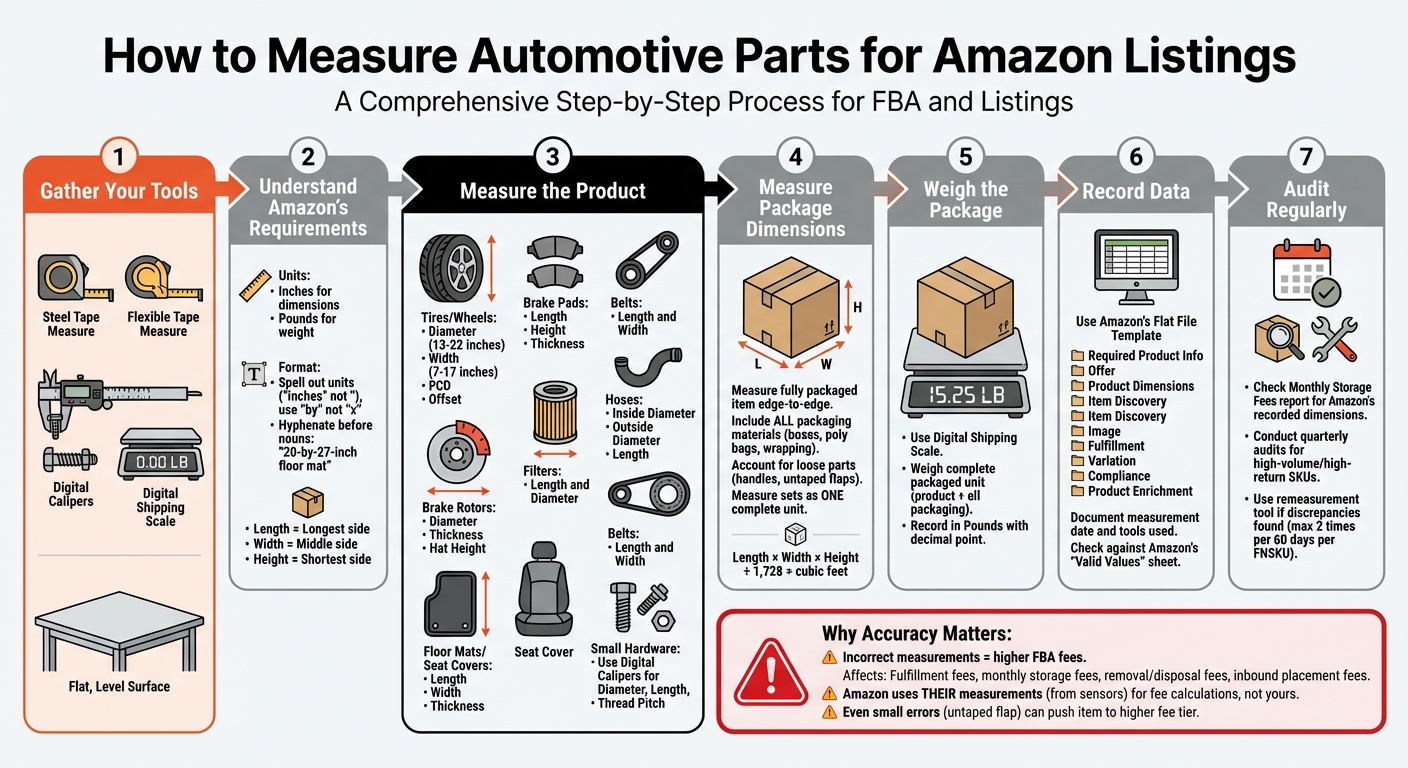
Complete Workflow for Measuring Automotive Parts for Amazon FBA Listings
Amazon‘s Measurement Requirements Explained
Item Dimensions vs. Package Dimensions and Weight
When it comes to Amazon, there’s a clear difference between item dimensions and package dimensions. Item dimensions refer to the size of the product itself, while package dimensions cover the full packaged unit, including any loose materials or protective packaging.
Here’s why this matters: Amazon calculates FBA fees based on package dimensions and weight. These measurements play a role in determining fulfillment costs, monthly storage fees, aged inventory surcharges, removal and disposal fees, and inbound placement service fees. Amazon uses automated sensors to measure the entire package, taking into account loose materials and any parts that stick out, as outlined in Seller Central guidelines.
This distinction becomes even more important when selling items as sets. For instance, if you’re listing a pair of brake rotors or a four-pack of oil filters, the dimensions and weight should reflect the total size and weight of all the items packaged together as a single unit for sale.
Measurement Units and Standards for US Listings
For US-based listings, Amazon requires specific units and standards to ensure consistency. Dimensions should be recorded in inches, and weight should be listed in pounds, with decimals separated by a dot.
Amazon categorizes package dimensions into three key measurements:
- Length: The longest side of the package
- Width: The middle side
- Height: The shortest side
These measurements are combined to calculate the package’s volume. To convert the volume from cubic inches to cubic feet, divide the total by 1,728. This volume is a crucial factor in determining storage fees.
When writing product descriptions, it’s important to spell out units of measurement instead of using symbols. For example:
- Write "inches" instead of using the quotation mark (").
- Use "by" instead of "x" when describing dimensions, such as "113 by 2 inches."
- If the measurements come before a noun, make sure to hyphenate them for clarity, like "20-by-27-inch floor mat."
These standards ensure clear, professional, and consistent descriptions across Amazon listings.
Tools and Workspace Setup for Measuring Automotive Parts
Measuring and Weighing Tools You’ll Need
Getting precise measurements starts with using the right tools. For larger dimensions, a steel tape measure works best, while a flexible tape measure is ideal for measuring the girth of irregularly shaped items (calculated as the median plus the shortest side, multiplied by 2) [2].
When dealing with smaller parts like bolts, clips, or electrical connectors, digital calipers are a must for capturing exact measurements. To determine both the unit weight (just the item) and the shipping weight (item plus all packaging), you’ll need a digital shipping scale [2]. These measurements are crucial because they directly influence your FBA fees – accuracy here can save you money.
Setting Up Your Workspace
Always measure on a flat, level surface to ensure accuracy when determining package dimensions [2].
Keep a spreadsheet application like Excel or Google Sheets open to organize your inventory templates [5][6]. For US listings, make sure your spreadsheet is set to use a dot as the decimal separator – this avoids any processing errors during submission [6].
"Product dimensions and volume are measures of the product’s size when fully packaged and ready to ship in accordance with FBA policies and requirements." – Amazon Seller Central [2]
With the right tools and a well-prepared workspace, you’re all set to measure automotive components accurately and efficiently.
How to Measure Common Automotive Parts
Here’s a detailed guide to measuring automotive parts accurately, following Amazon’s measurement guidelines.
Tires and Wheels
When measuring wheels, you’ll need to record several dimensions:
- Diameter: Typically ranges from 13 to 22 inches.
- Width: Generally between 7 and 17 inches.
- Pitch Circle Diameter (PCD): This indicates the bolt pattern, often found in 4, 5, 6, or 8-lug configurations.
- Offset (ET value) and Backspacing: These ensure the wheel fits correctly.
For tires, focus on the section width, sidewall height, and overall diameter. Be sure to format these measurements according to Amazon’s style guidelines for consistency.
Brake Components
Accurate measurement is crucial for brake parts:
- Brake Rotors: Measure the diameter (across the friction surface), thickness (depth of the rotor), and hat height (the raised central section).
- Brake Pads: Record the length, height, and thickness of the friction material.
Using digital calipers is recommended to ensure precision, as even slight inaccuracies can impact fitment.
Filters, Belts, and Hoses
For these components, measurements vary slightly:
- Filters: Capture both the overall length and diameter.
- Belts: Note the total length and width.
- Hoses: Measure the inside diameter (ID), outside diameter (OD), and overall length.
"Spell out units of common measurement (inches, feet, etc.)." – Amazon Category Style Guide [1]
Interior and Exterior Accessories
When dealing with items like floor mats or seat covers, measure the length, width, and thickness. For larger accessories like roof racks or cargo carriers, take measurements of the fully assembled item, covering all three dimensions. If you’re using Fulfillment by Amazon (FBA), measure these items in their packaged state, as Amazon uses those dimensions to determine size tiers and fees [2].
Small Hardware and Electrical Components
For smaller parts like fasteners or fuses, precision tools are essential:
- Use digital calipers to measure diameter, length, and thread pitch for fasteners.
- For packaged items like a set of fuses, measure the combined dimensions of the package.
Always follow Amazon’s formatting rules, such as spelling out units and hyphenating measurements before nouns (e.g., "1/2-inch bolt") [1].
| Component | Key Dimensions | Formatting Example |
|---|---|---|
| Filters | Length, Diameter | "6 by 4 inches" |
| Belts | Length, Width | "40-by-1-inch" |
| Hoses | Inside Diameter, Outside Diameter, Length | "3/8-inch by 50-foot" |
| Wheels | Diameter, Width, Offset, Backspacing | "13 to 22 inches diameter; 7 to 17 inches width" |
sbb-itb-ed4fa17
Measuring Package Dimensions and Shipping Weight
How to Measure Packaged Items
Amazon’s fulfillment centers rely on automated sensors to measure your packaged items from edge to edge. To ensure accurate dimensions, identify the longest side as the length, the middle-sized side as the width, and the shortest side as the height. These measurements must account for all packaging materials, including boxes, poly bags, protective wrapping, and any loose components like handles or untaped flaps.
"The measurement sensors will capture your item packaging edge-to-edge, including loose material, such as plastic bags, or loose parts, such as handles." – Amazon Seller Central [4]
Lay the item flat and extend any loose packaging to simulate how Amazon’s sensors will read it. If your product has irregular shapes or bulges, measure its maximum dimension to avoid misclassification. For products sold as sets (e.g., a pair of brake rotors or a multi-pack of filters), measure the entire package as one unit.
To keep dimensions lower and avoid higher fee tiers, consider using snug or vacuum-sealed poly bags and ensure all flaps and loose parts are securely taped. Additionally, weigh the fully packaged unit to calculate its shipping weight, as this includes both the product and its packaging.
These measurements are critical because they directly determine your FBA fees, as explained below.
How Package Dimensions Affect FBA Fees

Accurate dimensions ensure your products are classified in the correct size tier, which impacts several fees, including FBA fulfillment fees, monthly storage fees, removal/disposal fees, and inbound placement fees. Even small oversights – like an untaped poly bag flap – can push a product into a higher fee category.
Amazon calculates storage fees based on cubic feet. To convert your measurements, multiply the length, width, and height (in inches), then divide the result by 1,728 [2]. If you suspect Amazon has measured your item incorrectly, you can request a remeasurement using the "Remeasure FBA products and confirm fees" tool in Seller Central. Keep in mind, each FNSKU can only be remeasured twice within a 60-day window.
| Fee Type | How Dimensions Impact Cost |
|---|---|
| FBA Fulfillment Fees | Larger size tiers cost more to pick, pack, and ship. |
| Monthly Storage Fees | Fees are based on the cubic feet your item occupies. |
| Removal/Disposal Fees | Bigger dimensions increase these charges. |
| Inbound Placement Fees | Larger items are more expensive to distribute. |
To avoid unexpected fees, steer clear of packaging designs that sit near size-tier boundaries. Slight variations in manufacturing or packaging bulges could push your product into a higher fee category. Keeping your packaging compact and consistent will help you maintain predictable costs across your automotive parts inventory.
Recording and Maintaining Measurement Data
How to Structure and Store Dimension Data
Managing your dimension data accurately is key to avoiding fee misclassifications. After measuring your automotive parts, make sure to record the results using Amazon’s flat file template. These Excel-based templates include a "Data Definitions" sheet, which breaks down each column, highlights mandatory fields, and provides the accepted values for your entries [5][6].
Organize your data following Amazon’s nine standard sections: Required Product Information, Offer, Product Dimensions, Item Discovery, Image, Fulfillment, Variation, Compliance, and Product Enrichment [5]. Be sure to document the date of measurement and the tools used. This creates a reliable audit trail in case any disputes arise. Double-check your internal data against Amazon’s "Valid Values" sheet to ensure fields like "unit_of_measure" align with Amazon’s approved terms [5].
"Accurate data is crucial to discoverability and sales. How you present your products will greatly influence the customer’s purchasing decision." – Amazon Category Style Guide [1]
For products with variations (such as brake pads available in different sizes), keep your naming conventions consistent across your catalog. This avoids confusion and ensures child products are grouped correctly under their parent listings [7]. Also, record the Item Package Quantity (IPQ) carefully. For instance, if you’re selling a pack of eight oil filters under one scannable UPC, the IPQ is 1 [1].
Regular Audits and Updates
Once your data is organized, it’s essential to conduct regular reviews to ensure its accuracy. Amazon may update product dimensions without notifying you, and their recorded measurements are used for fee calculations – even if they differ from your original submissions [2]. To stay on top of potential discrepancies, regularly check the Monthly Storage Fees report in Seller Central. Use the item-volume field to see the dimensions Amazon currently has on file for your FNSKUs [2].
Plan quarterly audits for your high-volume and high-return SKUs. Products with frequent returns often have dimension or packaging issues that might have been overlooked during the initial measurements. Re-measuring these items can help you confirm that your data still matches the physical product, especially if you’ve switched suppliers or updated packaging materials.
Using FlatFilePro to Simplify Catalog Management

To streamline your catalog management, consider using FlatFilePro. This tool makes bulk updates and error tracking more efficient. With its bulk editing capabilities, you can update dimensions and weights for multiple products at once [7].
FlatFilePro’s Reflection Engine runs nightly checks on your listings, comparing your dimension data with what’s live on Amazon. It flags discrepancies with green checkmarks for matching data and red X’s for fields that need attention. This feature helps you catch when Amazon adjusts your measurements without notifying you.
The platform also categorizes listing errors, including those related to shipping dimensions, so you can quickly address these issues before they lead to incorrect fees or listing suppressions. Plus, the Activity Log keeps a record of all changes made to your measurement data, showing who made the changes and when. This ensures you have a clear audit trail for long-term catalog management [7].
If you only need to update measurement fields without altering other listing details, you can use the "PartialUpdate" function. This allows you to adjust specific dimensions without accidentally changing titles, bullet points, or other content. It’s a focused approach that reduces errors and speeds up corrections, especially for large catalogs [6].
Conclusion
Getting automotive part measurements right is crucial for creating successful Amazon listings. Accurate dimensions, packaging details, and weight not only minimize returns but also improve search visibility and help you avoid unexpected FBA fees. Keep in mind that Amazon uses its own measurements – not yours – for fee calculations, so maintaining precise data is key to protecting your profits [2].
A well-organized approach, which includes careful measurements, following Amazon’s style guidelines, and utilizing tools like FlatFilePro for bulk updates, ensures your listings stay accurate and competitive. Aligning with Amazon’s style standards also boosts your listings’ visibility [1]. This method simplifies catalog management while keeping your data reliable.
For sellers handling large automotive inventories, manual updates can be tedious and prone to mistakes. FlatFilePro makes bulk editing easier, flags inconsistencies with its Reflection Engine, and keeps a complete audit trail [7]. By automating updates and tracking errors, it connects accurate measurements with smooth daily operations.
Frequent audits of your measurement data are essential to prevent fee errors and maintain a competitive edge. This is especially critical for high-volume SKUs, where catching Amazon’s unexpected changes early can safeguard your listings’ performance and profitability [3].
FAQs
Why are accurate measurements critical for automotive parts on Amazon?
Accurate measurements play a crucial role when selling automotive parts on Amazon. They allow customers to determine whether a part will fit their vehicle. Key dimensions like length, width, and bolt-pattern spacing are integral to Amazon’s fitment system, which matches parts to the correct make, model, and year. This not only boosts visibility in search results but also gives buyers the confidence to complete their purchase.
Providing precise measurements does more than just assist with fitment – it helps minimize returns and negative feedback. A part that doesn’t fit is far more likely to be returned, potentially impacting your seller performance and reputation. By offering clear and accurate dimensions, you set proper expectations, improve the shopping experience, and safeguard your sales metrics on Amazon’s platform.
What tools do I need to measure automotive parts accurately for Amazon listings?
To get precise measurements for your automotive parts, you’ll need a mix of digital and physical tools. A wheel-offset and fitment calculator can be a game-changer. It helps you figure out key dimensions like diameter, width, offset, and tire profile. Plus, it ensures you can check clearances like ride height, poke, and even speedometer accuracy before documenting everything for your Amazon listing.
On the physical side, a wheel-offset measuring tool – also known as a wheel fitment tool or offset gauge – is a must-have. This handheld device lets you directly measure rim offset, backspacing, and overall diameter right on the part itself. Together, these tools make sure your listings are not only detailed but also accurate and free from errors.
How do product dimensions impact FBA fees on Amazon?
Product dimensions are crucial in defining your item’s size tier, which directly impacts the fees associated with Fulfillment by Amazon (FBA). These fees cover fulfillment, storage, and other related services. Generally, larger or heavier items are placed in higher size tiers, resulting in higher charges.
To steer clear of surprise expenses, make sure to provide precise measurements of your product’s packaging, including its length, width, height, and weight. Accurate details allow Amazon to classify your product correctly and calculate fees accordingly.